I've been running the SLZB-MR5U for a while now and figured I'd write up how I have it set up, since I couldn't find a complete guide that covered all the pieces together. The short version: the device runs ESPHome instead of the stock SMLIGHT firmware, sits on an isolated IoT VLAN, and everything talks to Home Assistant over a WireGuard tunnel. Zigbee2MQTT and OTBR never touch the IoT VLAN directly.
It took me a while to get all the moving parts right — especially the iptables DNAT rules and the hassio bridge routing — so hopefully this saves someone else the same headaches. I'll walk through the firmware choice, the flash process, and then the full network and add-on configuration.
Fair warning: this is probably massively over-engineered for what is essentially a Zigbee stick. A direct USB connection would have worked fine. But where's the fun in that.
The other thing I wanted to avoid was punching firewall holes from the IoT VLAN into the rest of my network. The IoT VLAN is isolated for a reason — I don't trust the devices on it. Opening a rule from IoT → HA just so a coordinator can phone home felt like the wrong direction. With WireGuard the device initiates the tunnel outbound, the stream servers only listen on the VPN interface, and nothing on the IoT VLAN can reach the radios directly.
Required add-ons and apps
You need four Home Assistant add-ons and the ESPHome CLI on your workstation.
| Add-on | GitHub | Role |
|---|---|---|
| ESPHome | esphome/home-assistant-addon | Manages the ESP32-S3 firmware, OTA updates, and exposes device entities in HA |
| WireGuard | hassio-addons/addon-wireguard | Runs the WireGuard server and the iptables DNAT rules that proxy Zigbee/Thread traffic into the tunnel |
| Zigbee2MQTT | zigbee2mqtt/hassio-zigbee2mqtt | Talks to the Zigbee radio over TCP via the WireGuard tunnel |
| OpenThread Border Router | home-assistant/addons | Talks to the Thread radio over TCP and bridges the Thread mesh to your IP network for Matter |
For the initial USB flash you need ESPHome on your workstation — either the ESPHome CLI (pip install esphome) or by using the ESPHome add-on directly from HA (Dashboard → three dots → Install from USB). After the first flash, OTA updates work through the add-on.
Flashing to ESPHome
Official firmware vs. ESPHome
The SLZB-MR5U ships with SMLIGHT's own firmware which is fine honestly — it has WireGuard, OTA, a decent web UI, and a full HA integration. The one thing I couldn't find is whether it lets you bind the serial stream server to a specific network interface. If it listens on all interfaces, anything on your IoT VLAN can connect to the radio directly — which defeats the point of isolating it. I created a fork of the stream server (sir-Unknown/esphome-stream-server) that adds a bind_wg option, which locks the socket to the WireGuard interface only. That was the deciding factor for me.
| Feature | Official SMLIGHT firmware | ESPHome (smlight-tech/slzb-esphome) |
|---|---|---|
| Management | Proprietary web UI + cloud | ESPHome dashboard / HA integration |
| WireGuard built-in | Yes | Yes (via wireguard: component) |
| Stream server bind to interface | Not documented — likely all interfaces | Yes — bind_wg restricts to WireGuard |
| OTA updates | SMLIGHT OTA (core + radio chip) | ESPHome OTA |
| Home Assistant sensor entities | Full (temp, uptime, RAM, VPN status via SMLIGHT integration) | Full (ESP32 temp, uptime, etc.) |
| Open source | No — MR5U source code not published | Yes |
| Network isolation | WireGuard present, but stream binding unconfirmed | Yes — stream servers on WireGuard only |
Flash procedure
The main chip is an ESP32-S3. First flash has to go over USB-C since there's no firmware on it yet to do OTA — after that you can update wirelessly.
Requirements:
- USB-C cable (data, not charge-only)
- ESPHome CLI or ESPHome Dashboard
slzb-mr5u.yamlfrom post 2 (update the three IPs and secrets before flashing)
Steps:
-
Put the device in flash mode:
Hold the BOOT button on the SLZB-MR5U, connect the USB-C cable to the computer, then release the button. The device appears as a serial port (e.g./dev/ttyUSB0). -
Compile and flash:
esphome run slzb-mr5u.yamlESPHome auto-detects the serial port. On first flash select the USB port; afterwards OTA works.
-
After the flash:
The device reboots and joins the ESPHome network. Adopt it via the ESPHome Dashboard or configure Ethernet through the captive portal.
Note: After switching to ESPHome the SMLIGHT web interface is no longer available. Management is fully handled by ESPHome and Home Assistant.
Network layout
Three VLANs are relevant here:
VLAN 10  Home         10.10.0.0/24    Main network. HA primary interface.
VLAN 20  Thread       10.20.0.0/24    Thread/Matter devices + WiFi SSID.
                                      HA dual-homed here for multicast.
                                      Router allows VLAN 20 → HA on VLAN 10
                                      (single HA entry in companion app).
VLAN 30  IoT          10.30.0.0/24    Isolated IoT devices.
                                      SLZB-MR5U lives here (10.30.0.200).
                                      No direct access to VLAN 10 or 20.
The coordinator sits on VLAN 30 with no route to the rest of the network. All traffic between HA and the device goes through the WireGuard tunnel.
SLZB-MR5U (ESPHome)
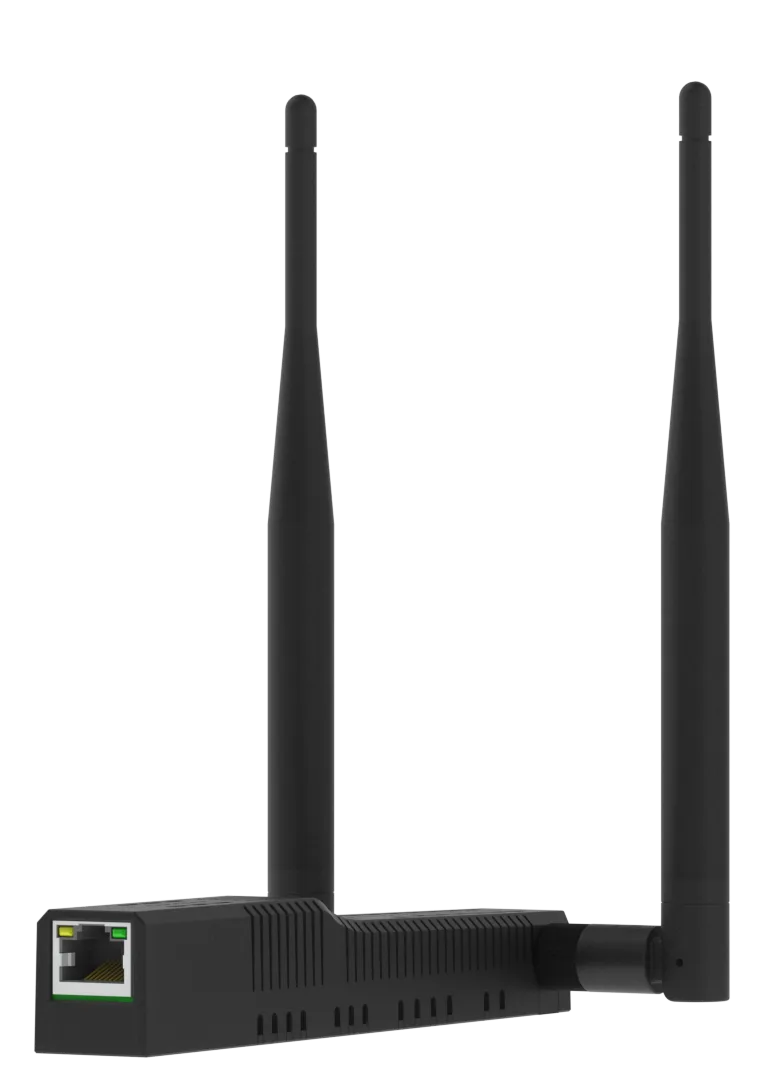
The hardware has two radio chips — one for Zigbee, one for Thread — each connected to the ESP32-S3 over a separate UART. The W5500 handles wired Ethernet.
- Product page: smlight.tech/product/slzb-mr5u
- Manual & specs: smlight.tech/support/manuals
Hardware: ESP32-S3 + 2× EFR32MG24 + W5500 Ethernet.
| Radio | UART | TCP port | Client |
|---|---|---|---|
| Zigbee | 1 | 7638 | Z2M |
| Thread | 2 | 6638 | OTBR |
| Bluetooth proxy | — | — | HA (active, 4 slots) |
ESPHome uses my fork of the stream server (sir-Unknown/esphome-stream-server) which adds bind_wg. Both stream servers are bound to the WireGuard interface only — they do not listen on the Ethernet IP (10.30.0.200). Nothing on the IoT VLAN can connect to the radios directly.
Stream server — bind_wg
The upstream stream server component (oxan/esphome-stream-server) binds its TCP socket to 0.0.0.0, meaning it listens on every interface — Ethernet, WiFi, and WireGuard alike. That's fine for most setups, but not when the device is on an isolated VLAN and the whole point is that nothing else on that VLAN should be able to talk to the radios.
I forked oxan/esphome-stream-server and added a single option (sir-Unknown/esphome-stream-server):
stream_server:
  - uart_id: hw_uart1
    port: 7638
    bind_wg: wg0   # restrict socket to the WireGuard interface
When bind_wg is set, the component looks up the IP address assigned to the named WireGuard interface at startup and calls bind() with that IP instead of 0.0.0.0. The result is that the TCP socket only accepts connections arriving on wg0 — the Ethernet port stays completely silent on that port. A port scan from anywhere on the IoT VLAN shows nothing.
The tradeoff is that the stream server won't start accepting connections until the WireGuard tunnel is up and has an IP assigned. In practice this hasn't been an issue — WireGuard comes up within a few seconds of boot, well before Z2M or OTBR try to connect.
ESPHome configuration
Full slzb-mr5u.yaml is in the second post. The only things you'll need to change for your own setup are the three IPs in the substitutions block at the top (eth_static_ip, eth_gateway, wg_server_host) and the four secrets (api_encryption_key, ota_password, slzb_mr5u_wg_private_key, hass_wg_public_key, slzb_mr5u_wg_preshared_key).
WireGuard tunnel
ESP32          172.27.66.2  ←——— WireGuard tunnel ———→  172.27.66.1  HA WireGuard add-on
(IoT VLAN 30)  10.30.0.200                               10.30.0.10   (VLAN 10)
The ESP32 initiates the connection to HA at 10.30.0.10:51820 — so traffic flows outbound from the IoT VLAN, no inbound firewall rule needed. A few things worth noting:
peer_allowed_ips: 172.27.66.1/32— only tunnel traffic for the HA peer, nothing else is routed through the tunnel.peer_persistent_keepalive: 25s— keeps the NAT mapping alive.reboot_timeout: 0s— device does not reboot if the tunnel drops; it reconnects automatically.
One gotcha: the WireGuard add-on runs with host_network: false, which means wg0 only exists inside the add-on's container. It's not visible from the HA host or other add-ons — which causes the routing problem described in the next section.
How Z2M and OTBR reach the radios
Because wg0 lives inside the WireGuard add-on container, Z2M and OTBR can't reach 172.27.66.2 directly. The fix is iptables DNAT rules in the WireGuard container that proxy incoming TCP connections from the hassio bridge through wg0 to the ESP32.
Z2M (172.30.33.4)  ──┐
                      ├──→  WireGuard add-on (172.30.33.2)
OTBR (host net)  ────┘         DNAT :7638 → 172.27.66.2:7638
                                DNAT :6638 → 172.27.66.2:6638
                                MASQUERADE -o wg0  (src becomes 172.27.66.1)
                                     │
                                     └──→  wg0 → tunnel → ESP32
The MASQUERADE -o wg0 rule is the part that tripped me up initially. The ESP32 only has a route back to 172.27.66.0/24 — if the source IP of an incoming connection is a hassio bridge address the return packets go nowhere. Masquerading makes everything look like it comes from 172.27.66.1.
OTBR runs with host_network: true so it shares the host's network namespace and can reach the hassio bridge at 172.30.33.2. Z2M runs with host_network: false but it's on the same hassio bridge as the WireGuard add-on, so it can reach 172.30.33.2 directly.
WireGuard add-on — full config
server:
  host: homeassistant2.local
  addresses:
    - 172.27.66.1
  dns: []
  post_up: >-
    iptables -A FORWARD -i %i -j ACCEPT; iptables -A FORWARD -o %i -j ACCEPT;
    iptables -t nat -A POSTROUTING -o eth0 -j MASQUERADE; iptables -t nat -A
    POSTROUTING -o %i -j MASQUERADE; iptables -t nat -A PREROUTING -p tcp
    --dport 6638 -j DNAT --to-destination 172.27.66.2:6638; iptables -t nat -A
    PREROUTING -p tcp --dport 7638 -j DNAT --to-destination 172.27.66.2:7638
  post_down: >-
    iptables -D FORWARD -i %i -j ACCEPT; iptables -D FORWARD -o %i -j ACCEPT;
    iptables -t nat -D POSTROUTING -o eth0 -j MASQUERADE; iptables -t nat -D
    POSTROUTING -o %i -j MASQUERADE; iptables -t nat -D PREROUTING -p tcp
    --dport 6638 -j DNAT --to-destination 172.27.66.2:6638; iptables -t nat -D
    PREROUTING -p tcp --dport 7638 -j DNAT --to-destination 172.27.66.2:7638
peers:
  - name: SLZB-MR5U
    public_key: <your-public-key>
    addresses:
      - 172.27.66.2
    allowed_ips:
      - 172.27.66.2/32
    client_allowed_ips:
      - 172.27.66.0/24
    pre_shared_key: <your-pre-shared-key>
Zigbee2MQTT — serial config
serial:
  port: tcp://172.30.33.2:7638
  baudrate: 115200          # must match uart1_baud in ESPHome substitutions
  rtscts: false
  adapter: ember
OTBR add-on config
device: /dev/ttyS2
baudrate: "460800"
flow_control: true
otbr_log_level: notice
firewall: true
nat64: false
beta: true
network_device: 172.30.33.2:6638
backbone_interface: enp6s19   # HA's VLAN 20 interface
device, baudrate, and flow_control are present but ignored when network_device is set — OTBR uses the TCP socket instead of the local serial port.
Thread network — why VLAN 20
Thread uses 802.15.4 radio, but Matter over Thread relies on IPv6 multicast for device discovery. The OTBR bridges the Thread mesh to your IP network, and for that multicast to flow properly the backbone interface needs to be on the same L2 segment as your Thread devices.
My Thread devices are on a dedicated WiFi SSID on VLAN 20. HA is dual-homed on that VLAN so:
enp6s19(VLAN 20) is the OTBR backbone interface.- Thread/Matter devices on the VLAN 20 WiFi SSID are reachable via multicast.
- The router allows VLAN 20 → HA on VLAN 10 so the companion app only needs one HA address.
Startup ordering
There's a race condition on boot: OTBR starts before the WireGuard add-on has finished applying its iptables rules, so it briefly can't reach the radio and logs "No route to host". It recovers on its own eventually, but I got tired of seeing the error so I added an automation that restarts OTBR a minute after HA starts — by then WireGuard is always up.
- id: restart_otbr_after_startup
  alias: Restart OTBR after startup
  triggers:
    - trigger: homeassistant
      event: start
  actions:
    - delay: "00:01:00"
    - action: hassio.addon_restart
      data:
        addon: core_openthread_border_router
  mode: single
Key IPs and ports
For reference, here's everything in one place:
| What | Address |
|---|---|
| SLZB-MR5U Ethernet | 10.30.0.200 |
| SLZB-MR5U WireGuard | 172.27.66.2 |
| HA WireGuard server | 10.30.0.10:51820 |
| HA WireGuard tunnel IP | 172.27.66.1 |
| WireGuard add-on hassio IP | 172.30.33.2 |
| Zigbee stream (Z2M) | 172.30.33.2:7638 |
| Thread stream (OTBR) | 172.30.33.2:6638 |
| OTBR backbone interface | enp6s19 (VLAN 20) |
The WireGuard add-on's hassio IP can change after a restart. To check the current value:
ha addons info a0d7b954_wireguard | grep ip_address
That's the whole setup. It's a lot of moving parts for a coordinator, but once it's running it's been rock solid — Zigbee and Thread both stable, no firewall holes, and the device is fully managed from HA. If something does break, the WireGuard handshake timestamp and the TCP connected sensors in HA are usually enough to tell you where the problem is. Hope this helps someone.