Yes - 4 seems to be the inverter, it will show battery data since the batteries are connected to it.
Device 3 seems to be the energy meter but I’m not sure.
Yes - 4 seems to be the inverter, it will show battery data since the batteries are connected to it.
Device 3 seems to be the energy meter but I’m not sure.
From my observation so far, these are the codes and what it represents. Still looking for EV charger though (I do not have EV charger)
1 = wifi dongle
2 = inverter
3 = energy meter
4 = battery
@zmszaman has created this custom integration for Solplanet inverters
can you share your config.yaml where you get data from the inverter? or maybe you want another way?
Hi, I’ve had a Solplanet 10kw hybrid inverter installed (ASW010K-SH) with a 50kw battery, which are AC coupled with a previously installed SMA Sunny Boy 5.0kw solar inverter.
I’ve been able to install the zbigniewmotyka solplanet integration through HACS and get a bunch of metrics to show up in my overview dashboard.
I’m however trying to replicate my Solplanet energy overview using the Energy dashboard in Home Assistant, but have not been able to really get any of the right (not even partial) parameters to show. The overview I’m trying to replicate looks like this:
Does anyone have any suggestions how to replicate something like this for the Solplanet integration using the Home Assistant Energy functions?
I do have metrics populated in the following:
But not in the following device, which would have my PV data:
What I am missing is really which of the metrics to put in the various Energy fields to get a similar output as above. At the moment I mostly see totals, which is ok for the daily graphs, but not for the real-time dashboard.
Thanks
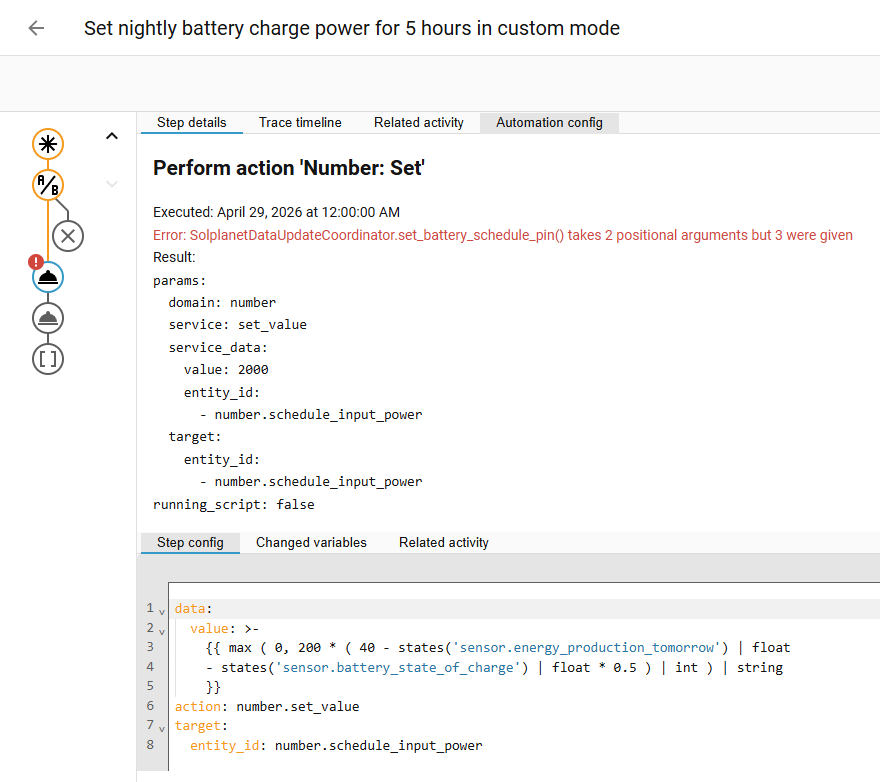
I’ve tried to create an automation that sets my battery to custom mode at night for 5 hours of charging. I determine the charge rate based on what I need for the day, what the battery level is that I start with, and the forecasted solar production, i.e. 40kw - current battery - forecasted solar.
When I try to set number.schedule_input_power, I get the following error in my automation trace.
Which aligns with the first line in the log:
2026-04-29 00:00:00.120 ERROR (MainThread) [homeassistant.components.automation.nightly_battery_char
ge_level] Set nightly battery charge power for 5 hours in custom mode: Error executing script. Unexp
ected error for call_service at pos 1: SolplanetDataUpdateCoordinator.set_battery_schedule_pin() tak
es 2 positional arguments but 3 were given
Anyone has any ideas what is going on? I’ve checked the related code and it all seems to indicate two parameters for set_battery_schedule_pin(isn, int(value)), so I am wondering where that 3rd is coming from that causes the problem?
P.-S.: I just noticed that even when setting the “Schedule Input Power” using the slider in the Overview, it returns the same error, so there must be a problem with the implementation of setting this particular value. Bug report?
Hi, I have found using the Power Flow card plus to be much better than the inbuilt energy dashboard, you can download it from HACS and then create a custom dashboard adding this card in one of the sections then fill in the correct entities and it should work. I can’t get mine working exactly right as my AC Coupled PV inverter is an old school one which I am still yet to work out jhow to get the PV power output reading as an entity. There are some you tube videos that describe good setups for this dashboard.
Goodluck