I’ve found your config very useful and I’ve put together a radio player page similar to yours. I’ve three devices (two are Sonos, the other is a Google home) I want to use and so I’ve put together the following page that includes 3 buttons to select the device I want the page to work for (it’s a work in progress and I’ll tidy it eventually). I’ve a few issues I wonder if you can help with. I’ll explain my approach first.

Selecting which device is done by tapping on the media buttons which updates an HA helper input_select.media_device which I use to track what I’ve selected. The bg colour of the selected media is yellow and can be changed when tapped (or when updated in HA). Then, when any of the radio buttons is tapped an automation is triggered in HA to action the request (exactly as you did).
I use Node Red for my automations and I’ve set up two, one for the radio selection and one for the volume selection as shown below (as an aside, I don’t know how I’d do it using HA standard automations). I reset the booleans in Node Red rather than my nspanel yaml. Hopefully they’re reasonably clear.
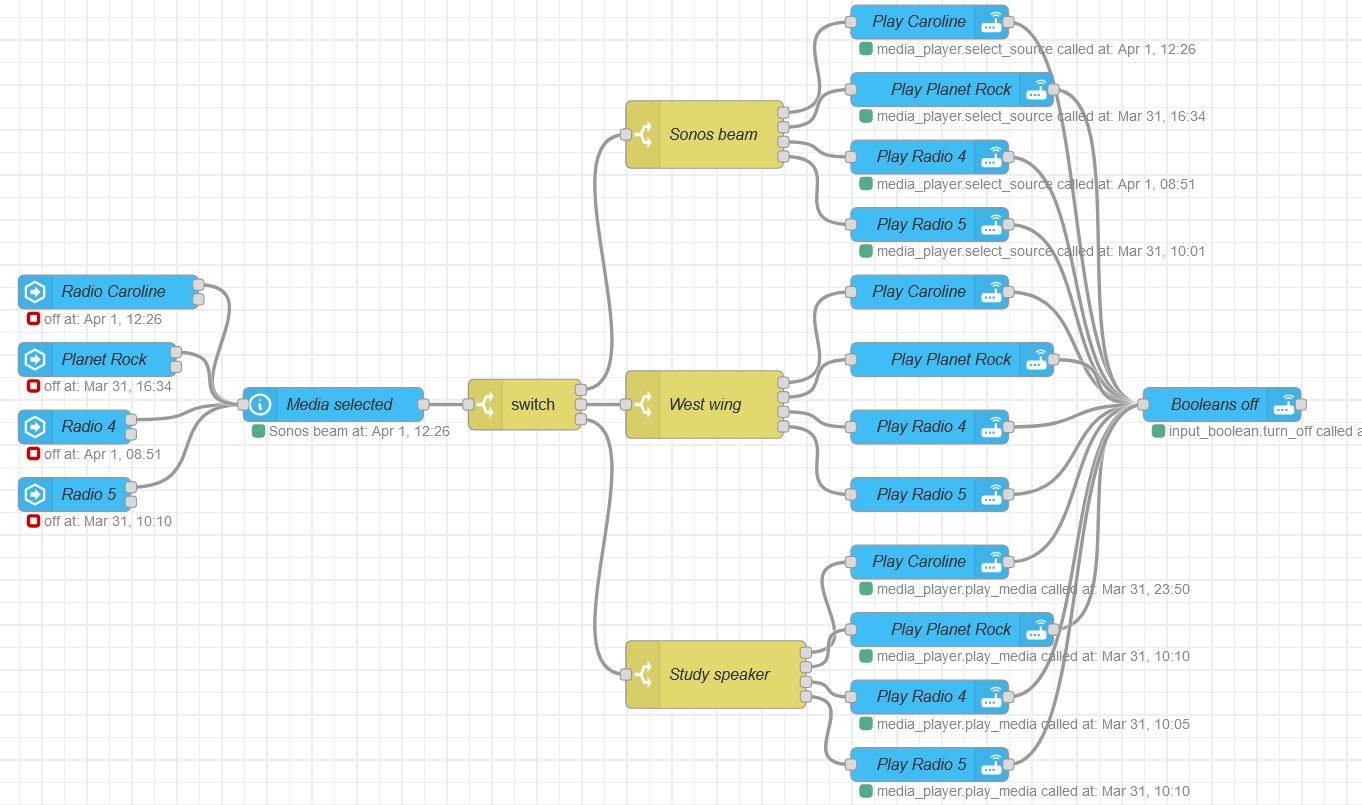

This works (and this approach means I can easily add buttons to Lovelace to do the same) but there are a few issues I’d like to iron out:
- I can’t use the media_player.media_play_pause service for play/pause, it doesn’t work for any of my devices. I have to use media_player.volume_mute which is a bit naff!
- I can’t get any song titles etc for any of my devices.
- When the page is opened on the nspanel, the current device selection doesn’t update automatically. I have to have a periodic updater (I use every 1s) to update the page. [This is actually a general issue I have on my pages; I’ve an ever growing set of nested if then elses in this every 1s section to ensure a page shows current information as soon as it’s displayed. It’d be more efficient if I could force an update of a page on its selection.]