I was just starting to do something here, I will assist best I can. I have a Villa in Como, Italy and we want PADs around for the Olympics.
That’s a lot of data for a single endpoint, guessing you might be able to get it with something like a python script but you would need to get the endpoints.
I will say a quick playing around with the endpoints finally gave me the Gold Medal game from 2022 - I used this link: https://site.api.espn.com/apis/site/v2/sports/hockey/olympics-mens-ice-hockey/scoreboard
This link gives you other endpoints but don’t have time to look at them:
http://sports.core.api.espn.com/v2/sports/hockey/leagues/olympics-mens-ice-hockey?lang=en®ion=us
Might check out these as well:
[ESPN hidden API Docs · GitHub ]
[List of nfl endpoints for ESPN's API · GitHub]
I was curious and just an update to Olympic Hockey. I don’t follow and most likely won’t continue down this path but to help. Here are a couple notes because it looks like matches are set.
I put my sensors in YAML files so I created a new olympic_sensors.yaml. Here is what I put in it:
######################### Olympic Winter
#####################  Hockey
- platform: rest
  scan_interval: 14400
  name: Olympics Winter Hockey
  unique_id: sensor.olympics_winter_hockey
  resource: https://site.api.espn.com/apis/site/v2/sports/hockey/olympics-mens-ice-hockey/scoreboard?dates=20260101-20260222
  value_template: "{{ now() }}"
  json_attributes:
      - leagues
      - events
I filtered through a template (assuming you will eventually want the medal rounds and that ESPN will have it in there). I just reused my NFL template and this is in the template.yaml file
##########  Olympics
########## Winter Hockey ##############################################################
- name: olympics_winter_hockey_filtered_events
  unique_id: sensor.olympics_winter_hockey_filtered_events
  state: "{{ now() }}"
  attributes:

    olympic_hockey: >
      {% set region = 'Preliminary Round' %}
      {% set filtered_ids = namespace(ids=[]) %}
      {% set filtered_events = namespace(events=[]) %}
      {% for event in state_attr('sensor.olympics_winter_hockey', 'events') %}
        {% if event.competitions %}
          {% for competition in event.competitions %}
            {% if competition.notes and competition.notes[0].headline | regex_search(region, ignorecase=False) %}
              {% set filtered_ids.ids = filtered_ids.ids + [competition.id] %}
            {% endif %}
          {% endfor %}
        {% endif %}
      {% endfor %}
      {% for event in state_attr('sensor.olympics_winter_hockey', 'events') %}
        {% if event.id in filtered_ids.ids %}
          {% set filtered_events.events = filtered_events.events + [event] %}
        {% endif %}
      {% endfor %}
      {{ filtered_events.events }}
    olympic_hockey_bronze: >
      {% set region = 'Bronze Medal Game' %}
      {% set filtered_ids = namespace(ids=[]) %}
      {% set filtered_events = namespace(events=[]) %}
      {% for event in state_attr('sensor.olympics_winter_hockey', 'events') %}
        {% if event.competitions %}
          {% for competition in event.competitions %}
            {% if competition.notes and competition.notes[0].headline | regex_search(region, ignorecase=False) %}
              {% set filtered_ids.ids = filtered_ids.ids + [competition.id] %}
            {% endif %}
          {% endfor %}
        {% endif %}
      {% endfor %}
      {% for event in state_attr('sensor.olympics_winter_hockey', 'events') %}
        {% if event.id in filtered_ids.ids %}
          {% set filtered_events.events = filtered_events.events + [event] %}
        {% endif %}
      {% endfor %}
      {{ filtered_events.events }}
    olympic_hockey_gold: >
      {% set region = 'Gold Medal Game' %}
      {% set filtered_ids = namespace(ids=[]) %}
      {% set filtered_events = namespace(events=[]) %}
      {% for event in state_attr('sensor.olympics_winter_hockey', 'events') %}
        {% if event.competitions %}
          {% for competition in event.competitions %}
            {% if competition.notes and competition.notes[0].headline | regex_search(region, ignorecase=False) %}
              {% set filtered_ids.ids = filtered_ids.ids + [competition.id] %}
            {% endif %}
          {% endfor %}
        {% endif %}
      {% endfor %}
      {% for event in state_attr('sensor.olympics_winter_hockey', 'events') %}
        {% if event.id in filtered_ids.ids %}
          {% set filtered_events.events = filtered_events.events + [event] %}
        {% endif %}
      {% endfor %}
      {{ filtered_events.events }}
Running it through my sports_playoffsv5_withsquarterscores: decluttering template I got this:
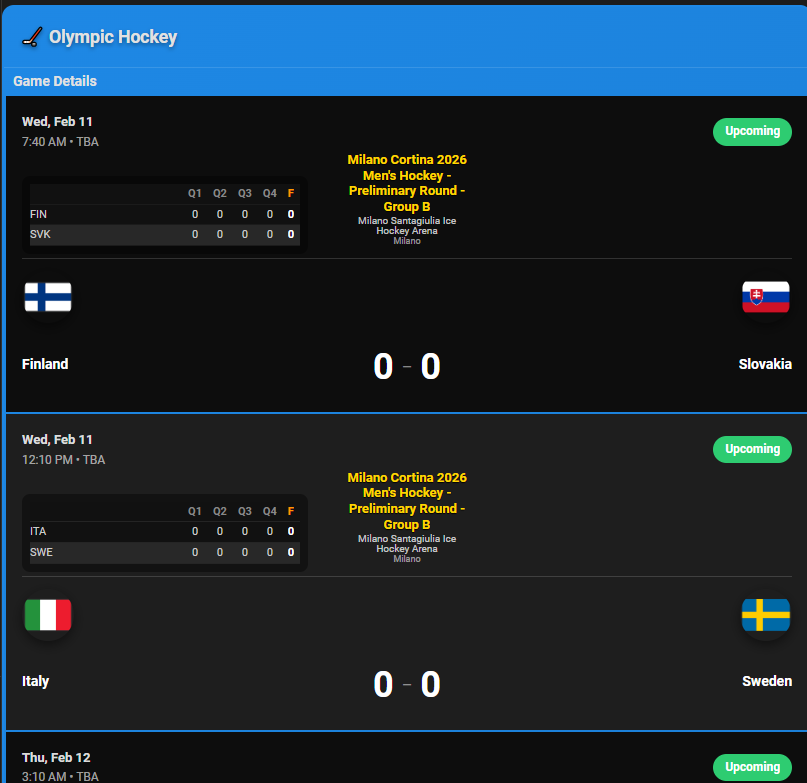
but as you can see it is using the football layout. So I sent the decluttering card through Chatgpt and it gave me this:
  sports_olympic_hockey_v1:
    card:
      type: custom:flex-table-card
      title: '[[title]]'
      css:
        table+: padding:0;width:100%;
        tbody tr td:first-child: width:100%;padding:0;border:none;
        tbody tr:hover: background-color:rgba(255,255,255,0.05)!important;
        tbody tr: border-bottom:1px solid rgba(255,255,255,0.08);
      card_mod:
        style:
          .: |
            ha-card {
              overflow: hidden;
              border: 2px solid [[color]];
              border-radius: 14px;
              background: linear-gradient(
                135deg,
                [[color]] 0%,
                color-mix(in oklab, [[color]], black 22%) 100%
              );
            }
            @keyframes scroll {
              0% { transform: translateX(0%); }
              100% { transform: translateX(-50%); }
            }
          $: |
            .card-header {
              background: transparent;
              color: white;
              padding: 14px 18px !important;
              font-size: 18px !important;
              font-weight: bold !important;
              text-shadow: 0 2px 4px rgba(0,0,0,0.4);
              border-bottom: 1px solid rgba(255,255,255,0.12);
            }
      sort_by: Date
      entities:
        include: '[[entity]]'
      columns:
        - name: ID
          data: '[[events]]'
          modify: x.competitions[0].id
          hidden: true
        - name: Date
          data: '[[events]]'
          modify: x.competitions[0].date
          hidden: true
        - name: Game
          data: '[[events]]'
          modify: |-
            (() => {
              if (!x?.competitions?.[0]) return "No data";
              const c = x.competitions[0];

              /* Dates */
              const gameDate = new Date(c.date).toLocaleDateString("en-US",
                { weekday:"short", month:"short", day:"numeric" });
              const gameTime = new Date(c.date).toLocaleTimeString("en-US",
                { hour:"numeric", minute:"2-digit", hour12:true });

              /* Teams */
              const competitors = c.competitors;
              const home = competitors.find(t => t.homeAway === "home");
              const away = competitors.find(t => t.homeAway === "away");

              /* Venue */
              const venue = c.venue?.fullName || "";
              const city = c.venue?.address?.city || "";
              const country = c.venue?.address?.country || "";
              const location = [city, country].filter(Boolean).join(", ");

              /* Round / Group */
              let roundName = "";
              if (c.notes?.[0]?.headline) {
                roundName = c.notes[0].headline
                  .replace("Milano Cortina 2026 ", "")
                  .replace("Men's Hockey - ", "");
              }

              /* Status */
              const state = c.status?.type?.state || "pre";
              let statusBadge = "";

              if (state === "post") {
                statusBadge = `<div style="background:#fff;color:#000;
                  padding:4px 14px;border-radius:18px;font-size:12px;font-weight:bold;">
                  Final</div>`;
              } else if (state === "pre") {
                statusBadge = `<div style="background:#2ecc71;color:#fff;
                  padding:4px 14px;border-radius:18px;font-size:12px;font-weight:bold;">
                  Upcoming</div>`;
              } else {
                statusBadge = `
                  <div style="text-align:center;">
                    <div style="background:#c00;color:#fff;
                      padding:2px 10px;border-radius:12px;
                      font-size:10px;font-weight:bold;letter-spacing:1px;">
                      LIVE
                    </div>
                    <div style="margin-top:4px;font-size:13px;font-weight:bold;">
                      ${c.status.displayClock}
                      <span style="font-size:11px;opacity:.7;">P${c.status.period}</span>
                    </div>
                  </div>`;
              }

              /* Hockey period grid (3) */
              let awayP = ["0","0","0"];
              let homeP = ["0","0","0"];

              if (state !== "pre" && away.linescores?.length) {
                for (let i = 0; i < 3; i++) {
                  if (away.linescores[i]) awayP[i] = away.linescores[i].displayValue || "0";
                  if (home.linescores[i]) homeP[i] = home.linescores[i].displayValue || "0";
                }
              }

              const awayScore = state === "pre" ? "0" : away.score;
              const homeScore = state === "pre" ? "0" : home.score;

              const periodGrid = `
                <div style="margin:8px 0;background:rgba(0,0,0,.4);
                  border-radius:10px;padding:8px;font-size:11px;">
                  <table style="width:100%;color:#ccc;">
                    <thead>
                      <tr style="text-align:center;color:#888;">
                        <th></th><th>P1</th><th>P2</th><th>P3</th>
                        <th style="color:#ff9800;">F</th>
                      </tr>
                    </thead>
                    <tbody>
                      <tr style="text-align:center;">
                        <td style="text-align:left;">${away.team.abbreviation}</td>
                        <td>${awayP[0]}</td><td>${awayP[1]}</td><td>${awayP[2]}</td>
                        <td style="color:#fff;font-weight:bold;">${awayScore}</td>
                      </tr>
                      <tr style="text-align:center;">
                        <td style="text-align:left;">${home.team.abbreviation}</td>
                        <td>${homeP[0]}</td><td>${homeP[1]}</td><td>${homeP[2]}</td>
                        <td style="color:#fff;font-weight:bold;">${homeScore}</td>
                      </tr>
                    </tbody>
                  </table>
                </div>`;

              return `
                <div style="padding:16px;background:rgba(0,0,0,.25);">
                  <div style="display:flex;justify-content:space-between;">
                    <div>
                      <div style="font-weight:600;">${gameDate}</div>
                      <div style="font-size:12px;opacity:.7;">
                        ${gameTime}
                      </div>
                    </div>
                    ${statusBadge}
                  </div>

                  ${roundName ? `
                    <div style="text-align:center;margin:10px 0;">
                      <div style="color:#FFD700;font-weight:bold;font-size:13px;">
                        ${roundName}
                      </div>
                      <div style="font-size:11px;opacity:.7;">
                        ${venue} • ${location}
                      </div>
                    </div>` : ""}

                  ${periodGrid}

                  <div style="display:flex;justify-content:space-between;align-items:center;">
                    <div style="flex:1;text-align:left;">
                      <img src="${away.team.logo}"
                        style="height:56px;border-radius:50%;">
                      <div style="font-weight:600;">${away.team.displayName}</div>
                    </div>

                    <div style="flex:1;text-align:center;font-size:36px;
                      font-weight:bold;">
                      ${awayScore} – ${homeScore}
                    </div>

                    <div style="flex:1;text-align:right;">
                      <img src="${home.team.logo}"
                        style="height:56px;border-radius:50%;">
                      <div style="font-weight:600;">${home.team.displayName}</div>
                    </div>
                  </div>
                </div>`;
            })()
I call like this:
- type: custom:decluttering-card
                                            template: sports_olympic_hockey_v1
                                            variables:
                                              - title: 🏒 Olympic Hockey
                                              - color: '#1e88e5'
                                              - entity: >-
                                                  sensor.olympics_winter_hockey_filtered_events
                                              - events: olympic_hockey
                                              - show_rankings: true
                                              - show_series: false
and I get this - probably more in line to what you are looking for:
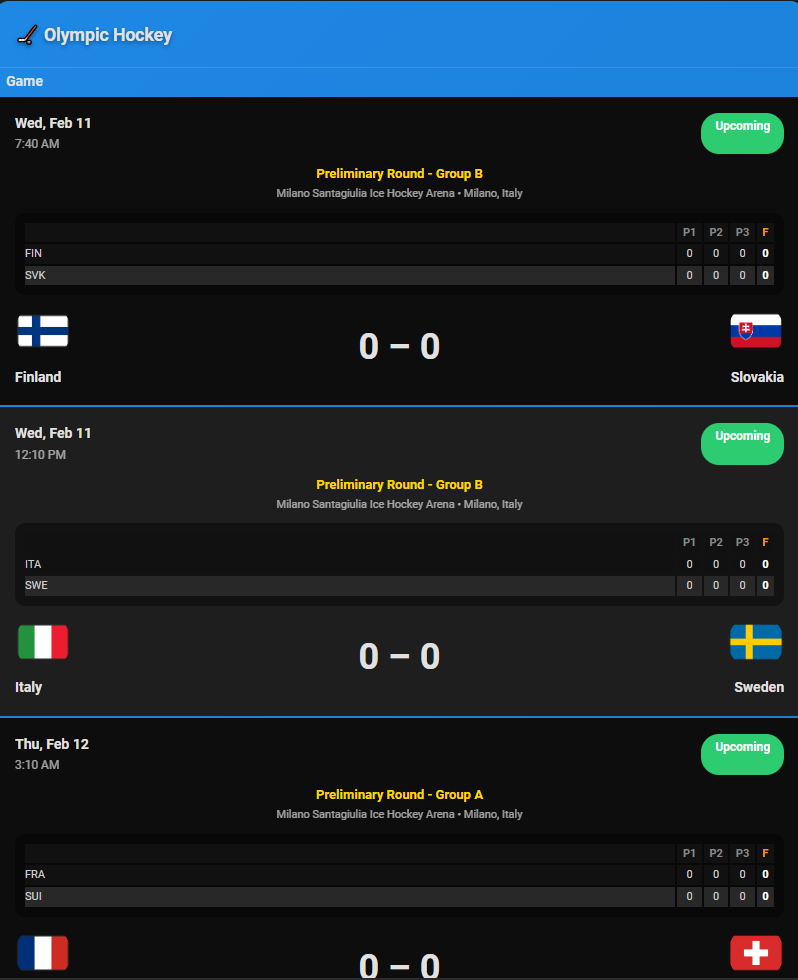
I am not planning on adding anything to this but thought it might help.
EDIT: A couple updates.
- My dates stopped at Feb-15 - Gold is Feb 22. Both date in sensor and template filtering are updated
- from an event perspective there are 3 filters - olympic_hockey, olympic_hockey_bronze & olympic_hockey_gold. You will now see them when called:

Hadn’t seen any updates since last post so I thought I would throw this out. I know that there are only a couple days left in the Olympics but I couldn’t figure out the endpoints. Still don’t have them for the sports outside of Hockey but may be able to use/build on these for the LA Games in the future.
I would love to see any additional endpoints if you have them.
I have also updated my github with changes.
If you are looking for Medals here is the link that currently works (always a big thanks to ESPN for supporting (indirectly) our community)
I also have these 2 endpoints but not much info:
- https://site.web.api.espn.com/apis/site/v2/olympics/winter/2026/scoreboard
- https://site.web.api.espn.com/apis/site/v2/olympics/winter/2026/results
Here is how I am getting the data (normal REST/JSON) and then parsing in the normal flex-table.
- platform: rest
  name: Olympics Winter Medals
  unique_id: sensor.olympics_winter_medals
  resource: https://site.web.api.espn.com/apis/site/v2/olympics/winter/2026/medals
  value_template: "{{ now() }}"
  json_attributes:
      - medals
Here’s my basic medal decluttering card:
olympics_medals:
card:
type: custom:flex-table-card
title: '[[title]]'
css:
table+: 'padding: 0px; width: 100%;border-collapse: collapse; margin-top:12px;'
tbody tr td:first-child: 'width: 10%;'
tbody tr td:nth-child(2): 'width: 2%;'
tbody tr td:nth-child(3): 'width: 1%;'
tbody tr td:nth-child(4): 'width: 2%;'
tbody tr:hover: 'background-color: dimgrey!important; color:white!important;'
card_mod:
style:
.: |
ha-card {
overflow: auto;
}
$: |
.card-header {
padding-top: 6px!important;
padding-bottom: 4px!important;
font-size: 14px!important;
line-height: 14px!important;
font-weight: bold!important;
}
sort_by: Total Medals-
entities:
include: '[[entity]]'
exclude: '[[excluded_entities]]'
columns:
- name: Country
data: '[[attribute]]'
modify: >-
'<div><img src="' + x.flag.href + '" style="height:
20px;vertical-align:middle;"> ' + x.name + '</div>'
- name: Total Medals
data: '[[attribute]]'
modify: x.medalStandings.totalMedals
- name: Gold Medals
data: '[[attribute]]'
modify: x.medalStandings.goldMedalCount
- name: Silver Medals
data: '[[attribute]]'
modify: x.medalStandings.silverMedalCount
- name: Bronze Medals
data: '[[attribute]]'
modify: x.medalStandings.bronzeMedalCount
How I call the card in the dashboard:
- type: custom:decluttering-card
                                            template: olympics_medals
                                            variables:
                                              - title: Olympic Medals
                                              - entity: sensor.olympics_winter_medals
                                              - attribute: medals
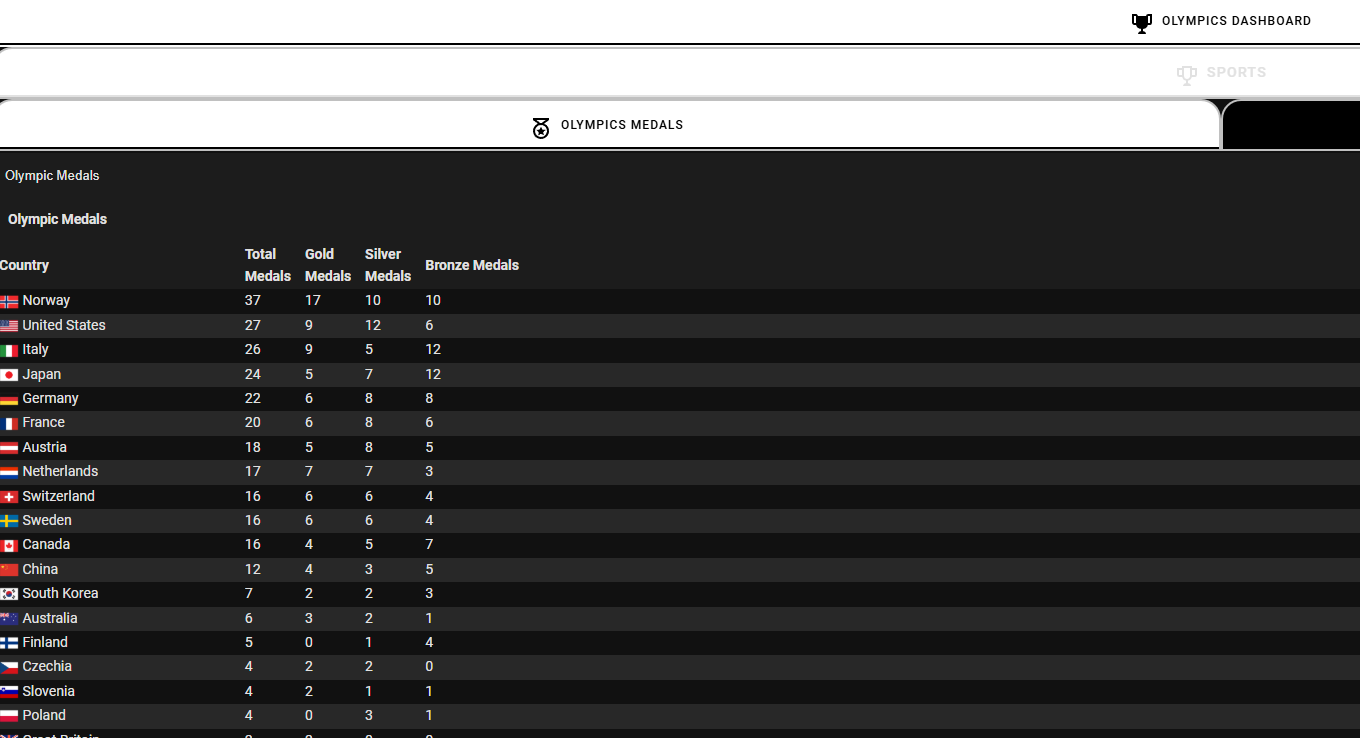
And you get this:
Is it possible to have an ATP men’s tennis ranking?
I show this link gives me the ATP rankings:
https://site.web.api.espn.com/apis/site/v2/sports/tennis/atp/rankings?region=us&lang=en
To get to the ATP ranks in the link I dive into the rankings. So my sensor looks like this (you can find it in the tennis.yaml on my github)
- platform: rest
  scan_interval: 36000
  name: Tennis ATP Ranking
  unique_id: sensor.tennis_atp_ranking
  resource: https://site.web.api.espn.com/apis/site/v2/sports/tennis/atp/rankings?region=us&lang=en
  value_template: "{{ now() }}"
  json_attributes_path: "$.['rankings'][0]"
  json_attributes:
    - ranks
My decluttering card looks like this:
decluttering_templates:
  ranking_settings:
    card:
      type: custom:flex-table-card
      title: '[[title]]'
      css:
        table+: >-
          padding: 0px; width: 100%; max-width: 1600px; display: block;
          overflow-x: auto;
        tbody tr td:first-child: 'width: 0.1%; text-align: center;'
        tbody tr td:nth-child(2): 'width: 0.1%; text-align: center;'
        tbody tr td:nth-child(3): 'width: auto; text-align: center;'
        tbody tr td:nth-child(n+4): 'width: auto;'
        tbody tr:hover: 'background-color: green!important; color: white!important;'
        '@media (max-width: 600px)': |
          tbody tr td {
            font-size: 12px;
            padding: 2px;
          }
          tbody tr td img {
            width: 15px;
            height: 15px;
          }
      card_mod:
        style:
          .: |
            ha-card {
              overflow: auto;
              }
          $: |
            .card-header {
               padding-top: 6px!important;
               padding-bottom: 4px!important;
               font-size: 14px!important;
               line-height: 14px!important;
               font-weight: bold!important;
             }
      entities:
        include: '[[entity]]'
      sort_by: ranks
      columns:
        - name: Rk
          data: ranks
          modify: x.current
        - name: +-
          data: ranks
          modify: >-
            '<div style="color:' + (x.trend > 0 ? 'green' : x.trend < 0 ? 'red'
            : 'white') + ';">' + x.trend + '</div>'
        - name: Flag
          data: ranks
          modify: >-
            '<div style="white-space: nowrap; display: flex; align-items:
            center;">' + (typeof x.athlete.flag !== 'undefined' ? '<img src="' +
            x.athlete.flag + '"
            style="width:20px;height:20px;margin-right:5px;">' : '') + '<span>'
            + x.athlete.citizenshipCountry + '</span></div>'
        - name: Name
          data: ranks
          modify: >-
            '<div style="white-space: nowrap; overflow: auto; max-width: 150px;
            display: inline-block;">' + (typeof x.athlete.headshot !==
            'undefined' ? '<img src="' + x.athlete.headshot + '"
            style="width:20px;height:20px;margin-right:5px;">' : '') +
            (x.athlete.links && x.athlete.links.find(l =>
            l.rel.includes("playercard")) ? '<a href="' + x.athlete.links.find(l
            => l.rel.includes("playercard")).href + '" target="_blank"
            style="text-decoration: none; color: inherit;">' +
            x.athlete.displayName + '</a>' : x.athlete.displayName) + '</div>'
        - name: Pts
          data: ranks
          modify: x.points
And I call it like this:
                    card:
                      type: custom:decluttering-card
                      template: ranking_settings
                      variables:
                        - title: ATP Rankings
                        - entity: sensor.tennis_atp_ranking
And I get this:
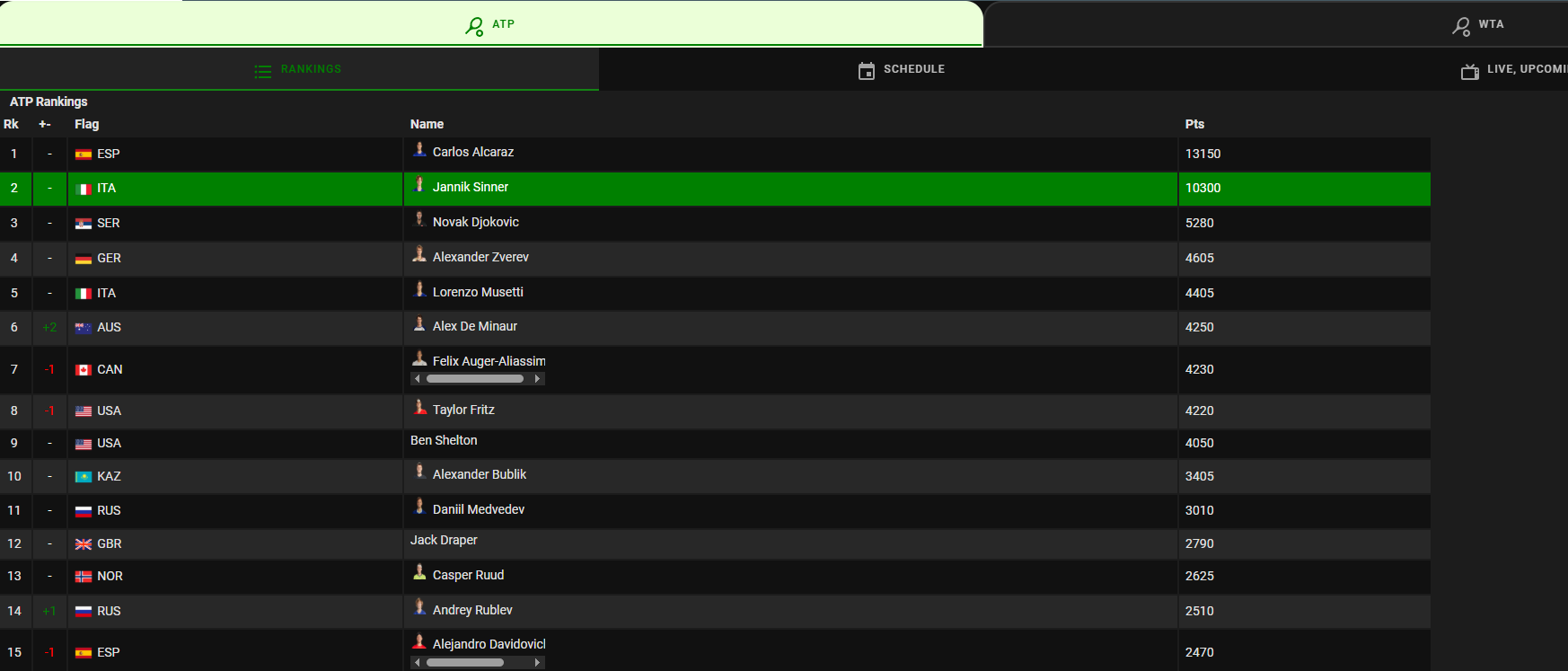
Hope that helps.
thanks very much!
How do I sort this by highest score? Right now it’s sorted by ‘Ptos’ but it orders it the wrong way (meaning the lowest is on top). I tried several ways and couldn’t get it to work.
type: custom:flex-table-card
title: null
entities:
  include: sensor.mls_posiciones
  exclude: zwave.unknown_node*
columns:
  - name: "#"
    data: entries
    modify: x.stats[10].value
  - name: Logo
    data: entries
    modify: "'<img src=\"' + x.team.logos[0].href + '\" style=\"width:30px;height:auto\">'"
  - name: Equipo
    data: entries
    modify: x.team.name
  - name: PJ
    data: entries
    modify: x.stats[0].value
  - name: G
    data: entries
    modify: x.stats[7].value
  - name: E
    data: entries
    modify: x.stats[6].value
  - name: P
    data: entries
    modify: x.stats[1].value
  - name: Ptos
    data: entries
    modify: x.stats[3].value
sort_by: "Ptos"
Have you tried using: sort_by: Ptos-
The - should put it in the correct order you are looking for - highest to lowest.
Out of curiosity what is the espn endpoint you are using?
thanks very much
this: https://site.web.api.espn.com/apis/v2/sports/soccer/usa.1/standings
Cool - glad it worked. Not sure if you saw my github but I have a mostly complete layout of soccer - (mostly majors). Sensors, templates, dashboard - all should be up there
Link is here: https://github.com/bburwell/HA-Sports-Scores
Soccer dashboard is here:
https://github.com/bburwell/HA-Sports-Scores/blob/c5a6afb093e397668dbe4aab29c7ec27575b827e/Dashboards/Sports_Soccer
Looks like this:
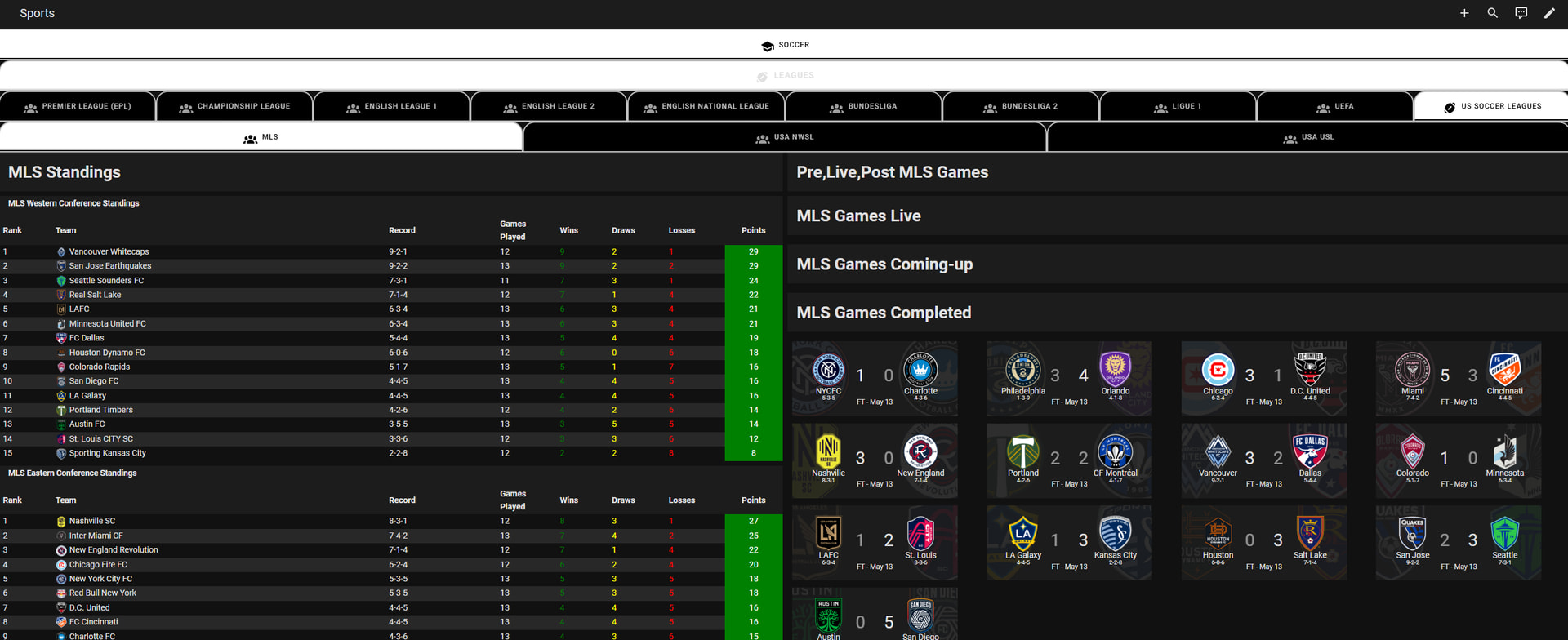
Can something like this be done for all the World Cup 2026 matches?
I'll be honest I haven't gone through and cleaned this up but there are some sections up on my github that should get you what you are looking for or at least give you a start. Mostly based on the 2022 WorldCup.
Dashboard is here: HA-Sports-Scores/Dashboards/Soccer - FIFA World Cup and FIFA Club World Cup at 3549be9d0cbaf7b3bd58c6489242179a490bfb66 · bburwell/HA-Sports-Scores · GitHub
Python Script is here: HA-Sports-Scores/Python Files/fifa_worldcup.py at 3549be9d0cbaf7b3bd58c6489242179a490bfb66 · bburwell/HA-Sports-Scores · GitHub
Soccer Sensors are here: HA-Sports-Scores/sensors/soccer_sensors.yaml at 3549be9d0cbaf7b3bd58c6489242179a490bfb66 · bburwell/HA-Sports-Scores · GitHub
You will need to add the python call to the configuration.yaml ( get_fifa_worldcup: 'python /config/www/fifa_worldcup.py') I have an example in github and setup an automation to call the python so it can separate the matches into json files that the sensors then import. It follows the same path as I do for most Tournaments/CFP/etc.
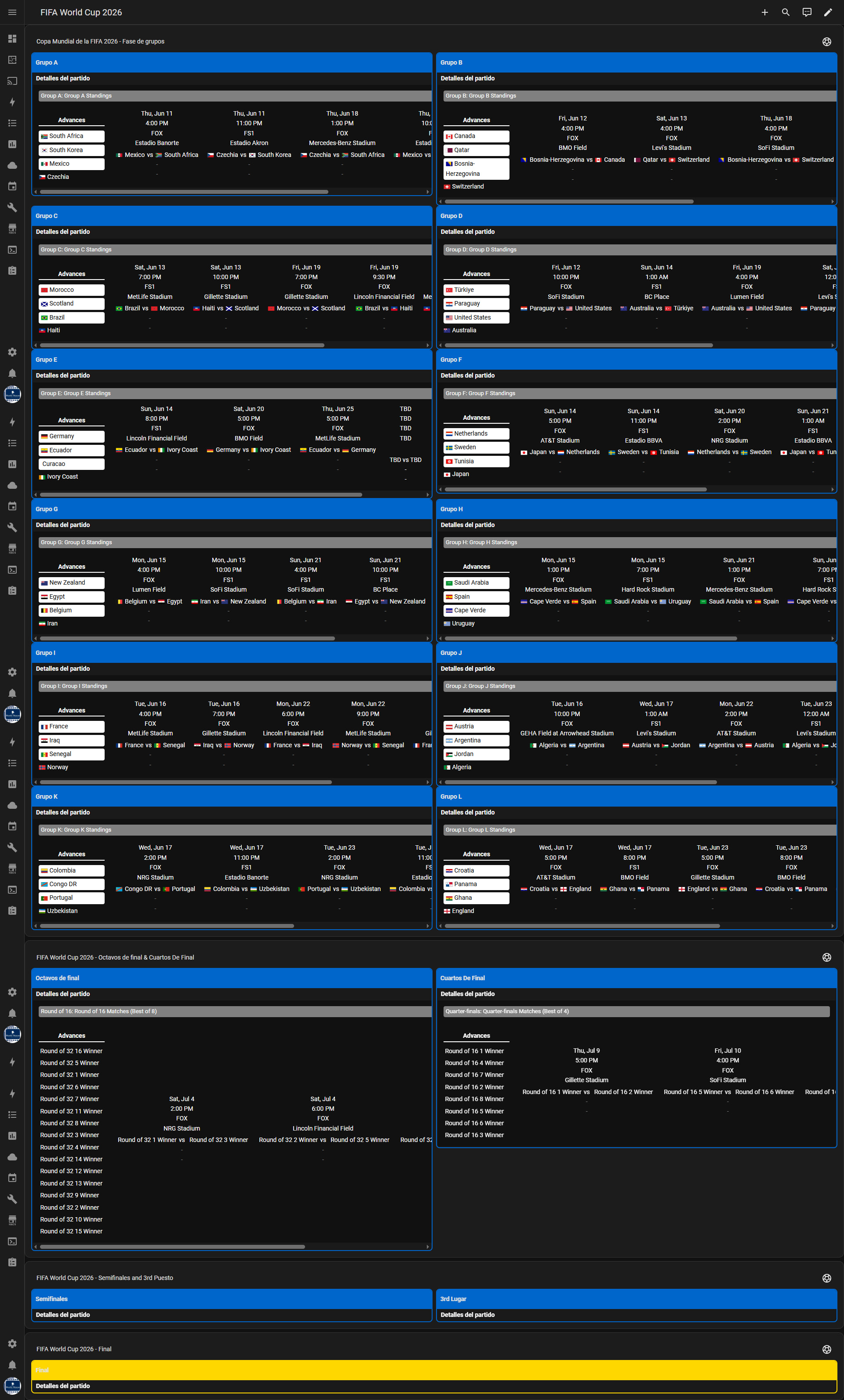
You should see this - caveat I have not started cleaning this up so pieces my be wrong or don't work. Let me know if you run into something and I can try to update.
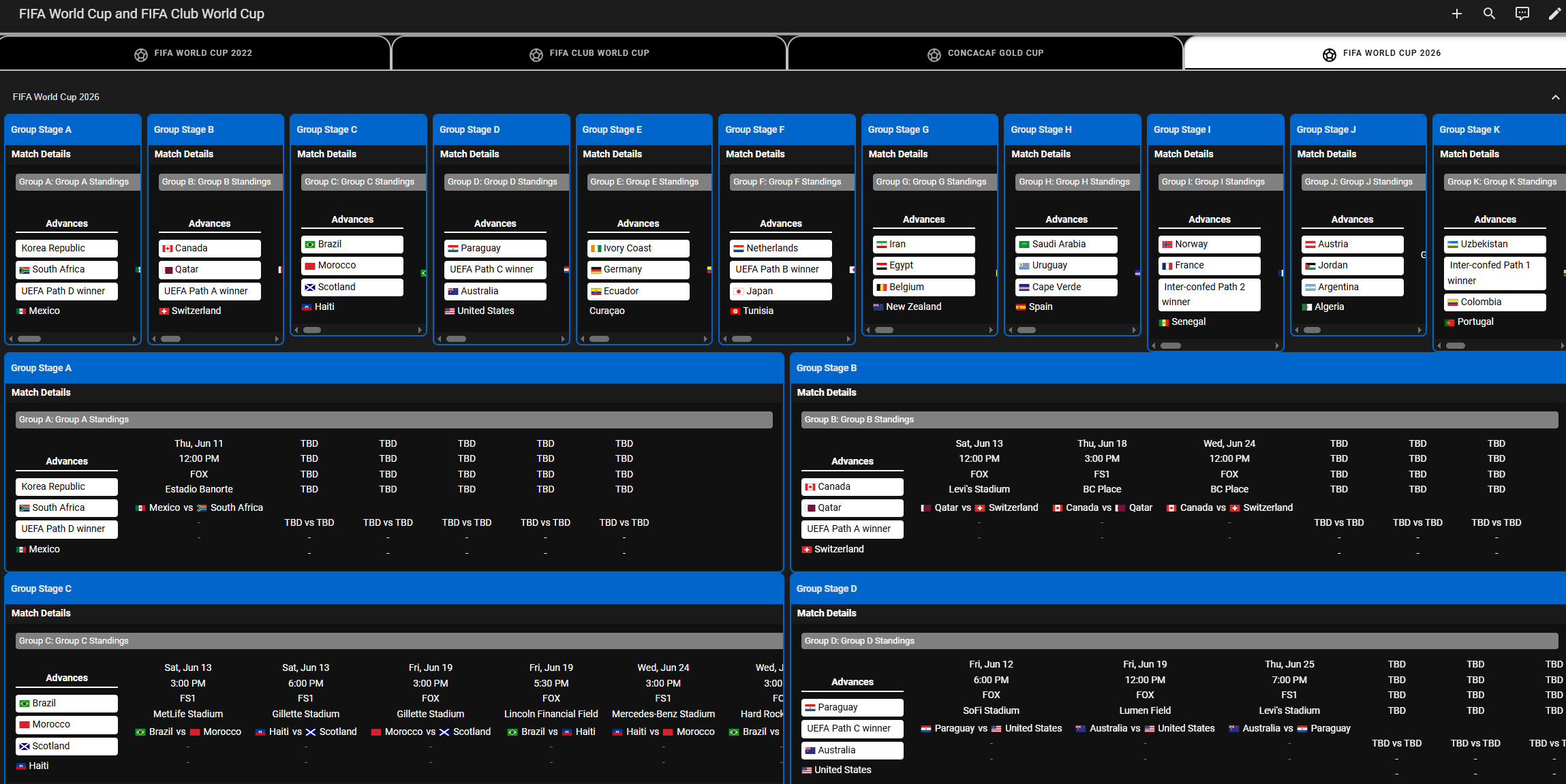
Thanks, during the week I’ll try to implement it, and I’ll let you know if I manage to do it! Many thanks
I am looking to simply have the NFL Standings. Trying to clip that out and use it but this is getting to be a bit more complicated than I expected. Some of the plugins are 7+ years old. Isn't there an updated way to just simply see the NFL standings on a dashboard either solo or as a card?
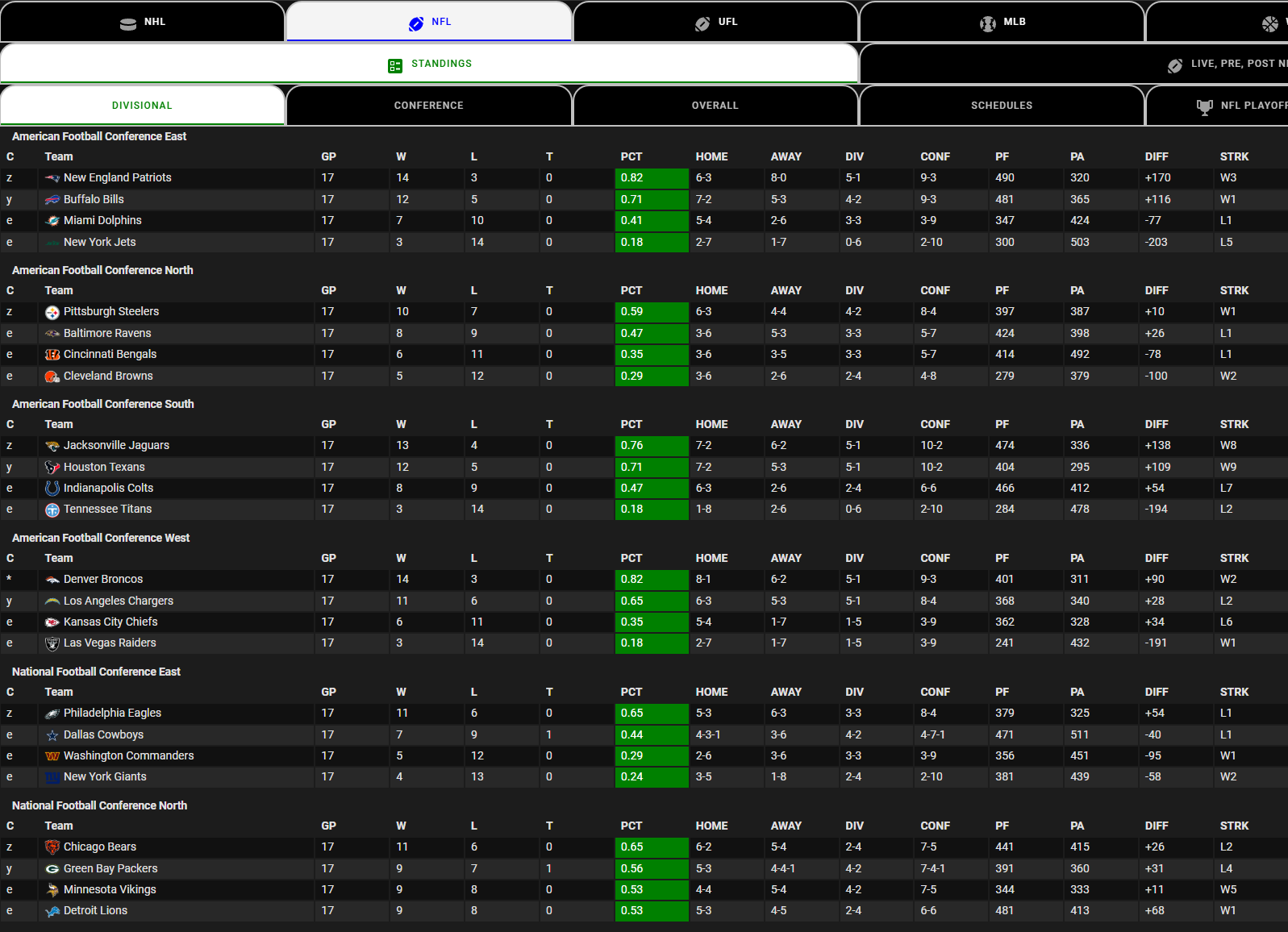
That is what I am trying to do. Which setup guide did you use? I understand some of the pieces required are now native to HA and don't need to be installed like decluttering. Maybe I am reading it wrong.
It all started with @kbrown01 design and then some of us added to his concept.
He lays out what he did at the top of this thread and I try to cover what I did at my github site here: GitHub - bburwell/HA-Sports-Scores: Home Assistant Sports Scores, Standings, Dashboards and Yaml's for Home Assistant · GitHub
Basically we pull data from ESPN Open API's, put the data in sensors, utilize Flex-table, Team Tracker, Card-mod etc to deliver the dashboards.
I use Python to put some of the data in sensors, some grab data from other API's/Sites, some just use Team-Tracker, some use the F1, mostly just for fun.
This thread has a lot of detail/data that should help you get started. My site has a bit of a write-up plus dashboards, sensors, templates, python files, etc. that may help you as well.
Have fun!
I got Tennis to work!!! I figured out my stupidity and fixed it. Thank you for all of your hard work!