It seams that token refresh works fine, but when it is necessary to refresh the token within a homeassistant function, the function keeps blocking even after successful token refresh. here are the logs:
2026-02-25 18:56:54.824 DEBUG (MainThread) [custom_components.spotifyplus] Processing service call 'get_player_devices' in async 'service_handle_spotify_serviceresponse' method
2026-02-25 18:56:54.824 DEBUG (MainThread) [custom_components.spotifyplus] Entity id value of 'media_player.spotifyplus_kamblilan' was resolved to MediaPlayerEntity instance for the 'get_player_devices' method call
2026-02-25 18:56:54.824 DEBUG (MainThread) [custom_components.spotifyplus] Executing 'get_player_devices' service on media player 'SpotifyPlus Kamblilan'
2026-02-25 18:56:54.830 DEBUG (SyncWorker_3) [custom_components.spotifyplus] Retrieving information from the Spotify Web API
2026-02-25 18:56:54.831 DEBUG (SyncWorker_3) [custom_components.spotifyplus] 'SpotifyPlus Kamblilan': TOKENUPDATER_LOCK is preparing to set the lock for method _TokenUpdater
2026-02-25 18:56:54.832 DEBUG (SyncWorker_3) [custom_components.spotifyplus] 'SpotifyPlus Kamblilan': TOKENUPDATER_LOCK is set for method _TokenUpdater
2026-02-25 18:56:54.832 DEBUG (SyncWorker_3) [custom_components.spotifyplus] 'SpotifyPlus Kamblilan': Component OAuth2 session token is either expired, not valid, or just refreshed by another HA worker thread; starting token refresh processing
2026-02-25 18:56:54.832 DEBUG (SyncWorker_3) [custom_components.spotifyplus] 'SpotifyPlus Kamblilan': Component is calling async_refresh_token to refresh the session token
2026-02-25 18:56:55.000 DEBUG (MainThread) [custom_components.spotifyplus] 'SpotifyPlus Kamblilan': Component options_update_listener is checking for authentication token refresh event
2026-02-25 18:56:55.001 DEBUG (MainThread) [custom_components.spotifyplus] 'SpotifyPlus Kamblilan': Component options_update_listener detected authentication token refresh; configuration will NOT be reloaded
2026-02-25 18:56:55.001 DEBUG (MainThread) [custom_components.spotifyplus] 'SpotifyPlus Kamblilan': Component options_update_listener is NOT reloading the configuration (due to token refresh)
2026-02-25 18:56:55.001 DEBUG (MainThread) [custom_components.spotifyplus] 'SpotifyPlus Kamblilan': Component options_update_listener completed
2026-02-25 18:56:55.003 DEBUG (SyncWorker_3) [custom_components.spotifyplus] 'SpotifyPlus Kamblilan': Component OAuth2 session token refresh complete
@Kamblian
Do those sets of messages keep repeating within milliseconds / seconds of each other? Note that the Spotify Web API auth token will be refresh every 60 minutes.
I would have to get a detailed SmartInspect trace from you to really figure out what is going on. To do that, you would want to open up a new issue on the github project page.
I execute the function “Get Player Devices” via Settings–>DeveloperTools–>Actions. When starting the function, log shows just once those lines:
2026-02-25 21:29:47.068 DEBUG (MainThread) [custom_components.spotifyplus] Processing service call 'get_player_devices' in async 'service_handle_spotify_serviceresponse' method
2026-02-25 21:29:47.068 DEBUG (MainThread) [custom_components.spotifyplus] Entity id value of 'media_player.spotifyplus_kamblilan' was resolved to MediaPlayerEntity instance for the 'get_player_devices' method call
2026-02-25 21:29:47.069 DEBUG (MainThread) [custom_components.spotifyplus] Executing 'get_player_devices' service on media player 'SpotifyPlus Kamblilan'
2026-02-25 21:29:47.076 DEBUG (SyncWorker_6) [custom_components.spotifyplus] Retrieving information from the Spotify Web API
Sometimes, after longer inactivity, no response is shown and the button I pressed to execute the function shows a turning icon eternally. When reloading the page and restarting the function 1-3 times, I get the response correctly. The same 4 lines are shown in the logs for each time I restart the function. No other repeats of those lines in milliseconds or seconds as you asked.
Approximately 15 minutes later I saw this in the logs:
@Kamblian
Is this for a Spotify Premium level account? Or is it a Free level account?
Note that Free level accounts will no longer be supported by the Spotify Developer App definitions created on / after 2026/02/11. Also, any existing (e.g. pre 2026/02/11) Free level accounts will no longer work after 2026/03/09.
followed the wiki and got the integration and card setup. it see all of my playlists as well all my sonos devices. but when i click on a playlist i get this error:
Failed to perform the action spotifyplus/player_media_play_context. Validation error: There is no active Spotify player device, and a default player device was not configured.
@Kooftness
You will need to configure the Default Player Device ID in the SpotifyPlus Integration configuration options. This will automatically select the chosen device if there is no currently active Spotify Player device.
You will also need to configure your Spotify LoginId, Username, and Password in the SpotifyPlus Integration configuration options. These are located on the second (of two) option screens (have to click “Next” to see these options).
As it sounds like you are a Sonos user, you will also want to check out the Extra Configuraiton Steps for Sonos Users wiki topic as well. You will need to do that in order to awaken Sonos devices.
Hi @thlucas,
I’ve been playing around with the integration a bit today and there’s one thing I’m not entirely happy with (or maybe I’m just not tech-savvy enough).
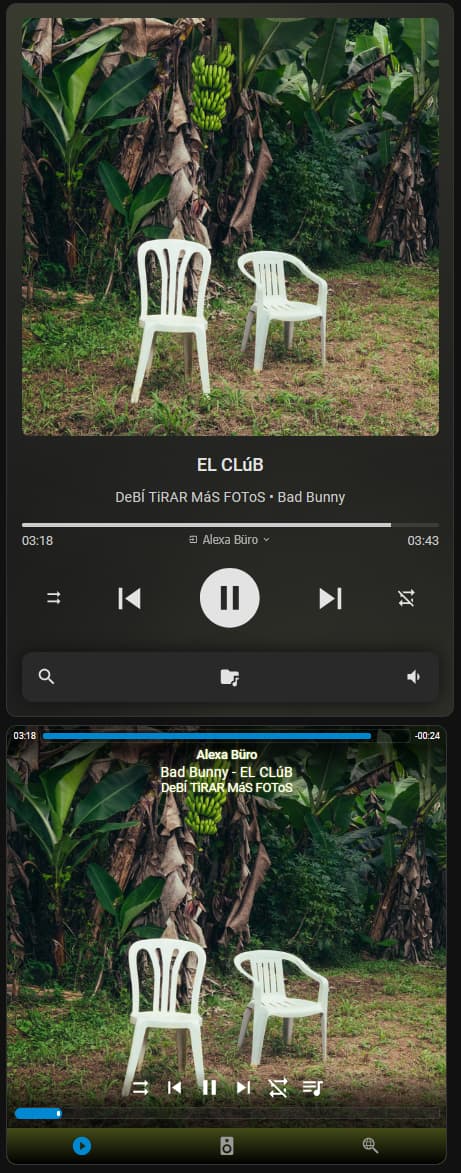
I want to use the integration together with the “Mediocre Massive Media Player” card because I think the design is a bit nicer than the SpotifyPlus card.
Everything works with the Mediocre Massive Media Player card and the SpotifyPlus integration except for the search function. Is it possible to get the search function to work with the card and the integration, or is it necessary to use the SpotifyPlus card for searching?
If it’s not possible, I would appreciate any tips on how I can design the SpotifyPlus card to be similar to the Mediocre Massive Media Player card.
Top is Mediocre Massive Media Player card and bottom is SpotifyPlus Card
@xTimboo
I am not familiar with the “Mediocre Media Player Card”, so I did a quick search for details. I found the following statement in the card search documentation:
The Mediocre Media Player Cards support search functionality when used with a Music Assistant player and other media players. By specifying the ma_entity_id option, you can enable Music Assistant-specific search features directly within the card. Alternatively, enabling the search.enabled option will use the regular Home Assistant search_media functionality.
The SpotifyPlus Integration does support the HA search_media functionality (note that it does not support Music Assistant search functionality). Check out the SpotifyPlus Integration Search Media wiki docs for how it implements the search_media function. I am not sure how that equates to configuration of the Mediocre Media Player Card though. I do know the SpotifyPlus Card will support more features related to search than the standard HA search_media support; I would guess it supports more than the MA functionality as well.
If I have some time, I will try to install the Mediocre Media Player Card and see if I can get something working with the search.
@xTimboo
Just released SpotifyPlus Integration v1.0.198 to fix the search issue.
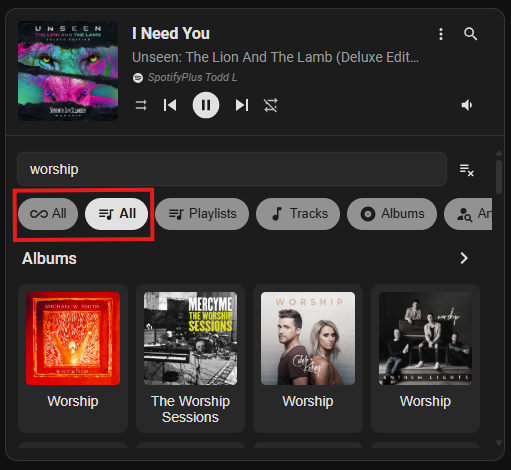
It appears the Mediocre Massive Media Player uses the media_content_type parameter to pass the filter type, and the integration was looking for the media_filter_classes parameter for the filter. I added processing of the media_content_type parameter value, and is working as expected.
Note that the default “All” criteria specified by the card only searches for “tracks”, and not ALL of the custom types specified. I defined a second “All” criteria type that will search ALL of the custom types specified. I would suggest that you contact the author of the card to allow a configuration option to remove the default “All” type button as it’s misleading (e.g. it will not search all types as assumed, only tracks).
@xTimboo
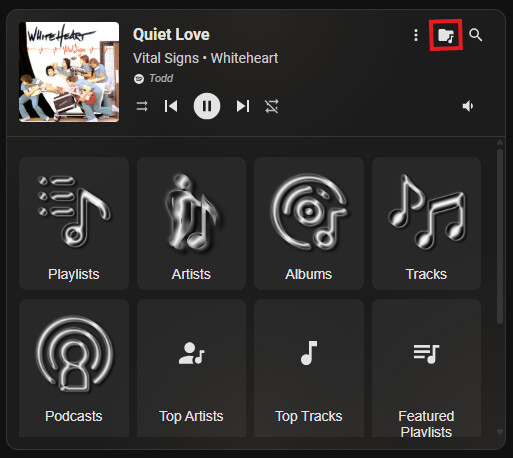
Note that the SpotifyPlus also supports HA Media Browser, so you can use that in your display as well. Just need to configure the media_browser: section of the card configuration, using the SpotifyPlus media player.
Hello, new to SpotifyPlus - I have followed the COMPREHENSIVE instructions and I think I have things working well but I am left with one question or point of confusion I was hoping someone could help clarify:
In Step 4e - Home Assistant Link Account there is a comment tat says:
" Note the Your Instance URL value in the Figure 4e example (toward the bottom); this must exactly match how you access your HA instance from the internet. The value should only contain the base url value (no trailing slash, no /auth/... , etc). For example, the value would be http://homeassistant.local:8123 if accessing from your local network"
This statement seems contradictory, the first part says “must exactly match how you access your HA instance from the internet” but the next sentence gives an example around local network. Assuming I am a Nabu Casa user what am I actually entering here to link, the internal URL or the Nabu Casa external ULR:
@jb1677
SpotifyPlus author here …
What URL did you wind up using for the instance URL (e.g. internal or external)?
The wording this must exactly match how you access your HA instance from the internet is a little vague, my apologies. It should read “this must exactly match how you access your HA instance from the browser when setting up the integration”. I will get that changed in the wiki docs.
In your case, you would use the https://XXXXX.ui.nabu.casa url if you were using that prefix when installing the integration; otherwise, you would use the http://homeassistant.local:8123 internal url.
Note that this is only relevant at the time of integration installation; you can use either the internal or external url to access HA after the integration install process is complete.
I like using the internal url when installing integrations, as some external cloud providers tend to block certain ports (or even ssl activity) or change headers which can cause issues with OAuth processing (e.g. certificate validation errors, TLS Server Name Indication (SNI) processing, etc).
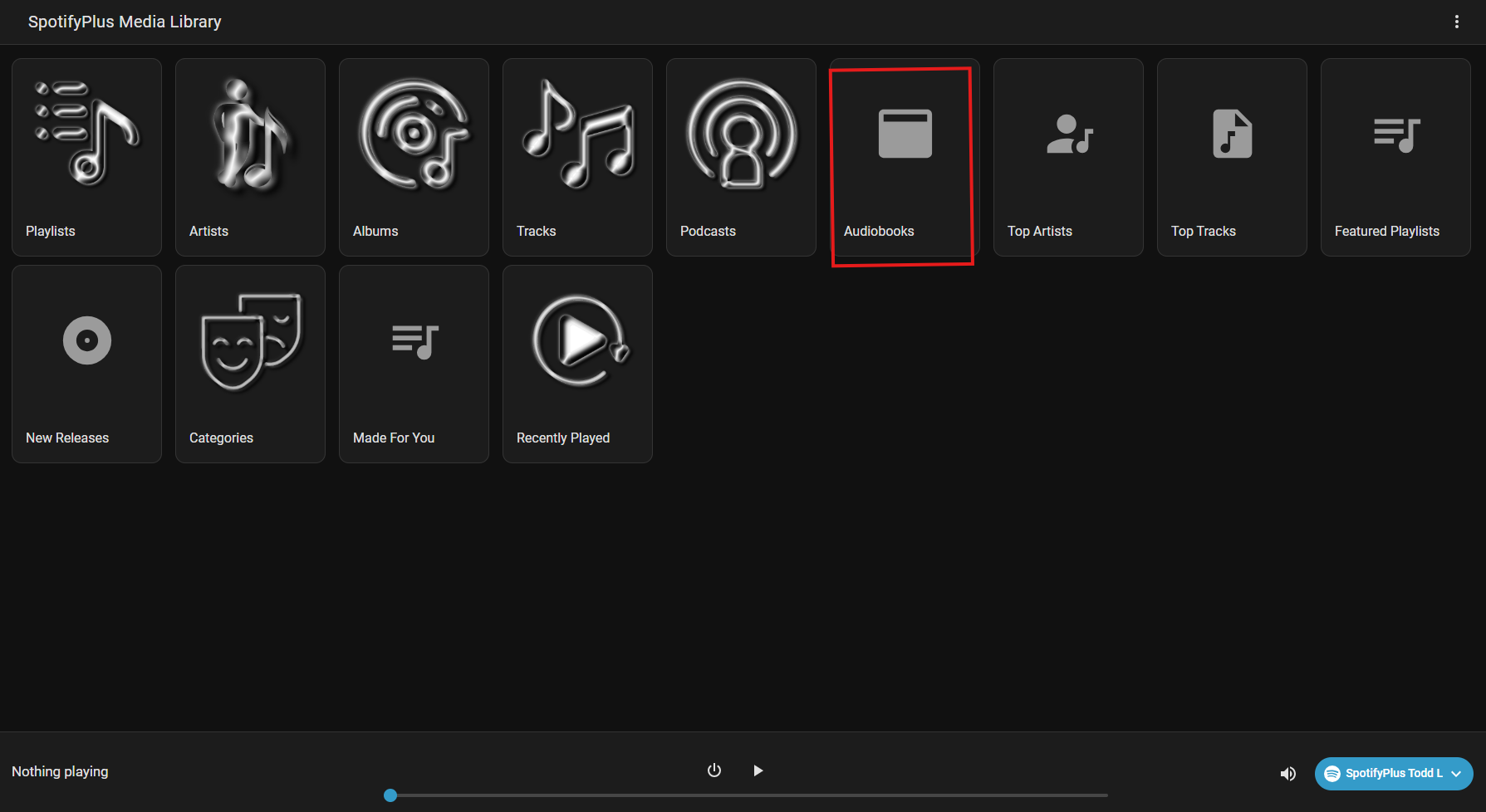
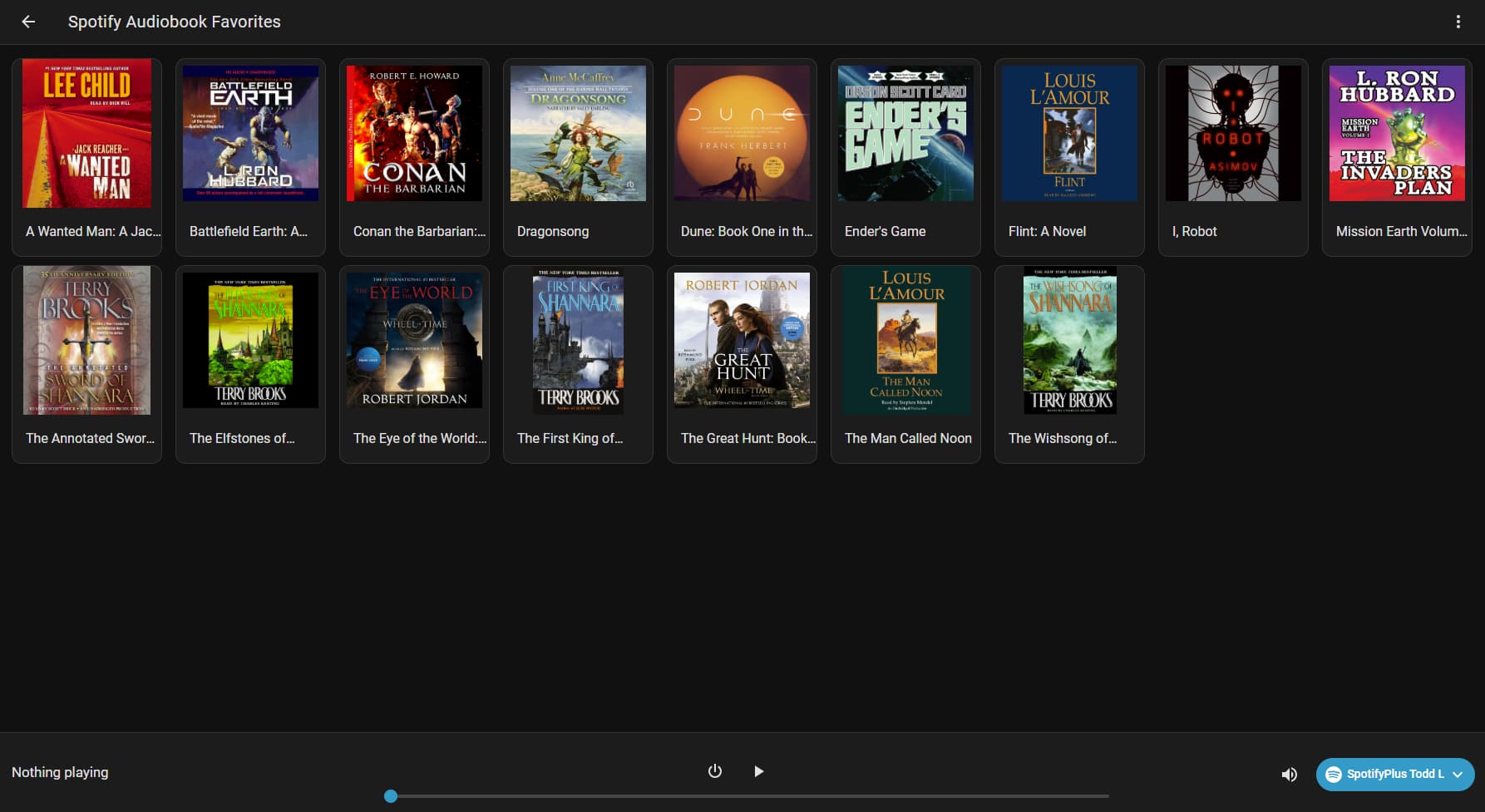
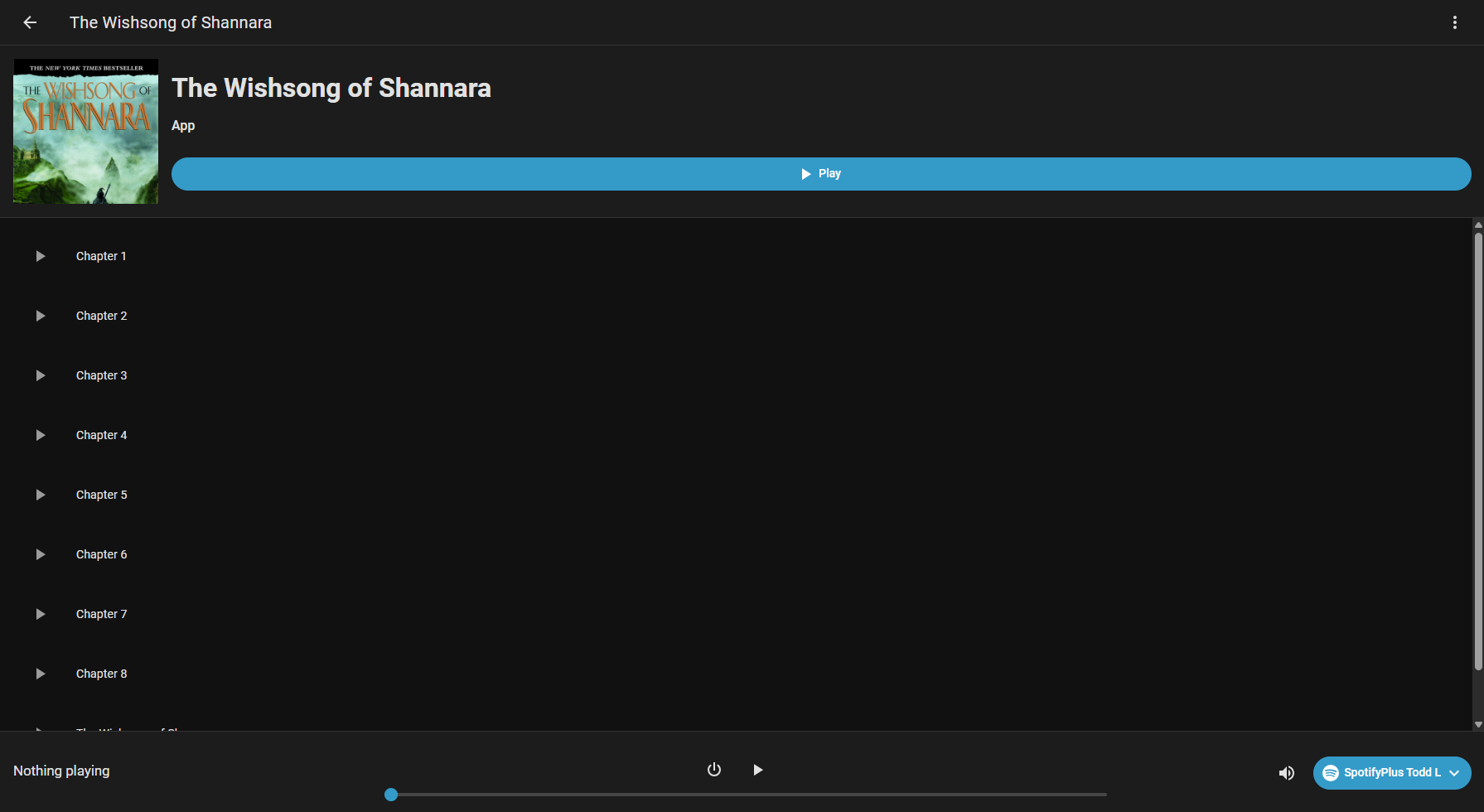
Added support for Spotify Audiobook favorites to the media browser. The heading in the media browser details will say “App” since HA does not have a media class built for audio books, so I had to utilize the “App” class for Audiobook functionality.
Updated spotifywebapipython package requirement to spotifywebapipython>=1.0.264.
Thanks for the clarification there, I setup the integration and then subsequently used the Internal URL for step 4e. All seems to be working fine, just was not sure if I was not sure if I was doing something wrong!
Loving the integration so far, thanks for building it!
I have a short question. Is it possible if a device play a song that the integration automatic show the track in home assistant?
At the moment I must always click the power on butten on the spotify integration
@daschmidt
Yes - you will want to enable the SpotifyPlus Integration Always On configuration option, which will keep the player in an “always on” state (similar to the HA Spotify integration).
If enabled, the TURN_ON / TURN_OFF features of the media player are disabled and the corresponding turn_on / turn_off services cannot be called. The Spotify Web API will also be constantly polled for updates to the player.
If disabled (default), the TURN_ON / TURN_OFF features of the media player are enabled and the corresponding turn_on / turn_off services may be called. The Spotify Web API will only be polled when the player state is not set to OFF (e.g. ON, PLAYING, IDLE, etc).
By default, it can take anywhere between 1 to 30 seconds for the SpotifyPlus Integration to detect that something is playing when the player is controlled outside of the HA environment (e.g. if you start play on the Spotify mobile App). That 30 second window can be narrowed down to 4 seconds if you configure the SpotifyPlus Integration Polling Scan Interval configuration option.
I’ve installed the latest Spotify Plus’ version as of today (1.0.199) and have exactly the same problem. Is anyone else facing the same issue? I have to say that before I had the Spotify integration working well with a given OAUTH keys. I tried to remove them, but was not possible. Then I uninstalled Spotify integration and that removed the keys as well. I re-created the keys, because now Spotify Developer only allows for a set of keys (not multiple as before), and tried to add those to Spotify Plus integration - it doesn’t work anyway. Likewise Giacomo mentioned, those same keys can be added to Spotify integration without problems. What the problem could be with this latest version of Spotify Plus?
@tiagodaniel
What error messages are you seeing in the installation process? Also, are there any messages in the HA System Log related to “spotify” or “oauth” or “application_credentials”?
i was able to get everything up and working with your instructions. the only issue i see now is that the card does not see speaker groups i have setup in sonos. it sees each speaker separately.