Apologies for resurrecting an old thread, but where can I find the docker compose file of the addon?
What “add-on” are you referring to? Maria DB ?
Yep, the ‘official’ addon at: addons/mariadb at master · home-assistant/addons · GitHub
If you’re using the official add-on, there’s no docker compose file to worry about. Supervisor takes care of all that for you. Only if you run MariaDB stand alone in a dedicated container environment (image downloaded from Docker HUB) will you either build a command Line startup or use a compose YAML.
I double checked it and the official add on is only using 128M as innodb pool size. This value cannot be changed easily unfortunately.
Exactly, so your only option to solve this then is to run MariaDB separately in a container. This can be done on any computer accessible from your HA instance.
Looks like many of os using the MariaDB addon are in the same boat with the recent database upgrades failing. Hope to find a solution to what seems a simple MariaDB config setting.
1 Like
You could try to modify the [config.yaml](https://github.com/home-assistant/addons/blob/12bc3e8fa0056dc9c45c56bba849594aa5143296/mariadb/config.yaml) file by adding
command: --innodb-buffer-pool-size=2G
On a running instance you could do this:
- ssh into HA
docker ps | grep mariaNote the container ID. In my case it’s9dea5234d73adocker exec -it 9dea5234d73a bashYou will get mariadb container consolemariadbyou will get MariaDB consoleSET GLOBAL innodb_buffer_pool_size=(2 * 1024 * 1024 * 1024);SHOW GLOBAL STATUS LIKE 'Innodb_buffer_pool_resize_status';
If you see something like this, then you’re good
+----------------------------------+--------------------------------------------------------------------+
| Variable_name                    | Value                                                              |
+----------------------------------+--------------------------------------------------------------------+
| Innodb_buffer_pool_resize_status | Completed resizing buffer pool from 134217728 to 2147483648 bytes. |
+----------------------------------+--------------------------------------------------------------------+
Thank you!
Here is another way to tweak the memory settings directly through SQL (eg. phpMyAdmin or any other SQL connection for that matter) - no ssh or docker logic required:
#This is an example for a 32GB RAM system - will continue to tune once the system has run for several days past the migration
SET GLOBAL key_buffer_size = (256*1024*1024); #256M
SET GLOBAL max_connections = 1024;
SET GLOBAL myisam_sort_buffer_size = (128*1024*1024); #128M
SET GLOBAL net_buffer_length = (1*1024*1024); #1M
SET GLOBAL read_buffer_size = (1*1024*1024); #1M
SET GLOBAL read_rnd_buffer_size = (8*1024*1024); #8M
SET GLOBAL sort_buffer_size = (8*1024*1024); #8M
SET GLOBAL join_buffer_size = (8*1024*1024); #8M
SET GLOBAL table_open_cache = 2000; #2000 is default for MariaDB
SET GLOBAL thread_cache_size = 64;
#SET GLOBAL thread_stack = (1*1024*1024); #1M - readonly
SET GLOBAL tmp_table_size = (128*1024*1024); #128M

SET GLOBAL query_cache_size = (32*1024*1024); #32M
SET GLOBAL query_cache_type = 'ON';

SET GLOBAL innodb_buffer_pool_size = (8*1024*1024*1024); #8G for a 32G system
#SET GLOBAL innodb_log_buffer_size = (512*1024*1024); #512M
SET GLOBAL innodb_log_file_size = (1*1024*1024*1024); #1G
SET GLOBAL max_binlog_size = (2*1024*1024*1024); #2G

#From phpmyadmin adviser
#SET GLOBAL innodb_sort_buffer_size = (16*1024*1024); #16M - readonly
SET GLOBAL max_heap_table_size = (128*1024*1024); #128M
Made the migration for a 100GB MariaDB database on a 32GB RAM NUC finish successfully in a few hours, while being live and running. (would fail after well over a day before)
Only callout: The settings need to be re-applied (the SQL rerun) after a database restart.
3 Likes
hi,
nice solutions 
i have mariadb addon on rasp4 installed and happy to see if this buffer size could be managed via an simple sql statement …
but i wonder: when settings have to be re-applied after a database restart; would this be a solution to set innodb_buffer_pool_size for an HA.core update 2024.8.x what lead to an migration of mariadb? i wonder if db will be restarted via updating and new buffer size setting might not be applied?
any experience here?
btw: would @yury-sannikov ´s solution be resetted after a restart of db anyhow? so buffer size is only temporary in a running session? same as sql-apply solution of @fxstein ?
thanx in advance
br
Frank
Hi Frank,
Given the nature of docker being version controlled immutable images, pretty much any of these ‘solutions’ are temporary unitl the next container or system restart or upgrade.
Good news is that the MariaDB add-on does not restart during a normal HA restart, only when it is upgraded, the entire system gets rebooted (not happing during a HA update) or if it happens to have crashed for some other reason.
Now the ultimate solution would be for the Add-on to either allow a mapping to a local my.cnf or if it had a text field in its advance config settings that would allow us to add those my.cnf overrides directly into the config of the addon.
For now the SQL solution works somewhat for me. I bookmarked the entire series of settings as a single SQL statement in phpMyAdmin and can rerun it with a few clicks anytime I need. It could also probably be put into a SQL sensor and run anytime HA restarts.
1 Like
hi @fxstein ,
thanx for your detailed (and noob proof) answer! 
i would had concentrated on the innodb_buffer_pool_size only? Would i need/or is it recommended to set all the other stuff for such dbmigration as well?
the last one: max_heap_table_size seems not such simple applicateable, as the other ones (Adviser any kind of dbadmin?)?
i found it in HeidiSQL under variables and it seems it could be edited as well (I have not dared yet)?
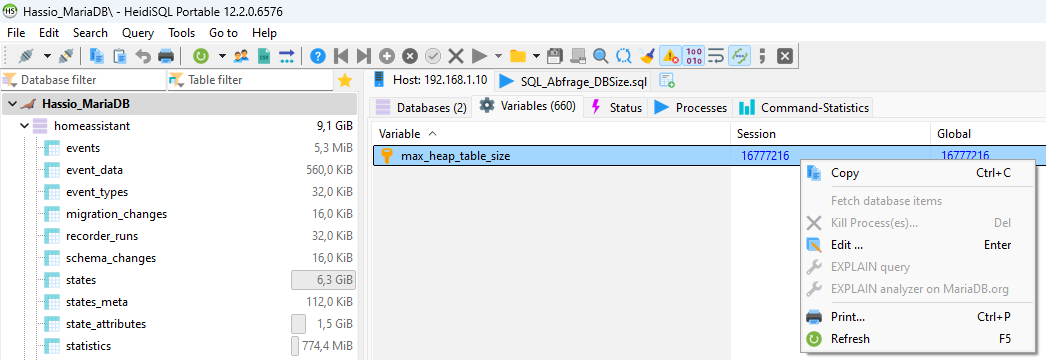
i would like kindly ask you, to assist any proposal for such values depending to my “smaller” system (at least the innodb_buffer_pool_size). can all be downsized the same way?
i am having HA on a rasp4…
4GB RAM (beeing used ~50% in normal usage and a peak of ~65-70?% in a daily nights backupsession).
~50GB SSD free discspace (at the same peak usage of backing up at night).
~10GB DB (with MariaDB addon)
thank you in advance
br
Frank
Frank,
Yes - simply changing the InnoDB buffer size to 1-2GB should be a good starting point for that kind of setup. All the other settings are just what I replicated from the default setup and scale up or what phpMyAdmin suggested to take a look at.
Hope this helps!
Best,
Oliver
2 Likes