As one non-professional to another, welcome! Templates are one of Home Assistant’s most powerful features. Make sure to check out out templating guides listed in the Community Cookbook Index.
Where your template went wrong…
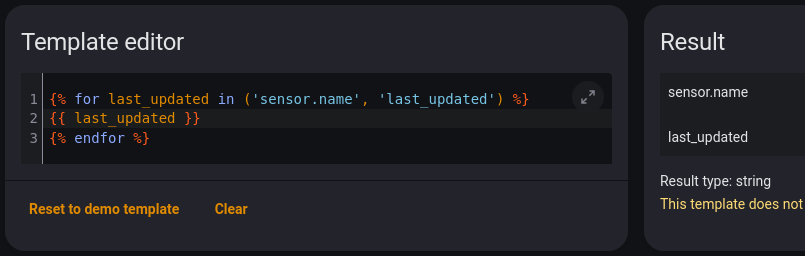
{% for last_updated in ('sensor.name', 'last_updated') %}
- You created a loop that will run twice… once for the string ‘sensor.name’ and again for the string ‘last_updated’. While the loop is running, the variable
last_updatedwill hold those strings as it’s value, each in it’s own turn. This can be seen in the following results from the Template Editor tool:
{% if now() - last_updated >= timedelta (hours=24) %}
- Here you have created an impossible If statement criteria… you cannot subtract a string like ‘sensor.name’ or ‘last_updated’ from a datetime object like
now(). This too can be demonstrated in the Template Editor:

{{ sensor.name }}: {{ state_attr('sensor.name', 'last_updated') }}
3a. Inside this loop there is no defined variable sensor so sensor.name is meaningless.

3b. Unless you actually have an entity in your Home Assistant instance with the entity ID “sensor.name”, the second part will always render none. Also last_updated and last_changed are properties of the state object, not state attributes, so they are not accessible with the function state_attr().

Here are two ways to accomplish your goal. Note that in both cases, the variable sensor holds a sensor entity’s state object as its value during each turn of the loop, so properties like name and last_changed are accessible.
Using filters to select before looping (more efficient):
{%- for sensor in states.sensor | selectattr('last_changed', 'lt', now()-timedelta(hours=24))| list %}
  {{ sensor.name }} : {{ sensor.last_changed }}
{%- endfor %}
or, using an If statement inside the loop:
{%- for sensor in states.sensor %}
  {%- if sensor.last_changed < now() - timedelta(hours=24) %}
    {{ sensor.name }} : {{ sensor.last_changed }}
  {%- endif %}
{%- endfor %}