Nice to see this. I just bough an Audi Etron 55 with 22kW/3Phase onboard charger. What 22kW charger can you recommend to integrate it with Home Assistant? I have also PV, so I would like to use dynamic optimisation to use the excess from PV. Also my house has only 14kW power supply, but I have >10kW from PV, so on a sunny day, when nobodys at home/low power usage I could really use the full 22kW for the EV.
You can check the chargers I’ve personally tested with the blueprint in the first post or in the GitHub README.
The Feyree Wallbox is available in a 22 kW / 3-phase version and works perfectly with the setup, as long as you have the rest of the required hardware in place (or an equivalent solution providing the same sensors to Home Assistant).
Also worth noting: in the latest version of the blueprint, thanks to suggestions and real-world testing by elbuit, PV / solar surplus charging is now supported, so you can dynamically use excess solar production for EV charging.
1 Like
Thanks for the great work! I am looking into using this with the ev charger suggested (still need to buy). At the first glance the 1 minute interval seems too long to prevent overcurrent when other large loads in the home are used (e.g. heat pump, electric cooking).
From the comments, I have not seen anyone mention tripping the main fuse due to the delay. Is that because you set a lower maximum charging current to avoid this, or does the 1‑minute interval work well in practice?
You’re welcome, glad it’s useful 
In practice the 1-minute interval hasn’t been an issue, and that’s mainly because of how protections work (at least in my case).
If you have an electronic smart meter (which is what I have), you don’t trip the contracted power instantly. You need to exceed the contracted power for a sustained period (around 10–15 minutes) before it cuts off. Short spikes from things like cooking or a heat pump starting up are normally absorbed without any problem.
Regarding the main breaker / MCB, it’s thermal. That means it doesn’t trip immediately either — the current has to stay high long enough for the breaker to heat up. Brief overloads of a minute or two won’t usually trigger it.
Because of that, the 1-minute control loop works well in real life:
• The charger adapts fast enough to changing loads
• Normal household spikes don’t cause trips
• You don’t need to artificially lower the max current just because of the interval
That said, if someone has very tight margins (contracted power extremely close to baseline consumption) or unusually aggressive breakers, reducing the max charging current slightly can add an extra safety buffer — but for most setups it’s not necessary.
So far, no reports of tripped fuses due to the control interval, which matches my own experience.
1 Like
Hi, love it!
Im using model y 2022 and TWC3.
Really annoying that TWC3 cant be controlled by home assistant.
i cant not use switch.model_y_charge for starting and stopping the charge.
Should it be rated as a switch?
In the early days I controlled it through the car integration, but I found it to be more cumbersome and problematic (if I wanted to charge a different car, for example).
To be honest, I can’t remember how I did configure it to make the car stop the charging.
Hi all,
Thanks again for this great automation.
I’ve been using it for a few weeks now, but ran into an issue where a single phase was overloading while charging, yet the total power limit wasn’t exceeded. Turns out my oven and one side of the induction hob were loading one phase heavily, and the original automation only looked at combined power.
Therefore, I created a new version with per-phase amperage monitoring:
- Uses the bottleneck principle: charging is limited by the most constrained phase.
- Intuitive setup: works directly with amperage values (you can just copy the numbers from your circuit breakers).
- Optional peak-hour filter for grid congestion management (a bit of a must in the Netherlands).
Repo: GitHub - allarddewinter/electric-vehicle-ev-dynamic-charging-home-assistant-amps at clean-v3.0
I’d love to hear from anyone with similar 3-phase setups…! Also, perhaps in the future we can look at combining the 1-phase and 3-phase setups into a single blueprint?
1 Like
Hi Eduardo,
I’m very new to HA, and I’ve just managed to connect my MGChargeHub to HA and set up a basic timer automation, which has worked fine for the last few days.
Now its time for me to try to track grid feed in from my Enphase Envoy and divert it to my EVSE.
I am poorly informed on the subject, and I’ve been scouring the net for info, when I stumbled across these HA blueprints and this brilliant blueprint of yours - thank you so much!
Before I try to implement your blueprint, I just wanted to clarrify your charge control method as I came across a cautionary post on github -
…and I guess I just wanted to check with you before I set up the automation.
Cheers,
PhilCash
Hi Phil,
Thanks for the kind words
This blueprint was designed and tested specifically for chargers that integrate via Tuya (like the Feyree charger mentioned in the original post). I haven’t used OCPP myself and haven’t tested the blueprint with that protocol at all, so I really can’t give you reliable advice on whether it’s safe for your MG Charge.
The reason the warning doesn’t apply to Tuya-based chargers is that when you control the amperage through LocalTuya. There’s no direct writing to the charger’s internal memory like with OCPP’s ChargePointMaxProfile.
For your setup with MGChargeHub via OCPP, I’d strongly recommend checking with someone who has actually tested that combination, or looking into the ocpp.set_charge_rate approach with TxProfile that the GitHub post mentions.
Sorry I can’t be more helpful on the OCPP side
Hi Eduardo,
Thank you very much for your feedback.
Bummer though! I thought I’d found the answer. I’ll keep searching.
Cheers,
Phil
Mostly it worked, minor changes as I found errors that occurred.
iI’m probably going to not end up using this as my other method just got working.
- choose:
    - conditions:
        - condition: template
          value_template: "{{ actual_free_power / voltage >= min_amps and is_state('switch.model3_charge', 'off') }}"
      sequence:
        - service: switch.turn_on
          target:
            entity_id: !input charger_toggle
    - conditions:
        - condition: template
          value_template: "{{ actual_free_power / voltage < min_amps and is_state('switch.model3_charge', 'on') }}"
      sequence:
        - service: switch.turn_off
          target:
            entity_id: !input charger_toggle
also modified :
    charger_consumption: "{% set state = states(sensor_charging_entity) | lower %}\n{%
      if state in ['charging', 'plugged_in', 'waiting_for_authorization', 'waiting',  'starting', 'stopped', 'complete']
      %}\n  {{ charging_current_value * voltage }}\n{% else %}\n  0\n{% endif %}"

and expanded the conditions here:
state:
- charging
- charged
- starting
- stopped
- complete
- plugged_in
- Charging
- CHARGING
not fully testedThanks for doing this Eduardo! that's a nice blueprint with some good options, was interesting to look how you did it. I created my own before I spotted your blueprint - but it was a fun way to develop my Home Assistant skills, and it works good enough.
I've been searching everywhere but struggled to find good recommendations on two settings:
(1) how frequent to change the charge current (not stop/starting, just changing the current) - and what problems may occur if you update too frequently
(2) how big a jump to make when updating the charge current (increments of 1A? doesn't matter?)
Do you have any insights in these, or references you could share?
I live in Belgium: many days are partly cloudy, the solar production jumps from 5 to 15 amps within a few seconds, and then back again - I'd like to follow the PV production as tightly as possible, but obviously I don't want to damage my hardware.
I have a Tesla model y, and a Tesla charger. All sensors and controls are via https://github.com/yoziru/esphome-tesla-ble
Hi Bas,
For the charge I use I had to go for a several seconds delay when going up or down, using increments of 1A. Otherwise it would end up showing an error.
I would try to go this way, as the issue is more related to the charging process to stop rather than damaging the hardware.
Hey guys,
this constant change in Amperage is safe for the chargers? which ones are safe to do that?
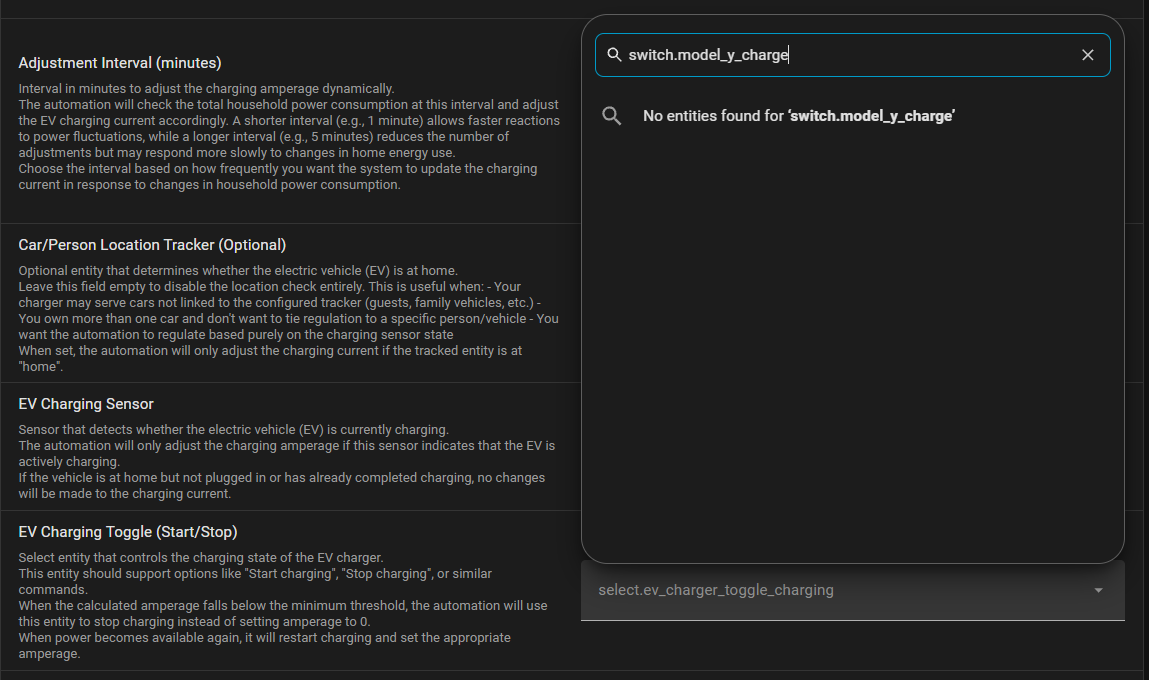
Hi! I’m using Dynamic EV Charging Automation v2.2 with the official Tesla Fleet integration in Home Assistant.
The Tesla integration exposes charging control as:
switch.model_y_charge
where:
- turn_on = start charging
- turn_off = stop charging
The blueprint’s EV Charging Toggle (Start/Stop) input appears to only accept a select entity, so the Tesla charging switch cannot be selected.
Would you consider adding support for switch entities as well as select entities?
Ideally the blueprint could: - use switch.turn_on to start charging when the selected entity is a switch
- use switch.turn_off to stop charging
- retain the current select.select_option behaviour for chargers that use a select entity
Tesla also exposes charging-current control separately as a number entity, so the rest of the blueprint appears compatible.
Happy to test a modified version with Tesla Fleet if that helps.
or am i doing something wrong?
1 Like
You’re not doing anything wrong. v2.2 only accepts a select entity for the start/stop toggle, so a Tesla switch can’t be picked directly.
The easiest workaround is to wrap the Tesla switch in a template select and use that in the blueprint. Add this to configuration.yaml (or create it via Settings > Helpers > Template > Select):
template:
  - select:
      - name: "EV Charger Control"
        unique_id: ev_charger_control
        options: "{{ ['Start', 'Stop'] }}"
        state: "{{ 'Start' if is_state('switch.model_y_charge', 'on') else 'Stop' }}"
        select_option:
          - action: "{{ 'switch.turn_on' if option == 'Start' else 'switch.turn_off' }}"
            target:
              entity_id: switch.model_y_charge
I use exactly this setup with my own Tesla and it works fine.
Thanks also for the PR on GitHub. It’s a big rewrite focused on Tesla Fleet and the Wall Connector, and I’d like to keep this blueprint generic for other chargers, so I think it fits best as a dedicated Tesla edition in your fork. I’ll reply there too.
1 Like