??? The SMLIGHT SLZB-MR2 supports both simultaneously and has PoE. It’s very ugly, but what you want has existed for a while now.
Yeah, I am aware there are other solutions.
How this antenna designed for 2400-2483.5 MHz will handle new Zigbee 4.0 feature called Suzi?
Suzi-branded devices will be able to work on the European 800 MHz and North American 900 MHz frequency bands.
I guess it wont work.
1 Like
Some clarification regarding installation - powered by USB, but does it need to connect to device running Home Assistant or can it be remote USB ?
Just thinking how other network devices connect to HS e.g. Aqara & WiZ
My Home Assistant runs in a container on a NAS device.
I am currently using zigbee2mqtt with CC2652P adapter. Will I need to repair all my devices when switching to this new one?
Hi,
Sorry for the stupid question. I have the ZWA2 (the Z-wave one, taller, recently announced) on my desk.
Will I hit any interference issues If I put the Zigbee one in this thread directly next to it?
Thanks!
Matt
Maybe. It can work, but some devices might need to be re-paired anyway, so officially moving from zstack to ember coordinators without re-pairing the devices is not supported.
This sounds great, what are you running ser2net on?
You shouldn’t. Totally different spectrum - 2.4ghz for zigbee vs <1ghz for ZWave.
1 Like
It looks the same as the ZWA so that would be a yes.
If like the ZWA that would also be a yes.
Even better (again assuming it does work like the ZWA-2), it will be automatable like any other light entity in Home Assistant, so could potentially be used for things like alerts, notifications, etc.
RPi 3B HomeSeer Z-Net. They have been running Ethernet Z-wave and Zigbee for years.
I’m probably not going to make any friends by giving my opinion on this new product.
I’m slightly disappointed that it’s just an evolution of the first product, and then you see that there are already a multitude of products of this type (not this kind) on the market. So for the average user, it will be OK—they’ll go for the “Home Assistant” brand and won’t look for other solutions, but it would have been more interesting to have a single gateway combining several protocols with this design. This could have been done with the announcement of the Z-Wave gateway (zwa-2), but if I understand correctly, combining everything on one antenna is quite complicated. Another point that’s a little disappointing is the visuals that position the product as if everyone had a small installation in a living room or a high-traffic area, which is wonderful, when I think that the majority of users have a computer rack tucked away in a corner where no one will see the design of these products 
I was expecting more of an announcement about an upgrade to HA Voice or another product that no one would have suspected, so there you go, don’t all jump on me.
Oh yes, and I’d also be curious to know if it sold as quickly and as well as HA Voice Preview did last year.
Keep going in this direction, guys, HA is life!
1 Like
Well, from what I’ve seen elsewhere so far, all the other multi-protocol radios use two antennas, one for each. That’s where simply having this plus the ZWA-2 side by side is basically the same thing albeit much bigger space wise.
Wondering if Open Home Foundation members and/or Nabu Casa employees are at this time are willing to share their thoughts about these three work-in-progress projects that can add native Zigbee end-device implementations to the ESPHome firmware that can allow easy-to-build/use DIY Zigbee end-devices on ESP32 and nRF52 microcontrollers for battery-powered Zigbee devices (Zigbee binary_sensor, switch, time, sensor, number, and binary input devices compatible with ZHA and Zigbee2MQTT?
For reference, see this feature request issue tracker for end-user and cross-platform discussion:
2 Likes
Hey guys!
What about the upgrade from ZBT-1 to ZBT-2 ?
I am using proxmox as a platform. Should I expect any problems with the ZBT-2 visibility or Zigbee2MQTT ?
Do I have to rebuild the whole ZigBee network (manually pairing device after device) after doing this upgrade ?
I know that the Thread standard/protocol support using multiple Thread Border Router (TBR) as entry/exit points for a single Thread network, but as I understand this is not yet supported with ZBT-2 nor with the built-in OpenThread Border Router (OTBR) add-on/integration in Home Assistant, or does it support that already?
I think that the OpenThread Border Router (OTBR) add-on/integration is currenty limited in this regard so today it can only connect to a single Thread Border Router, or am I wrong?
…I bet that if it supported multiple Thread Border Router then they sell a lot more of ZBT-2 as the more Thread Border Router devices your network have the more stable and robust it will be! 
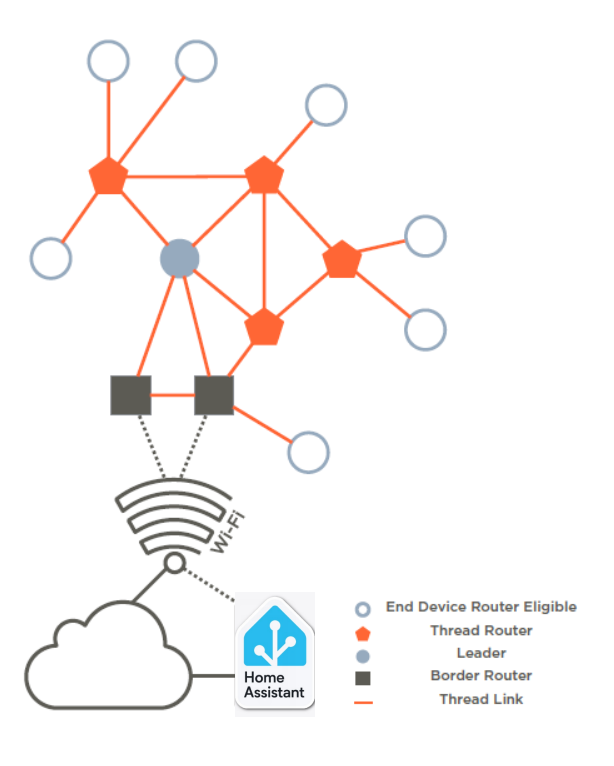
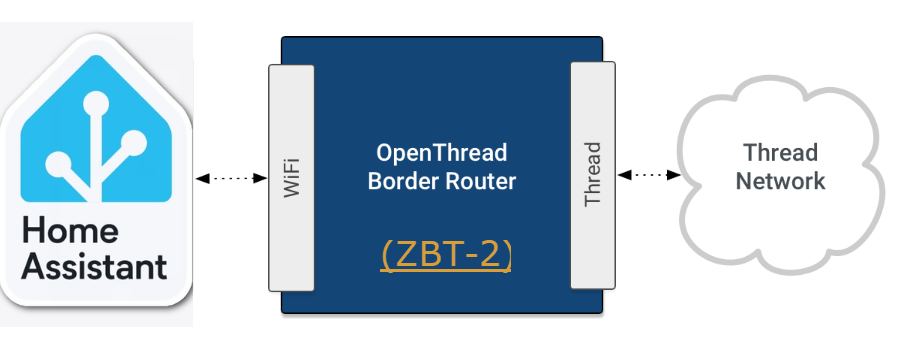
I believe to achieve that Home Assistant developers would both need to add support to connect multiple OpenThread Border Routers to the OpenThread Border Router (OTBR) add-on/integration, and ESPHome firmware developers probably also need to enable Wi-Fi support on the ESP32 in the ZBT-2 so that it can act a LAN-proxy to allow connecting remotley to the OpenThread RCP firmware.
The architecture would look something like this:
- Home Assistant’s OTBR add-on/integration ↔ LAN ↔ ESP32 proxy ↔ OpenThread RCP.
PS: FYI, both ZHA/zigpy and Zigbee2MQTT/zigbee-herdsman developers have by the way been working on experimental Zigbee stacks that can achieve a somewhat similar architecture for Zigbee using a concept they call “Zigbee-on-Host” (solutions that also make use of OpenThread RCP firmware on the adapter though with the limitation on only using one adapter at a time but since the Zigbee stack is broken out you could have a active-passive High Availability setup that can fail-over to a other OpenThread RCP adapter if one adapter breaks). You can check those out here:
3 Likes
Well, but the benefit is that you CAN place it somewhere visible.
Not sure why it’s a disadvantage to have it not look artificial ugly in case of using it in a rack, hidden from the world.
Would it destroy the perfectly crafted cruelness, regularly used to shock visitors?
I like the stand design a lot.
They didn’t cramp everything on the circuit board, adding text markings and made it easy to tinker with.
And the antenna is automatically positioned instead of laying on a possible blocking surface, without me needing to 3d-print a holder.
And if you don’t have a place in your living room:
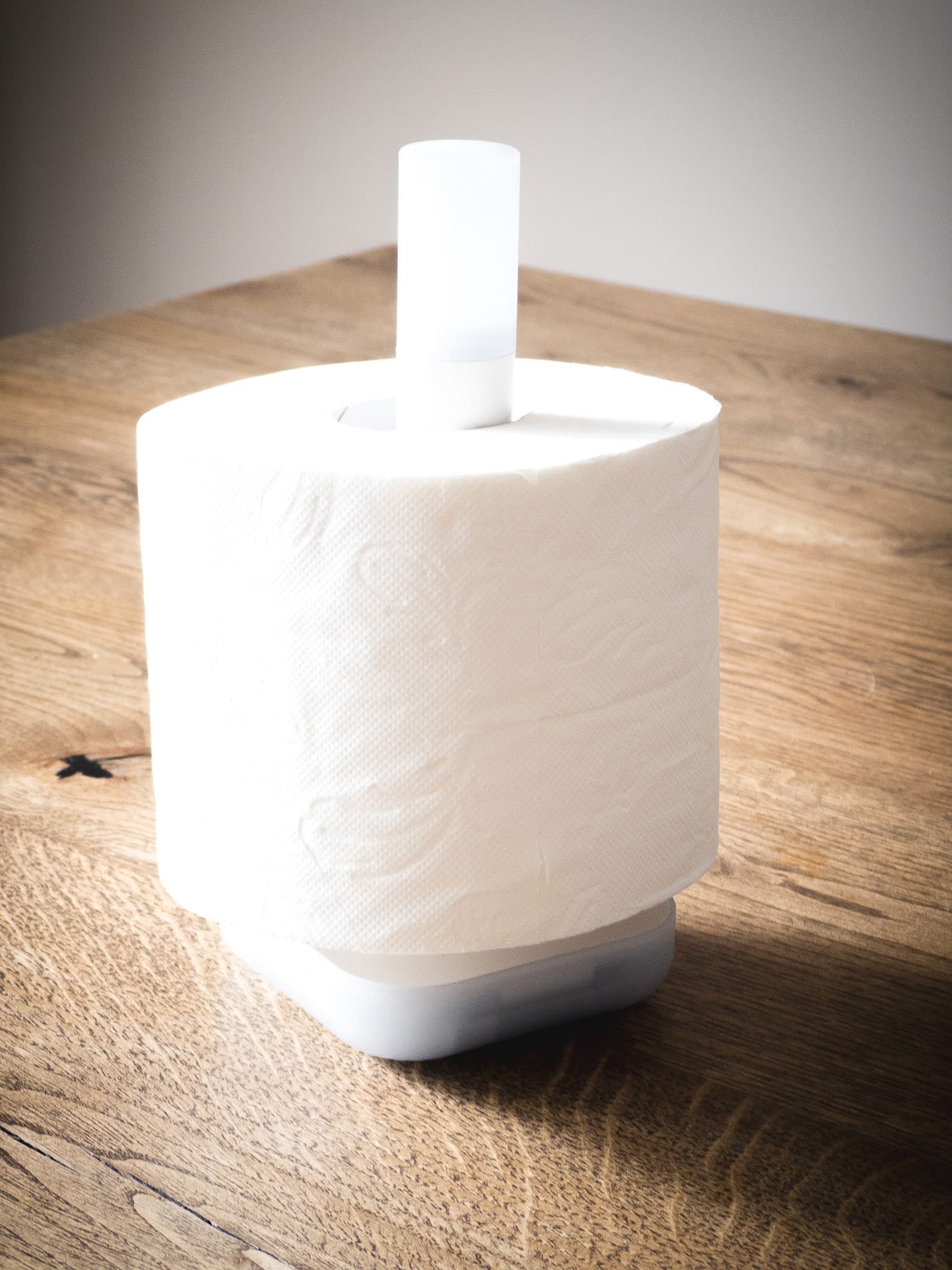
Marcel showed in the live stream that it also works well as toilet paper holder, in case this is a good central place in your home. 
edit:
Mine already arrived a few minutes ago.
That was a quick delivery. 
4 Likes
So the migration path for zigbee2mqtt seems a little bit harder than expected
It fails with an error and here is the log :
homeassistant.components.homeassistant_hardware.firmware_config_flow
Source: components/homeassistant_hardware/firmware_config_flow.py:201
intégration: Home Assistant Hardware (documentation, problèmes)
S'est produit pour la première fois: 12:01:07 (1 occurrence)
Dernier enregistrement: 12:01:07

Failed to flash firmware
Traceback (most recent call last):
  File "/usr/local/lib/python3.13/site-packages/universal_silabs_flasher/gecko_bootloader.py", line 141, in probe
    return await self.ebl_info()
           ^^^^^^^^^^^^^^^^^^^^^
  File "/usr/local/lib/python3.13/site-packages/universal_silabs_flasher/gecko_bootloader.py", line 151, in ebl_info
    await self._state_machine.wait_for_state(State.IN_MENU)
  File "/usr/local/lib/python3.13/site-packages/universal_silabs_flasher/common.py", line 125, in wait_for_state
    return await future
           ^^^^^^^^^^^^
asyncio.exceptions.CancelledError

The above exception was the direct cause of the following exception:

Traceback (most recent call last):
  File "/usr/src/homeassistant/homeassistant/components/homeassistant_hardware/util.py", line 396, in async_flash_silabs_firmware
    await flasher.flash_firmware(
        fw_image, progress_callback=progress_callback
    )
  File "/usr/local/lib/python3.13/site-packages/universal_silabs_flasher/flasher.py", line 378, in flash_firmware
    await gecko.probe()
  File "/usr/local/lib/python3.13/site-packages/universal_silabs_flasher/gecko_bootloader.py", line 140, in probe
    async with asyncio_timeout(PROBE_TIMEOUT):
               ~~~~~~~~~~~~~~~^^^^^^^^^^^^^^^
  File "/usr/local/lib/python3.13/asyncio/timeouts.py", line 116, in __aexit__
    raise TimeoutError from exc_val
TimeoutError

The above exception was the direct cause of the following exception:

Traceback (most recent call last):
  File "/usr/src/homeassistant/homeassistant/components/homeassistant_hardware/firmware_config_flow.py", line 201, in _install_firmware_step
    await self.firmware_install_task
  File "/usr/src/homeassistant/homeassistant/components/homeassistant_hardware/firmware_config_flow.py", line 292, in _install_firmware
    self._probed_firmware_info = await async_flash_silabs_firmware(
                                 ^^^^^^^^^^^^^^^^^^^^^^^^^^^^^^^^^^
    ...<8 lines>...
    )
    ^
  File "/usr/src/homeassistant/homeassistant/components/homeassistant_hardware/util.py", line 400, in async_flash_silabs_firmware
    raise HomeAssistantError("Failed to flash firmware") from err
homeassistant.exceptions.HomeAssistantError: Failed to flash firmware
I’m not that far yet, as I’m scratching my head around this part of the migration docs:
It says, that if you already have an supported stick, which allows you to migrate without repairing, you should copy the iee address from the old stick to the new one.
These docs say, you should set your new stick into bootloader mode to achieve this.
Can’t find how to do that in the ZBT-2 docs …