this works, thanks very much!
1 Like
If you read Dcapslock’s post, you’ll see that it has changed to using slots.
The point is you don’t need to be messing around with shadow-roots anymore, but can just target the state-display element directly.
The problem with your proposed solution is that it loses the elegance of the original, in that you could prepend or append extra text to the existing state_content option on the tile card (which uses the middle dot separator by the way).
I’m also not 100% certain that setting the secondary element to display: none won’t also mess with the vertical alignment in some situations.
You will need shadow roots if you want to apply different styles for primary and secondary.
Dcapslock method is elegant and streamlined for a specific scenario.
To be clear, pseudo-elements have been around for a while 
Not correct in my experience - for styling primary, target the span.primary element. For styling secondary, target the state-display element. No shadow-roots needed in either case.
And? What’s the point you’re trying to make about that exactly?
I’m not here to argue. Shadow roots are necessary most of the time when modding with card_mod! Some of that is changing with recent updates.
Yes, but we’re not talking about ‘most of the time’ here - this is specifically about modding the tile card. For me, the recent changes in core have made that task very much easier.
So what you are saying is it works for the Tile Card when the entity is an alarm or climate device?
In my experience, it just works for the tile card for any type of entity.
A lot more elements and features with those cards, in my experience.
Here’s an example. The recent changes to battery attributes means the tile card would no longer display the battery level for robot vacuums, as the battery level is now a separate sensor.
In this case I’ve appended it to the state_content element, which already shows the vacuum status (‘Docked’) and the fan speed (‘max’):
style:
  .: |
    state-display {
      white-space: normal;
    }
    {%- set battery_level = states(config.entity.replace("vacuum.", "sensor.") | regex_replace("$", "_battery_level")) %}
    {%- set content_after = " · " ~ battery_level ~ "%" %}
    state-display::after {
      color: var(--tile-info-secondary-color);
      content: "{{ content_after }}";
      font-size: var(--tile-info-secondary-font-size);
      font-weight: var(--tile-info-secondary-font-weight);
      letter-spacing: var(--tile-info-secondary-letter-spacing);
      line-height: var(--tile-info-secondary-line-height);
    }
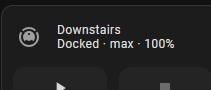
EDIT: The image shows that I also mod the primary field to set the font-size and weight to be the same as the secondary field, but that’s just a personal preference, and not specifically relevant here, so not included in the code example.
or
card_mod:
  style: |
    span:nth-child(2):after{
    {%- set battery_level = states(config.entity.replace("vacuum.", "sensor.") | regex_replace("$", "_battery_level")) %}
    {%- set content_after = " · " ~ battery_level ~ "%" %}
      color: var(--tile-info-secondary-color);
      content: "{{ content_after }}";
      font-size: var(--tile-info-secondary-font-size);
      font-weight: var(--tile-info-secondary-font-weight);
      letter-spacing: var(--tile-info-secondary-letter-spacing);
      line-height: var(--tile-info-secondary-line-height);
    }
Yes, but which version is the more instantly understandable when you come back to it in x months and you’ve completely forgotten how it works?
You mean when the element name changes AGAIN? Good conversation, bedtime for me!
seems like that im in the right place here:
my tile card info is no longer correctly arranged horizontally:
  - type: custom:stack-in-card
    mode: horizontal
    cards:
      - type: tile
        icon: mdi:television
        entity: switch.tz3000_2putqrmw_ts011f_switch
        name: TV
        tap_action:
          action: toggle
        hold_action:
          action: more-info
        card_mod:
          style:
            ha-tile-info$: |
              .secondary:after {
                visibility: visible;
                content: " ⸱ {{ states('sensor.tz3000_2putqrmw_ts011f_active_power') }} W";
              }

Do you have any ideas?
Did you at least try this?
card_mod:
  style:
    .: |
      state-display:after {
        content: " ⸱ {{ states('sensor.tz3000_2putqrmw_ts011f_active_power') }} W";
      }
2 Likes
Exactly that is what i have not tried!
I tried
ha-tile-info$:  to state-display:
---
style: |
    span:nth-child(2):after{
---
.secondary:after:   to hidden and
content:  + sensor.state
and so on …
But your solution works - thank you!
1 Like