@landonr do you (or other contributors) plan to make this part of esphome standard dist?
I picked up a few of these, and I’m not able to display anything on them with:
I’m seeing this in the logs:
[15:33:05][C][TDisplayS3:023]: T-Display S3 (ST7789)
[15:33:05][C][TDisplayS3:023]:   Rotations: 270 °
[15:33:05][C][TDisplayS3:023]:   Dimensions: 320px x 170px
[15:33:05][C][TDisplayS3:024]:   Update Interval: 60.0s
When I think it’s supposed to be 160x80 and an ST7735 display…
Edit: I think it’s because I’m using a different device 
I got Tasmota on it but it was a bit of a struggle. Even got the display working by copying some Berry code, whatever that is!
1 Like
I’ve been trying for days to get this thing to work. The device is working great as a bluetooth proxy but for the life of me I can’t get the display to work. I have the plain T-Display-S3, not the AMOLED version. There is some debate whether this device is SPI or parallel. I finally got PSRAM enabled. That was a battle.
Here is a basic config for the T-Display-S3 (TFT, not AMOLED); I would recommend that you flash this exactly as is to verify your hardware is ok before making any changes.
Support for the display driver is currently in PR - once this is merged (hopefully the next release) you will be able to remove the external_components config.
esphome:
  name: t-display-s3
  platformio_options:
    board_build.flash_mode: dio

esp32:
  board: esp32-s3-devkitc-1
  framework:
    type: esp-idf

logger:

output:
  - platform: ledc
    frequency: 9765Hz
    pin: GPIO38
    id: backlight_output

light:
  - platform: monochromatic
    output: backlight_output
    name: LCD Backlight
    id: led
    restore_mode: ALWAYS_ON
    default_transition_length: 0s

power_supply:
  - id: lcd_pwr
    enable_on_boot: true
    pin: GPIO15

i80:
  dc_pin: 7
  wr_pin: 8
  rd_pin: 9
  data_pins:
    - 39
    - 40
    - 41
    - 42
    -
      ignore_strapping_warning: true
      number: 45
    -
      ignore_strapping_warning: true
      number: 46
    - 47
    - 48

psram:
  speed: 80MHz
  mode: octal

external_components:
 - source: github://pr#8230
   components: [ i80, io_bus, ili9xxx, spi ]

display:
  - platform: ili9xxx
    bus_type: i80
    cs_pin: 6
    reset_pin: 5
    model: st7789v
    data_rate: 2MHz
    dimensions:
      height: 170
      width: 320
      offset_width: 0
      offset_height: 35
    transform:
      mirror_y: true
      mirror_x: false
      swap_xy: true
    color_order: bgr
    invert_colors: true

lvgl:
1 Like
Hi @clydebarrow I’m trying your code, but even if I paste it as is, esphome gives me an error “Platform not found: ‘display.ili9xxx’”. I’m on esphome 2025.2.2 and using this device. Any ideas? Thanks
Show the full compile log.
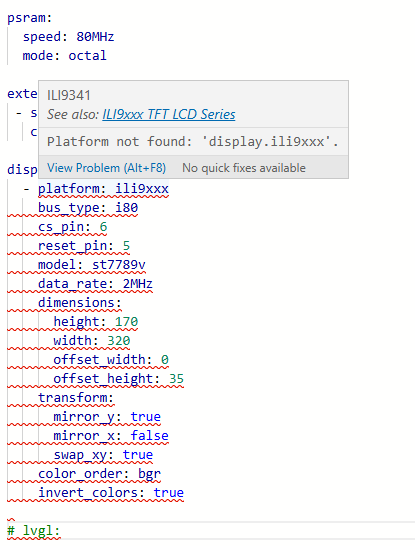
That’s an editor screenshot, not a compile log. And important parts of the yaml are hidden, but I can see at least one change from what I provided above. Try the yaml exactly as provided before making any changes. And preferably don’t insert screenshots, copy the actual text and paste it.
The compile log is what you get when you click Install. It will look like this which is where any important errors will appear:
INFO ESPHome 2025.3.0-dev
INFO Reading configuration ./t-display.yaml...
WARNING GPIO5 is a strapping PIN and should only be used for I/O with care.
Attaching external pullup/down resistors to strapping pins can cause unexpected failures.
See https://esphome.io/guides/faq.html#why-am-i-getting-a-warning-about-strapping-pins
INFO No pages or widgets configured, creating default hello_world page
INFO Generating C++ source...
INFO Core config, version or integrations changed, cleaning build files...
INFO Deleting /Users/clyde/dev/opensourceprojects/esp/device-configs/displays/.esphome/build/t-display/.pioenvs
INFO Deleting /Users/clyde/dev/opensourceprojects/esp/device-configs/displays/.esphome/build/t-display/.piolibdeps
INFO Compiling app...
Processing t-display (board: esp32dev; framework: arduino; platform: platformio/[email protected])
--------------------------------------------------------------------------------
Library Manager: Installing lvgl/lvgl @ 8.4.0
... etc
Sorry, I didn’t understand. I thought that if the editor marked the code in red, the compilation would not work.
I didn’t even try.
It works perfectly.
Now I would like to activate the touchscreen with this code:
i2c:
  scl: 17
  sda: 18

touchscreen:
  platform: cst816
  interrupt_pin: 16
  id: my_touchscreen
  transform:
    mirror_x: true
    mirror_y: false
    swap_xy: true


  on_touch:
    - lambda: |-
          ESP_LOGI("cal", "x=%d, y=%d, x_raw=%d, y_raw=%0d",
              touch.x,
              touch.y,
              touch.x_raw,
              touch.y_raw
              );
but with get these errors:
[12:56:52][E][component:164]: Component touchscreen set Error flag: Failed to read chip id
[12:56:56][I][i2c.idf:098]: Results from i2c bus scan:
[12:56:56][I][i2c.idf:100]: Found no i2c devices!
[12:56:52][E][component:119]: Component touchscreen was marked as failed.
[12:56:56][E][component:082]:   Component touchscreen is marked FAILED
My device has a
i2c_id: bus_b
setting in touchscreen:
maybe try…
Make sure your board actually has a touchscreen, not all variants of that board do.
Also the CST816 has a quirk that makes it inaccessible until it’s touched. Try adding skip_probe: true to the touchscreen config.
YESS!! You’re right, it needs the skip_probe: true option.
So this is perfectly working now.
This is a complete code for the LilyGO T-Display-S3 NO AMOLED touch version.
I use it in landscape mode with the power connector on the right.
The button, the checkbox and the slider are perfectly working.
esphome:
  name: t-display-s3
  platformio_options:
    board_build.flash_mode: dio

esp32:
  board: esp32-s3-devkitc-1
  framework:
    type: esp-idf

logger:

output:
  - platform: ledc
    frequency: 9765Hz
    pin: GPIO38
    id: backlight_output

light:
  - platform: monochromatic
    output: backlight_output
    name: LCD Backlight
    id: led
    restore_mode: ALWAYS_ON
    default_transition_length: 0s

power_supply:
  - id: lcd_pwr
    enable_on_boot: true
    pin: GPIO15

i80:
  dc_pin: 7
  wr_pin: 8
  rd_pin: 9
  data_pins:
    - 39
    - 40
    - 41
    - 42
    -
      ignore_strapping_warning: true
      number: 45
    -
      ignore_strapping_warning: true
      number: 46
    - 47
    - 48

psram:
  speed: 80MHz
  mode: octal

external_components:
 - source: github://pr#8230
   components: [ i80, io_bus, ili9xxx, spi ]

display:
  - platform: ili9xxx
    bus_type: i80
    cs_pin: 6
    reset_pin: 5
    model: st7789v
    data_rate: 2MHz
    dimensions:
      height: 170
      width: 320
      offset_width: 0
      offset_height: 35
    transform:
      mirror_y: false
      mirror_x: true
      swap_xy: true
    color_order: bgr
    invert_colors: true

lvgl:

i2c:
  scl: 17
  sda: 18

touchscreen:
  platform: cst816
  interrupt_pin: 16
  id: my_touchscreen
  skip_probe: true
  transform:
    mirror_x: true
    mirror_y: false
    swap_xy: true
  calibration:
    x_min: 0
    x_max: 170
    y_min: 0
    y_max: 320
  on_touch:
    - lambda: |-
          ESP_LOGI("cal", "x=%d, y=%d, x_raw=%d, y_raw=%0d",
              touch.x,
              touch.y,
              touch.x_raw,
              touch.y_raw
              );
thanks @clydebarrow ! I hope the PR is merged soon .
Hello everyone, I am facing an issue with my ESPHome project and a T-Display S3 (Lilygo) screen. I have successfully uploaded my configuration file to the ESP32, the Wi-Fi connection is working fine, and the ESP32 is properly connected to my network. However, even though the logs do not report any major errors and the code seems to upload correctly, nothing is displayed on the screen (the “Coucou!” message I am trying to display does not show up).
I would like to thank in advance anyone who can provide one or more suggestions to help solve this issue.
esphome:
  name: lilygodispii
  friendly_name: LilygoDispII

external_components:
  - source: github://landonr/lilygo-tdisplays3-esphome@main
    components: [tdisplays3]

esp32:
  board: esp32-s3-devkitc-1
  variant: esp32s3
  framework:
    type: arduino

captive_portal:

logger:

# Enable Home Assistant API
api:
  encryption:
    key: "dfvfdfvdfvdvdvdfvdv"

ota:
  - platform: esphome
    password: "dfvdvdvdvdvdvdvdvdvd"

wifi:
  ssid: vdfvdvdvdvdvdvd
  password: vdfvddvdfvdfvfv

# Heure via Home Assistant
time:
  - platform: homeassistant
    id: homeassistant_time

# Rétroéclairage - PWM via GPIO4
output:
  - platform: ledc
    pin: GPIO4
    id: gpio4
    frequency: 1000Hz

# Affichage écran T-Display S3
font:
  # - file: "gfonts://Roboto"
  - file: "Arial.ttf"
    id: font1
    size: 20

display:
  - platform: tdisplays3
    id: disp
    update_interval: 10s
    rotation: 270
    lambda: |-
      it.fill(Color(0, 0, 0));  // fond noir
      it.print(10, 10, id(font1), Color(255, 255, 255), TextAlign::TOP_LEFT, "Coucou !");


---------------------------------------------------------------------------
LOGS :


INFO ESPHome 2025.3.3
INFO Reading configuration /config/esphome/lilygodispii.yaml...
INFO Detected timezone 'Europe/Brussels'
INFO Starting log output from 192.168.1.198 using esphome API
INFO Successfully connected to lilygodispii @ 192.168.1.198 in 0.044s
INFO Successful handshake with lilygodispii @ 192.168.1.198 in 0.078s
[17:45:04][I][app:100]: ESPHome version 2025.3.3 compiled on Apr 12 2025, 17:41:07
[17:45:04][C][wifi:600]: WiFi:
[17:45:04][C][wifi:428]:   Local MAC: F0:F5:BD:42:8F:C4
[17:45:04][C][wifi:433]:   SSID: [redacted]
[17:45:04][C][wifi:436]:   IP Address: 192.168.1.198
[17:45:04][C][wifi:440]:   BSSID: [redacted]
[17:45:04][C][wifi:441]:   Hostname: 'lilygodispii'
[17:45:04][C][wifi:443]:   Signal strength: -49 dB ▂▄▆█
[17:45:04][C][wifi:447]:   Channel: 6
[17:45:04][C][wifi:448]:   Subnet: 255.255.255.0
[17:45:04][C][wifi:449]:   Gateway: 192.168.1.1
[17:45:04][C][wifi:450]:   DNS1: 192.168.1.1
[17:45:04][C][wifi:451]:   DNS2: 192.168.1.1
[17:45:04][C][logger:177]: Logger:
[17:45:04][C][logger:178]:   Max Level: DEBUG
[17:45:04][C][logger:179]:   Initial Level: DEBUG
[17:45:04][C][logger:181]:   Log Baud Rate: 115200
[17:45:04][C][logger:182]:   Hardware UART: USB_CDC
[17:45:04][C][ledc.output:180]: LEDC Output:
[17:45:04][C][ledc.output:181]:   Pin GPIO4
[17:45:04][C][ledc.output:182]:   LEDC Channel: 0
[17:45:04][C][ledc.output:183]:   PWM Frequency: 1000.0 Hz
[17:45:04][C][ledc.output:184]:   Phase angle: 0.0°
[17:45:04][C][ledc.output:185]:   Bit depth: 14
[17:45:04][C][homeassistant.time:010]: Home Assistant Time:
[17:45:04][C][homeassistant.time:011]:   Timezone: 'CET-1CEST,M3.5.0,M10.5.0/3'
[17:45:04][C][TDisplayS3:023]: T-Display S3 (ST7789)
[17:45:04][C][TDisplayS3:023]:   Rotations: 270 °
[17:45:04][C][TDisplayS3:023]:   Dimensions: 320px x 170px
[17:45:04][C][TDisplayS3:024]:   Update Interval: 10.0s
[17:45:04][C][psram:020]: PSRAM:
[17:45:04][C][psram:021]:   Available: NO
[17:45:04][C][captive_portal:089]: Captive Portal:
[17:45:04][C][mdns:116]: mDNS:
[17:45:04][C][mdns:117]:   Hostname: lilygodispii
[17:45:04][C][esphome.ota:073]: Over-The-Air updates:
[17:45:04][C][esphome.ota:074]:   Address: lilygodispii.local:3232
[17:45:04][C][esphome.ota:075]:   Version: 2
[17:45:04][C][esphome.ota:078]:   Password configured
[17:45:04][C][safe_mode:018]: Safe Mode:
[17:45:04][C][safe_mode:020]:   Boot considered successful after 60 seconds
[17:45:04][C][safe_mode:021]:   Invoke after 10 boot attempts
[17:45:04][C][safe_mode:023]:   Remain in safe mode for 300 seconds
[17:45:04][C][api:140]: API Server:
[17:45:04][C][api:141]:   Address: lilygodispii.local:6053
[17:45:04][C][api:143]:   Using noise encryption: YES
Et voilààà … le code yaml ci-dessous fonctionne, je ne sais pas pourquoi mais je suis super content !!
esphome:
  name: lilygodispii
  friendly_name: LilygoDispII

external_components:
  - source: github://landonr/lilygo-tdisplays3-esphome@main
    components: [tdisplays3]

esp32:
  board: esp32-s3-devkitc-1
  variant: esp32s3
  framework:
    type: arduino
  flash_size: 16MB

captive_portal:

logger:

# Enable Home Assistant API
api:
  encryption:
    key: "*****************************************************"

ota:
  - platform: esphome
    password: "**************************************************"

wifi:
  ssid: ****
  password: ********


# Heure via Home Assistant
time:
  - platform: homeassistant
    id: ha_time

output:
  - platform: ledc
    pin: GPIO38
    id: gpio38
    frequency: 2000

light:
  - platform: monochromatic
    output: gpio38
    name: "Backlight"
    restore_mode: RESTORE_DEFAULT_ON

# Affichage écran T-Display S3
font:
  - file: "gfonts://Roboto"
  # - file: "Arial.ttf"
    id: font1
    size: 30

display:
  - platform: tdisplays3
    id: disp
    rotation: 90
    update_interval: 1s
    lambda: |-
      it.fill(Color(46, 0, 108));
      it.print(10, 10, id(font1), Color(0, 255, 255), TextAlign::TOP_LEFT, "Coucou !");
      it.printf(10, 70, id(font1), Color(255, 0, 0), id(ha_time).now().strftime("%Y-%m-%d").c_str());
      it.printf(10, 100, id(font1), Color(253, 233, 224), id(ha_time).now().strftime("%H:%M:%S").c_str());