Show your Zigbee2MQTT logs
Looks like i didnt wait quit long enough, its working now that I removed the -port0 from the end of the port path.
Is there any specific coordinator firmware to run with this dongle that works better, or should I just stick with what it came with?
The ember stack, but you need 7.4.x firmware
Thanks for the help!
I assume I need to use the custom install file for this? Do I use the one under zbdonglee folder (ncp-uart-hw-v7.4.1.0-zbdonglee-115200.gbl) ?
I was able to flash the version above, and things seem to be ok.
I also tried using the edge version with the adapter set to ember, but things would not start in that enviroment. Should they?
[12:39:14] INFO: Preparing to start...
[12:39:14] INFO: Socat not enabled
[12:39:15] INFO: Starting Zigbee2MQTT...
Zigbee2MQTT:info 2024-03-31 12:39:17: Logging to console and directory: '/config/zigbee2mqtt/log/2024-03-31.12-39-17' filename: log.txt
Zigbee2MQTT:info 2024-03-31 12:39:17: Starting Zigbee2MQTT version 1.36.0-dev (commit #1e74b2f)
Zigbee2MQTT:info 2024-03-31 12:39:17: Starting zigbee-herdsman (0.40.3)
======== Ember Adapter Starting ========
======== EZSP starting ========
======== ASH NCP reset ========
======== ASH starting ========
======== ASH connected ========
======== ASH started ========
======== EZSP started ========
[STACK STATUS] Network up.
Zigbee2MQTT:error 2024-03-31 12:39:18: Error while starting zigbee-herdsman
Zigbee2MQTT:error 2024-03-31 12:39:18: Failed to start zigbee
Zigbee2MQTT:error 2024-03-31 12:39:18: Check https://www.zigbee2mqtt.io/guide/installation/20_zigbee2mqtt-fails-to-start.html for possible solutions
Zigbee2MQTT:error 2024-03-31 12:39:18: Exiting...
Zigbee2MQTT:error 2024-03-31 12:39:18: Error: [BACKUP] Current backup file is from an unsupported EZSP version (min: 12).
at EmberAdapter.getStoredBackup (/app/node_modules/zigbee-herdsman/src/adapter/ember/adapter/emberAdapter.ts:1343:23)
at EmberAdapter.initTrustCenter (/app/node_modules/zigbee-herdsman/src/adapter/ember/adapter/emberAdapter.ts:1134:33)
at EmberAdapter.initEzsp (/app/node_modules/zigbee-herdsman/src/adapter/ember/adapter/emberAdapter.ts:820:19)
at EmberAdapter.start (/app/node_modules/zigbee-herdsman/src/adapter/ember/adapter/emberAdapter.ts:2661:24)
at Controller.start (/app/node_modules/zigbee-herdsman/src/controller/controller.ts:132:29)
at Zigbee.start (/app/lib/zigbee.ts:62:27)
at Controller.start (/app/lib/controller.ts:109:27)
at start (/app/index.js:107:5)
all good now, I just forgot to enter the rtscts: false
I figured out that my Sonoff ZBDongle E came with the Router Firmware.
It must be flashed with the Coordinator Firmware (or maybe the ember one mentioned above, didnât try that)
https://sonoff.tech/wp-content/uploads/2023/02/SONOFF-Zigbee-3.0-USB-dongle-plus-firmware-flashing.pdf
You must physically open up the Dongle. Then press the boot button on the pcb, plug it in and then release the button. Now you can flash the firmware.
My z2m settings are:
data_path: /config/zigbee2mqtt
socat:
enabled: false
master: pty,raw,echo=0,link=/tmp/ttyZ2M,mode=777
slave: tcp-listen:8485,keepalive,nodelay,reuseaddr,keepidle=1,keepintvl=1,keepcnt=5
options: "-d -d"
log: false
mqtt: {}
serial:
port: >-
/dev/serial/by-id/usb-ITEAD_SONOFF_Zigbee_3.0_USB_Dongle_Plus_V2_20231215085617-if00
adapter: ezsp
In case anyone gets this error after flashing firmware try this: first put adapter: ezsp under serial in the Z2MQTT configuration. Then reload all the devices by turning them off and on 1 by 1. Then i changed the adapter to adapter: ember and now i donât get errors anymore.
How? Physically on the unit itself?
Today, the default (and only) choice is still <v7.4.x : 7.3.x
Do you have a link to the correct FW?
Thank you!
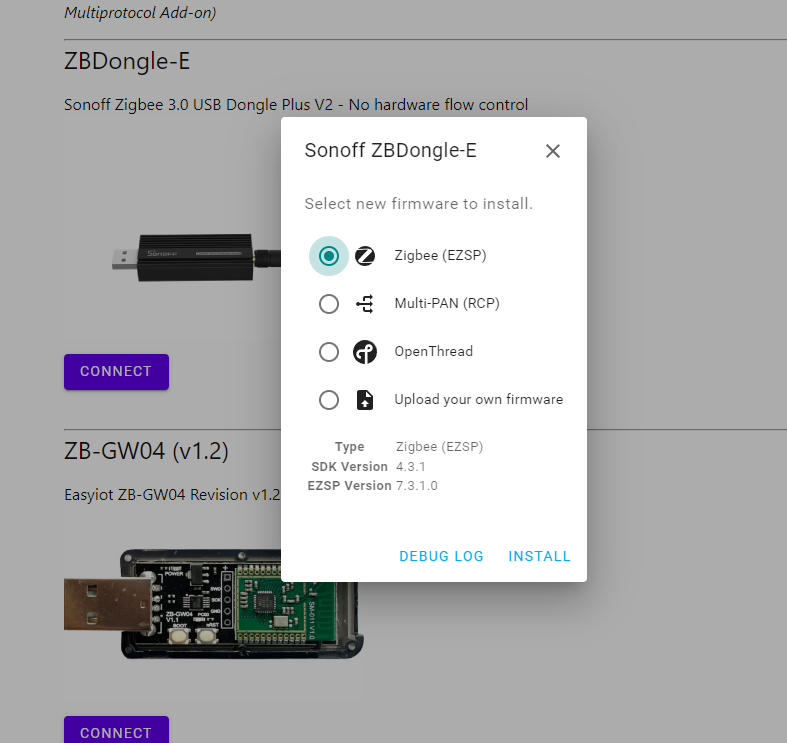
I donât see the 7.4.3 there, and donât flash the 7.4.2
You can download 7.4.3 here: silabs-firmware-builder/firmware_builds/zbdonglee at 4.4.3 ¡ darkxst/silabs-firmware-builder ¡ GitHub
Having similar issue, debugging for daysâŚ
Machine: Raspberry PI 5, RPI OS, latest updates
Device Sonoff Zigbee 3.0 USB E, no firmware flashing done, zstack adapter discovered but not sure what exactly is inside and how to discover.
ls -l /dev/serial/by-id/
total 0
lrwxrwxrwx 1 root root 13 Feb 3 16:27 usb-ITead_Sonoff_Zigbee_3.0_USB_Dongle_Plus_ea88acf9a239ef119ca859f454516304-if00-port0 -> ../../ttyUSB0
Log:
> [email protected] start /opt/zigbee2mqtt
> node index.js
Starting Zigbee2MQTT without watchdog.
[2025-02-03 19:39:48] info: z2m: Logging to console, file (filename: log.log)
[2025-02-03 19:39:48] info: z2m: Starting Zigbee2MQTT version 2.1.0 (commit #83ff4a7)
[2025-02-03 19:39:48] info: z2m: Starting zigbee-herdsman (3.2.5)
[2025-02-03 19:39:49] info: zh:adapter:discovery: Matched adapter: {"path":"/dev/ttyUSB0","manufacturer":"ITead","serialNumber":"ea88acf9a239ef119ca859f454516304","pnpId":"usb-ITead_Sonoff_Zigbee_3.0_USB_Dongle_Plus_ea88acf9a239ef119ca859f454516304-if00-port0","vendorId":"10c4","productId":"ea60"} => zstack: path=/dev/ttyUSB0, score=4
[2025-02-03 19:39:49] info: zh:zstack:znp: Opening SerialPort with {"path":"/dev/ttyUSB0","baudRate":115200,"rtscts":false,"autoOpen":false}
[2025-02-03 19:39:49] info: zh:zstack:znp: Serialport opened
[2025-02-03 19:39:49] info: zh:zstack:znp: Writing CC2530/CC2531 skip bootloader payload
[2025-02-03 19:39:50] info: zh:zstack:znp: Skip bootloader for CC2652/CC1352
[2025-02-03 19:40:09] error: z2m: Error while starting zigbee-herdsman
[2025-02-03 19:40:09] error: z2m: Failed to start zigbee-herdsman
[2025-02-03 19:40:09] error: z2m: Check https://www.zigbee2mqtt.io/guide/installation/20_zigbee2mqtt-fails-to-start_crashes-runtime.html for possible solutions
[2025-02-03 19:40:09] error: z2m: Exiting...
[2025-02-03 19:40:09] error: z2m: Error: Failed to connect to the adapter (Error: SRSP - SYS - ping after 6000ms)
at ZStackAdapter.start (/opt/zigbee2mqtt/node_modules/.pnpm/[email protected]/node_modules/zigbee-herdsman/src/adapter/z-stack/adapter/zStackAdapter.ts:113:27)
at Controller.start (/opt/zigbee2mqtt/node_modules/.pnpm/[email protected]/node_modules/zigbee-herdsman/src/controller/controller.ts:136:29)
at Zigbee.start (/opt/zigbee2mqtt/lib/zigbee.ts:69:27)
at Controller.start (/opt/zigbee2mqtt/lib/controller.ts:142:13)
at start (/opt/zigbee2mqtt/index.js:161:5)
Currently no adapter section in config but tried all combinations. Thank you!
I received my Sonoff Zigbee E today - I want to use it with my raspberry pi 4.
I managed to install everything, but the final outcome at the moment is:
Ideas?
Edit: might be a firmware issue - i will look for an update.
Itâs not a firmware issue. Look at the error more closely - thereâs a troubleshooting page linked there. The SRSP - SYS - ping after 6000ms usually means that it was autodetected by ZHA, which is blocking Z2M from communicating with your coordinator.
With the update of the firmware and change to âemberâ it is working.
You gotta disable/uninstall ZHA, if it is enabled/running. Check out this thread.
Hi, writing this comment, to help other lost souls, because I had problems with the migration from zstack to ember with the error z2m: Error: [BACKUP] Current backup file is not for EmberZNet stack. even after changing the IEEE according to FAQ | Zigbee2MQTT (was a bit pain under W11 with WSL [see usbipd]), too.
- stop z2m
- backup from zigbee2mqtt (or data) directory (this is to make a clean rollback if needed)
- configuration.yaml
- coordinator_backup.json
- database.db (warning: under VSCode itâs usually hidden!)
- state.json
- rename
coordinator_backup.jsonto e.g.coordinator_backup.save.json - In the zigbee2mqtt/configuration.yaml
- change serial adapter to
adapter: ember(maybeport, for me it stayedport: /dev/ttyUSB0 - maybe in
advancedtotransmit_power: 20
- start z2m to generate a new
coordinator_backup.json
- now the error occurs
- stop z2m
- in
coordinator_backup.json
- copy everything from
coordinator_backup.save.jsonexpect the first 2 blocks (metadataandstack_specific) and save
For me I first tried to keep the newcoordinator_ieee(although I changed and checked it according to the link above) and theextended_pan_id, which was a mess.
- start z2m again
For me this worked flawless after my initial fail. Hope it may helps someone

