Ok, in that case everything should be ok now
1 Like
I feel myself stupid.
Trying to adjust demo.yaml from Piotr’s repo with xiaomi_miio service calls.
Have kind of this code for map mode
additional_presets:
  - preset_name: Карта
    entity: vacuum.robot_pylesos
    map_source:
      image: "/hacsfiles/lovelace-xiaomi-vacuum-map-card/map.png"
    calibration_source:
      calibration_points:
        - vacuum:
            x: 25900
            y: 25800
          map:
            x: 243
            y: 157
        - vacuum:
            x: 32100
            y: 25300
          map:
            x: 1238
            y: 249
        - vacuum:
            x: 30600
            y: 18250
          map:
            x: 971
            y: 1373
    map_modes:
      - name: Уборка зоны
        icon: mdi:select-drag
        selection_type: MANUAL_RECTANGLE
        max_selections: 5
        repeats_type: INTERNAL
        max_repeats: 5
        service_call_schema:
          service: xiaomi_miio.vacuum_clean_zone
          service_data:
            zone: '[[selection]]'
            repeats: '[[repeats]]'
            predefined: 'false'
          # target:
            entity_id: '[[entity_id]]'
      - name: Список зон
        icon: mdi:texture-box
        selection_type: PREDEFINED_RECTANGLE
        max_selections: 5
        repeats_type: INTERNAL
        max_repeats: 5
        service_call_schema:
          service: xiaomi_miio.vacuum_clean_zone
          service_data:
            zone: '[[selection]]'
            repeats: '[[repeats]]'
            predefined: 'true'
          # target:
            entity_id: '[[entity_id]]'
        predefined_selections:
          - zones: [[25234, 20876, 26984, 22476]]
            label:
              text: "Кухня"
              x: 26100
              y: 21650
              # offset_y: 35
          - zones: [[27529, 22053, 31529, 22803]]
            label:
              text: "Коридор"
              x: 29500
              y: 23100
              offset_y: 35
          - zones: [[30593, 18152, 31593, 20302]]
            label:
              text: "Прихожая"
              x: 31100
              y: 20000
              offset_y: 35
Service calls raises an error about missing values in both cases.
Can’t perform action xiaomi_miio/vacuum_clean_zone. None @ data[‘zone’][0]

What am I doing wrong? My code looks the same as other guys in this thread
change value for repeats_type from INTERNAL to EXTERNAL
Thank you. I was able to fix zone section. And now I’m struggling with point.
I have full set of vacuum map function from your demo)
      - name: Точка назначения
        icon: mdi:map-marker-plus
        selection_type: MANUAL_POINT
        max_selections: 5
        repeats_type: NONE
        max_repeats: 5
        service_call_schema:
          service: xiaomi_miio.vacuum_goto
          service_data:
            point: '[[selection]]'
            point_x: '[[point_x]]'
            point_y: '[[point_y]]'
            repeats: '[[repeats]]'
            # predefined: 'false'
          # target:
            entity_id: '[[entity_id]]'
      - name: Предустановленные точки
        icon: mdi:map-marker
        selection_type: PREDEFINED_POINT
        max_selections: 5
        repeats_type: NONE
        max_repeats: 5
        service_call_schema:
          service: xiaomi_miio.vacuum_goto
          service_data:
            point: '[[selection]]'
            repeats: '[[repeats]]'
            point_x: '[[point_x]]'
            point_y: '[[point_y]]'
            # predefined: 'true'
          # target:
            entity_id: '[[entity_id]]'
        predefined_selections:
          - position: [ 26250, 21500 ]
            label:
              text: "В мусор"
              x: 26000
              y: 22000
              offset_y: 35
            icon:
              name: "mdi:delete"
              x: 26000
              y: 22000
          - position: [ 28200, 22450 ]
            label:
              text: "В унитаз"
              x: 28200
              y: 22450
              offset_y: 35
            icon:
              name: "mdi:toilet"
              x: 28200
              y: 22450
Both points actions fail because service_data section is not allowed.
xiaomi_miio/vacuum_goto. extra keys not allowed @ data[‘point’]
Could you please suggest what may be adjusted in this case?
Why do you override the whole config? You can just use existing templates:
map_modes:
  - template: vacuum_goto
  - template: vacuum_goto_predefined
    predefined_selections:
      - position: [ 26250, 21500 ]
        label:
          text: "В мусор"
          x: 26000
          y: 22000
          offset_y: 35
        icon:
          name: "mdi:delete"
          x: 26000
          y: 22000
      - (...)
It is much more simple in this way)
Thank you!
You can do the same thing with zone cleaning
(template: vacuum_clean_zone, template: vacuum_clean_zone_predefined)
1 Like
Hi everyone,
I’m new on it and I’m trying to set up my Xiaomi Robot. I only can see Zone CleanUp and Pin and Go.
I see a video were I can pick up per rooms as we have in the Xiaomi app.
How can I do that?
thank you for the help.
It highly depends on your vacuum model and integration that you use to add the vacuum to HA.
Is it possible to use a picture behind the map from my vacuum?
So, that i see the vaccum on the second picture? 
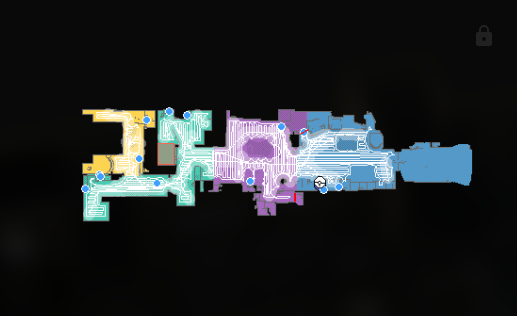
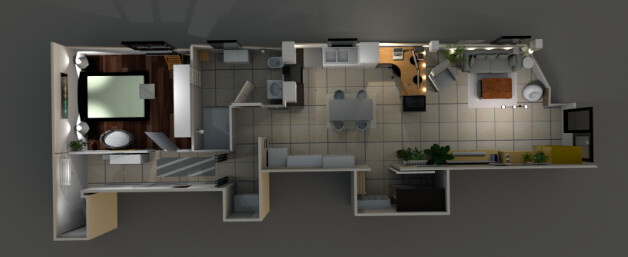
It’s not officially possible at this moment, but there are some workarounds
1 Like
how did you add 4th button with water drop icon? I want it to set cleaning mode in my xiaomi x20+.
@3_14 may be you can help
Hello @3_14 Piotr,
I’ve been using this for a while successfully thanks a lot.
I installed the blueprint to disable the camera so I don’t get banned from xiaomi, although I’ve noticed that when I restart HA and the vacuum is docked the camera starts on and therefore the following day the map is not loading.
It would be nice if you can include that condition in the blueprint (I can open a topic on github if you prefere), or tell me which line to modify in the blueprint for that, I guess a trigger when HA starts and the vacuum is docked then turn the camera off.
Thanks.
@Galindo I’m rewriting the integration, hopefully soon the blueprint won’t be needed anymore.
3 Likes
Hello,
I am trying to use this Map Card but end up always with the same issue…
I have a Xiaomi (viomi_v7) robot, and I can get the map AND start the cleaning for all rooms, but cannot select a single room for cleaning…
When I try to test the following action :
service: xiaomi_miio.vacuum_clean_segment
data:
  segments: [10]
target:
  entity_id: vacuum.viomi_v7_f47a_robot_cleaner
I get this error : Action xiaomi_miio.vacuum_clean_segment not found
In configuration.yaml, I have:
# https://github.com/PiotrMachowski/Home-Assistant-custom-components-Xiaomi-Cloud-Map-Extractor?tab=readme-ov-file#basic
camera:
  - platform: xiaomi_cloud_map_extractor
    host: 192.168.1.100
    token: XXXXXXXXXXXXXXXXXX
    username: [email protected]
    password: XXXXXXXXXX
    draw: ['all']
    attributes:
      - calibration_points
My configuration card is :
type: custom:xiaomi-vacuum-map-card
title: Vacuum Xiaomi
preset_name: Live map
entity: vacuum.viomi_v7_f47a_robot_cleaner
map_source:
  camera: camera.xiaomi_cloud_map_extractor
calibration_source:
  camera: true
map_modes:
  - name: Rooms
    icon: mdi:floor-plan
    run_immediately: false
    coordinates_rounding: true
    coordinates_to_meters_divider: 1000
    selection_type: ROOM
    id_type: number
    max_selections: 999
    repeats_type: EXTERNAL
    max_repeats: 3
    service_call_schema:
      service: vacuum.send_command
      service_data:
        command: app_segment_clean
        entity_id: "[[entity_id]]"
        params:
          - segments: "[[selection]]"
            repeat: "[[repeats]]"
    predefined_selections:
      - id: "10"
        icon:
          name: mdi:broom
          x: 3.15
          "y": -7.025
        label:
          text: Kitchen
          x: 3.15
          "y": -7.025
          offset_y: 35
        outline:
          - - 2.6
            - -8.45
          - - 3.7
            - -8.45
          - - 3.7
            - -5.6
          - - 2.6
            - -5.6
      - id: "11"
        icon:
          name: mdi:broom
          x: 1.2750000000000001
          "y": -10.600000000000001
        label:
          text: Room
          x: 1.2750000000000001
          "y": -10.600000000000001
          offset_y: 35
        outline:
          - - -1.05
            - -12
          - - 3.6
            - -12
          - - 3.6
            - -9.2
          - - -1.05
            - -9.2
      - id: "12"
        icon:
          name: mdi:broom
          x: -0.2
          "y": -7.3999999999999995
        label:
          text: Shower
          x: -0.2
          "y": -7.3999999999999995
          offset_y: 35
        outline:
          - - -1
            - -8.35
          - - 0.6
            - -8.35
          - - 0.6
            - -6.45
          - - -1
            - -6.45
      - id: "13"
        icon:
          name: mdi:broom
          x: -3.85
          "y": -9.175
        label:
          text: Parents
          x: -3.85
          "y": -9.175
          offset_y: 35
        outline:
          - - -6.4
            - -11.9
          - - -1.3
            - -11.9
          - - -1.3
            - -6.45
          - - -6.4
            - -6.45
      - id: "14"
        icon:
          name: mdi:broom
          x: -0.625
          "y": -6.199999999999999
        label:
          text: Corridor
          x: -0.625
          "y": -6.199999999999999
          offset_y: 35
        outline:
          - - -3.1
            - -9.25
          - - 1.85
            - -9.25
          - - 1.85
            - -3.15
          - - -3.1
            - -3.15
      - id: "15"
        icon:
          name: mdi:broom
          x: 2.9
          "y": -3.4250000000000003
        label:
          text: Entrance
          x: 2.9
          "y": -3.4250000000000003
          offset_y: 35
        outline:
          - - 1.9
            - -5.55
          - - 3.9
            - -5.55
          - - 3.9
            - -1.3
          - - 1.9
            - -1.3
      - id: "16"
        icon:
          name: mdi:broom
          x: 0.7250000000000001
          "y": -2.3499999999999996
        label:
          text: Office
          x: 0.7250000000000001
          "y": -2.3499999999999996
          offset_y: 35
        outline:
          - - -0.4
            - -4.85
          - - 1.85
            - -4.85
          - - 1.85
            - 0.15
          - - -0.4
            - 0.15
      - id: "17"
        icon:
          name: mdi:broom
          x: 5.4
          "y": -1.55
        label:
          text: Bathroom
          x: 5.4
          "y": -1.55
          offset_y: 35
        outline:
          - - 4.25
            - -3.15
          - - 6.55
            - -3.15
          - - 6.55
            - 0.05
          - - 4.25
            - 0.05
      - id: "18"
        icon:
          name: mdi:broom
          x: 9.1
          "y": -1.6500000000000001
        label:
          text: Guest
          x: 9.1
          "y": -1.6500000000000001
          offset_y: 35
        outline:
          - - 6.6
            - -3.35
          - - 11.6
            - -3.35
          - - 11.6
            - 0.05
          - - 6.6
            - 0.05
      - id: "19"
        icon:
          name: mdi:broom
          x: 6.65
          "y": -10.649999999999999
        label:
          text: Sofa
          x: 6.65
          "y": -10.649999999999999
          offset_y: 35
        outline:
          - - 4
            - -12.1
          - - 9.3
            - -12.1
          - - 9.3
            - -9.2
          - - 4
            - -9.2
      - id: "20"
        icon:
          name: mdi:broom
          x: 6.6499999999999995
          "y": -6.2749999999999995
        label:
          text: Living
          x: 6.6499999999999995
          "y": -6.2749999999999995
          offset_y: 35
        outline:
          - - 3.95
            - -9.15
          - - 9.35
            - -9.15
          - - 9.35
            - -3.4
          - - 3.95
            - -3.4
    variables: {}
map_locked: false
icons:
  - icon: mdi:play
    conditions:
      - entity: vacuum.viomi_v7_f47a_robot_cleaner
        value_not: cleaning
      - entity: vacuum.viomi_v7_f47a_robot_cleaner
        value_not: error
      - entity: vacuum.viomi_v7_f47a_robot_cleaner
        value_not: returning
    tooltip: Start
    tap_action:
      action: call-service
      service: vacuum.start
      service_data:
        entity_id: vacuum.viomi_v7_f47a_robot_cleaner
  - icon: mdi:pause
    conditions:
      - entity: vacuum.viomi_v7_f47a_robot_cleaner
        value_not: docked
      - entity: vacuum.viomi_v7_f47a_robot_cleaner
        value_not: idle
      - entity: vacuum.viomi_v7_f47a_robot_cleaner
        value_not: error
      - entity: vacuum.viomi_v7_f47a_robot_cleaner
        value_not: paused
    tooltip: Pause
    tap_action:
      action: call-service
      service: vacuum.pause
      service_data:
        entity_id: vacuum.viomi_v7_f47a_robot_cleaner
  - icon: mdi:stop
    conditions:
      - entity: vacuum.viomi_v7_f47a_robot_cleaner
        value_not: docked
      - entity: vacuum.viomi_v7_f47a_robot_cleaner
        value_not: idle
      - entity: vacuum.viomi_v7_f47a_robot_cleaner
        value_not: error
      - entity: vacuum.viomi_v7_f47a_robot_cleaner
        value_not: paused
    tooltip: Stop
    tap_action:
      action: call-service
      service: vacuum.stop
      service_data:
        entity_id: vacuum.viomi_v7_f47a_robot_cleaner
  - icon: mdi:home-map-marker
    conditions:
      - entity: vacuum.viomi_v7_f47a_robot_cleaner
        value_not: docked
      - entity: vacuum.viomi_v7_f47a_robot_cleaner
        value_not: returning
    tooltip: Return to base
    tap_action:
      action: call-service
      service: vacuum.return_to_base
      service_data:
        entity_id: vacuum.viomi_v7_f47a_robot_cleaner
  - icon: mdi:map-marker
    tooltip: Locate
    tap_action:
      action: call-service
      service: vacuum.locate
      service_data:
        entity_id: vacuum.viomi_v7_f47a_robot_cleaner
  - menu_id: fan_speed
    icon: mdi:fan-remove
    label: Silent
    conditions:
      - entity: vacuum.viomi_v7_f47a_robot_cleaner
        attribute: fan_speed
        value: Silent
    tooltip: Change fan speed
    tap_action:
      action: call-service
      service: vacuum.set_fan_speed
      service_data:
        entity_id: vacuum.viomi_v7_f47a_robot_cleaner
        fan_speed: Silent
  - menu_id: fan_speed
    icon: mdi:fan-speed-1
    label: Basic
    conditions:
      - entity: vacuum.viomi_v7_f47a_robot_cleaner
        attribute: fan_speed
        value: Basic
    tooltip: Change fan speed
    tap_action:
      action: call-service
      service: vacuum.set_fan_speed
      service_data:
        entity_id: vacuum.viomi_v7_f47a_robot_cleaner
        fan_speed: Basic
  - menu_id: fan_speed
    icon: mdi:fan-speed-2
    label: Strong
    conditions:
      - entity: vacuum.viomi_v7_f47a_robot_cleaner
        attribute: fan_speed
        value: Strong
    tooltip: Change fan speed
    tap_action:
      action: call-service
      service: vacuum.set_fan_speed
      service_data:
        entity_id: vacuum.viomi_v7_f47a_robot_cleaner
        fan_speed: Strong
  - icon: mdi:fan-alert
    conditions:
      - entity: vacuum.viomi_v7_f47a_robot_cleaner
        attribute: fan_speed
        value_not: Silent
      - entity: vacuum.viomi_v7_f47a_robot_cleaner
        attribute: fan_speed
        value_not: Basic
      - entity: vacuum.viomi_v7_f47a_robot_cleaner
        attribute: fan_speed
        value_not: Strong
    tooltip: Change fan speed
    tap_action:
      action: call-service
      service: vacuum.set_fan_speed
      service_data:
        entity_id: vacuum.viomi_v7_f47a_robot_cleaner
        fan_speed: Silent
tiles:
  - tile_id: battery_level
    entity: vacuum.viomi_v7_f47a_robot_cleaner
    label: Battery
    attribute: battery_level
    icon_source: vacuum.viomi_v7_f47a_robot_cleaner.attributes.battery_icon
    unit: "%"
  - tile_id: fan_speed
    entity: vacuum.viomi_v7_f47a_robot_cleaner
    label: Fan speed
    attribute: fan_speed
    icon: mdi:fan
    translations:
      silent: Silent
      standard: Standard
      medium: Medium
      turbo: Turbo
      auto: Auto
      gentle: Gentle
additional_presets: []
vacuum_platform: default
Any idea would be greatly appreciated, I have been stucked here for 10 days…
Thanks
Which integration do you use to add the vacuum to HA?
Sorry I forgot to add this. I am using Xiaomi Miot Auto
This one might work for you:
Unfortunately no…
I still get the message “sucess” but I don’t get anything happening, the robot keeps charging…
In the developer tools, I get this message : “Action xiaomi_miio.vacuum_clean_segment not found”, although the xiaomi_miio.vacuum_clean_segment is one of the listed Action…
Can you post your config after the change?