Oef, not that advanced over here. How can I do that? ssh into HA and then tcpdump command which what parameters?
Yeah, sorry, if you are up for learning I can try to describe how I would do it. Start by connecting to HA with ssh, then find out what your network interface is called with the ifconfig command. There might be a few listed so you want the one associated with the IP address you use to connect to HA. Once you have that I would run tcpdump with something like:
tcpdump -i <iface name> 'udp port 5060'
You might want to write that out to a file by adding ‘-w ’. You can then read it with ‘tcpdump -r -A’.
Sorry, I think you will need to add -A to that command to get it to print out the packet contents.
When I use the app the successful log info is:
Speech-to-text2.22s 
Engine
stt.faster_whisper
Language
en
Output
What is the outside humidity?
Raw
Natural Language Processing0.06s 
Engine
conversation.home_assistant
Language
en
Input
What is the outside humidity?
Response type
query_answer
Prefer handling locally
true
Processed locally
true
I see the error “speech-to-text failed” when running with the HT801V2 and the log is below. I have the codec (all entries) set to OPUS and followed the tutorial for setting up the rest, though the info for setting up the GrandStream device is rather light in the tutorial.
stage: done
run:
pipeline: 01jgm6dzfctr1t7ngkfnwymrv4
language: en
events:
- type: run-start
data:
pipeline: 01jgm6dzfctr1t7ngkfnwymrv4
language: en
timestamp: “2025-01-16T21:38:37.193354+00:00” - type: stt-start
data:
engine: stt.faster_whisper
metadata:
language: en
format: wav
codec: pcm
bit_rate: 16
sample_rate: 16000
channel: 1
timestamp: “2025-01-16T21:38:37.193614+00:00” - type: error
data:
code: stt-stream-failed
message: speech-to-text failed
timestamp: “2025-01-16T21:38:42.552141+00:00” - type: run-end
data: null
timestamp: “2025-01-16T21:38:42.552638+00:00”
stt:
engine: stt.faster_whisper
metadata:
language: en
format: wav
codec: pcm
bit_rate: 16
sample_rate: 16000
channel: 1
done: false
error:
code: stt-stream-failed
message: speech-to-text failed
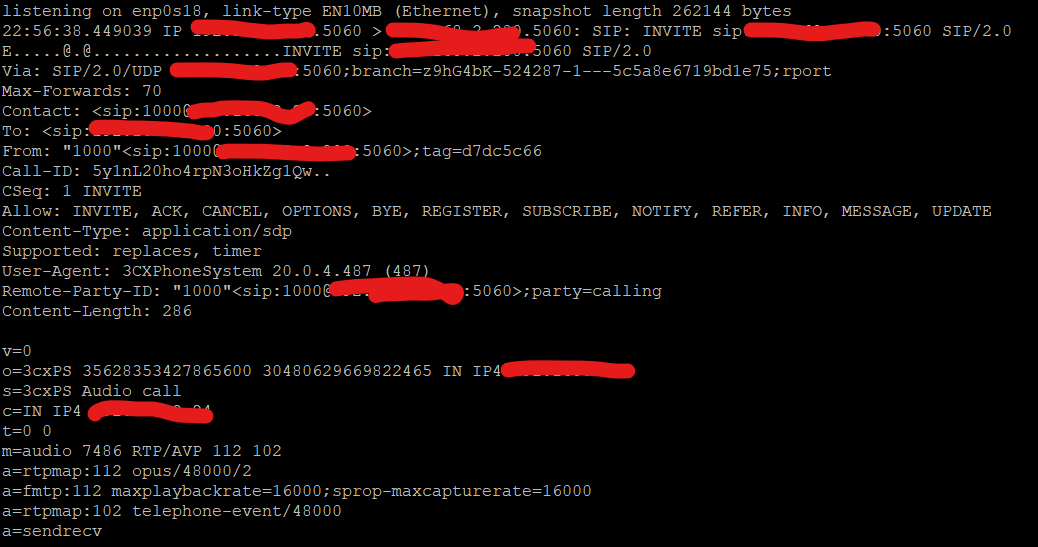
That is interesting, it looks like in the From header there is no space between the description and the actual URI. I’ll have to take a closer look at the SIP spec, I think the space is required.
I stand corrected, it appears in https://www.ietf.org/rfc/rfc3261.txt section 20.10 Contact that
There may or may not be LWS between the display-name and the “<”.
Assuming LWS means linear white space. Looks like we need to update the header parsing to account for that.
As you may have noted it appears your STT processing is taking longer than 2 seconds, which I suspect is the cause of the problem.
Great to hear you might have found the issue. I am sure other 3cx users will be happy to get this resolved. Let me know if you want more details on my set-up to further help resolve.
It was a pretty easy fix, if you want to watch for if/when it gets merged Fix SIP header parsing by jaminh · Pull Request #26 · home-assistant-libs/voip-utils · GitHub.
Great! I see all checks have passed so assume it will be include in 2025.1.4 (or 2025.2.1) release?
I’m not a core dev so I can’t make any promises, but I know a guy I’ll see what I can do.
I see the PR was added in 2025.2. I had the same error in the logs (Invalid SIP header). Interestingly thouhg trying to call the extensions results in HA crushing and restarting a few minutes later.
Crashing HA is somewhat surprising. Could you explain a little bit more about what you are trying to do? Are you trying to make outbound calls from HA to a phone? Are you calling through a Voip server like Asterisk?
I was trying to follow the example (from BigHomie) and then followed by mn_box to use our 3CX on premise install with a trunk to HA to connect to the voip integration.
So I made a trunk and all with a dummy number and HA’s IP and port etc. Trying to call a number pointing to that trunk I was getting error logs in HA about invalid SIP headers which then got me to a PR made I think from you which was merged in 2025.2. I updated HA but now when I try calling HA is crashing
Funny thing is I seem to be reproducing the error in two different HA-3CX networks. Either I’m being stupid twice with some setting or I don’t know haha.
I never heard any message back, yet after coming back online from the crash I do see two devices showing up but still nothing works
Log wise looking at before the crash I find this
2025-02-10 20:40:04.717 ERROR (MainThread) [homeassistant] Error doing job: Task exception was never retrieved (None)
Traceback (most recent call last):
File "/usr/local/lib/python3.13/site-packages/voip_utils/voip.py", line 124, in _create_rtp_server
await loop.create_datagram_endpoint(
...<2 lines>...
)
File "/usr/local/lib/python3.13/asyncio/base_events.py", line 1462, in create_datagram_endpoint
raise exceptions[0]
File "/usr/local/lib/python3.13/asyncio/base_events.py", line 1446, in create_datagram_endpoint
sock.bind(local_address)
~~~~~~~~~^^^^^^^^^^^^^^^
OSError: [Errno 98] Address in use
2025-02-10 20:40:07.398 ERROR (MainThread) [homeassistant] Error doing job: Task exception was never retrieved (None)
Traceback (most recent call last):
File "/usr/local/lib/python3.13/site-packages/voip_utils/voip.py", line 124, in _create_rtp_server
await loop.create_datagram_endpoint(
...<2 lines>...
)
File "/usr/local/lib/python3.13/asyncio/base_events.py", line 1462, in create_datagram_endpoint
raise exceptions[0]
File "/usr/local/lib/python3.13/asyncio/base_events.py", line 1446, in create_datagram_endpoint
sock.bind(local_address)
~~~~~~~~~^^^^^^^^^^^^^^^
OSError: [Errno 98] Address in use
2025-02-10 20:40:08.984 ERROR (MainThread) [homeassistant] Error doing job: Task exception was never retrieved (None)
Traceback (most recent call last):
File "/usr/local/lib/python3.13/site-packages/voip_utils/voip.py", line 124, in _create_rtp_server
await loop.create_datagram_endpoint(
...<2 lines>...
)
File "/usr/local/lib/python3.13/asyncio/base_events.py", line 1462, in create_datagram_endpoint
raise exceptions[0]
File "/usr/local/lib/python3.13/asyncio/base_events.py", line 1446, in create_datagram_endpoint
sock.bind(local_address)
~~~~~~~~~^^^^^^^^^^^^^^^
OSError: [Errno 98] Address in use
That is a strange error indeed. It should be randomly picking an RTP port, but it seems at some point between when HA chooses the port and it actually creates the listener something else has bound to that same random port? It seems highly unlikely that would be happening consistently, so I would suspect something else is at play. Would it be possible for you to enable logging for the voip_utils library and see what IP/port it is trying to bind to before it crashes?
Repeated the steps with debug logging on the component and this is what I got. Lines 1 - 35 were shown once, then lines 36-80 with the response message were repeated idefinitely (up to line 551130)
192.168.1.251 is my HA IP
192.168.1.65 is my 3CX instance
Also where +30PHONENUMBER was my actual phone number (it must be getting that from the extension info but I’m suprised to see that, I was expecting to see my extension number instead)
2025-02-11 20:43:51.250 DEBUG (MainThread) [voip_utils.sip] Received datagram protocol=[SIP/2.0], method=[INVITE], ruri=[sip:192.168.1.251:5060], code=[None], reason=[None], headers=[{'via': 'SIP/2.0/UDP 192.168.1.65:5060;branch=z9hG4bK-524287-1---7d81d2326382094c;rport', 'max-forwards': '70', 'contact': '<sip:[email protected]:5060>', 'to': '<sip:192.168.1.251:5060>', 'from': '"+30PHONENUMBER"<sip:[email protected]:5060>;tag=d3949c1a', 'call-id': 'VrdpQIP8qh78fhRI-mAxgQ..', 'cseq': '1 INVITE', 'allow': 'INVITE, ACK, CANCEL, OPTIONS, BYE, REGISTER, SUBSCRIBE, NOTIFY, REFER, INFO, MESSAGE, UPDATE', 'content-type': 'application/sdp', 'supported': 'replaces, timer', 'user-agent': '3CXPhoneSystem 20.0.3.806 (806)', 'remote-party-id': '"+30PHONENUMBER"<sip:[email protected]:5060>;party=calling', 'content-length': '419'}], body=[
v=0
o=3cxPS 4656140692488192 34633058191671297 IN IP4 192.168.1.65
s=3cxPS Audio call
c=IN IP4 192.168.1.65
t=0 0
m=audio 7010 RTP/AVP 112 0 8 18 102 101
a=rtpmap:112 opus/48000/2
a=fmtp:112 maxplaybackrate=16000;sprop-maxcapturerate=16000
a=rtpmap:0 PCMU/8000
a=rtpmap:8 PCMA/8000
a=rtpmap:18 G729/8000
a=fmtp:18 annexb=no
a=rtpmap:102 telephone-event/48000
a=rtpmap:101 telephone-event/8000
a=sendrecv
]
2025-02-11 20:43:51.250 DEBUG (MainThread) [voip_utils.sip] Received invite message
2025-02-11 20:43:51.250 DEBUG (MainThread) [voip_utils.sip] Incoming call from endpoint=SipEndpoint(sip_header='"+30PHONENUMBER"<sip:[email protected]:5060>;tag=d3949c1a', uri='sip:[email protected]:5060', scheme='sip', host='192.168.1.251', port=5060, username='+30PHONENUMBER', description='+30PHONENUMBER')
2025-02-11 20:43:51.252 DEBUG (MainThread) [voip_utils.sip] Detected OPUS payload type as 112
2025-02-11 20:43:51.254 DEBUG (MainThread) [voip_utils.voip] Starting RTP server on ip=0.0.0.0, rtp_port=33728, rtcp_port=33729
2025-02-11 20:43:51.255 DEBUG (MainThread) [voip_utils.sip] Sent OK to ip=192.168.1.251, port=5060 with rtp_port=33728
2025-02-11 20:43:51.255 DEBUG (MainThread) [voip_utils.sip] Received datagram protocol=[SIP/2.0], method=[None], ruri=[None], code=[200], reason=[OK], headers=[{'via': 'SIP/2.0/UDP 192.168.1.65:5060;branch=z9hG4bK-524287-1---7d81d2326382094c;rport', 'from': '"+30PHONENUMBER"<sip:[email protected]:5060>;tag=d3949c1a', 'to': '<sip:192.168.1.251:5060>', 'call-id': 'VrdpQIP8qh78fhRI-mAxgQ..', 'content-type': 'application/sdp', 'content-length': '201', 'cseq': '1 INVITE', 'contact': '<sip:[email protected]:5060>', 'user-agent': 'homeassistant 243150548090522 2025.2.1', 'allow': 'INVITE, ACK, BYE, CANCEL, OPTIONS'}], body=[
v=0
o=homeassistant 243150548090522 1 IN IP4 192.168.1.251
s=voip_hass
c=IN IP4 192.168.1.251
t=0 0
m=audio 33728 RTP/AVP 112
a=rtpmap:112 opus/48000/2
a=ptime:20
a=maxptime:150
a=sendrecv
]
2025-02-11 20:43:51.255 DEBUG (MainThread) [voip_utils.sip] Received response [SIP/2.0 200 OK
Via: SIP/2.0/UDP 192.168.1.65:5060;branch=z9hG4bK-524287-1---7d81d2326382094c;rport
From: "+30PHONENUMBER"<sip:[email protected]:5060>;tag=d3949c1a
To: <sip:192.168.1.251:5060>
Call-ID: VrdpQIP8qh78fhRI-mAxgQ..
Content-Type: application/sdp
Content-Length: 201
CSeq: 1 INVITE
Contact: <sip:[email protected]:5060>
User-Agent: homeassistant 243150548090522 2025.2.1
Allow: INVITE, ACK, BYE, CANCEL, OPTIONS
v=0
o=homeassistant 243150548090522 1 IN IP4 192.168.1.251
s=voip_hass
c=IN IP4 192.168.1.251
t=0 0
m=audio 33728 RTP/AVP 112
a=rtpmap:112 opus/48000/2
a=ptime:20
a=maxptime:150
a=sendrecv
]
2025-02-11 20:43:51.255 DEBUG (MainThread) [voip_utils.sip] Got OK message
2025-02-11 20:43:51.255 DEBUG (MainThread) [voip_utils.sip] Got invite response
2025-02-11 20:43:51.255 DEBUG (MainThread) [voip_utils.sip] Detected OPUS payload type as None
2025-02-11 20:43:51.255 DEBUG (MainThread) [voip_utils.sip] Using first detected payload type: 112
2025-02-11 20:43:51.256 DEBUG (MainThread) [voip_utils.sip] Outgoing call to endpoint=SipEndpoint(sip_header='<sip:192.168.1.251:5060>', uri='sip:192.168.1.251:5060', scheme='sip', host='192.168.1.251', port=5060, username=None, description=None)
2025-02-11 20:43:51.264 DEBUG (MainThread) [voip_utils.voip] Starting RTP server on ip=0.0.0.0, rtp_port=35806, rtcp_port=35807
2025-02-11 20:43:51.266 DEBUG (MainThread) [voip_utils.sip] Sent OK to ip=192.168.1.251, port=5060 with rtp_port=35806
2025-02-11 20:43:51.271 DEBUG (MainThread) [voip_utils.sip] Received datagram protocol=[SIP/2.0], method=[ACK], ruri=[sip:192.168.1.251:5060], code=[None], reason=[None], headers=[{'via': 'SIP/2.0/UDP 192.168.1.251:5060', 'from': '"+30PHONENUMBER"<sip:[email protected]:5060>;tag=d3949c1a', 'to': '<sip:192.168.1.251:5060>', 'call-id': 'VrdpQIP8qh78fhRI-mAxgQ..', 'cseq': '50 ACK', 'user-agent': 'voip-utils 1.0', 'content-length': '0'}], body=[]
2025-02-11 20:43:51.273 DEBUG (MainThread) [voip_utils.sip] Received datagram protocol=[SIP/2.0], method=[None], ruri=[None], code=[200], reason=[OK], headers=[{'via': 'SIP/2.0/UDP 192.168.1.65:5060;branch=z9hG4bK-524287-1---7d81d2326382094c;rport', 'from': '"+30PHONENUMBER"<sip:[email protected]:5060>;tag=d3949c1a', 'to': '<sip:192.168.1.251:5060>', 'call-id': 'VrdpQIP8qh78fhRI-mAxgQ..', 'content-type': 'application/sdp', 'content-length': '201', 'cseq': '1 INVITE', 'contact': '<sip:[email protected]:5060>', 'user-agent': 'homeassistant 243150548090522 2025.2.1', 'allow': 'INVITE, ACK, BYE, CANCEL, OPTIONS'}], body=[
v=0
o=homeassistant 243150548090522 1 IN IP4 192.168.1.251
s=voip_hass
c=IN IP4 192.168.1.251
t=0 0
m=audio 35806 RTP/AVP 112
a=rtpmap:112 opus/48000/2
a=ptime:20
a=maxptime:150
a=sendrecv
]
```
So I can not use the Cisco SPA122, it cant have the Opus codec?
regards
It is a little difficult to say exactly what is going on since we are only really seeing one side of the conversation, but as far as I can tell it looks like 3cx is responding with a 200 OK rather than acknowledging the 200 OK from HA. That behavior doesn’t seem to be following the SIP spec, but 3cx is pretty widely used so I would guess either I am misunderstanding something or there is just something really strange going on with your specific setup that is causing that pattern. If there are other people here with 3cx working it would be interesting to see how their traffic compares.


