Hi, I have created a wine cellar app and it is open source and got the most features, host it your self with docker or use the https://cellarion.app, if you need any ideas.
Hej Johan
Thanks for sharing! Good to see multiple projects in this space. Wine Tracker is built specifically for Home Assistant with AI label recognition, native integration, and a focus on being fully open-source and a focus on being free and self-hosted.
Cheers
Just installed Wine Tracker and have scanned in a few labels with AI. Where does it get the drink window from? Is that something the AI model comes up with or does it get that information from a database somewhere?
The OpenAI issue was fixed on March 15th with version 1.5.1
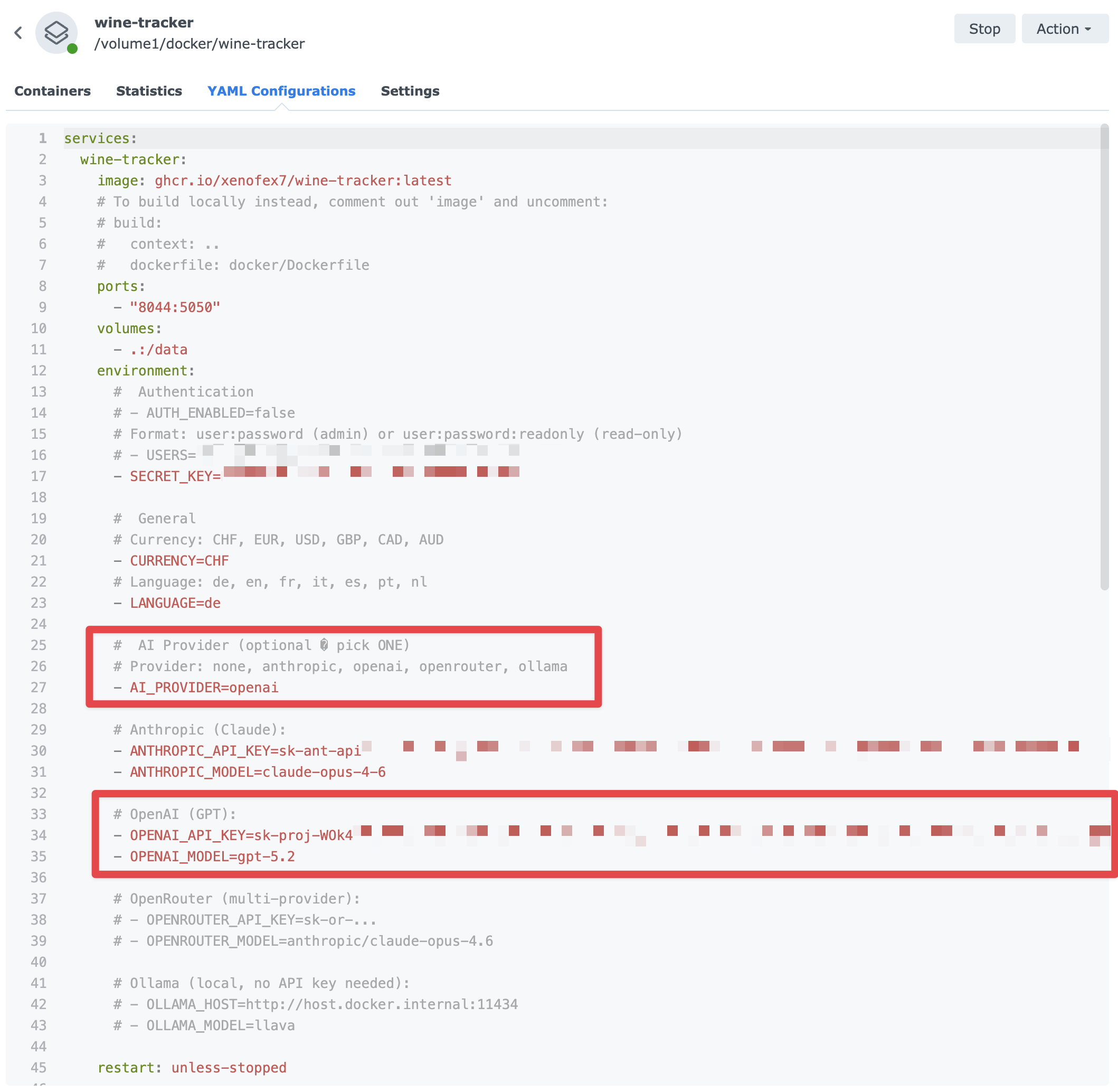
Here’s how to use OpenAI with Docker:
→ Here’s my setup (docker-compose.yaml)
→ Line 27 → enable: AI_PROVIDER=openai
→ Line 43 → Token: OPENAI_API_KEY=sk-proj-…
→ Line 44 → Model: gpt-5.2
Great question! The drink window is calculated by the AI model based on the wine’s vintage year and origin/region. It uses knowledge similar to what you’d find in wine maturity charts (like this one from VINUM - Trinkreifetabelle - VINUM (in german)).
Since different AI models can vary slightly in their estimates, the values aren’t pulled from a fixed database - they’re AI-generated recommendations. If you know of a good maturity chart or database you’d like us to integrate as a fixed reference, let me know! That’s something I could potentially add - so the drink windows are more consistent regardless of which AI model is used.
Great, thanks for clarifying! I don’t have a particular database to recommend at this stage…but good to know how the data is being created. Going to load up my wines this weekend with the label recognition so I’m looking forward to exploring the app more! Thank you!
I have just set up within HA but am finding that the app returns no results in about 50% of the wines I search for leaving me to manually add. When I go into Vivino app on my phone most of the missing wines are listed though. I am in Australia and wonder if there are unique databases used based on country and that not all wines are held in the database this application is drawing its info from. Thanks for your great work on this.
An example is Wynns Coonawarra Riesling is not available to be updated via Vivino in HA but available in Vivino app I am using on my phone.
Hi dormani, thanks a lot for the detailed report - you put your finger exactly on the issue.
You’re right that Vivino serves different catalogues depending on the user’s region. What’s happening in the add-on is a bit more subtle though: for certain queries (especially more specific ones like “Wynns Coonawarra Riesling”) and for users in some countries, Vivino silently redirects the search page to a different layout (/en/explore) that our add-on can’t parse - so it looks like “no results” even when the wine is in Vivino’s database.
I just pushed a fix that retries the search on two alternative Vivino endpoints when the primary one gets redirected or returns nothing. In my testing your Wynns Coonawarra Riesling example now returns 4 vintages via the fallback chain. I couldn’t test from an Australian IP directly, so I’d really appreciate if you could verify it on your end once the new version is out.
Could you do two things when you get a chance?
Update to the new version (release notes will mention “Vivino search fallback chain for regional wines”) and try the same searches that failed before - Wynns Coonawarra Riesling is the obvious first test, but please also try a handful of other Australian wines you know should be there (Penfolds, Henschke, Torbreck, Leeuwin, whatever you have in your cellar).
If something still fails, let me know the exact search term you used and ideally which ones work vs don’t work. That gives me concrete test cases to improve the fallback chain further.
One more thing while you’re here: if you haven’t already, I’d strongly recommend configuring an AI provider in the add-on options (Anthropic, OpenAI, OpenRouter, MiniMax or a local Ollama - whatever you prefer). With that enabled you can just snap a photo of the bottle label and the add-on fills in name, vintage, region, grape, drinking window, maturity phases, taste profile and food pairings in one go - no Vivino search needed. It’s much more reliable than relying on any regional catalogue, and it works just as well for obscure local wines as for global names. For Australian labels in particular this is probably going to be the smoother path until Vivino itself gets more consistent.
Also a quick question: what do you have set as your currency in the add-on options? (AUD, USD, something else?) That tells me what regional signal the add-on was sending before - useful background info even though the current fix doesn’t rely on currency anymore.
Thanks again for taking the time to report this with such a clean example - it made the debugging much faster.
Thanks for your reply and providing the update to the addon. I can now find and update the Wynns wine. Have changed over to using OpenAI which works fine but does involve additional steps with taking a photo of the bottle, uploading the photo to PC and then introducing it to OpenAI and waiting for the info. to be returned. Not sure how accurate the drink by data is. I have not had a fail with OpenAI.
The currency I have set is AUD.
The ability to “dice and slice” the information held in the database would be helpful, eg list all chardonnay by maximum recommended consume date. A number of dropdown options based on data available would be great.
Thanks again for your work on this.
Hej dormani, glad the Wynns wine shows up now, and happy to hear OpenAI is reliable for you! A couple of thoughts:
On the photo workflow - if you’re currently going phone → PC → upload, there are two smoother paths that avoid the PC step entirely:
Open the add-on on your phone (through the Home Assistant Companion app or HA’s web UI from the phone’s browser). The file picker on mobile offers “Take a photo” directly from the camera, so you can snap the label and save in the same step - no transfer needed.
Use the sommelier chat. Attach the label photo right inside the chat, discuss the wine with the assistant if you like, then tell it to add the wine to your cellar - it does the full create in one go, with the same label analysis running in the background. There’s a setting called “Edit wines via chat” that needs to be enabled once (off by default).
Either of those should make the flow feel much less clunky than going via your PC.
On “dice and slice” - your specific example (“list all Chardonnay by maximum recommended consume date”) actually works today, it’s just not super discoverable:
In Settings, switch the Cellar view to Table.
Type chardonnay in the search bar (it matches the grape field too).
Click the Drink until column header to sort ascending - closest-to-expiry first.
That said, you’re absolutely right that the app is missing a proper filter bar with dropdowns for Type / Region / Grape / Drink-window, populated from what’s actually in your cellar. That’s already tracked as a feature request and sits on the roadmap - thanks for the extra nudge, it’s a good reminder to move it up.
On drink-by dates - they’re AI-estimated from wine type, grape, region and vintage. For classic, well-documented wines (Barolo 2018, Bordeaux Cru, etc.) the estimates are usually in the right ballpark, but for regional or unusual bottles the AI is essentially making an educated guess. Treat them as a helpful rough indicator, not a lab result. If a wine has a “drink by” printed on the back label, you can override the AI’s value in the edit modal at any time.
Thanks again for the detailed feedback - it genuinely helps shape what comes next!
I've been using PLOC to list and track my wine, it's adequate but I really want something local, and integration in HA is always welcome!
Two questions:
1-is there a way to represent my wine cellar in the interface? Say, define the number of row and columns in a grid (and maybe, given how wine cellars are made, speficy the number of bottles per row, not globally)?
2-I like the information in the "statistics" section. One thing I like to do is filter by "ready to drink". Is there a quick way to do this? On my computer, it's reasonably easy, but on the phone the drinking window chart isn't as convenient. Just a filtered list would be amazing.
I also installed the app in docker standalone mode - loving it!
Searching for my wines, I sometimes don’t find the exact one, however, vivino lists the wine at its page. It would be cool having the possibility to search the wine by vivino id or the full link.
Another useful feature would be the possibility to “fetch” a photo from a remote url (e.g. providing a link from the vinery itself) and automatically add this to the wine.
I enjoy creating my self hosted wine cellar - Thanks a lot!