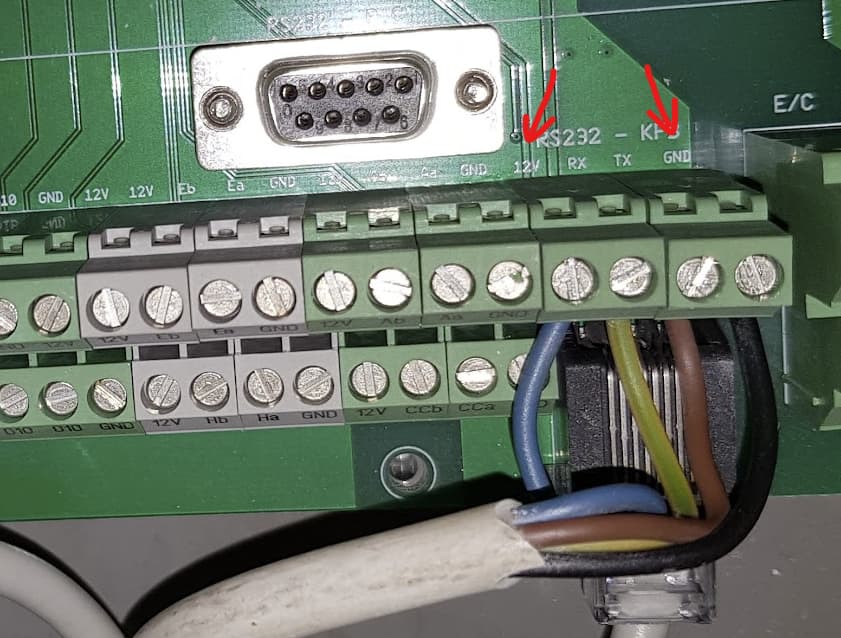
Well, 1st of all you should only have one device connected to the RS232 terminal. Either the CCEase or HA. This is a point-to-point protocol and can only have 2 devices connected at a time. Some units have 2 separate ports and apparently can serve two connected devices at a time but those are independent terminals on comfoair unit.
This will be in the docker container log. You can read it with docker logs command (docker container logs | Docker Docs) or via portainer gui if you have it.
Ah, ok. In this case I don’t think it is written anywhere, you need to run in interactive mode in console to see the log. I think it is also mentioned in the wiki
Thank you again for your setup — it’s finally working!
I solved it using a WaveShare Industrial Serial Server RS232/485 to WiFi or Ethernet PoE (B) and then integrated it into Home Assistant via Docker.
However, I noticed that changes in Home Assistant respond rather slowly — it takes about 2–3 seconds for the values to update.
Is there a way to make this faster, or is that just something we have to live with?
I tried to improve it with the following code:
**loop_counter = 0**
while True:
    try:
        if RS485_protocol == False:
            # Fast group
            get_temp();               time.sleep**(0.5)**
            get_fan_status();         time.sleep**(0.5)**
            get_ventilation_status(); time.sleep(0.5)

            # Slow group (every 4th cycle)
            if loop_counter % 4 == 0:
                get_filter_status();      time.sleep(0.5)
                get_filter_weeks();       time.sleep(0.5)
                get_filter_hours();       time.sleep(0.5)
                get_bypass_status();      time.sleep(0.5)
                get_preheating_status();  time.sleep(0.5)
                get_analog_sensor();      time.sleep(0.5)

            **loop_counter += 1**
I’ve set the refresh interval to 20 seconds.
In the DEBUG log, I’m still getting two warnings — can these be ignored, or do you see a way to fix them?
30-09-2025 13:27:01 WARNING: Expected return not found
30-09-2025 13:27:01 WARNING: get_ventilation_status function could not get serial data
Do you really mean 2-3 seconds? To me it is rather 10-30 seconds. My refresh interval is 15 seconds. And I don’t think the update interval has anything to do with it. Actually I’m refreshing the status right after sending control command to the unit but only after anything between 10-30 (sometimes even more) seconds the state is updated. My feeling is that the device has some internal timer according to which it updates sensors. If you we poll the status update shortly after that timer ticks we get update quickly, otherwise it might be only after the subsequent internal refresh. I’d bet it is 30 seconds. This means that there is nothing you can do about it from outside of the device’s control firmware.
And regarding warnings - my feeling is that this rs232 protocol is very unreliable - it often gets bad responses, not sure if it is the unit’s bad hardware, software or if there is anything that could be done from our python code side. I’ve experienced the same when connecting via rs232 cable directly to a pc as well as now with the waveshare wifi-rs232 interface.
Well, depends on location. I’ve hired the vent installers do design and build it. If you know nothing about the ventilation and how to calculate it I would recommend to hire experts.
I have successfully connected my CA300 Standard.
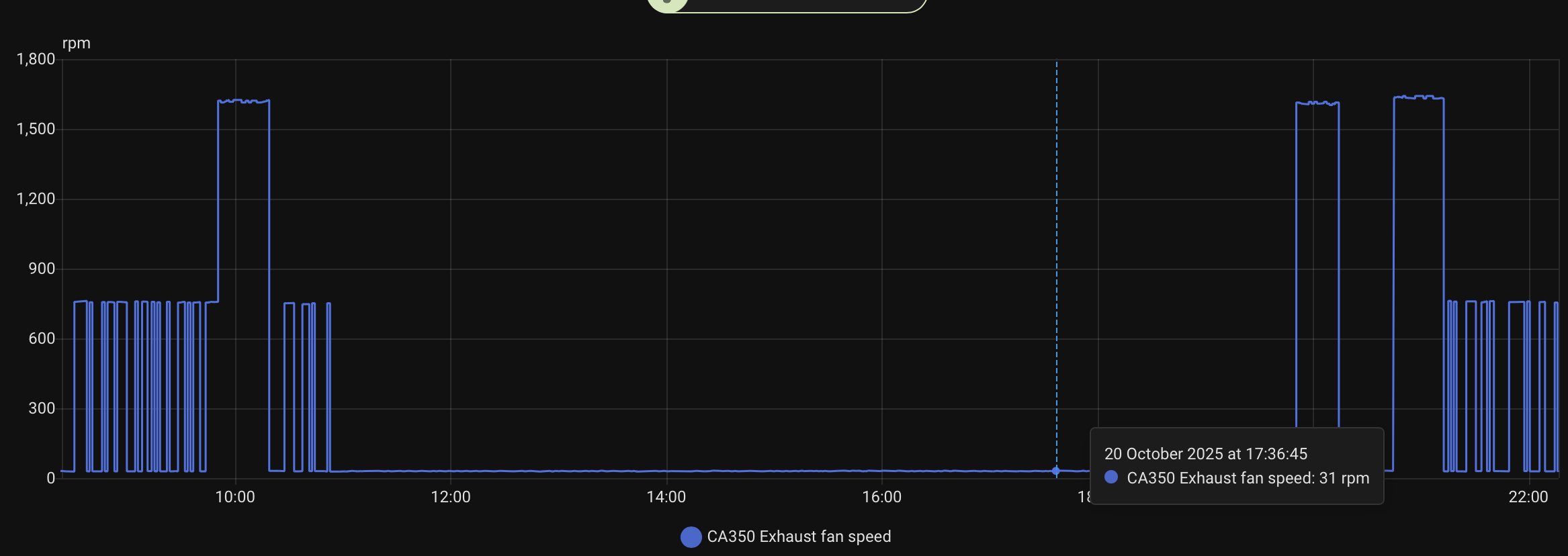
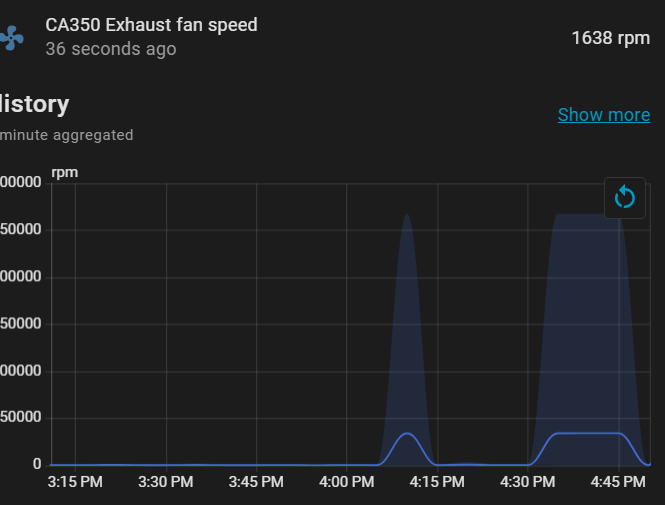
Anyone else experienced drops at the exhaust fan rpm?
Correct Speed Low Fan:
18-10-2025 18:30:06 DEBUG: published message 30 on topic comfoair/intakefanspeed at Sat Oct 18 18:30:06 2025
18-10-2025 18:30:07 DEBUG: published message 25 on topic comfoair/exhaustfanspeed at Sat Oct 18 18:30:07 2025
18-10-2025 18:30:07 DEBUG: published message 904 on topic comfoair/intakefanrpm at Sat Oct 18 18:30:07 2025
18-10-2025 18:30:07 DEBUG: published message 741 on topic comfoair/exhaustfanrpm at Sat Oct 18 18:30:07 2025
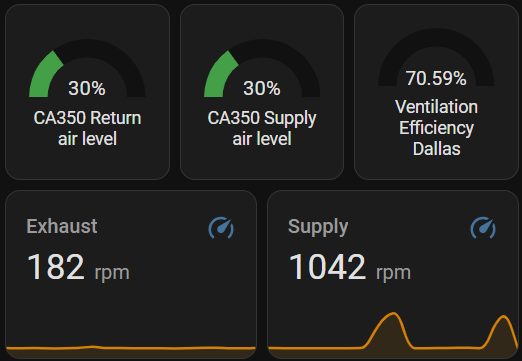
RPM Exhaust lower / Intake higher than usual:
18-10-2025 18:20:16 DEBUG: published message 30 on topic comfoair/intakefanspeed at Sat Oct 18 18:20:16 2025
18-10-2025 18:20:16 DEBUG: published message 25 on topic comfoair/exhaustfanspeed at Sat Oct 18 18:20:16 2025
18-10-2025 18:20:16 DEBUG: published message 1042 on topic comfoair/intakefanrpm at Sat Oct 18 18:20:16 2025
18-10-2025 18:20:16 DEBUG: published message 29 on topic comfoair/exhaustfanrpm at Sat Oct 18 18:20:16 2025
I have the same issue since a while. It was working ok when I set it up but since a year or so on one speed it always shows much lower RPM value. On different speeds the reading is ok. I would bet that something is wrong in the unit itself, e.g. failed sensor or something.
Hi @adorobis,
first off all thank you for this great Integration.
i am faceing a Implementation of my Wernig CS 90-160 HR like @elcrni.
in an Topic Above you Answered him, you have an Waveshare RS232 to LAN now in use.
Can you Please Explain me the Wiring? did you go also go in this Converter with the DB9 Plug? oder do you plugged the cables in on the other side? and is it correct do go on the Same output on the System Board of the Ventilation System like the Wall Panel? KFB? (Comfosense 55).
Thank you so mutch for your Informations.
No, the converter has the RS232 interface so just a standard serial cable is needed. On the comfoair side I’ve connected cables to the RJ45 terminal following the chart as described here. You can also use the screw terminal instead.
I’m working on integrating my Aeris 350 STD (Zehnder-branded) ventilation unit with Home Assistant via RS232. I came across two possible solutions and would appreciate your insights:
Waveshare RS232/485 TO WIFI ETH (B) – I understand some of you are using this successfully. My question is: How exactly are you powering the Waveshare module?
I’ve read that it can be powered from the “12V line” inside the ComfoAir unit, but I’m not sure if that refers to the RS232 port itself or a separate internal power source. Does anyone have a wiring example or photo of how they connected it?
I found a WiFi module on OLX that claims to work with Aeris 350/450/550 and is powered directly from the RS232 port:
OLX listing Has anyone tested this module or knows how it works?
It’s advertised as compatible with Home Assistant, but the seller doesn’t provide documentation or pinout. I’m concerned about powering anything directly from RS232, since it’s not designed to supply power.
Any advice or confirmation from someone who’s done this with Aeris 350 would be super helpful. I’d prefer a stable and documented solution, but I’m open to experimenting if it’s safe.
Hi everyone,
I’ve read through a good chunk of the 700+ messages in this discussion. I’ve had Home Assistant for a while, but I still consider myself a beginner with limited programming knowledge.
I have a Zehnder ComfoAir standard 300 375 system controlled by a very simple ComfoSense 55 unit, which is connected to the machine via a cable (similar to an RJ45).
Here’s my situation: I would like to integrate this system into Home Assistant, but I have no idea where to start. I don’t know what to buy or how to program an ESP32, as I’ve never done that before.
Is there a kind soul who can sell me a plug-and-play system to replace the ComfoSense 55? I tried searching online and found a device (LINK). The complete system costs about 30€. I reached out to the developer, but the platform isn’t sending my messages. Does anyone have any ideas or can help me out?
I’m writing from Italy. Thank you and apologies for the intrusion into this thread.
There is no plug and play solution to integrate Comfoair with HA. This discussion is about controling it via RS232 and to find which solution is the best for you I’d start with checking the possible deployment options in the wiki:
Personally I find the easiest to buy an RS232-WiFi (or ethernet) bridge. This one: RS232/485 TO WIFI ETH (B) ttps://www.waveshare.com/wiki/RS232/485_TO_WIFI_ETH_(B) can be powered from comfoair directly so number of connections and cables is minimized. I’m using it with the Docker deployment method, also described in the wiki.
Thank you for your answer.
What ready‑made cable can I use to connect the Aeris RJ45 RS232 port to the Waveshare DB9 RS232 port?
I know I could build a custom cable if I had the pinout, but I’d prefer to buy a reliable off‑the‑shelf solution (like a Cisco console cable or similar) if possible. Has anyone here already done this and can recommend a specific cable or adapter that works?
I don’t think you’ll find such cable. Just get an RS232 cable, cut it to the length you need and connect to the KFB screw terminal on comfoair control board as per the cable description from this post, the other end to the RS232 port of the waveshare module. That would be the easiest way without any soldering etc.
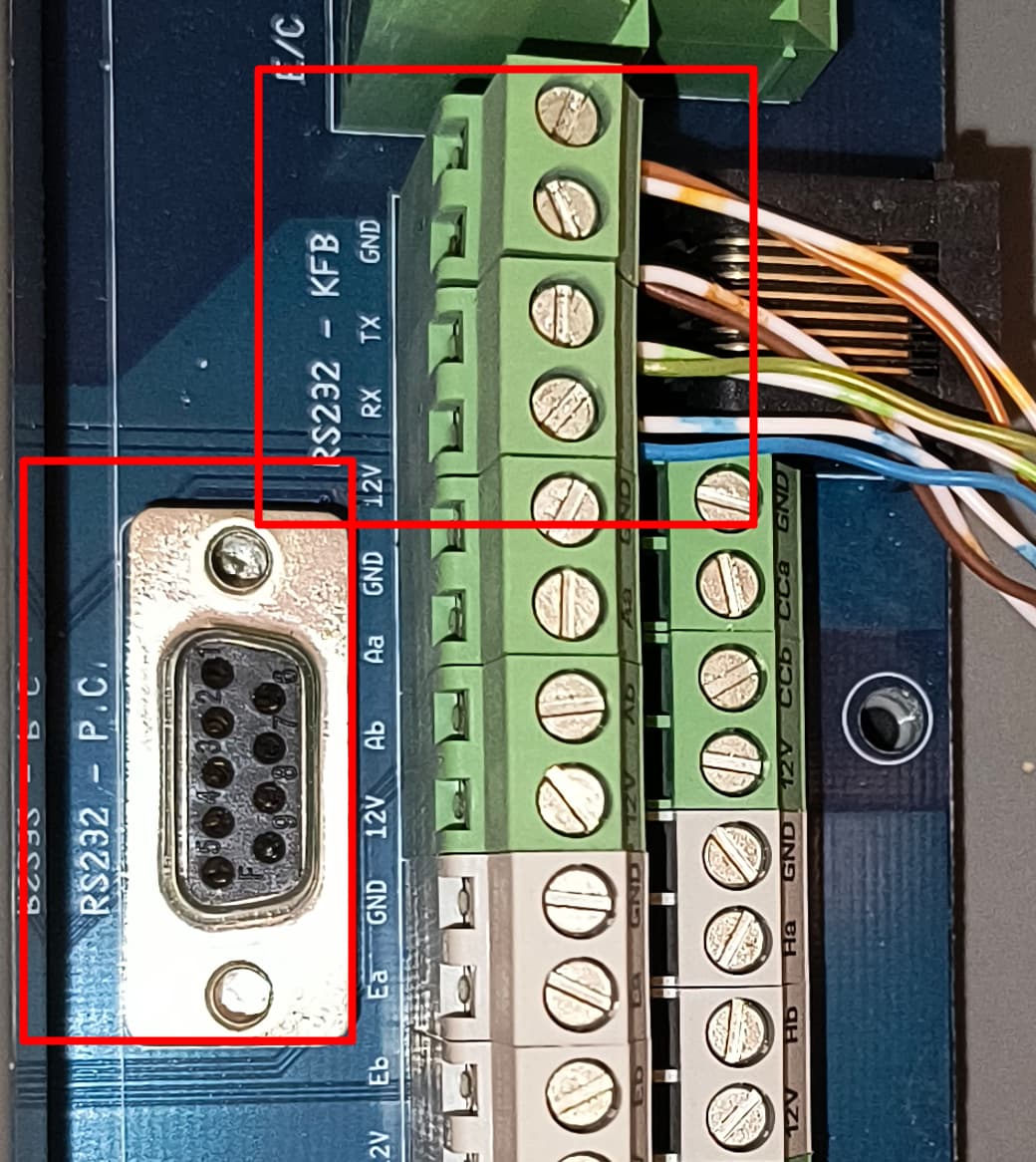

 How exactly are you powering the Waveshare module?