I use the Hue Tap dial with Z2M and NR. When I turn the dial there is a delay in dimming the lights of say, a second or so. I was wondering if dimming the lights with the dial is instant with this. When I look at the Z2M logs though, I suspect the delay is somewhere between the dial and Z2M.
Thank you
@fleeman can you take a look if it’s worth to update the blueprint? Before I take control of them. Since I have multiple, it would complicate things.
Sorry, I had to edit my post above. I got confused and shared the wrong template. It is now corrected.
If you don’t want to wait, you can change the blueprint template yourself. Use File Editor or VSCode Addon.
You should find it under: blueprints/automation
And remember don’t forget to restart the automations and template engine after the change.
I’ll get the blueprint fixed in the next few days—thanks for bearing with me!
2 Likes
Should be fixed now!
2 Likes
Great! Thank you
1 Like
Hello. Thank you for the blueprint it is working very well for us.
I am wondering if it is possible using this blueprint to have hue/color control via the dial. Maybe after double (or long) pressing the button the dial would control hue for a group of lights. Or possibly another button would activate this mode?
I’ve tried to figure out how to do this through your blueprint but I can’t come up with anything.
Hi,
I have imported your latest excellent Blueprint to handle the Hue Tap Dial, your work is great !
I am just failing to use the rotate clockwise and counter clockwise to dim a light (bulb), don’t really know how to do the setup ?
Could you provide more info to be able to achieve it ?
Many thanks in advance.
Nicolas
Hi,
Slightly offtopic, but since it seems to be a general question on how the brightness adjustment can be made with Hue Tapdial and Z2M.
This is a separate automation, but probably could be implemented also to the blueprint.
alias: Livingroom_Tapdial_BrightnessDial
description: Dynamically adjusts brightness with Hue Tap Dial for lights that are on
triggers:
  - trigger: mqtt
    topic: zigbee2mqtt/Livingroom_Tapdial_Remote
conditions: []
actions:
  - variables:
      lights_on: |-
        {{ expand(area_entities('living_room'))
          | selectattr('domain', 'eq', 'light')
          | rejectattr('object_id', 'eq', 'livingroom_lights_all')
          | selectattr('state', 'eq', 'on')
          | map(attribute='entity_id') | list }}
  - choose:
      - conditions:
          - condition: template
            value_template: "{{ lights_on | length > 0 }}"
        sequence:
          - target:
              entity_id: "{{ lights_on }}"
            data:
              brightness_step_pct: "{{ trigger.payload_json.action_brightness_delta | int * 0.5}}"
            action: light.turn_on
mode: parallel
max: 10
I have the “lights_on” variable, which checks which lights are on in the area “living_room”, since I wanted a functionality where brightness changes are only applied to the lights which are on. “livingroom_lights_all” is a Z2M group and I wanted to exclude that from the check.
@fleeman I would like to propose a change suggestion to this blueprint. It works great, but I think we could squeeze more juice out of it. Here I focus on zigbee2mqtt version.
When the device rotates, it typically sends 2 different MQTT messages, each with the content similar to the below examples.
Clockwise rotation of a single step
First message has a brightness_step_up action, followed by dial_rotate_right_step action message
{
  "action": "brightness_step_up",
  "action_direction": null,
  "action_step_size": 8,
  "action_time": null,
  "action_transition_time": 0.04,
  "action_type": null,
  "battery": 100,
  "brightness": null,
  "linkquality": 87,
  "update": {
    "installed_version": 33574183,
    "latest_version": 33574183,
    "state": "idle"
  }
}

{
  "action": "dial_rotate_right_step",
  "action_direction": "right",
  "action_step_size": null,
  "action_time": 15,
  "action_type": "step",
  "battery": 100,
  "brightness": null,
  "linkquality": 87,
  "update": {
    "installed_version": 33574183,
    "latest_version": 33574183,
    "state": "idle"
  }
}
Counterclockwise rotation of a single step
First MQTT message has a brightness_step_down action, followed by dial_rotate_left_step action message
{
  "action": "brightness_step_down",
  "action_direction": null,
  "action_step_size": 8,
  "action_time": null,
  "action_transition_time": 0.04,
  "action_type": null,
  "battery": 100,
  "brightness": null,
  "linkquality": 69,
  "update": {
    "installed_version": 33574183,
    "latest_version": 33574183,
    "state": "idle"
  }
}

{
  "action": "dial_rotate_left_step",
  "action_direction": "left",
  "action_step_size": null,
  "action_time": 15,
  "action_type": "step",
  "battery": 100,
  "brightness": null,
  "linkquality": 69,
  "update": {
    "installed_version": 33574183,
    "latest_version": 33574183,
    "state": "idle"
  }
}
Clockwise fast rotation
Now there are even 3 messages. I put them in a single block.
{
  "action": "brightness_step_up",
  "action_direction": null,
  "action_step_size": 117,
  "action_time": null,
  "action_transition_time": 0.05,
  "action_type": null,
  "battery": 100,
  "brightness": null,
  "linkquality": 102,
  "update": {
    "installed_version": 33574183,
    "latest_version": 33574183,
    "state": "idle"
  }
}

{
  "action": "dial_rotate_right_slow",
  "action_direction": "right",
  "action_step_size": null,
  "action_time": 31,
  "action_type": "step",
  "battery": 100,
  "brightness": null,
  "linkquality": 98,
  "update": {
    "installed_version": 33574183,
    "latest_version": 33574183,
    "state": "idle"
  }
}

{
  "action": "dial_rotate_right_step",
  "action_direction": "right",
  "action_step_size": null,
  "action_time": 15,
  "action_type": "rotate",
  "battery": 100,
  "brightness": null,
  "linkquality": 109,
  "update": {
    "installed_version": 33574183,
    "latest_version": 33574183,
    "state": "idle"
  }
}
Interesting part
The most interesting parts are the action messages brightness_step_up or brightness_step_down, because these messages contain the field action_step_size which tells us the relative number corresponding to the rotation steps between messages. The bottom line is that we could use this field to detect how much to set brightness on a light or how much to turn on speaker in a single shot.
Field action_step_size seems to contain value 8 for one slow step, and then increasing value depending on the speed of the knob rotation.
Proposed update
The proposed update is to introduce new variable and to update existing template checks.
Steps
Under the variables, introduce the action_step variable:
  - variables:
      input_text_var: !input last_pressed
      counter_var: !input tap_counter
      action_step: "{{ trigger.payload_json.action_step_size | int(0) }}"
Then, replace all checks:
dial_rotate_withbrightness_stepdial_rotate_left_withbrightness_step_downdial_rotate_right_withbrightness_step_up
Finally, when creating the actions, user can now use the action_step variable in a template to get the rotation from device and apply it for the use cases.
For example:
action: light.turn_on
target:
  entity_id: light.your_light
data:
  # Without modification, action step variable will be set to 8 on a single step.
  brightness_step_pct: '{{ action_step }}'
There is no behavior change when the user doesn’t need the variable data.
Final version
blueprint:
  name: Zigbee2MQTT - Philips Hue Tap Dial Switch by SmartHomeGeeks.io
  author: SmartHomeGeeks.io
  description:
    Integrate Philips Hue Tap Dial Switch into Home Assistant to create
    a powerful remote control, supporting single tap, double tap, hold, and conditional
    rotate functionality. <br><br> **For more information, visit:** [SmartHomeGeeks.io](https://smarthomegeeks.io/hue-tap-dial-switch/)
  domain: automation
  input:
    mqtt_topic:
      name: MQTT Topic
      description: Topic of the Philips Hue Tap Dial Switch
      default: zigbee2mqtt/<device name>
    tap_counter:
      name: Counter Helper
      description:
        Create a counter helper within Home Assistant to monitor the number
        of button presses on the switch, distinguishing between single and multiple
        clicks. This helper can be used for various switches, provided that they are
        not pressed at the same time
      selector:
        entity:
          domain:
            - counter
          multiple: false
    last_pressed:
      name: Last Pressed Input Text Helper
      description:
        Create an input text helper within Home Assistant to keep track
        of the last button pressed. This will facilitate implementing different rotation
        actions based on the last button pressed. **Each switch requires a unique
        helper!**
      selector:
        entity:
          domain:
            - input_text
          multiple: false
    button_1_single_press:
      name: Button 1 Single Press
      default: []
      selector:
        action: {}
    button_1_double_press:
      name: Button 1 Double Press
      default: []
      selector:
        action: {}
    button_1_hold:
      name: Button 1 Hold
      default: []
      selector:
        action: {}
    button_1_rotate_clockwise:
      name: Button 1 Rotate Clockwise
      default: []
      selector:
        action: {}
    button_1_rotate_counter_clockwise:
      name: Button 1 Rotate Counter-Clockwise
      default: []
      selector:
        action: {}
    button_2_single_press:
      name: Button 2 Single Press
      default: []
      selector:
        action: {}
    button_2_double_press:
      name: Button 2 Double Press
      default: []
      selector:
        action: {}
    button_2_hold:
      name: Button 2 Hold
      default: []
      selector:
        action: {}
    button_2_rotate_clockwise:
      name: Button 2 Rotate Clockwise
      default: []
      selector:
        action: {}
    button_2_rotate_counter_clockwise:
      name: Button 2 Rotate Counter-Clockwise
      default: []
      selector:
        action: {}
    button_3_single_press:
      name: Button 3 Single Press
      default: []
      selector:
        action: {}
    button_3_double_press:
      name: Button 3 Double Press
      default: []
      selector:
        action: {}
    button_3_hold:
      name: Button 3 Hold
      default: []
      selector:
        action: {}
    button_3_rotate_clockwise:
      name: Button 3 Rotate Clockwise
      default: []
      selector:
        action: {}
    button_3_rotate_counter_clockwise:
      name: Button 3 Rotate Counter-Clockwise
      default: []
      selector:
        action: {}
    button_4_single_press:
      name: Button 4 Single Press
      default: []
      selector:
        action: {}
    button_4_double_press:
      name: Button 4 Double Press
      default: []
      selector:
        action: {}
    button_4_hold:
      name: Button 4 Hold
      default: []
      selector:
        action: {}
    button_4_rotate_clockwise:
      name: Button 4 Rotate Clockwise
      default: []
      selector:
        action: {}
    button_4_rotate_counter_clockwise:
      name: Button 4 Rotate Counter-Clockwise
      default: []
      selector:
        action: {}
  source_url: https://community.home-assistant.io/t/zigbee2mqtt-philips-hue-tap-dial-switch-by-smarthomegeeks-io/696229
mode: parallel
max: 50
max_exceeded: silent
trigger:
  - platform: mqtt
    topic: !input mqtt_topic
condition:
  - condition: template
    value_template: "{{ trigger.payload_json.action != '' }}"
action:
  - variables:
      input_text_var: !input last_pressed
      counter_var: !input tap_counter
      action_step: "{{ trigger.payload_json.action_step_size | int(0) }}"
  - choose:
      - conditions:
          - condition: template
            value_template:
              "{{ trigger.payload_json.action is match('^button_[1-4]_press$')
              }}"
        sequence:
          - if:
              - condition: template
                value_template:
                  "{{ trigger.payload_json.action | regex_replace(find='[^1-4]',
                  replace='') != states(input_text_var) }}"
            then:
              - service: counter.reset
                target:
                  entity_id: "{{ counter_var }}"
          - service: input_text.set_value
            data:
              value:
                "{{ trigger.payload_json.action | regex_replace(find='[^1-4]', replace='')
                }}"
            target:
              entity_id: "{{ input_text_var }}"
          - service: counter.increment
            target:
              entity_id: "{{ counter_var }}"
          - delay:
              seconds: 1
          - service: counter.reset
            target:
              entity_id: "{{ counter_var }}"
      - conditions:
          - condition: template
            value_template:
              "{{ trigger.payload_json.action is match('button_[1-4]_press_release')
              and states(counter_var) > '1' }}"
        sequence:
          - choose:
              - conditions:
                  - condition: template
                    value_template:
                      "{{ trigger.payload_json.action == 'button_1_press_release'
                      }}"
                sequence: !input button_1_double_press
              - conditions:
                  - condition: template
                    value_template:
                      "{{ trigger.payload_json.action == 'button_2_press_release'
                      }}"
                sequence: !input button_2_double_press
              - conditions:
                  - condition: template
                    value_template:
                      "{{ trigger.payload_json.action == 'button_3_press_release'
                      }}"
                sequence: !input button_3_double_press
              - conditions:
                  - condition: template
                    value_template:
                      "{{ trigger.payload_json.action == 'button_4_press_release'
                      }}"
                sequence: !input button_4_double_press
    default:
      - if:
          - condition: template
            value_template:
              "{{ trigger.payload_json.action is match('button_[1-4]_press_release')
              }}"
        then:
          - delay:
              milliseconds: 250
          - if:
              - condition: template
                value_template: "{{ states(counter_var) > '1' }}"
            then:
              - stop: Double tap detected
      - choose:
          - conditions:
              - condition: template
                value_template:
                  "{{ states(input_text_var) == '1' and trigger.payload_json.action
                  is match('^brightness_step_') }}"
            sequence:
              - choose:
                  - conditions:
                      - condition: template
                        value_template:
                          "{{ trigger.payload_json.action is match('^brightness_step_down')
                          }}"
                    sequence: !input button_1_rotate_counter_clockwise
                  - conditions:
                      - condition: template
                        value_template:
                          "{{ trigger.payload_json.action is match('^brightness_step_up')
                          }}"
                    sequence: !input button_1_rotate_clockwise
          - conditions:
              - condition: template
                value_template:
                  "{{ states(input_text_var) == '2' and trigger.payload_json.action
                  is match('^brightness_step_') }}"
            sequence:
              - choose:
                  - conditions:
                      - condition: template
                        value_template:
                          "{{ trigger.payload_json.action is match('^brightness_step_down')
                          }}"
                    sequence: !input button_2_rotate_counter_clockwise
                  - conditions:
                      - condition: template
                        value_template:
                          "{{ trigger.payload_json.action is match('^brightness_step_up')
                          }}"
                    sequence: !input button_2_rotate_clockwise
          - conditions:
              - condition: template
                value_template:
                  "{{ states(input_text_var) == '3' and trigger.payload_json.action
                  is match('^brightness_step_') }}"
            sequence:
              - choose:
                  - conditions:
                      - condition: template
                        value_template:
                          "{{ trigger.payload_json.action is match('^brightness_step_down')
                          }}"
                    sequence: !input button_3_rotate_counter_clockwise
                  - conditions:
                      - condition: template
                        value_template:
                          "{{ trigger.payload_json.action is match('^brightness_step_up')
                          }}"
                    sequence: !input button_3_rotate_clockwise
          - conditions:
              - condition: template
                value_template:
                  "{{ states(input_text_var) == '4' and trigger.payload_json.action
                  is match('^brightness_step_') }}"
            sequence:
              - choose:
                  - conditions:
                      - condition: template
                        value_template:
                          "{{ trigger.payload_json.action is match('^brightness_step_down')
                          }}"
                    sequence: !input button_4_rotate_counter_clockwise
                  - conditions:
                      - condition: template
                        value_template:
                          "{{ trigger.payload_json.action is match('^brightness_step_up')
                          }}"
                    sequence: !input button_4_rotate_clockwise
          - conditions:
              - condition: template
                value_template:
                  "{{ trigger.payload_json.action == 'button_1_press_release'
                  }}"
            sequence: !input button_1_single_press
          - conditions:
              - condition: template
                value_template: "{{ trigger.payload_json.action == 'button_1_hold' }}"
            sequence: !input button_1_hold
          - conditions:
              - condition: template
                value_template:
                  "{{ trigger.payload_json.action == 'button_2_press_release'
                  }}"
            sequence: !input button_2_single_press
          - conditions:
              - condition: template
                value_template: "{{ trigger.payload_json.action == 'button_2_hold' }}"
            sequence: !input button_2_hold
          - conditions:
              - condition: template
                value_template:
                  "{{ trigger.payload_json.action == 'button_3_press_release'
                  }}"
            sequence: !input button_3_single_press
          - conditions:
              - condition: template
                value_template: "{{ trigger.payload_json.action == 'button_3_hold' }}"
            sequence: !input button_3_hold
          - conditions:
              - condition: template
                value_template:
                  "{{ trigger.payload_json.action == 'button_4_press_release'
                  }}"
            sequence: !input button_4_single_press
          - conditions:
              - condition: template
                value_template: "{{ trigger.payload_json.action == 'button_4_hold' }}"
            sequence: !input button_4_hold
3 Likes
Wow - nice addition that I will want to use. Has there been any traction to get this code added to the official blueprint?
Added! New version available now!
1 Like
Z2M got updated today and now I can continue with the zigbee testing. Something isn’t quite right yet as the device is now recognized but no actions are getting through - yet.
is there a way to set the minimum dim level?
if i turn the dial to far clockwise the light turns off, i gues it is better when you reach a mimimum dim level, turn of is done by a button.
Is it possible to use, say, double press to select between dimmer and colour change on a smart bulb? So, single press is on and dim functionality, double press selects colour change on the dial and another double press, resets back to the dimmer functionality.
For all of you who encouter issues that double-press is not working anymore and the blueprint doesn’t act as it should, you should have a look at this issue. This is due to the changed MQTT standard behaviour which now allows duplicate messages.
TLDR;:
create mosquitto.conf with the following content in /share/mosquitto:
allow_duplicate_messages false
Go to Apps → Mosquitto → Configuration → Customize → ative.
The setting will unfortunately be deprecated in MQTT 3.0, however, it will solve the issue for now as the other solution didn’t work for me.
I am using the SmartHomeGeeks Zigbee2MQTT Philips Hue Tap Dial Switch blueprint.
Home Assistant logs repeated warnings:
Template variable warning: 'dict object' has no attribute 'action'
when rendering:
{{ trigger.payload_json.action is match('^button_[1-4]press$') }}
{{ trigger.payload_json.action is match('button[1-4]press_release') }}
{{ states(input_text_var) == '1' and trigger.payload_json.action is match('^brightness_step') }}
Do you notice similar problems?
The automation is triggered by the whole Zigbee2MQTT device MQTT topic. Some device payloads do not include the key action, so the top-level condition:
{{ trigger.payload_json.action != '' }}
does not safely filter them. Because of that, later templates also try to read trigger.payload_json.action and Home Assistant logs warnings.
Suggested fix:
condition:
- condition: template
value_template: >
{{ trigger.payload_json is mapping and trigger.payload_json.get('action') not in [none, ''] }}
This should ignore non-action MQTT messages safely before the action block runs.
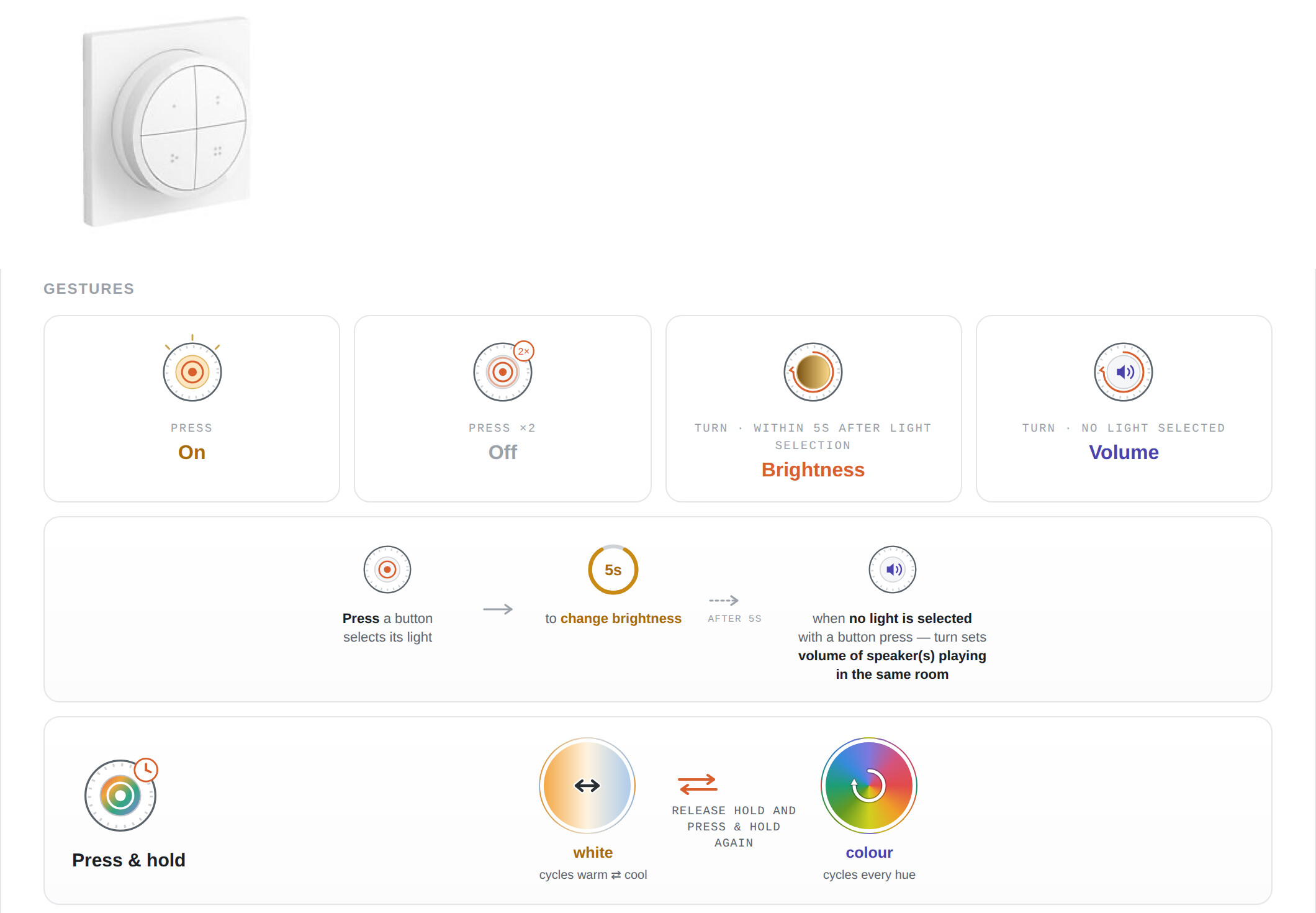
Inspired and building on top of the great work of @fleeman and others, who provided great blueprints, I finally wanted to have a perfectly customised solution for my lights setup. I have e.g. CCT, CCT/RGB, galaxy laser projectors, ir controlled candle lights, led fireplace, which I wanted to control all with 10 Hue Tap Dial Switches at my place, besides controlling them via HA ui, and also I wanted to use the same basic button/rotary wheel control logic for all of these different lights.
This is a high-level (not covering all my light types) overview of the general functionality/logic:
btw, the existing blueprints also coexist perfectly with a custom automation you only set up for certain buttons.