Is streaming responses supported with OpenAI Conversation and voice assistants?
The release notes imply that it is but I can’t see any settings to enable/disable it and responses don’t seem any quicker since this update.
Is streaming responses supported with OpenAI Conversation and voice assistants?
The release notes imply that it is but I can’t see any settings to enable/disable it and responses don’t seem any quicker since this update.
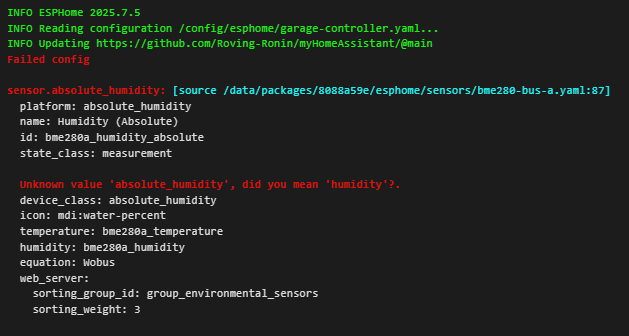
@mib1185 Seems like ESPHome isn’t in sync with Home Assistant in regards the new device_class: absolute_humidity ?
Added it to a BME280 sensor configuration and tried to ‘validate’ and it now fails:
My yaml for that sensor:
   # BME280 Sensor in I2C Port - Absolute Humidity
  - platform: absolute_humidity
    name: "${bme_sensor1_location}Humidity (Absolute)"
    id: bme280a_humidity_absolute
    state_class: measurement
    device_class: absolute_humidity
    icon: 'mdi:water-percent'
    temperature: bme280a_temperature
    humidity: bme280a_humidity
    equation: Wobus   # Wobus (Default), optional Tetens or Buck
ESPHome updates drop in the middle of the month.
Have you tried the Dev version?
It could be in that (I haven’t checked).
Must be the issue, pending ESPHome 2025.8.0 I’m guessing.
Dev build is showing:
Under AI suggestion in General settings, I can’t select anything. The field is empty. Am I missing something?
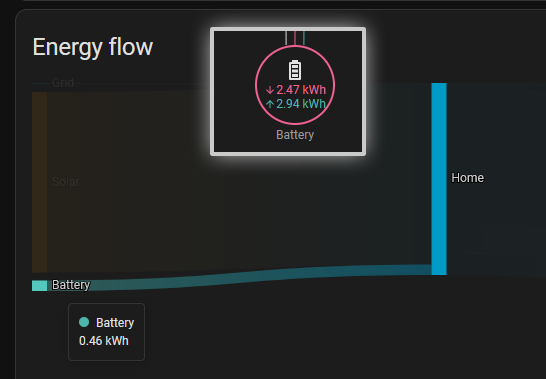
I see major difference in battery usage. Looks like a delta between Battery in and out. I’d prefer to see the energy from solar and from battery (even if the battery energy came from solar  )…
)…
Means that when i install it now it is fixed or in nxt sub Release?
Restarting integrations in Home Assistant can cause already-processed events to be retriggered, leading to unintended trigger automations. I think it’s a bug because the event did actually physically not occur.
This issue has been around for a long time. I hope the official team can notice it and fix it
If you add:
"light.*":
  icon: mdi:lightbulb
to global customization you set the default icon regardless of the state. Look here for an example and howto.
We will have to wait and see to be sure.
First time ever, (running HA for many many years) I have runned into issues during an update (from 2025.7.4 to 2025.8.5).
After the update I cannot access homeassistant.local:8123 or 192.x.x.x:8123.
Running banner command in console and everything seems normal.
Accessing homeassistant.local:4357 seems normal. (|Supervisor:|Connected| |Support:|Supported| |Health:|Healthy|)
From the console I can restart it to safe mode (core restart --safe-mode), then I can access HA on above methods. So I guess it has something to do with an addon or similar…not sure how to troubleshoot that…any tips is highly appreciated.
Running HASS on Proxmox.
OK - got it up and running.
Removed some swedish specific (skolmat & skola24) platforms from configuration.yaml - then started and all fine.
Completely different view from my sandkey vs energy.
I need to look at why because both use same data.
[edited:] FYI. The battery indication in the energy dashboard is in fact the energy lost, it’s the absolute value of the battery consumption. Where in my sandkey, it’s a bit different way to display this and I normaly need at least 2 days of data to have a correct view for the battery.
Can I add the value next to the text or only via the mouse over ?
No. it is not configurable. There’s an old feature request topic here: Core Sankey chart improvement suggestions · home-assistant/frontend · Discussion #24104 · GitHub
Though I don’t think the frontend dev responsible ever saw it as it still does not use the same CSS for the card title as all the other core cards.
Indeed. it’s battery consumption which is not the correct efficiency on one day (at least in my case)
As the previous day, solar charge the battery and then over the night, the battery discharge which is split over 2 days. I’m always looking for a day without sun, then battery is not charging in my case.
I discovered this in my post 2025.8: The summer of AI ☀️ - #53 by zigomatic, then see your post afterwards.
You need to setup an AI integration like OpenAI, Ollama, Google Generative AI or OpenRouter and add an AI task
Am I missing something here?
Most of the AI stuff I’ve seen in Home Assistant is basically just fancy text-to-speech with a sprinkle of “Look, I noticed the temperature changed!” thrown in.
Now we’ve got image analysis, which is cool.
But seriously, what else can we do?
I already had AI take a peek at my setup and it came back with some surprisingly smart suggestions.
So here’s my real question: could AI actually analyze my Home Assistant instance in real time?
And why am I still writing automations manually like it’s 2019? Can’t GenAI handle that?
Like, “OK Butler, whenever I leave home, lock the place down like Fort Knox and kill all the lights!”
Really not my taste either. Will customize it back again as well. Hope it will still work with the lighgroups,
For me a color coding of on and off for bulbs is still enough instead of crossed out bulbs. Didn’t see it anywhere else before as an off state for lights.
hmm, maybe that fixes this too, color palettes in themes not loaded · Issue #26415 · home-assistant/frontend · GitHub
occurred between b4 and b5
After updating to 2025.8 I noticed that remote access stopped working. In the all it was showing SSL error.
When I checked the cloud area, it was showing “Remote access is being prepared”, but even after waiting a lot, it did not change.
I reset the Cloud settings, and re-added my credentials. Now it stays in “Your certificate is loading”, and still doesn’t work.
The NabuCasa account page shows status “Not connected”.
Any clues here?