I thought about it. Its better. Not ideal, since one cannot guarantee another tab’s/window’s position is always the same for muscle memory do its trick, but better.
I’m going to give a shot to this first (hope it will support /config/developer-tools link to mimic current functionality). But your suggestion is my 2nd choice.
Though adding direct keyboard shortcut would be ideal IMO: 2026.2: Home, sweet overview - #305 by Forsaken.
I am genuinely perplexed at the logic of some recent updates and developments. I trust there is some logic behind it, I just don’t see it.
There are so many broken things that are in dire need of fixing in HA, yet the time is instead invested into visual tweaks (not fixes), renaming / moving things around for no real reason, the overview dashboard, and… winter mode in labs. Yes, a lot of other valuable updates make it (e.g. the energy dashboard) - and thank you for that.
Yet, 21st century table stakes features like product security are given precisely zero attention for at least 2+ years now.
- proper ABAC/RBAC
- patching up the open HA OS root console with no password, for anyone to do as they please
- proper OAuth2 implementation that supports custom providers
Or even something as simple as fixing the statistics editor, where the dialog closes and filters reset after every-single-change.
19 Likes
(yawning) Was explained earlier. Some people use iPad. Some people use PC and do not like that a tab is called “Settings”.
uBlock browser extension caused my Node Red to reload over and over again
You only hit enter on the keyboard once it’s highlighted. Why use a keyboard shortcut and then click?
And again, it’s only until the sidebar can be fully customized. Everyone has it in them to wait it out.
1 Like
So I was also pretty grumpy about the dev tools moving.
That said, somewhere along the line someone mentioned custom-sidebar which I hadn’t used before. I got a chance to configure it today, it’s a little intimidating as it’s quite powerful, but I got it working with almost no troubleshooting. I think someone shared a snippit but I couldn’t find it so I’ll share here.
In the end I’m actually grateful it got moved as now I have automations and devices/integrations on my sidebar too. I’m grateful because each of those were commonly accessed and I’m now saving a click for each. 
Just drop this in the YAML file the custom-sidebar instructions suggest you configure:
title: "Your Home"
exceptions:
  - is_admin: true
    extend_from: 'base'
    order:
      - new_item: true
        item: 'Developer Tools'
        href: '/config/developer-tools/yaml'
        icon: 'mdi:hammer'
        bottom: true
        order: 1
      - new_item: true
        item: 'Automations'
        href: '/config/automation/dashboard'
        icon: 'mdi:robot'
        bottom: true
        order: 2
      - new_item: true
        item: 'Integrations'
        href: '/config/integrations/dashboard'
        icon: 'mdi:devices'
        bottom: true
        order: 3
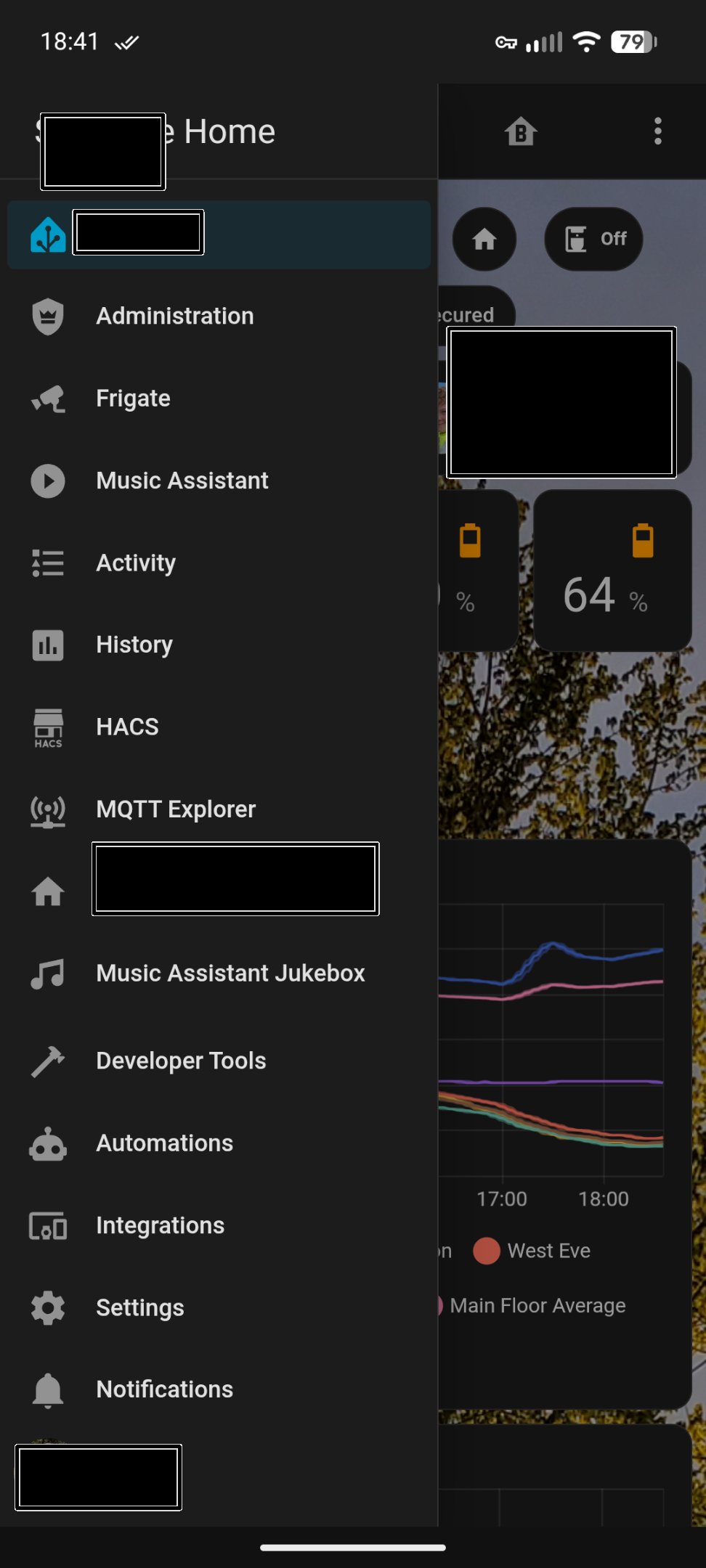
10 Likes
Strongly dislike the moving of Dev Tools. Many of the things in there are of constant use to most of us, I would think.
6 Likes
I cannot choose a dashboard for each device now? When i choose my cellphone dashboard at my profile, my pc changes too.
Why so many things get more complicated in this update?
2 Likes
It doesn’t help that the name of the integration for template sensor entities is “template” in the integrations listing. I brought that up a long while back and got shut down when I suggested changing the integration name.
I don’t get why HA wants to try to pander to new users who might be scared of being able to use HA for what HA is designed for.
“ooohhh, we can’t let new users know that there’s this thing called ‘developers tools’. they might be scared away because they might think they have to develop something, oooh scary”.
You know what - they are developing things. they’re developing the system used to automate their homes. So instead of getting new users to embrace the idea that they might have to actually learn something we hide everything that might seem even the least bit “developy” away. And then the users (who will all eventually start needing to use the developers tools as they realize what their HA is actually supposed to be used for) have to dig around in layers of menu’s just get to the tools that every user needs to use to actually automate their homes.
Every single thing that makes HA a home automation platform is hidden away in 2 or 3 layers deep of sub-menu’s that takes way too many clicks to get to.
You would think that by the way some HA devs act that they think that HA is just some kind of fancy UI dashboard for the users devices that they need to open up and click on to activate instead of eventually not needing to ever open up a dashboard ever again unless it’s to further develop the automation system (which is what I use the dashboard for 90% of the time) - which they then need to click thru several more submenu’s to get to.
But that’s just me. I could be wrong tho. I may have missed the memo.
I think it’s not right that the users are the ones who need to “wait it out” when it’s the developer(s) who have total control over when a feature gets released and they could have more easily “waited it out” instead of expecting thousands of users to deal with it in the meantime. Especially when there was no urgent need to move it right now since it was working just fine the way it was.
so is that an app that used to be THE app or is that now an app that used to be an add-on but is now an app?

Sorry couldn’t resist. But maybe I should try harder.
No. You have to choose a dashboard per user.
if you want a different dashboard on a different device you need to create a new user for each different device.
9 Likes
Kinda hoping they’ll announce this update was just a prank.
5 Likes
I believe that change goes back to 2025.8. Another option is Browser Mod which can assign default dash per device or user.
The app, what else 
1 Like
HA add-ons are services, not apps. And HA services are handlers.
2 Likes
Having this really weird issue where the quick menu just refuses to work on chrome. seems to work a-okay on firefox. tried removing chrome, restart and install and still the same issue? stumped. any suggestions?
Noting here that Browser mod Default dashboard Frontend setting is legacy since Home Assistant 2025.12. Browser Mod will only adjust defaultPanel in Browser localStorage. Once you set Default dashboard in Home Assistant, either global or user, it will win out over the localStorage setting.
Browser Mod does have a Default action Frontend setting where you can use browser_mod.navigate to achieve a default panel, though this will be whatever is set in Home Assistant.
1 Like
Agree on all points you raise.
Thanks for the heads up.
This solves it for me.
I can understand removing dev tools to make it less intimidating for new arrivals.
I don’t understand forcibly removing it for every one else
Should you also find this problem I narrowed it down to puppet and someone else has already raised the issue and suggested a workaround here:
The fact that the “Developer tools” button is now under the settings is another stupid idea on your part. Now you have to click more to get there. I’ve been using HomeAssistant for many years now, and it’s getting more complicated instead of easier. The system is now so overloaded with features and “apps” that only a few people need. Finally get back to the essentials
6 Likes
I’m using HA now for years. And was in love with information details and handling from day one. And thought, that it has been build this way, because the core delopers exactly build it that they, how they love it as well and for me it was a match. Same for every other friend, whom I recommended to move from the other platforms.
But in the meantime it seems, that is was build in a way the core developer hate it instead of loving it as I did. Because then afterwards there were:
- nesting setting menu
- Hiding history in more info
- Hiding attribute in more info
- Hiding dev tools
- hiding state settings in dev tools
- hiding integration start times
- Hiding entity ids
- Remove options for per user and per device settings
- Introducing 2-x more clicks than before everywhere
- Many more
A few in the meantime again mitigated. Thanks.
And I’m talking only about the admin part of HA. The user frontent part, I’m still in love with 99% of all changes and additions.
But this is, what I don’t get at all. There is an admin mode. There is an advenced view in UI. For me there is no single need to do all the above and hiding and removing information at all for that admin group. Do all this in end user view, without admin flag and without advanced mode and fine. But I’m “working” in admin mode and still would want the details and easynes as I was before and were I felt in love.
And if I don’t like this “work mode” I can still create another non admin user for it. I"m used to it because of the recent changes with themes and dashboards anyways.
19 Likes