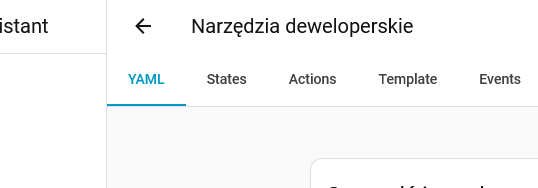
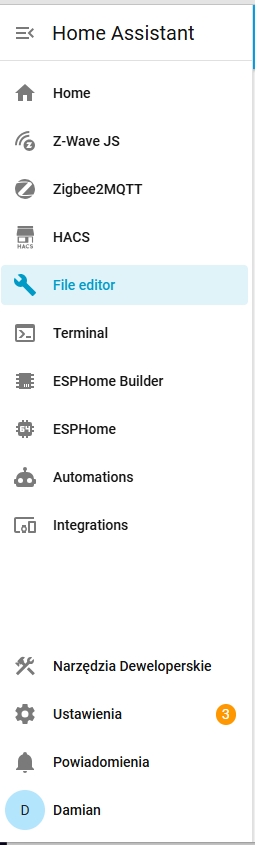
Dashboard selected view has no primary (blue) colour highlight:
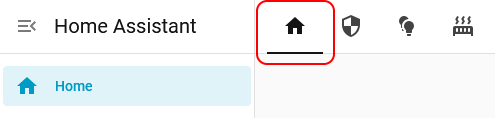
Settings pages selected views are highlighted in primary (blue) colour:

So not consistent, as it was supposed to be according to the blog post.
Dashboard selected view has no primary (blue) colour highlight:
Settings pages selected views are highlighted in primary (blue) colour:
So not consistent, as it was supposed to be according to the blog post.
Your Home is Highlighted, Your User-Made Dashboards View-Tabs / Cards / Badges is another “Story” , but i understand your point
After months of HA stability, I pushed my luck this Weekend.
I have made a lot of changes to automations and dashboards - and yes, then I upgraded to 2026.2 as my confidence in this great platform was (too) high :- 
Suddenly my automations vanished! Well, some odd old ones from months/years ago were kept but all my hard work in 138 automations blew up 
SO SAD - I read on Reddit that I am not the only one but after restarting a couple of times (the cure for some), I gave up and restored the old 2025 version and thereby all my hard work vanished in this late Evening hour…
Just a warning: I was starting to get the Github working but I didn’t have time to get through it all - and now: Gone!
Sorry for my late evening frustration but as always: Make your backup work on many levels and don’t be to confident: Always track your changes so you don’t lose too much…
Well, I have to rework it: The Home Assistant is at great platform but you really have to “know it all” - otherwise you can be hit when you least expect it…
Ah, that’s what you mean, I see now. It’s about text color, not the background color. Honestly, I wonder if this is even intended. Might be a bug. Brace for another change to the header in one of the next updates 
But either way, the design is not exactly the same, as in that part of settings the header items are centered, not left-aligned like in the dashboards.
However, I should note, the developers tools (also in settings now) has the same design as dashboards.
Personally I think it would look better if the primary color was used for the highlighted element in all those places, would look like this:
Yes, and once you’ve seen it, you can’t unsee it.
These should all be consistently highlighted in the primary colour.
Thanks @santiniuk for your configuration! I couldn’t get this add-on running until I came across your post. I’ve modified your code so that it’s now possible to freely set the order of each item in the sidebar menu. Hopefully, this will be useful for someone.
title: "Home"

exceptions:
  - is_admin: true
    order:
      - item: "Home"
        order: 1
      - item: "Z-Wave JS"
        order: 2
      - item: "Zigbee2MQTT"
        order: 3
      - item: "HACS"
        order: 4
      - item: "File editor"
        order: 5
      - item: "Terminal"
        order: 6
      - item: "ESPHome Builder"
        order: 7


      - item: "ESPHome"
        new_item: true
        href: "/config/integrations/integration/esphome"
        icon: "mdi:car-esp"
        order: 10
      - item: "Automations"
        new_item: true
        href: "/config/automation/dashboard"
        icon: "mdi:robot"
        order: 11
      - item: "Integrations"
        new_item: true
        href: "/config/integrations/dashboard"
        icon: "mdi:devices"
        order: 12


      - item: "Developer Tools"
        new_item: true
        href: "/config/developer-tools/yaml"
        icon: "mdi:hammer-wrench"
        bottom: true
        order: 100
      - item: "Settings"
        bottom: true
        order: 101
      - item: "Notifications"
        bottom: true
        order: 102
Hello, I find it completely illogical to move the developer tools without leaving the option to add a shortcut to the sidebar. It’s one of the things we use most, and now we have to waste time searching for it every time. But weren’t these things tested? Revert this as soon as possible, and the day you have the option to add a shortcut to the sidebar ready, then you can move the developer tools to configuration, but never before.
There are at least 3 or 4 solutions posted here how to get this entry back.
Unfortunately not any of them has been mentioned in the release notes, which would have been a good idea.
I see that you took your config from @santiniuk but there is something not right there. The line - item: "*" does nothing. I see that there is not any item named * among your items, so it will not match any one of them. If you open the browser console you should see a warning stating:
custom-sidebar: you have an order item in your configuration that didn’t match any sidebar item: “*”
Yes, they were. Every month, multiple users join the beta channel, install the beta during development, test the changes and give feedback to the developers and the team in general. That specific topic was discussed extensibly during the beta.
You’re right. The code was already working, so I quickly adapted it to my own needs without paying much attention to that initial part.
Which translated means: it was acknowledged that this was contentious during beta and that the decision of how to correct it will be via changes to the code in future releases.
Since the upgrade to 2026.2, clicking on the sensor card has changed. Most of the aera with the graph is not clickable, you have to click on the top of it to get a detailed history. Am I the only one, who noticed this?
Hi, everyone!
Is anyone else having problems with Melcloud reauthentication after the update?
I enter my username and password, it accepts them, and then asks for them again a moment later.
Could be caused by adding actions for Entity card (which is a part of the Sensor card). I will check what should be fixed in the code.
Update: fixed here.
Someone annoyed enought will simply fork Home-Assistant. Personally, I already maintain a couple of patches to Core and Frontend:
Before updating to 2026.2 (only crazy people updated on .0!), I’ll write a patch to revert attributes in more-info
What does that make beta testers then?
Indeed.
.2+ → validate in DEV → deploy to PROD.
Beta test directly in PROD? Hold my beer!
Yes. And I often do it from 5000km away too. Never had an issue that a 3 minute version rollback via the CLI couldn’t fix.
I have out of memory issue with my Home Assistant server, it keeps restarting Home Assistant constantly if I try to do anything, like going into settings or doing something on the dashboard.
It looks like I am the only one, so I don’t understand why it happens.
My setup is:
NUC NUC5i3RYK
Home Assistant OS
Core when it crashes: 2026.2.0 and 2026.2.1
Operating System: 17.0
Frontend: 20260107.2
The processor floats between 6% and 10% load in normal circumstances. And system uses around 2GB of 8GB of the memory.
I have a mid-size Home Assistant, I guess, with 120 Zigbee devices, around 100 automations, and another 200 Node-RED automations, 6 ESPHome devices and a couple of Local Tuya devices.
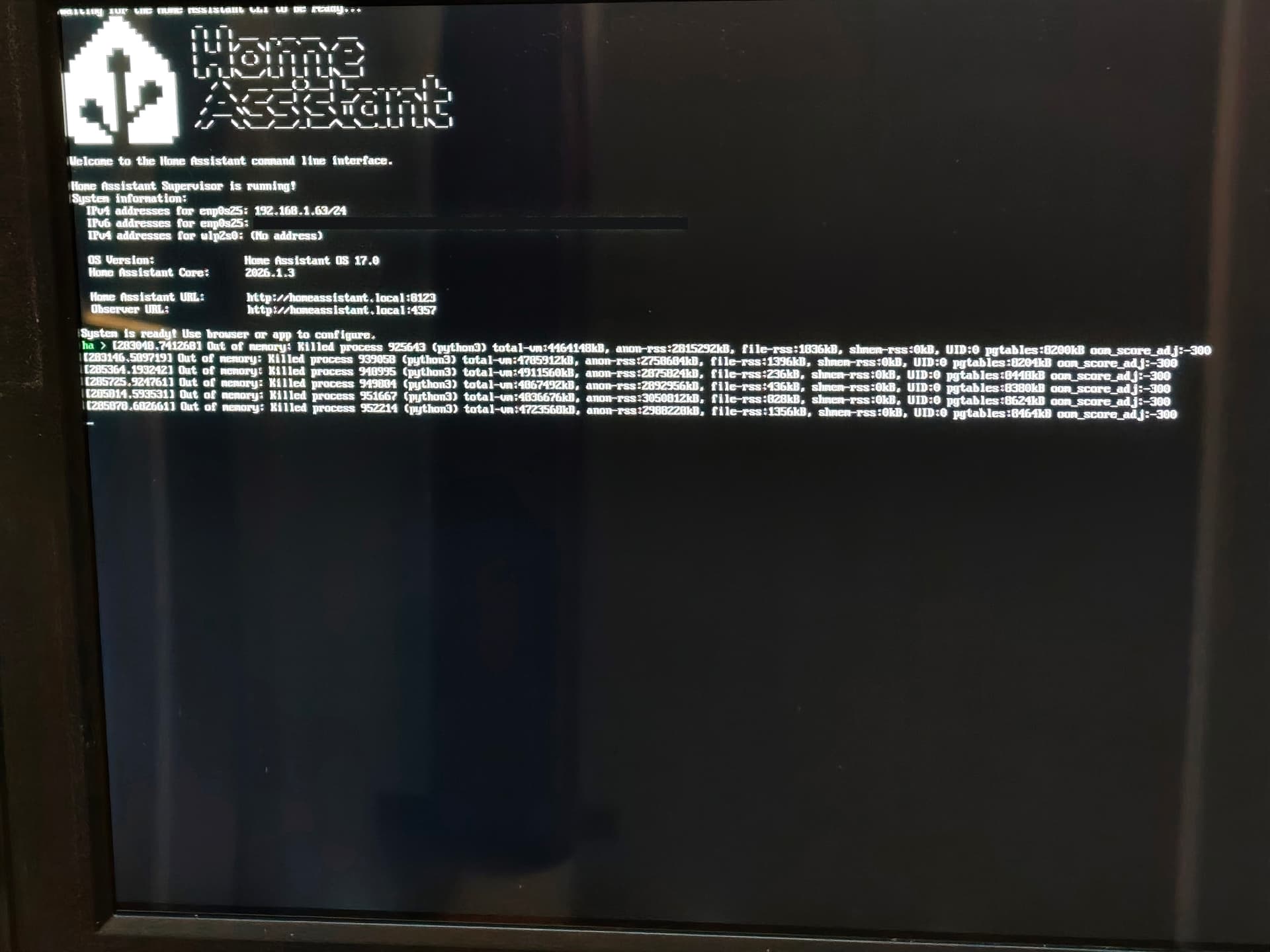
The first day when 2026.2.0 came out, I installed it directly as usual, and the problem started directly. I have a monitor connected to the NUC and I get random Out of memory messages on the monitor.
I can’t make screenshot in there, of course but it looks like this it is random and sometimes with an another process:
ha > [ 314.8196161 Out of memory: Killed process 4893 (python3) total-vm:4654888kB, anon-rss:2921864kB, file-rss:748kB,shmen-rss:0kB, UID:0 pgtables:0592kB oom_score_adj:-300
First replace the power supply of the NUC just to be sure, but it didn’t help.
Putting back a backup was impossible; I had to restart in safe mode and put the latest daily automatic backup of 2026.1.3, Since my backup is huge, it took a while. Even getting to restart in safe mode is hard in between the restarts
When I rolled back to 2026.1.3 Everything went back to normal.
After that I thought maybe it is one of the updates of add-ons or integrations which I installed around the same time as the update. So the last couple of days I installed the add-ons and the integrations one by one and waited to see if something happens, this was not the case. The system was working as always without issues.
When 2026.1.1 came out, I waited a little and installed it just an hour ago. The problem started again with Out of memory messages on the monitor connected to the NUC and Home Assistant keeps restarting again if I touch anything.
I did choose to make a backup just before I upgraded to 2026.2.1 I put that back again from save mode, I was back on 2026.1.3 but the problems were not gone, still same Home Assistant restarts and Out of memory messages.
Since I have daily automatically made backups, I will try to restart in Safe mode if the restarts let me and go back to a backup from 24 hours ago.
I am sure this will be solved soon. But since I didn’t see anyone report the same issue, I am afraid to try every update and fall into restarts and then try to restart in Safe Mode in between the restarts.
I would appreciate it if anyone has advice for me on how to deal with this issue.
I can only make a photo of the screen connected to the Home Assistant server, so no screenshots, but here it goes:
Each of those “Out of memory” messages is just before a restart or crash it depends on how you call it, I guess.