Hopefully someone does as this is very useful. I can’t find it anywhere.
See my comment in this thread:
Thank you SO much. I changed the keyboard shortcut line to
const isShortcut =
	e.code === 'KeyN' && !e.shiftKey && !e.ctrlKey && !e.metaKey && !e.altKey;
to get it to show up when pressing N, and it works perfectly!
Yes, but I was hoping to look at the YAML from the built-in dashboard so that I could see what features were used and adapt cards to my own preferences.
I guess I don’t understand the purpose of the built-in dashboards. Are people expected to use them as is? Are they supposed to be a learning tool for how to customize our own dashboards?
1 Like
I think they are meant to be used as is, by people who do not want to build their own.
Thanks for dropping the earworm in the end. Im listening to Linkin Park now and totally forgot what you wrote and why Im here. 
For anyone interested - the custom ZHA quirk for the Aqara H1 Dial has been updated by Shura1oplot over at Github. Key change is the power management has been changed to Xiaomi Power Config.
I’ve tested this and both my Aqara H1 dials now work under HA Core 2026.2.3
lumi.remote.rkba01
by LUMI

Connected via [dresden elektronik Conbee II]( <url redacted>)
Firmware: 0x00000014
Zigbee: 54:EF:44:10:00:DA:D6:EA

Zigbee info
Nwk: 0x57c0
Device Type: EndDevice
LQI: 255
RSSI: -49
Last seen: 2026-03-01T01:50:14
Power source: Battery or Unknown
Quirk: remote_h1_knob.AqaraH1KnobWireless
1 Like
To add more to the “HA doesn’t change users dashboards” discussion…
I finally updated my HA instance to 2026.2.3 yesterday and this morning had a need to open the HA app on my mobile device and the dashboard it opened was the new UI created overview dashboard. The original overview dashboard was still in the list on the sidebar (along with the new UI overview dashboard) and I selected that. as soon as I closed out the app and reopened it the UI overview dashboard was opened again. I had to go to my dashboard section on my mobile device and select the original overview as my default dashboard. As of now it’s working as expected.
I had opened my desktop (browser) HA instance yesterday after the update and it was still showing the original overview dashboard that I had before the update.
Both devices use the exact same HA user.
So there is definitely something that is not right. If the dashboard is supposed to be the same on every device based on the user then why was the default behavior between the two devices different?
Here is the setting for which dashboard to use in my user setting on the desktop:
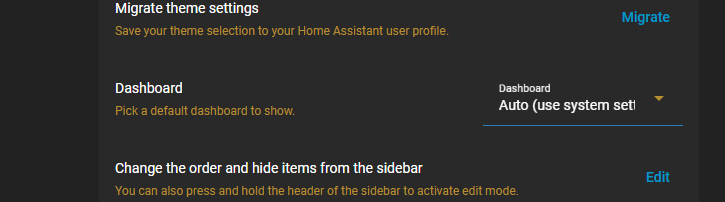
Here is the dashboard section of the desktop showing the original overview dashboard as the default for my user (which I did not have to go:
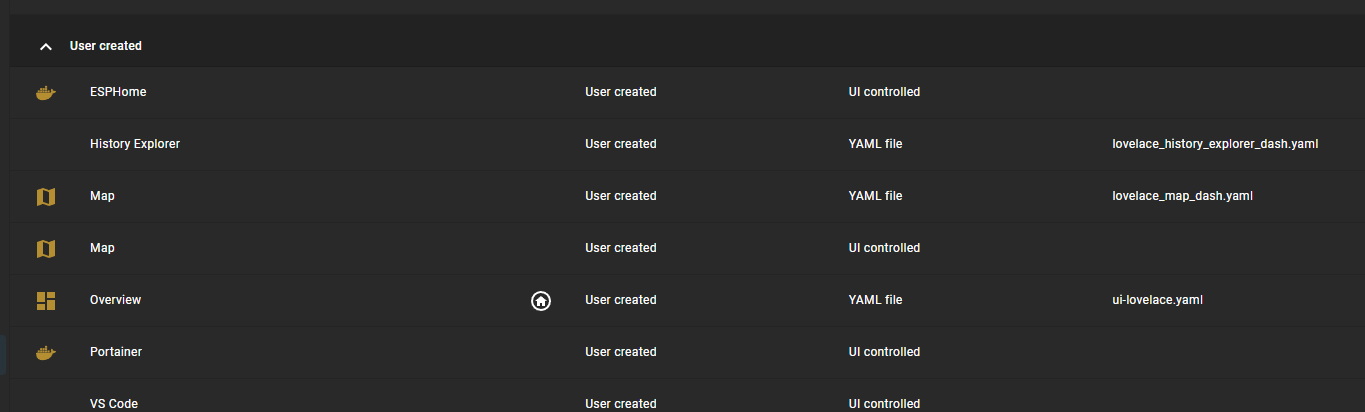
those settings are now the same on my mobile device app after I went into the dashboard settings on the mobile device and selected the old overview as my default.
Hopefully the dashboard issues are sorted on my devices but I haven’t logged out and back in to see if everything stays as desired from now on.
I just wanted to add extra support to the others who said that they were having issues with dashboards after the update and info for those who were claiming that it wasn’t happening or it was a bug. Well it must be a bug.
2 Likes
There are more “deep-rooted” Issues with these new Dashboards, which Dev’s seems resilient to either discuss nor admit.
Fact is it’s “All User Dashboards” which are generated( And Populated With Entities ( Even such which are not suppose to be in a “Multi-User” Dashboard )( i.e Calling HA’s internal API’s, And in some cases even External API’s ), And definitely in some cases Not In 2 Different Dashboards ) , And this is Happening in an early state of Building the Front-End ) , Before The Process of " Looking at Specific User Credentials/Settings/Connections " Etc.
No, It’s an Insane Idea, Which are a “popular” Approach For Brand-Protected APP’s ( Single-user-“locked”-Phone App )
3 Likes
Thays the fundamental disconnect.
Its being treated as a singe user system when it’s not.
The model Should be an infrastructure base that requires SU to access with a security mask sitting over the top. You don’t even see ents if you don’t have auth. But that would require a fundamental rearchiteture Ala Windows95/98/ME>WindowsXP (sp1 post UAC) thay took Microsoft three years internally and the first attempt got re-engineered again as SP1. It ain’t easy.
But thays fundamentally whatll need to happen to properly support a home. Right now it cannot securely support
Managed provider.
Head of household as admin
No privileged users/zones
Security isolation of creds. /mem spaces etc.
Which means things like secure agents (read::openclaw etc.)become a significant threat if introduced to HA because you can’t mask the structure internally. Go ahead run Claude code in your config folder and ask him about Has nonexistent security model… (I can see my house from here!) use HALMark when you do and ask him for a read only assessment… By the way - shameless plug.
Its currently fundamentally a single user system. And trying to shim multi user on tip is the root of everything you’re having issue with B…
I agree with thier direction of bifurcation of an admin s surface and a user surface. But until the security mask goes in front of the entities you will always fundamentally have this problem.
10 Likes
Well, i can only “add” I was “astonished” when i first saw these Dashboards, last Year, and Hoped/Thought/Wished they wouldn’t go “through” with it …
Really ! i simply couldn’t imagine that noone wouldn’t say " Hey wait a minute here ! " … let’s start in another end, And i.e give an “alternative” to those of choices, to install these “Fabulous” Dashboards as an Optional Integration. (With Warnings  )
)
1 Like
Because the url didn’t change.
The legacy url always points to the new homepage. If you set a new dashboard, you need to leave the page entirely. Refreshing will always show what’s set as the url, that’s how browsers work.
TLDR: your new default dashboard has a new url even though it’s the default. So your bookmarks all need to be updated.
Just updated to 2026.2.3 and thanks to everyone here I knew what to do after the update.
Added back the legacy Overview dashboard and made it the default.
Found “Developer tools” under “Settings”. I noticed that in the Google Chrome browser on a Mac the “Developer tools” page always opens at the bottom of the page and I always need to scroll up to get to “Check and restart”. Cleared cache and that didn’t make a difference.
Wish “Developer tools” had a “Show in sidebar” option like some of the Add-ons/Apps.
1 Like
I dont recall exactly, but it was recent as I usually update within a day or couple of days of them appearing in HA. So it would definitely have been either 2026.1 or 2026.2.1.
Performing ls -al in the config directory shows:
drwxr-xr-x   12 root     root          4096 Feb 26 20:56 .
drwxr-xr-x    1 root     root          4096 Feb 26 20:38 ..
-rw-r--r--    1 root     root             8 Feb 21 19:17 .HA_VERSION
drwxr-xr-x    2 root     root          4096 Sep 22  2023 .cloud
-rw-r--r--    1 root     root            82 Feb 22 21:27 .ha_run.lock
drwxr-xr-x    2 root     root          4096 Mar  1 21:44 .storage
drwxr-xr-x    2 root     root          4096 Oct  3  2023 .vscode
-rw-r--r--    1 root     root          8878 Feb 17 18:54 automations.yaml
drwxr-xr-x    5 root     root          4096 Oct 20 20:56 blueprints
-rw-r--r--    1 root     root          1202 Dec 21 21:08 configuration.yaml
drwxr-xr-x    4 root     root          4096 May 17  2025 custom_components
drwxr-xr-x    2 root     root          4096 Sep 22  2023 deps
-rw-r--r--    1 root     root             0 Feb 22 21:27 home-assistant.log.fault
-rw-r--r--    1 root     root      55681024 Mar  1 21:35 home-assistant_v2.db
-rw-r--r--    1 root     root         32768 Mar  1 21:51 home-assistant_v2.db-shm
-rw-r--r--    1 root     root       4260112 Mar  1 21:51 home-assistant_v2.db-wal
drwxr-xr-x    5 root     root          4096 Oct 21  2023 image
-rw-r--r--    1 root     root           192 Dec 22 22:58 ip_bans.yaml
-rw-r--r--    1 root     root             3 Oct 23 14:24 scenes.yaml
-rw-r--r--    1 root     root             0 Sep 22  2023 scripts.yaml
-rw-r--r--    1 root     root           160 May  6  2024 secrets.yaml
drwxr-xr-x    2 root     root          4096 Jan 11 20:36 themes
drwxr-xr-x    2 root     root          4096 Sep 22  2023 tts
drwxr-xr-x    3 root     root          4096 Oct  8  2023 www
-rw-r--r--    1 root     root        327680 Mar  1 14:38 zigbee.db
-rw-r--r--    1 root     root         32768 Mar  1 21:51 zigbee.db-shm
-rw-r--r--    1 root     root       4120032 Mar  1 21:51 zigbee.db-wal
I didn’t log out on my mobile app and it updated to the new one. Maybe that’s due to the fact that the app isn’t running in a browser window?  I’m not a browser guru so I don’t know how that all works.
But that’s the problem.
the developers make these changes and tell us “move along. there’s nothing to see here. we won’t change your dashboards” (or what ever the next change might be). but then things change. And it confuses users. including many fairly experienced users. But most of those experienced users can usually flail around trying to eventually fix things because they at least have some knowledge of how it’s supposed to work. new users don’t stand a chance.
All these breaking changes and renaming of things and creating new dashboards (that may or may not override the dashboard that the user has spent many hours trying to get things the way they want) and etc. just do nothing but sow confusion.
Every single month I dread the new release because I never know what new change might break something that just works for me right now. Almost every month I need to spend some amount of time mitigating the effects of decisions the developers make that many times provide no added functionality.
Luckily I can either fix it on my own or there are others that eventually figure out a work around for changes that someone else thought was a good idea. That’s exactly why I always wait till the end of the release cycle to update. I don’t want my stuff to potentially break and not know how to fix it right away. (Strangely but sadly) I feel relieved when the release comes out and I’m lucky enough to not have a breaking change happen so that that I don’t need to fix anything. And if there is something then I sigh and resign myself to needing to take the time…again…to fix things.
and then when users complain then we get told that “it’s no big deal. just deal with it. it doesn’t take much time or effort to fix it.”
Chances are high that I know I’m going to have to (IOW be forced to) spend some amount of time most months fiddling with my HA instance just to keep it working as I expect it to. Yeah, “it’s no big deal”. It might not take me that much time to fix it. Or it might. That’s the problem. We just never know when the next paradigm shifting breaking change is going to happen. All those “no big deal”, “not much time” changes all add up.
And it’s true that the fix itself usually doesn’t take much time. But that time expenditure isn’t simply the effort or time it takes to do the actual fix itself.
Most users need to spend way more time on the forums searching, reading the release thread, etc to see what they actually need to do to perform the fix than they do on actually fixing it. That’s after they do the update and then realize any stuff that changed that they now have to go looking for solutions for.
And if a user has the audacity to do the update without reading the release notes then people act like they’ve committed some act of sheer stupidity akin to stepping in front of a speeding car. “what do you mean you didn’t know about the breaking change? didn’t you read the release notes before you updated? No?! Everybody knows you need to read every word in every release note before you dare to do an update!.” But even if a user reads the release notes and finds something that affects them it still isn’t guaranteed that the fix for the breaking change will be included. Then they’re back to searching the forums for the fix.
How long would a user who doesn’t usually read a release thread need to spend reading just this 800 post thread to figure out how to get their developers tools link back in the sidebar the way it was before the change?
Another example is how much ado was made by users when the change was made to the template config. (I understand the reason for that change but that’s not the point.) That thread is 1370 posts long. That’s a long read. Many of those posts were made before the instructions for fixing it was included in a later patch release. I know I had to spend some time trying to figure out what needed fixed and then it took an hour to fix my 140 templates. That’s for just one change. add that to all the other changes that I’ve had to make over the years. And all the forum posts I’ve read trying to figure out what I needed to do to fix all of those other changes. It all adds up and that’s A LOT of time.
and how many forum posts have been made recently about “I can’t find my add-ons section anywhere. What’s wrong with my install?”. That’s all extra time spent posting about a change that added little if any benefit.
I also spend a lot of time on the forums (not nearly as much as used to tho) pre-emptively trying to make sure I keep up with anything that’s coming down the pike that might affect me.
It’s almost like it’s a second job. I have no idea how many countless hours I’ve spent in things HA related.
Instead of being forced to spend all that extra time just keeping up with breaking changes I’d like to use that time to actual create things with my HA that I want. Or maybe even spend it with my family? Nah, who am I kidding? I don’t have a family…anymore… (kidding…)
Adding new functionality is great but we spend way more time than we should fixing breaking changes.
We are users, not employees. Please try to remember that.
Sorry for the rant and I hope I’ve been respectful here and I don’t bring down the wrath of the gods. But don’t worry, I’m done now.
12 Likes
Guys what is now the best solution to get Dev Tools Back to the sidebar >700 Posts  ? The new Beta does Not have it when i read the doc right.
→ Dashboard link to Dev Tools?
I have a love/hate relationship with HA. I love it. I hate the development model. Once again I will post my wish they would adopt the development model of the most-similar open source project I can think of: OpenWRT.
The difficulty is the mass number of devices supported, and their ever-changing interfaces. But fixed release points for both the system itself, and the devices supported solves this. If you don’t add any new devices, you don’t need to update HA or the packages – which are only updated for security reasons.
Users then have the option of “stable” or “bleeding-edge”, and only have to worry about configuration changes if they choose to add a device that is unsupported in the stable configuration.
This month is not the first time I’ve skipped a release in order to avoid unnecessary hassles that are to be undone in an upcoming release. There is nothing compelling for me in most new releases and I only upgraded last month to front-run the hassle in all the template sensor changes.
I would loooooooove it if stable releases would be considered. Not holding my breath, not losing any sleep over it, but upgrading in a manner that minimizes my busy work.
2 Likes
I have no issue at all if the breaking changes were caused by external events outside the control of HA. Obviously HA needs to ensure that users devices still work with HA.
But I also wish that those outside influencers would also take this to heart themselves and not make unnecessary changes that force downstream users to react to maintain previous functionality.
Breaking changes (or even changes that simply “move things around”, etc) should only ever be a complete last resort when there is no other way around it.
put it in the sidebar with a custom panel in configuration.yaml.
panel_custom:
  - name: Developer Tools
    sidebar_title: Developer Tools
    sidebar_icon: mdi:hammer
    js_url: /api/hassio/app/entrypoint.js
    url_path: developer-tools/yaml
    embed_iframe: true
    require_admin: true
    config:
      ingress: core_configurator
3 Likes
Thank you 
1 Like