Add network state (online/offline) to every z2m device in 3 easy steps!

Hi everyone,

If this is a duplicate, please let me know. I was just reading and saw multiple questions about adding an availability sensor.

This can easily be achieved!

Step 1
In your z2m configuration, make sure you select MQTT version 5, this is needed for message retention. And make sure you have availability: enabled: true. This is disabled by default.
Restart if needed.

Now z2m publishes the network state (online/offline) of each device in it own topic, for instance: zigbee2mqtt/Kitchen motion sensor/availability

Step 2
You need to create a sensor for each of the devices. See MQTT Sensor - Home Assistant. But who has time for that!
Luckily, we have Jinja. Find the device name of your bridge, by default its Zigbee2MQTT Bridge. If you changed it, then also change it in the code below.

Copy and paste this code in “Developer tools” > “Template editor”.

{% set id_zigbee_radio = device_id('Zigbee2MQTT Bridge') %}

mqtt:
  binary_sensor:
{%- set ns = namespace(out=[]) -%}
{%- set device_ids = integration_entities('mqtt') | map('device_id') | unique | list -%}
{%- for device_id in device_ids -%}
{%- if device_attr(device_id, "via_device_id") == id_zigbee_radio %}
    - device:
        identifiers:
          - {{ (device_attr(device_id, "identifiers")|first)[1] }}
      enabled_by_default: true
      entity_category: diagnostic
      device_class: connectivity
      icon: mdi:network
      state_topic: zigbee2mqtt/{{ device_attr(device_id, "name") }}/availability
      unique_id: {{ (device_attr(device_id, "identifiers")|first)[1] | replace('zigbee2mqtt_', '') }}_network_state
      value_template: >
        {{ "{{ " }} 'ON' if value_json.state == 'online' else 'OFF' {{ " }}" }}
      name: network state
{%- endif %}
{%- endfor %}

Your output should look something like this.

mqtt:
  binary_sensor:
    - device:
        identifiers:
          - zigbee2mqtt_0x0000000000000000
      enabled_by_default: true
      entity_category: diagnostic
      device_class: connectivity
      icon: mdi:network
      state_topic: zigbee2mqtt/Kitchen motion/availability
      unique_id: 0x0000000000000000_network_state
      value_template: >
        {{  'ON' if value_json.state == 'online' else 'OFF'  }}
      name: network state
    - device:
        identifiers:
          - zigbee2mqtt_0x0000000000000000
      enabled_by_default: true
      entity_category: diagnostic
      device_class: connectivity
      icon: mdi:network
      state_topic: zigbee2mqtt/Livingroom motion/availability
      unique_id: 0x0000000000000000_network_state
      value_template: >
        {{  'ON' if value_json.state == 'online' else 'OFF'  }}
      name: network state

Step 3
Copy output (!) and paste it in your configuration.yaml. Be sure to check your configuration.
Now click on “Developer tools” > “YAML” > “YAML configuration reloading” > “Manually configured mqtt entities.”

Et voilĂ , every Z2M device has a sensor online/offline.

Hope this helps, kind regards,
- Ingrid

Edit: changed the sensor to a binary_sensor with device_class connectivity
4 Likes

And did you know that you can keep your last_seen entity from going to “unavailable” when the device is offline.

Add this to your zigbee2mqtt configuration.yaml.

device_options:
  homeassistant:
    last_seen:
      enabled_by_default: true
      availability: []

Kind regards,
- Ingrid

5 Likes

I’m trying this, but I’m running into an error in the template editor. “TemplateError: Must provide a device or entity ID”. I’ve spent a bit trying to debug it, but I can’t find why it would work for you and mine doesn’t. Here’s the code I’m using which is just a copy/paste of yours. My bridge has the default name. Its probably something simple, but I haven’t been able to find it so I thought I’d ask.

{% set id_zigbee_radio = device_id('Zigbee2MQTT Bridge') %}

mqtt:
  binary_sensor:
{%- set ns = namespace(out=[]) -%}
{%- set device_ids = integration_entities('mqtt') | map('device_id') | unique | list -%}
{%- for device_id in device_ids -%}
{%- if device_attr(device_id, "via_device_id") == id_zigbee_radio %}
    - device:
        identifiers:
          - {{ (device_attr(device_id, "identifiers")|first)[1] }}
      enabled_by_default: true
      entity_category: diagnostic
      device_class: connectivity
      icon: mdi:network
      state_topic: zigbee2mqtt/{{ device_attr(device_id, "name") }}/availability
      unique_id: {{ (device_attr(device_id, "identifiers")|first)[1] | replace('zigbee2mqtt_', '') }}_network_state
      value_template: >
        {{ "{{ " }} 'ON' if value_json.state == 'online' else 'OFF' {{ " }}" }}
      name: network state
{%- endif %}
{%- endfor %}

I figured it out. Apparently I have some mqtt entities (non-zigbee) that don’t have an associated device, so I had to filter “device=none”. The code below works for me, with the key line being:

{%- set device_ids = integration_entities(‘mqtt’) | map(‘device_id’) | reject(‘equalto’, None) | unique | list -%}

{%- set id_zigbee_radio = device_id('Zigbee2MQTT Bridge') %}
mqtt:
  binary_sensor:
{%- set ns = namespace(out=[]) -%}
{%- set device_ids = integration_entities('mqtt') | map('device_id') | reject('equalto', None) | unique | list -%}
{%- for device_id in device_ids -%}
  {%- if device_attr(device_id, "via_device_id") == id_zigbee_radio %}
    - device:
        identifiers:
          - {{ (device_attr(device_id, "identifiers") | first)[1] }}
      enabled_by_default: true
      entity_category: diagnostic
      device_class: connectivity
      icon: mdi:network
      state_topic: zigbee2mqtt/{{ device_attr(device_id, "name") }}/availability
      unique_id: {{ (device_attr(device_id, "identifiers") | first)[1] | replace('zigbee2mqtt_', '') }}_network_state
      value_template: >
        {{ "{{ " }} 'ON' if value_json.state == 'online' else 'OFF' {{ " }}" }}
      name: zigbee network state
  {%- endif %}
{%- endfor %}
1 Like

Once your binary sensors are created, you can count dead devices with template sensors. This one lists the number of dead devices, and the name of the device(s) is in attributes.

    #Sensor to count dead zigbee Devices with friendly names for notification purposes only.
    - name: "Dead Zigbee Devices Friendly Name"
      unique_id: dead_zigbee_devices_friendly_name
      unit_of_measurement: devices
      state: >
        {{ states
           | selectattr('entity_id', 'search', '_zigbee_network_state$')
           | selectattr('state', 'equalto', 'off')
           | list
           | length }}
      attributes: 
        device_names: >
          {{ states
             | selectattr('entity_id', 'search', '_zigbee_network_state$')
             | selectattr('state', 'equalto', 'off')
             | map(attribute='entity_id')
             | map('device_id')
             | map('device_attr', 'name')
             | unique
             | list }}
      icon: mid:zigbee

This one gives you the total zigbee device count from z2m and the number of them that are currently alive, for example “29 Alive / 30 Total”

    # Count Zigbee devices based on Zigbee2MQTT bridge
    - name: "Zigbee Device Count from z2m"
      state: >
        {%- set id_zigbee_radio = device_id('Zigbee2MQTT Bridge') %}
        {%- set device_ids = integration_entities('mqtt') | map('device_id') | reject('equalto', None) | unique | list %}
        {%- set ns = namespace(total=0, alive=0) %}
        {%- for device_id in device_ids %}
          {%- if device_attr(device_id, 'via_device_id') == id_zigbee_radio %}
            {%- set ns.total = ns.total + 1 %}
            {%- set zigbee_name = device_attr(device_id, 'name') | trim %}
            {%- set network_sensor_id = 'binary_sensor.' ~ zigbee_name | replace(' ', '_') | lower ~ '_zigbee_network_state' %}
            {%- set state = states(network_sensor_id) %}
            {%- if state in ['on', 'unknown'] %}
              {%- set ns.alive = ns.alive + 1 %}
            {%- endif %}
          {%- endif %}
        {%- endfor %}
        {{ ns.alive }} Alive / {{ ns.total }} Total
      icon: mdi:zigbee
      unique_id: "sensor_zigbee_device_count_from_z2m"

I’ve been looking but can’t seem to find (Gemini did find something but didn’t work, great ai…)

Is it possible to create a counter of the avaiable number of devices but from Z2M.

Because sometimes, every once or twice a year, a device drops from Z2M, but the device is removed completely. It would be nice if I can just create a notification on the number of devices dropping. I had one motion sensor which dropped last week, and Spooky didn’t notice.

This sensor will do what you want. You could then set an automation to notify you every time the count changed. You’d still have to manually figure out what device left, but at least you’d know something did. You should replace “Zigbee2MQTT Bridge” with the actual device name of your zigbee radio device.

- name: "Zigbee Device Count from z2m"
  state: >
    {%- set id_zigbee_radio = device_id('Zigbee2MQTT Bridge') %}
    {%- set device_ids = integration_entities('mqtt') 
        | map('device_id') 
        | reject('equalto', None) 
        | unique 
        | list %}
    {%- set ns = namespace(total=0) %}
    {%- for device_id in device_ids %}
      {%- if device_attr(device_id, 'via_device_id') == id_zigbee_radio %}
        {%- set ns.total = ns.total + 1 %}
      {%- endif %}
    {%- endfor %}
    {{ ns.total }}
  icon: mdi:zigbee
  unique_id: "sensor_zigbee_device_total_count_from_z2m"
1 Like

Do you have to do this for each device, or is it a global option?

Way cool, thanks!

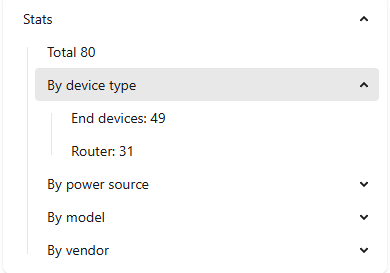
I’ve added it. It counts to 61, while z2m shows 80.

What can that be?

image

@mhoogenbosch This template sensor counts devices whose “via_device_id” attribute matches ‘Zigbee2MQTT Bridge’ or whatever the name of your zigbee radio is if you’ve changed it. If the count you’re getting is less than that shown in Z2M, then you have z2m devices whose ‘via_device_id’ attribute doesn’t match for some reason. You would need to investigate that on your end, as I can’t tell you why that would be. The code below will give you the “via_device_id” attribute for any entity when you paste it into the template section in developer tools. That might help you locate Z2M devices that don’t match for whatever reason and go from there.

{% set device = 'sensor.0x8cf681fffe223865_battery' %}
{% set attrs = [
  "via_device_id"
] %}
{% for attr in attrs %}
{{ attr }}: {{ device_attr(device, attr) }}
{%- endfor %}
1 Like

Right, thanks! I’ll look into it.

When it is placed under device options as shown, it is a global setting.
You can also change these setting per device.
- Ingrid

Thank you gor the great work!

However it stopped working with Home Assistant core 2025.9.1 (i skipped 2025.9.0). Now all sensors says Unknown.

Hans

worked for me, i am now seeing the availability in HA.

Thank you very much for the helpful template Ingrid! @studioIngrid
I just tried to implement the icon also as a template, just to find out that icon_template is not valid here. However there is still a solution, much simpler; leaving the line for the icon, as you specified the device_class already :slight_smile:

{% set id_zigbee_radio = device_id('Zigbee2MQTT Bridge') %}

mqtt:
  binary_sensor:
{%- set ns = namespace(out=[]) -%}
{%- set device_ids = integration_entities('mqtt') | map('device_id') | unique | list -%}
{%- for device_id in device_ids -%}
{%- if device_attr(device_id, "via_device_id") == id_zigbee_radio %}
    - device:
        identifiers:
          - {{ (device_attr(device_id, "identifiers")|first)[1] }}
      enabled_by_default: true
      entity_category: diagnostic
      device_class: connectivity
      state_topic: zigbee2mqtt/{{ device_attr(device_id, "name") }}/availability
      unique_id: {{ (device_attr(device_id, "identifiers")|first)[1] | replace('zigbee2mqtt_', '') }}_network_state
      value_template: >
        {{ "{{ " }} 'ON' if value_json.state == 'online' else 'OFF' {{ " }}" }}
      name: network state
{%- endif %}
{%- endfor %}

Hi all,

While this template worked, everything had to be maintained by hand — and as soon as something changed, things would break :warning:. So I set out to make a custom component that has all the features that I was missing. This new custom integration can:

  • :mag: Discover MQTT devices with connection topics
  • :arrows_counterclockwise: Auto-update when device information or topics change
  • :rotating_light: Raise Repair issues when a device becomes orphaned (meaning the Z2M device has dropped off the network entirely)
  • :zap: Use actions for bulk setup on new installs

Check it out here:

https://community.home-assistant.io/t/add-connection-state-online-offline-to-every-z2m-device-or-other-mqtt-device/

Kind regards,
- Ingrid

3 Likes
