I just released Home Assistant Proton Drive Backup, an add-on that automatically creates Home Assistant backups and keeps copies of them in Proton Drive.
It's a Proton Drive port of the excellent Home Assistant Google Drive Backup add-on by Stephen Beechen. The scheduling, retention, and generational backup logic is reused unchanged, only the storage backend has been replaced.
Proton recently released an official CLI for Proton Drive, and I wanted to use it to get my HA backups into an end-to-end encrypted drive instead of a regular cloud one. There wasn't an existing add-on for it, so I built one.
Bonjour, je ne parle pas français, j'utilise donc Google Traduction pour rédiger ce message. Veuillez m'excuser pour les éventuelles erreurs. Pour répondre à votre question, cette extension utilise l'interface en ligne de commande (CLI) récemment publiée de Proton Drive, qui, je crois, est également compatible avec les comptes gratuits. L'erreur s'affiche-t-elle sur le site web de Proton ou dans l'interface de l'extension elle-même ? Si elle apparaît dans l'extension, pourriez-vous fournir les journaux (logs) ?
Hi, just wanted to check if you're pointing out that add-ons were renamed to apps or you're facing an issue while installing. If it's the former, thanks for pointing it out. I'll update the doc later in the day. If it's the latter, can you please describe the exact issue you're facing? Can you also provide details of your hardware? Happy to help.
I have installed the add-on then I try to configure Proton drive by your connexion page then that open a page 'sign in to proton drive' then a button iopen proton sign in. Here I come to Proton Drive: Sign-in and when I fill my information, I get a error message than my email is not existing. Stopped there - you can answer in english, no problem
Awesome! I was searching for this very specific solution you built here and AI told me that it became recently available and put this link. First thought it was hallucinating. Big ups!!
hi @luttappi
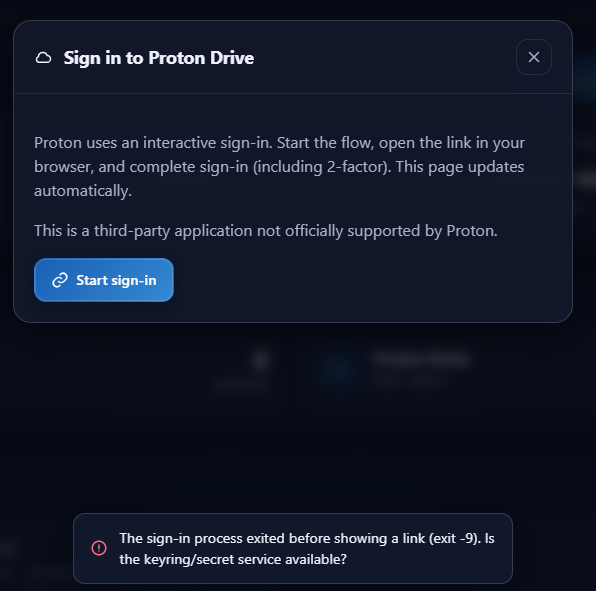
i have a problem in the initial sign in process. If i hit the sign in Button, no Sign in URL appears so i cant connect the addon with my proton drive account…Only this short error message is raising: The sign-in process exited before showing a link (exit -9). Is the keyring/secret service available? Do i have something other to do?
I already deleted my browser cache, trying another browser and restarted Homeassistant…
Hi @marcelgoe16, can you please provide logs and some info about your hardware where you’re running home assistant? You can find logs in the logs section of the app. Thanks
Thanks for the log. Exit -9 means the proton-drive process was killed by the operating system. The add-on didn’t stop it, and it produced no output at all. The most common reason for this is the system running out of memory.
Could you check two things:
Restart the add-on so the error happens again, then go to Settings → System → Logs, switch the source (dropdown, top right) to “Host”, and look for a line like Out of memory: Killed process ... from around that moment. Please paste what you find.
How much RAM is assigned to your Proxmox VM, and is ballooning enabled?
Hi @luttappi,
after starting the addon, the entries of the host protocol are jumping high.
And as you expected: I can find the following entry:
2026-07-28 17:25:15.545 homeassistant kernel: Out of memory: Killed process 373222 (proton-drive) total-vm:80887084kB, anon-rss:3293664kB, file-rss:48kB, shmem-rss:0kB, UID:0 pgtables:12452kB oom_score_adj:200
Balooning is active and i assigned 4 GB of RAM to the HASS VM.
The NUC has 16GB. I could double the RAM for HASS.
Hey thanks for this add on. Just switched to proton drive from google drive and this is exactly what I wanted. Everything worked for me although I noticed when first starting it it mentioned it was going to make a backup in like 10 minutes. I went right to settings and made my auto backups for 3AM. Not sure if this was supposed to automatically make a backup after started the add on
Yes, that’s intended. When the add-on starts up and there aren’t any backups yet, it schedules one straight away. It just holds it back about 10 minutes so it isn’t creating a backup while Home Assistant is still booting (the same short delay applies right after you sign in to Proton). This is inherited from Home Assistant Google Drive Backup, which the add-on is a port of.
After that first backup, it follows your settings. So with 3 AM configured, the next one should land at 3 AM, then every days_between_backups days after that.