Hi. I am trying to use your app but I habe problems to find the following informations:
Client ID
Client Secret
User prefix
Can someone help me?
Hi. I am trying to use your app but I habe problems to find the following informations:
Client ID
Client Secret
User prefix
Can someone help me?
hi, i know it’s 8 years later but can you maybe still share the client secret to me please? ^^
the secret is 929a9f6253babbee1a6e8d4bd51745f
for version 2.4.4.0
There is one number missing at the end and it is lower than 1…
however I have a feeling I cant do anything anymore except reading the temperature???
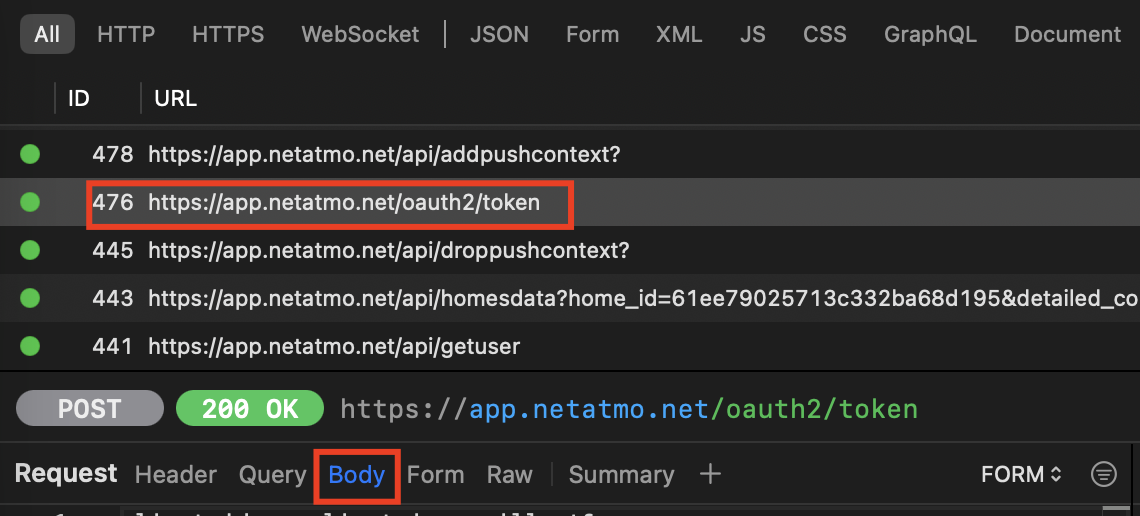
I have recently installed the integration, and to me it seems to work just fine, with version number 1.0.4.0 (even if the iPhone client version is much newer, 2.4.2). Also I wanted to share a little guide here how can you find the ominous client_secret and client_id yourself if you are curious enough. I am a Mac and iPhone user myself, so I detail steps for these platforms, but it can easily be adopted.
<MAC_IP><MAC_IP>9090http://proxy.man/ssl
app.netatmo.net URL (indeed the vaillant app is just a wrapper around netatmo  ) → Click on it
https://app.netatmo.net/oauth2/token. Select it, and click on Body to get the content.client_id, and client_secret we have been looking for 
 . This is the exact reason why you should not trust any public wifi, because a bad actor can do what we did with some tricks (called man in the middle attacks). Be safe!
Any chance to get access somehow to the flow temperatures of the boilers, maybe the return temperatures, heat curve?
Hi. I am trying to use your app but I habe pr the informations:
Client ID
Client Secret
User prefix
Can someone help me?
I’m on iphone et je suis français 
Thank’s
can someone provide me the secret key and client id please?
Don’t forget to add the last ‘0’
Thanks a lot. It work fine 
Hi everyone, I just updated to HA core 2026.01 and the vsmart integration is giving me the following error. Any advice?
Registrador: homeassistant.setup
Fuente: setup.py:343
Ocurrió por primera vez: 08:25:22 (1 ocurrencia)
Última vez registrado: 08:25:22

Setup failed for custom integration 'vaillant_vsmart': Unable to import component: cannot import name 'Config' from 'homeassistant.core' (/usr/src/homeassistant/homeassistant/core.py)
Traceback (most recent call last):
  File "/usr/src/homeassistant/homeassistant/loader.py", line 1018, in async_get_component
    comp = await self.hass.async_add_import_executor_job(
           ^^^^^^^^^^^^^^^^^^^^^^^^^^^^^^^^^^^^^^^^^^^^^^
        self._get_component, True
        ^^^^^^^^^^^^^^^^^^^^^^^^^
    )
    ^
  File "/usr/local/lib/python3.13/concurrent/futures/thread.py", line 59, in run
    result = self.fn(*self.args, **self.kwargs)
  File "/usr/src/homeassistant/homeassistant/loader.py", line 1078, in _get_component
    ComponentProtocol, importlib.import_module(self.pkg_path)
                       ~~~~~~~~~~~~~~~~~~~~~~~^^^^^^^^^^^^^^^
  File "/usr/src/homeassistant/homeassistant/util/loop.py", line 201, in protected_loop_func
    return func(*args, **kwargs)
  File "/usr/local/lib/python3.13/importlib/__init__.py", line 88, in import_module
    return _bootstrap._gcd_import(name[level:], package, level)
           ~~~~~~~~~~~~~~~~~~~~~~^^^^^^^^^^^^^^^^^^^^^^^^^^^^^^
  File "<frozen importlib._bootstrap>", line 1387, in _gcd_import
  File "<frozen importlib._bootstrap>", line 1360, in _find_and_load
  File "<frozen importlib._bootstrap>", line 1331, in _find_and_load_unlocked
  File "<frozen importlib._bootstrap>", line 935, in _load_unlocked
  File "<frozen importlib._bootstrap_external>", line 1023, in exec_module
  File "<frozen importlib._bootstrap>", line 488, in _call_with_frames_removed
  File "/config/custom_components/vaillant_vsmart/__init__.py", line 10, in <module>
    from homeassistant.core import Config, HomeAssistant
ImportError: cannot import name 'Config' from 'homeassistant.core' (/usr/src/homeassistant/homeassistant/core.py). Did you mean: 'config'?

During handling of the above exception, another exception occurred:

Traceback (most recent call last):
  File "/usr/src/homeassistant/homeassistant/setup.py", line 343, in _async_setup_component
    component = await integration.async_get_component()
                ^^^^^^^^^^^^^^^^^^^^^^^^^^^^^^^^^^^^^^^
  File "/usr/src/homeassistant/homeassistant/loader.py", line 1038, in async_get_component
    self._component_future.result()
    ~~~~~~~~~~~~~~~~~~~~~~~~~~~~~^^
  File "/usr/src/homeassistant/homeassistant/loader.py", line 1030, in async_get_component
    comp = self._get_component()
  File "/usr/src/homeassistant/homeassistant/loader.py", line 1078, in _get_component
    ComponentProtocol, importlib.import_module(self.pkg_path)
                       ~~~~~~~~~~~~~~~~~~~~~~~^^^^^^^^^^^^^^^
  File "/usr/src/homeassistant/homeassistant/util/loop.py", line 201, in protected_loop_func
    return func(*args, **kwargs)
  File "/usr/local/lib/python3.13/importlib/__init__.py", line 88, in import_module
    return _bootstrap._gcd_import(name[level:], package, level)
           ~~~~~~~~~~~~~~~~~~~~~~^^^^^^^^^^^^^^^^^^^^^^^^^^^^^^
  File "<frozen importlib._bootstrap>", line 1387, in _gcd_import
  File "<frozen importlib._bootstrap>", line 1360, in _find_and_load
  File "<frozen importlib._bootstrap>", line 1331, in _find_and_load_unlocked
  File "<frozen importlib._bootstrap>", line 935, in _load_unlocked
  File "<frozen importlib._bootstrap_external>", line 1023, in exec_module
  File "<frozen importlib._bootstrap>", line 488, in _call_with_frames_removed
  File "/config/custom_components/vaillant_vsmart/__init__.py", line 10, in <module>
    from homeassistant.core import Config, HomeAssistant
ImportError: cannot import name 'Config' from 'homeassistant.core' (/usr/src/homeassistant/homeassistant/core.py). Did you mean: 'config'?
Problème identique : version 2026.1.1
Setup failed for custom integration ‘vaillant_vsmart’: Unable to import component: cannot import name ‘Config’ from ‘homeassistant.core’ (/usr/src/homeassistant/homeassistant/core.py)
Traceback (most recent call last):
File “/usr/src/homeassistant/homeassistant/loader.py”, line 1018, in async_get_component
comp = await self.hass.async_add_import_executor_job(
^^^^^^^^^^^^^^^^^^^^^^^^^^^^^^^^^^^^^^^^^^^^^^
self._get_component, True
^^^^^^^^^^^^^^^^^^^^^^^^^
)
^
File “/usr/local/lib/python3.13/concurrent/futures/thread.py”, line 59, in run
result = self.fn(*self.args, **self.kwargs)
File “/usr/src/homeassistant/homeassistant/loader.py”, line 1078, in _get_component
ComponentProtocol, importlib.import_module(self.pkg_path)
~~~~~~~~~~~~~~~~~~~~~~~^^^^^^^^^^^^^^^
File “/usr/src/homeassistant/homeassistant/util/loop.py”, line 201, in protected_loop_func
return func(*args, **kwargs)
File “/usr/local/lib/python3.13/importlib/init.py”, line 88, in import_module
return _bootstrap._gcd_import(name[level:], package, level)
~~~~~~~~~~~~~~~~~~~~~~^^^^^^^^^^^^^^^^^^^^^^^^^^^^^^
File “”, line 1387, in _gcd_import
File “”, line 1360, in _find_and_load
File “”, line 1331, in _find_and_load_unlocked
File “”, line 935, in _load_unlocked
File “”, line 1023, in exec_module
File “”, line 488, in _call_with_frames_removed
File “/config/custom_components/vaillant_vsmart/init.py”, line 10, in
from homeassistant.core import Config, HomeAssistant
ImportError: cannot import name ‘Config’ from ‘homeassistant.core’ (/usr/src/homeassistant/homeassistant/core.py). Did you mean: ‘config’?
The below was written by Claude AI, but it did actually fix the errors mentioned in the previous two comments! If I can figure out how I’ll make pull request to the Github, but for now if you manually follow the below it should work.
Solution for vSMART Integration Error on Home Assistant 2026.1
For anyone experiencing this error after upgrading to HA 2026.1:
ImportError: cannot import name 'Config' from 'homeassistant.core'
This is caused by Home Assistant removing the deprecated Config import. Here’s how to fix it:
Quick Fix:
/config/custom_components/vaillant_vsmart/__init__.pyLine 9 - Change from:
from homeassistant.core import Config, HomeAssistant
To:
from homeassistant.core import HomeAssistant
Line 12 - Add this new import:
from homeassistant.helpers.typing import ConfigType
Line 25 - Change from:
async def async_setup(hass: HomeAssistant, config: Config) -> bool:
To:
async def async_setup(hass: HomeAssistant, config: ConfigType) -> bool:
The integration should now load successfully on 2026.1!
Note: This is a temporary workaround until the integration maintainer releases an official update. Keep an eye on the GitHub repository for an official fix.
The full init.py file contents:
"""Custom integration to integrate Vaillant vSMART with Home Assistant.
For more details about this integration, please refer to
https://github.com/MislavMandaric/home-assistant-vaillant-vsmart
"""
from __future__ import annotations

from homeassistant.config_entries import ConfigEntry
from homeassistant.const import CONF_CLIENT_ID, CONF_CLIENT_SECRET, CONF_TOKEN
from homeassistant.core import HomeAssistant
from homeassistant.helpers import config_validation as cv
from homeassistant.helpers.httpx_client import get_async_client
from homeassistant.helpers.typing import ConfigType
from vaillant_netatmo_api import ThermostatClient, Token, TokenStore

from .const import (
    DOMAIN,
    PLATFORMS,
)
from .entity import VaillantCoordinator
from .websockets import async_register_websockets

CONFIG_SCHEMA = cv.empty_config_schema(DOMAIN)


async def async_setup(hass: HomeAssistant, config: ConfigType) -> bool:
    """Set up Vaillant vSMART component."""
    hass.data.setdefault(DOMAIN, {})
    await async_register_websockets(hass)
    return True


async def async_setup_entry(hass: HomeAssistant, entry: ConfigEntry) -> bool:
    """Set up Vaillant vSMART from a config entry."""

    def handle_token_update(token: Token) -> None:
        data = entry.data.copy()
        data[CONF_TOKEN] = token.serialize()
        hass.config_entries.async_update_entry(entry, data=data)

    client_id = entry.data.get(CONF_CLIENT_ID)
    client_secret = entry.data.get(CONF_CLIENT_SECRET)
    token = Token.deserialize(entry.data.get(CONF_TOKEN))

    client = ThermostatClient(
        get_async_client(hass),
        TokenStore(client_id, client_secret, token, handle_token_update),
    )

    coordinator = VaillantCoordinator(hass, client)

    await coordinator.async_config_entry_first_refresh()

    hass.data[DOMAIN][entry.entry_id] = coordinator

    await hass.config_entries.async_forward_entry_setups(entry, PLATFORMS)

    return True


async def async_unload_entry(hass: HomeAssistant, entry: ConfigEntry) -> bool:
    """Unload a config entry."""
    unload_ok = await hass.config_entries.async_unload_platforms(entry, PLATFORMS)
    if unload_ok:
        hass.data[DOMAIN].pop(entry.entry_id)

    return unload_ok
Hi can you please send me a set of API_KEY, SECRET_KEY, APP_VERSION and USER_PREFIX for Migo?
Thank you!
Thank you so much jr3, with your solution I have the sensors working ok again.
Except for the temperature selector (which hasn’t been working for a while either), if I change the temperature from Home Assistant, the physical Erelax thermostat doesn’t change to the setting selected in Home Assistant.
I have to reload the integration for it to sync the thermostat temperature.
Thanks
Hi can you please send me a set of API_KEY, SECRET_KEY, APP_VERSION and USER_PREFIX for Vaillant
Hello @samueldumont ? Can you provide me a client ID and Client secret for the eRELAX/vSMART? Which “User Prefix” and “App version” should I use? I’m using the iPhone App for eRelax/vSmart. Can I get these information from the app? Thanks for your work!
Hello, thank you very much for this information, greatly helpful!
Thank you to all contributors for your help, time, involvement and for sharing your developments!
Best regards