Hi All,
I am a long-time Home Assistant user but this is essentially only my second post. A few years ago I shared a circadian lighting blueprint that attracted some interest, but was not well documented and had bugs I never found the time to sort out. Following changes to Home Assistant, the blueprint eventually got deprecated, so I was finally forced to rewrite it properly. With the help of AI tools — ChatGPT and Claude — I eventually did, and tested it considerably more thoroughly than the first time around.
What does it do?
This blueprint adjusts light brightness, colour temperature, and colour hue based on time of day and sun position, with optional presence and sleep control. Lights follow circadian curve, scaling smoothly between configurable day and night values, as shown in the figure below.
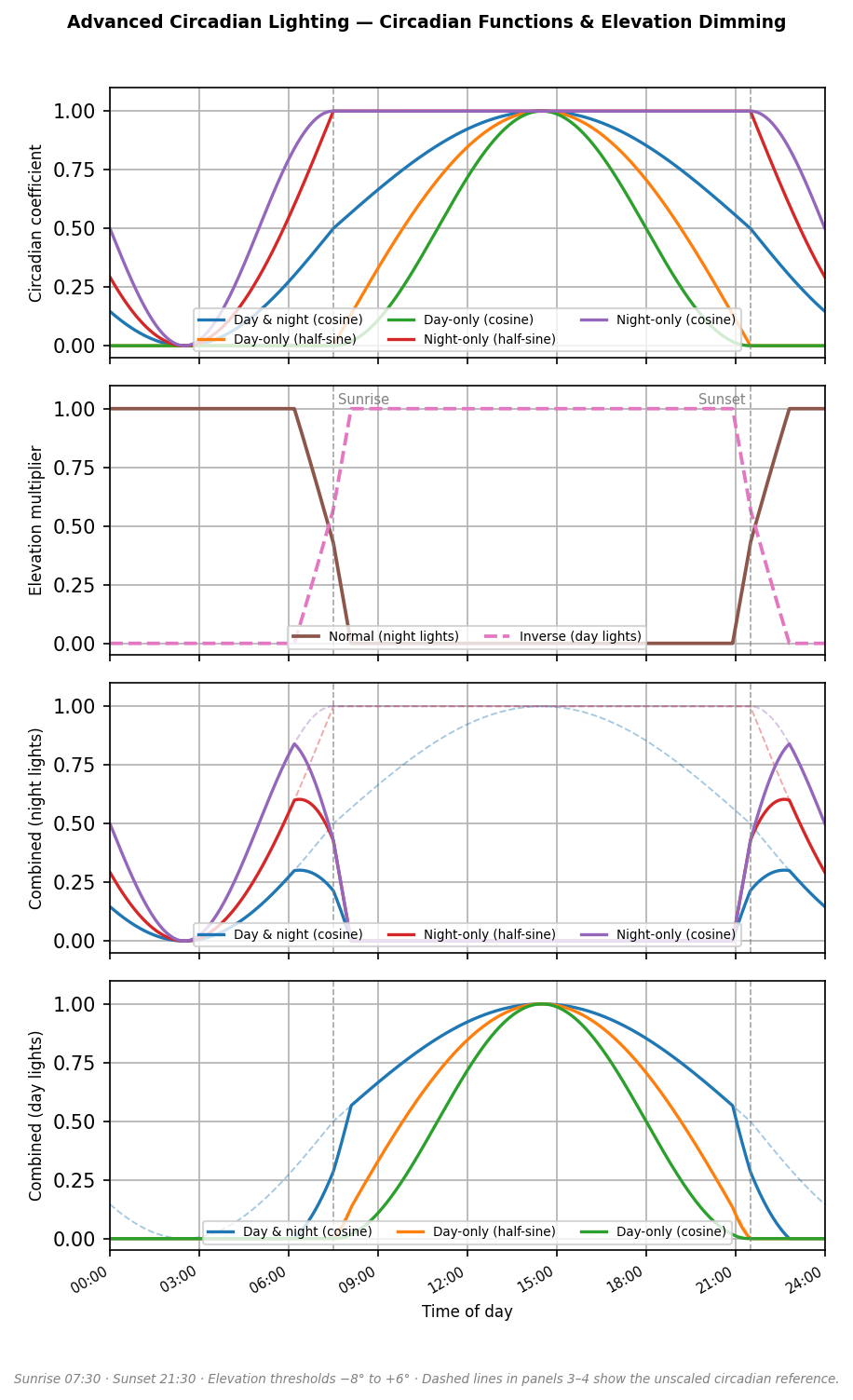
Circadian functions define how the main circadian coefficient — a value between 0 and 1 — varies over 24 hours. When the coefficient is 0, lights are set to the configured night brightness, colour temperature, and hue. When it is 1, they are set to the day values. Five functions are available:
- Day & night (cosine): active 24 hours. Reaches 1 at the middle of the day and 0 at the middle of the night, with a smooth continuous transition throughout.
- Day-only (half-sine and cosine): stays at 0 between sunset and sunrise, then rises to 1 at the middle of the day and returns to 0 at sunset.
- Night-only (half-sine and cosine): stays at 1 during the day, then drops to 0 at the middle of the night and returns to 1 at sunrise.
The half-sine and cosine variants produce slightly different curve shapes — the cosine has a smoother, more gradual transition between night and day values, while the half-sine is more prominent.
The circadian cycle can follow fixed configured times or actual sunrise and sunset from your location.
Colour hue cycles continuously through the colour wheel over 24 hours — red in the middle of the night, through orange, yellow, green, blue, and purple during the day, and back to red. This applies only to lights currently in colour mode. A default fixed hue is available as fallback when the circadian function is disabled.
Elevation-based dimming (optional) adds a multiplicative brightness scaling as the sun crosses configurable elevation thresholds. In the case of night lights, before sunset, when the sun is above the upper threshold, lights are off. As it drops through the sunset window toward the lower threshold, the elevation coefficient ramps from 0 to 1, and the actual brightness sent to the light is circadian_brightness × elevation_coefficient. This gives a smooth, gradual turn-on at sunset and can be accordingly configured for a smooth turn-off at sunrise, rather than an abrupt switch. An inverse mode is also available for daytime lights that should be on when the sun is up.
Presence (optional) turns lights on when present and off when away. Both the turn-on and turn-off directions can be independently enabled or disabled. The presence entity does not need to be a presence sensor — it can be the state of a media player (e.g. a TV) or any other boolean device.
Sleep (optional) can either turn lights off when a sleep entity activates, or switch them to night attributes (minimum brightness, warmest colour temperature, red hue) without turning them off. Waking up restores normal circadian following.
Manual hold — if you adjust a light manually (brightness, colour temperature, or hue), the automation detects this by comparing the requested value against the current circadian target, and leaves the light alone. The hold is cleared when the light is turned off, after which it re-enters circadian mode on the next turn-on. The automation will still turn the light off automatically via presence, sun elevation, or sleep — the hold only prevents circadian attribute updates.
For lights that support both white and colour modes, switching between modes is detected as a mode switch and adopted without triggering a hold. For example, if a light is in colour mode and you request a white colour temperature, it switches to white mode and continues following the circadian curve in that mode. If you then adjust the white temperature to something different from the circadian target, it enters manual hold.
How does it compare to Adaptive Lighting?
There is an excellent and widely-used HACS component called Adaptive Lighting by @basnijholt that does a similar job and is considerably more mature. If you have HACS installed and want a feature-rich, well-supported solution, that is probably the better choice for most people.
This blueprint may be of interest if you want something that requires no HACS installation — it imports directly from a Gist — or if you want specific features it offers:
- Elevation-based multiplicative dimming with configurable thresholds and an inverse mode for daytime lights
- Multiple circadian function shapes to choose from (day-only, night-only, and full 24-hour variants)
- Colour hue cycling through the full colour wheel over the day
Migration from v1 — breaking changes
Two breaking changes require action before migrating:
1. New helper required. Create an input_text helper with entity ID input_text.adaptive_circadian_manual_hold. This is shared across all your automations using this blueprint and is used internally to track manually held lights. If it is missing, the automation runs but manual hold detection is disabled.
2. Lights input changed. The lights input is now an entity list selector. You will need to re-select your lights when creating new automations from the blueprint.
The recommended migration path is to delete your existing v1 automations and create new ones from the blueprint.
Installation

Or import manually from the Gist URL:
https://gist.github.com/dimkaram/39cfe8e996aaa7f3fe3727495b120ce5
This is an alpha release. Core functionality has been tested but edge cases might still exist. Please report any issues in this thread or on the Gist.
Acknowledgements
Parts of the code review, debugging, and testing for v2 were done with the assistance of AI tools — specifically ChatGPT and Claude. The design decisions and testing are my own.
Dimitris