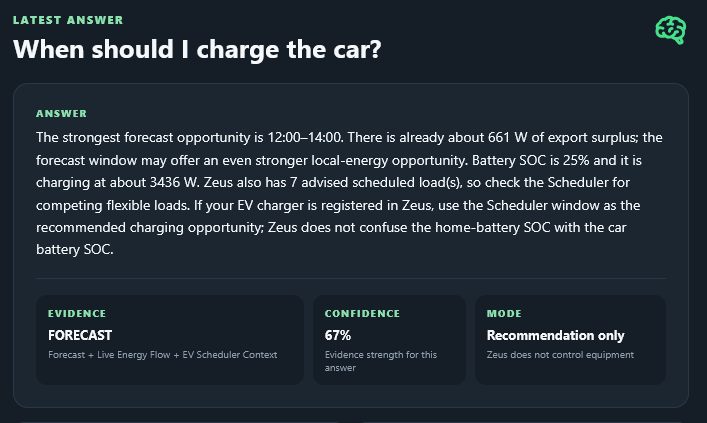
AION EMS Zeus – Energy Management & Intelligence for Home Assistant

Quick Links
GitHub Repository: GitHub - showupch/AION-EMS-Zeus: Energy Management & Intelligence for Home Assistant. · GitHub

Latest Releases: AION EMS Zeus Releases Releases · showupch/AION-EMS-Zeus · GitHub

Setup Guides / Help: aion-ems.ch/setup-guide Setup Guide – AION EMS Zeus

Home Assistant Community Forum: AION EMS Zeus Forum Thread

Open your Home Assistant instance and open a repository inside the Home Assistant Community Store.

AION EMS Zeus — Energy Management & Intelligence for Home Assistant

AION — Adaptive Intelligence & Optimization Network

AION EMS Zeus is an open-source Energy Management System for Home Assistant.

Zeus brings your energy system together in one interface: Solar, Grid, House, Battery, EV charging, Heat Pump, DHW/ELWA, flexible loads, historical analytics, forecasting, finance and supervised Smart Control.

The goal is not simply to display sensors.

Observe → Learn → Predict → Recommend → Verify → Improve

Zeus uses real Home Assistant measurements and Recorder history wherever possible and follows one important rule:

If Zeus doesn’t know it, Zeus shouldn’t invent it.

:high_voltage: Current Release

AION EMS Zeus v16.0.0 — Live Energy Intelligence

v16 introduces the new Live dashboard with real-time gauges for Solar, House, Grid, Battery, all registered EV chargers, DHW/ELWA, Heat Pump and flexible loads, together with today’s Solar, Export, Import and House totals.

Zeus also includes:

  • Live whole-home energy flow
  • Battery intelligence and planning
  • Forecast vs Reality
  • Historical Analytics
  • Device Energy Attribution
  • Heat Pump & DHW intelligence
  • Finance and tariff analysis
  • Weather and solar forecasting
  • my-PV ELWA supervised Smart Control
  • EV surplus intelligence
  • Dedicated Command Center / Kiosk
  • Zeus Briefing & Copilot
  • Backup & Restore
  • Evidence and confidence diagnostics

AION EMS Zeus is open source under the MIT License and is an independent community project, not an official Home Assistant or Nabu Casa product.

Real-world testing and feedback are very welcome — especially measurements, entity mappings, Recorder data and reproducible examples when something doesn’t behave as expected.

Thanks to everyone testing Zeus and helping improve it.

By V.T. — Switzerland

New Heatpump Statistics area of Zeus.

The app looks good. At first glance, I notice the absence of wallbox integration and electric vehicle charging strategy features.
Is there a German language version available? How are heat pumps integrated—for example, a Viessmann Vitocal 333G-NC?

At the moment is only in English. Heat pumps integrated from there own entities, basically Zeus accept whatever is on Home assistant, so the heat pump must be all ready on the system. Then it gives an output/data like this.

With short description, Zeus analyze all the energy of any device is connected to the system, with statistics about Energy, Finance,Errors etc.

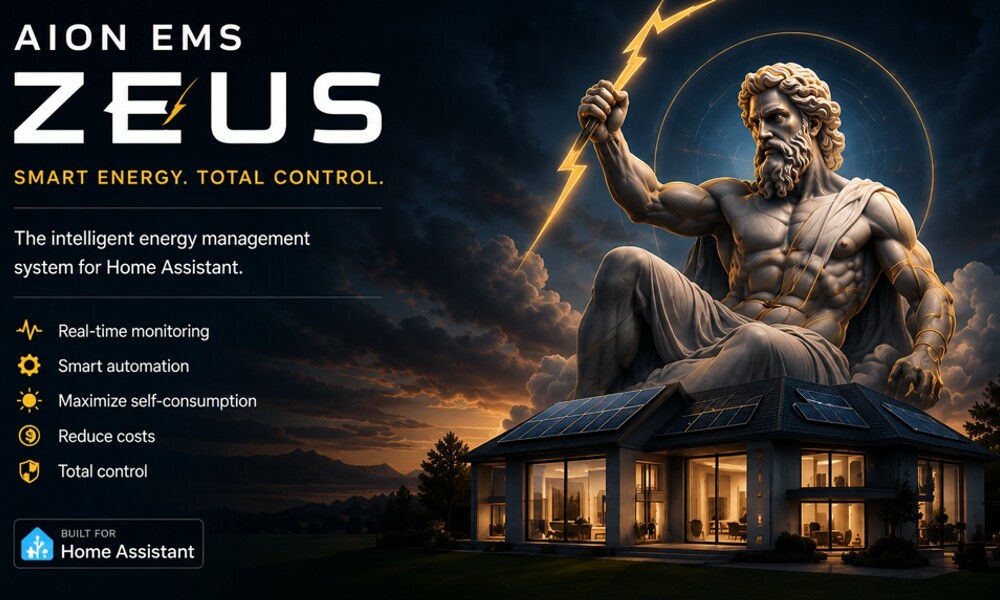
That includes also the EV Chargers, On Co-Pilot area of Zeus you can ask: When I should charge the car? Then Zeus will give you back something like this…

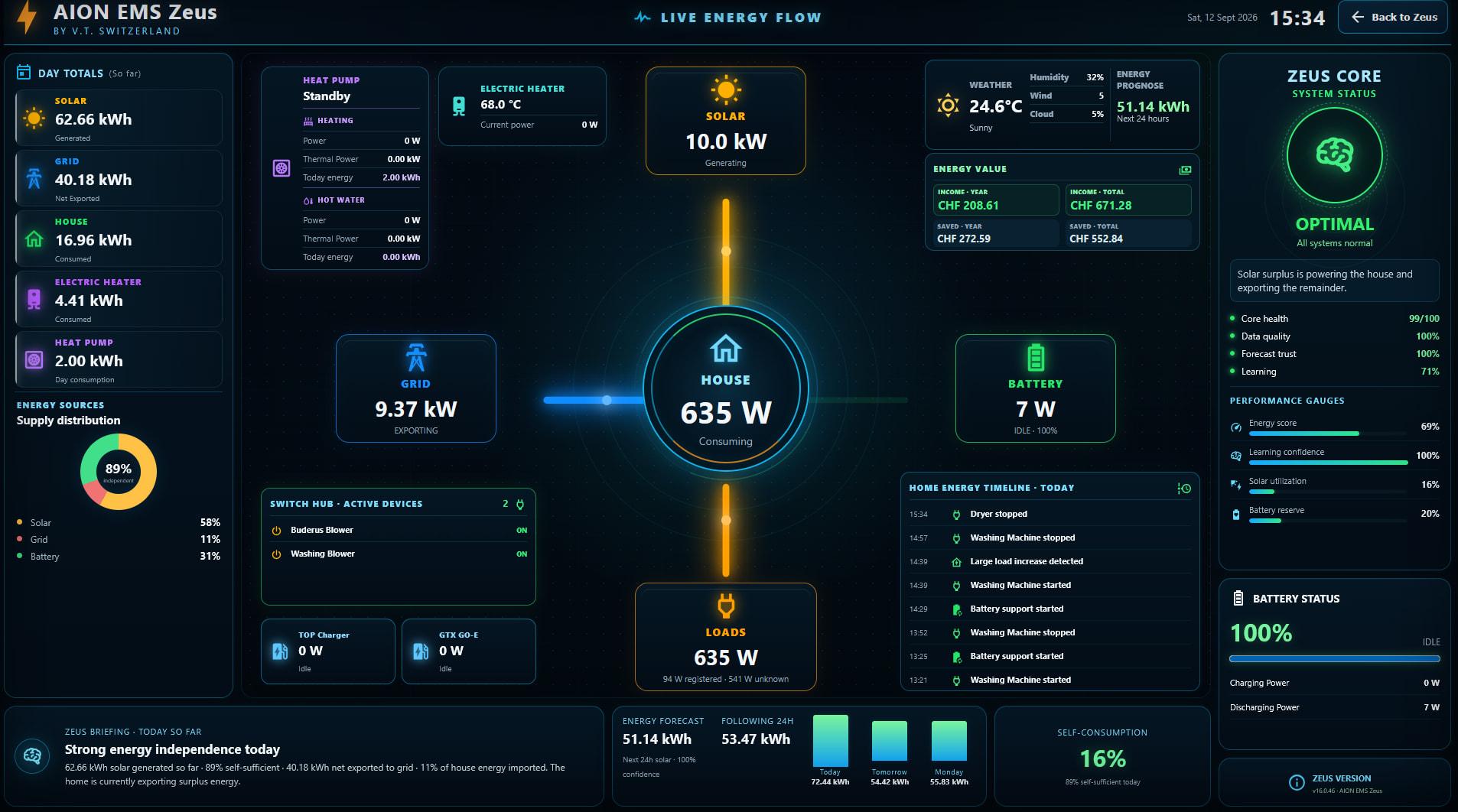
Also for each connected device to Zeus you get also details like Energy use from solar, from battery and Grid with details, also for periods like Today, week, Month, Year… A small sample

Give a try…German will be also included on short time.

It iseems it didn’t get the attention it deserves, it offers quite some useful functionalities. I starred it at least, for future investigation.

Since you mention forecasting, I put a link to another project which does just forecasting. It could be useful to know about it in case they have features worth importing.

Main difference is that EMHASS (kind of) prefers InfluxDB as historical data source.

I just let out a new stable release ( 14.0.0 ) please add this version and let me know how it is.
Also any suggestions…are welcome.

I’m quite busy working on (“contributing to”) a package meant for Zendure home batteries.
This year where I live I can still exprt energy to the network at the same price I buy it (at the current hourly price which changes over the day), so I have not much incentive to look into forecasting or more advanced solutions.

Later this year, once the battery integration runs as well as I need it to, then I’ll install and compare EMHASS and yours. But I starred it, so I won’t forget it.

Thanks, that’s definitely worth looking at.

Zeus already has its own forecast and forecast-validation logic, but I’m very interested in seeing how other Home Assistant projects approach forecasting.

One thing I’m particularly interested in is not only producing a forecast, but also measuring afterwards how accurate that forecast actually was. Zeus keeps historical learning confidence and forward forecast accuracy separate for that reason.

I’ll have a look at the project you linked and see whether there are concepts or approaches that could complement Zeus.

Thanks for pointing it out.

I have now set up the system, but I encountered a few issues:

  1. There are plugins available for my Kostal Piko 20 and Kostal Plenticore G3 inverters.
    The plugin for the Kostal Piko 20 refuses to install. This might be due to the inverter’s Modbus integration.
    I have entered the data as HA entities.

  2. My wallbox is a go-eCharger. I was unable to integrate this unit as well.
    The wallbox is integrated into HA via MQTT.

  3. The dashboard screen jumps to the bottom of the page after a few seconds. I am using Chrome on a Mac.

Other mention of a much simpler approach, specific for battery and dynamic tariffs in NL: GitHub - corneel27/day-ahead: Optimize your consumption, production and batterystorage of electricity with dynamic prices · GitHub

@showup
When do you plan to add German language support? Integrating a heat pump is extremely important to me. I operate a Vitocal 333G-NC sole-to-water heat pump (with Natural Cooling) and a Vitovent 300F central ventilation unit with heat recovery.
For control, I use Viessmann’s ViCare integration, but I also use the OptiSplitter to retrieve all data—including all energy and consumption figures—from the system. All values ​​are available as Home Assistant entities.

Thanks — that is actually a very interesting setup for Zeus.

German language support is definitely something I would like to add. Until now I have concentrated mainly on getting the energy data, intelligence and v14 interface stable before introducing translations. Now that v14 has reached a stable baseline, localization is much more realistic. German would be one of the first languages I would target.

Regarding the heat pump: Zeus already supports registered Heat Pump devices and can use mapped Home Assistant power and energy entities together with Recorder history for consumption statistics and operating evidence.

Your Vitocal 333G-NC + Vitovent 300F + ViCare/OptiSplitter setup would actually be very useful for testing because, as you say, the important measurements are already available as Home Assistant entities.

I am particularly interested in using real measured values rather than estimating things such as COP or thermal output when the necessary measurements are unavailable. If OptiSplitter exposes electrical consumption, thermal energy, temperatures, operating states, heating/cooling information, etc., there may be considerably more useful Viessmann/heat-pump intelligence that Zeus could support.

And yes — German support is on the roadmap. :germany:

Thanks for the detailed information about your setup!

Thanks for the feedback.

Regarding the Kostal Piko 20, could you clarify exactly what you tried to do in Zeus → Plugins & Integrations?

When you say “the plugin for the Kostal Piko 20 refuses to install”, I would like to understand the exact steps, because Zeus calls this area Plugins & Integrations, but it does not necessarily mean that a separate Kostal plugin/software package is being installed.

Could you tell me:

  • Which Kostal entry you selected in Zeus
  • Which button/action you used
  • What happened after clicking it
  • Whether Zeus displayed an error message

A screenshot of the Zeus Plugins & Integrations page at the point where it fails would be especially useful.

Since you have already mapped the Kostal values as Home Assistant entities, that also helps me understand which part of the Zeus integration process is causing the problem.

For the go-eCharger via MQTT, I will also check how Zeus handles a wallbox whose data is already exposed as Home Assistant entities.

And I will investigate the Chrome/macOS page jumping to the bottom as a separate UI issue. If you can tell me which Zeus page this happens on, that would help narrow it down.

Thanks — these are very useful real-world compatibility tests.

Here you see my detailed list of datapoints of the vitocal und vitovent system. The names in HA can defer from this mqtt-names:

    # meine Viessdata Tabelle
    # Tabelle für Vitocal 333-G
    ("Anlagenzeit", 0x08E0, 8, 'vdatetime'),
    ("error", 0x0491, 1, 1, False),
    ("Frostschutz_HK1", 0x1410, 1, 1, False),
    ("outside_temperature", 0x0101, 2, 0.1, True),
#        ("hk1_mode", 0xB000, 1, 1, False),			# betriebsart bit 4,5,6,7 comfort  bit 1 spar bit 0
    ("hk1_mode", 0xB000, 3, "b:0:0", 1, False),   # HK1_Betriebsart0=0 – Abschaltbetrieb,1=1 – Nur WW,2=2 – Heizen/Kühlen/WW,4=4 – dauernd reduziert,5=5 – dauernd normal,6=6 – normal Abschalt,7=7 – nur Kühlen
    ("hk1_requested_temperature", 0xA406, 2, 0.01, False),
    ("hk1_normal_temperature", 0x2000, 2, 0.1, False),
    ("hk1_reduced_temperature", 0x2001, 2, 0.1, False),
    ("hk1_party_temperature", 0x2022, 2, 0.1, False),
    ("hk1_temperature", 0x0116, 2, 0.1, False),
    ("hk1_niveau", 0x2006, 2, 0.1, True),
    ("hk1_neigung", 0x2007, 2, 0.1, False),
    ("hk1_hysterese", 0x7003, 2, 0.1, False),
    ("compressor_ein", 0x0480, 1, 1, False),
    ("primary_pump", 0x0484, 1, 1, False),
    ("secondary_pump", 0x048D, 1, 1, False),
    ("hk1_pump", 0x048D, 1, 1, False),
    ("primary_pump_drehzahl", 0xB420, 2, 1, False),
    ("secondary_pump_drehzahl", 0xB421, 2, 1, False),
    ("hk1_zirkulation", 0x0490, 1, 1, False),
    ("hk1_supply_temperature", 0x010A, 2, 0.1, False),
   #  ("buffer_temperature", 0x010B, 2, 0.1, False),
   
   #  ********   Kühlung *****************   
    
    ("nc_cooling", 0x0492, 1, 1, False),
    ("nc_supply_temperature", 0x0119, 2, 0.1, False),
    ("nc_supply_target_temperature", 0x1804, 2, 0.1, False),
    ("nc_cooling_hysterese", 0x7107, 2, 0.1, True),
    ("nc_cooling_niveau", 0x7110, 2, 0.1, True),
    ("nc_cooling_neigung", 0x7111, 2, 0.1, True),
    ("compressor", 0xB423, 2, 1, False),

    # 
    ("primary_supply_temperature", 0x0103, 2, 0.1, True),
    ("primary_return_temperature", 0x0104, 2, 0.1, True),
    # ---- TEST ---
    ("secondary_supply_temperature", 0x0105, 2, 0.1, True),
    ("secondary_return_temperature", 0x0106, 2, 0.1, True),
    # ----- TEST ENDE -----
    # 
    # ----- Energie / Leistung -----
    ("thermal_energy", 0x1640, 4, 0.1, False),
    ("thermal_power", 0x16A0, 4, 1, False),
    ("thermal_energy_cooling", 0x1645, 4, 0.1, False),
    ("thermal_energy_ww", 0x1650, 4, 0.1, False),
    ("electrical_energy", 0x1660, 4, 0.1, False),
    ("electrical_energy_cooling", 0x1665, 4, 0.1, False),
    ("electrical_energy_ww", 0x1670, 4, 0.1, False),
    ("electrical_power", 0x16A4, 4, 1, False),
    ("electrical_power_cooling", 0x16A2, 4, 1, False),
    ("cop_jaz", 0x1680, 1, 0.1, False),
    ("cop_jaz_heiz", 0x1681, 1, 0.1, False),
    ("cop_jaz_ww", 0x1682, 1, 0.1, False),
    ("cop_jaz_kuehlen", 0x1683, 1, 0.1, False),
    ("cop_heiz", 0x1690, 1, 0.1, False),
    # ----- Energie / Leistung ENDE -----
    ("warmwasser_hysterese",0x6007, 2,0.1,False),
    ("warmwasser",0x010D,2,0.1,False),
    ("ww_einmalaufladung", 0xB020, 1, 1, False),
    ("warmwasser_soll",0x6000,2,0.1,False),
    ("warmwasser_soll2",0x600C,2,0.1,False),
    ("ventil_ww",0x0494,1,1,False),
# Vitovent
    ("Betriebsart_Lueftung", 0xB005, 1, 1, False),
    ("Betriebsprogramm_Lueftung", 0x0A7E, 1, 'b:0:1', 1, True),
  #   ("MinZuluftBypass",0x7D0F,2,0.1,False),
    ("AbluftTempSoll",0x7D08,3,0.1,False),
    ("AussenLuftTemp",0x0A00,3,0.1,True),
    ("ZuluftTemp",0x0A01,3,0.1,True),
    ("AbluftTemp",0x0A02,3,0.1,True),
    ("FortluftTemp",0x0A03,3,0.1,True),
    ("Differenzdruck_Aussenluftfilter", 0x0A08, 3, 'b:0:1', 0.1, True),  
    ("Differenzdruck_Abluftfilter", 0x0A09, 3, 'b:0:1', 0.1, True),
    ("Zuluft_Volumenstrom_m3_h", 0x0A04, 3, 'b:0:1', 1, True),
    ("Fortluft_Volumenstrom_m3_h", 0x0A05, 3, 'b:0:1', 1, True),
    ("Elektrisches_Vorheizregister", 0x0A0C, 3, 'b:0:1', 1, True),
    ("Bypass", 0x0A0D, 3, 'b:0:1', 1, True),
    ("Bypass_Status", 0x0A19, 3, 'b:0:1', 1, True),
    ("Spannung_Zuluft_V", 0x0A11, 3, 'b:0:1', 0.01, True),
    ("Spannung_Fortluft_V", 0x0A12, 3, 'b:0:1', 0.01, True),
    ("Aktive_Frostschutzmethode", 0x0A24, 3, 'b:0:1', 1, True),
    ("Geraetekennung", 0x0A25, 3, 'b:0:1', 1, True),
    ("HW_SW_Kennung", 0x0A7A, 1, 'b:0:1', 1, True),
    ("Grundlueftung_Stufe_1", 0x7D09, 2, 1, False),
    ("Reduzierte_Lueftung_Stufe_2", 0x7D0A, 2, 1, False),
    ("Nennlueftung_Stufe_3", 0x7D0B, 2, 1, False),
    ("Intensivlueftung_Stufe_4", 0x7D0C, 2, 1, False),
    ("Max_Luftvolumenstrom", 0x7D0E, 2, 1, False),
    ("Mindest_Zuluft-Temperatur", 0x7D0F, 2, 0.1, False),
#      ("Lueftungsmodus_ist", 0x0A7E, 1, 1, False),
      
# Zeitpläne

# Verifizierte Startadressen (aus DP_CU401B_G.txt):
#   HK1  0x9200  NKU_Tagesprogramm_HK1
#   HK2  0x9238  NKU_Tagesprogramm_HK2  (nur wenn HK2 vorhanden)
#   HK3  0x9270  NKU_Tagesprogramm_HK3  (nur wenn HK3 vorhanden)
#   PSP  0x92A8  NKU_Tagesprogramm_PSP  (nur wenn Pufferspeicher vorhanden)
#   WW   0x92E0  NKU_Tagesprogramm_WW   (empirisch ✓)
#   ZP   0x9318  NKU_Tagesprogramm_ZP   (empirisch ✓)
#   EHz  0x9350  WPR3_Zeitprogramm_EHeizung
#   Ger  0x9388  WPR3_Zeitprogramm_Geraeuschreduzierung
#   Luef 0x93C0  WPR3_Zeitprogramm_Lueftung
#   KPuf 0x93F8  WPR3_93F8_Schaltzeit_Kuehlpufferspeicher

# ===========================================================================
# ZEITPLÄNE HEIZKREIS 1 (HK1) - Start bei 0x9200
# ===========================================================================
("timer_hk1_mo", 0x9200, 24, 'schedvcal'),
("timer_hk1_di", 0x9208, 24, 'schedvcal'),
("timer_hk1_mi", 0x9210, 24, 'schedvcal'),
("timer_hk1_do", 0x9218, 24, 'schedvcal'),
("timer_hk1_fr", 0x9220, 24, 'schedvcal'),
("timer_hk1_sa", 0x9228, 24, 'schedvcal'),
("timer_hk1_so", 0x9230, 24, 'schedvcal'),


# ===========================================================================
# ZEITPLÄNE WARMWASSER (WW) - Start bei: 0x92E0 ---
# ===========================================================================
("timer_ww_mo", 0x92E0, 24, 'schedvcal'),
("timer_ww_di", 0x92E8, 24, 'schedvcal'),
("timer_ww_mi", 0x92F0, 24, 'schedvcal'),
("timer_ww_do", 0x92F8, 24, 'schedvcal'),
("timer_ww_fr", 0x9300, 24, 'schedvcal'),
("timer_ww_sa", 0x9308, 24, 'schedvcal'),
("timer_ww_so", 0x9310, 24, 'schedvcal'),

# ===========================================================================
# ZEITPLÄNE WW Zirkulationspumpe - Start bei: 0x9318 ---
# ===========================================================================
("timer_zirk_mo", 0x9318, 24, 'schedvcal'),
("timer_zirk_di", 0x9320, 24, 'schedvcal'),
("timer_zirk_mi", 0x9328, 24, 'schedvcal'),
("timer_zirk_do", 0x9330, 24, 'schedvcal'),
("timer_zirk_fr", 0x9338, 24, 'schedvcal'),
("timer_zirk_sa", 0x9340, 24, 'schedvcal'),
("timer_zirk_so", 0x9348, 24, 'schedvcal'),

    
# ===========================================================================
#   ZEITPLÄNE LÜFTUNG (Vent) - Start 0x93C0
# ===========================================================================  
("timer_vent_mo", 0x93C0, 24, 'schedvcal'),
("timer_vent_di", 0x93C8, 24, 'schedvcal'),
("timer_vent_mi", 0x93D0, 24, 'schedvcal'),
("timer_vent_do", 0x93D8, 24, 'schedvcal'),
("timer_vent_fr", 0x93E0, 24, 'schedvcal'),
("timer_vent_sa", 0x93E8, 24, 'schedvcal'),
("timer_vent_so", 0x93F0, 24, 'schedvcal'),

# ===========================================================================
#         Ende Zeitpläne  ##
# ===========================================================================

# Statistik
    ("LZ_Pumpe_Zirk",0x0590,4,2.7777778e-4,False),
    ("LZ_Pumpe_HK1",0x058D,4,2.7777778e-4,False),
    ("LZ_Pumpe_Sek",0x0584,4,2.7777778e-4,False),
    ("LZ_WP",0x0580,4,2.7777778e-4,False),
    ("LZ_E-Heizung_Stufe_1",0x0588,4, 2.7777778e-4,False),
    ("LZ_E-Heizung_Stufe_2",0x0589,4, 2.7777778e-4,False),
    ("Anz_Schalt_WP",0x0500,4,1,False),
    ("Anz_Schalt_PrimaerPumpe",0x0502,4,1,False),
    ("Anz_Schalt_SekundaerPumpe",0x0504,4,1,False),
    ("Anz_Schalt_Heizstab_1",0x0508,4,1,False),
    #  ("Anz_Schalt_Heizstab_2",0x0508,4,1,False),
# NEU
    ("Vorlauftemperatur_Sekundaerkreis", 0xB402, 3, 'b:0:1', 0.1, True),
    ("Vorlauftemperatur_Primaerkreis", 0xB400, 3, 'b:0:1', 0.1, True),
    ("Rücklauftemperatur_Sekundaerkreis", 0xB403, 3, 'b:0:1', 0.1, True),
    ("Rücklauftemperatur_Primaerkreis", 0xB401, 3, 'b:0:1', 0.1, True),
    ("Heissgastemperatur", 0xB40A,  3, 0.1, 'b:0:1', True),
    ("Verfluessigungsdruck", 0xB411, 3, 0.1, 'b:0:1', True),
    ("Sauggastemperatur", 0xB409, 3, 0.1, 'b:0:1', True),
    ("Sauggasdruck", 0xB410, 3, 0.1, 'b:0:1', True),
    ("Verdampfungstemperatur_t0", 0xB407, 3, 'b:0:1',0.1, True),
    ("Verfluessigungstemperatur_tc", 0xB408, 3, 0.1, 'b:0:1', True),
    ("Fluessiggastemperatur", 0xB404, 3, 0.1, 'b:0:1', True),
    ("Sauggasüberhitzung", 0xB40B, 3, 0.1, 'b:0:1', True),
    ("Expansionsventils", 0xB424, 2, 1, False),


#  ********   Elektro-Heizung *****************   
# E-Heizung
# Eingabe in 0.1 Grad, z.B. 50 für 5 Grad
    ("E-Heizung_Hysterese",0x6008, 2,0.1,False),
    ("E-Heizung_Stufe_1",0x0488, 1,1,False),
    ("E-Heizung_Stufe_2",0x0489, 1,1,False),

# Freigabe Kompressor 0=aus 1=WW 2=Heiz 3=WW+Heiz 15=default
    ("setKompressor",0x5012, 1,1,False),
# Heizstab 
# Durchlauferhitzer für Warmwasser aktivieren
    ("setHeater_WW",0x6015, 1,1,False),

# Durchlauferhitzer ein- und ausschalten
# (1=ein, 0=aus)
    ("setHeater_on",0x7900, 1,1,False),

# Durchlauferhitzer für Warmwasser aktivieren
# 0 == aus oder 1 == ein 
    ("setHeater1_WW",0x7901, 1,1,False),

# Durchlauferhitzer für Heizung aktivieren
# 0 == aus oder 1 == ein 
    ("setHeater_Heizung",0x7902, 1,1,False),

# Leistung für Durchlauferhitzer setzen
# (1=3, 2=6 oder 3=9kW)
    ("setHeater_Power",0x7907, 1,1,False),

# Durchlauferhitzer Bivalenztemperatur
# (Temp * 10 z.B. 500)
    ("Heater_Bivalenz",0x790B, 2,0.1,False)
]

I assume you offer two ways to integrate inverters:

  1. Via the Device Manager, where HA entities can be registered—e.g., solar production, battery SoC, etc.
  2. Under “Manage,” there is a “plugins” entry. Here, too, the Kostal Piko and Kostal Plenticore can be selected and loaded.
    The Plenticore loads successfully, whereas the Piko remains permanently greyed out. The difference (in my case) lies in how the two inverters are integrated: the Plenticore is loaded via an HA integration, while the Piko uses a Modbus integration.

Thank you — this is extremely useful.

This is much more detailed than a normal Heat Pump integration and gives Zeus some very interesting possibilities.

In particular, I can see that you have real measured values for:

  • Heat Pump electrical power and energy
  • Thermal power and energy
  • Separate DHW and cooling energy
  • COP/JAZ
  • Compressor state/runtime
  • Primary and secondary circuit temperatures
  • Natural Cooling
  • Pumps and pump speeds
  • DHW temperatures
  • Heating circuit information
  • Vitovent temperatures, airflow, bypass and filter information
  • Heating, DHW, circulation and ventilation schedules

This is exactly the type of setup where I would prefer Zeus to use the real Home Assistant entities rather than estimate values.

For example, Zeus normally refuses to invent COP when thermal measurements are unavailable. In your installation the required thermal and electrical measurements appear to exist, so considerably more detailed Heat Pump efficiency analysis should be possible.

The Natural Cooling information is also particularly interesting. Zeus currently treats Heat Pumps more generically, but your data would allow us to distinguish heating, DHW and cooling operation much more accurately.

The schedules are also useful because I am currently working on the planning/scheduling intelligence. Knowing the actual configured DHW/heating/ventilation schedules is much better evidence than simply assuming that a device should run because solar energy is available.

I don’t want to add all of these entities blindly to Zeus. I would rather identify a smaller set of canonical Heat Pump inputs and let users map the corresponding Home Assistant entities, regardless of whether they come from ViCare, MQTT, OptiSplitter or another integration.

Your system would be an excellent real-world case for developing and testing that.

If you’re willing to help test it, I think the first useful step would be for me to define the additional Heat Pump inputs Zeus should support and then compare them against the entities available in your Home Assistant installation.

Thanks again for providing the complete list — this is very valuable.

Thanks, now I understand exactly what you mean.

Yes, you are referring to two different paths in Zeus:

  1. Device Manager / Energy Sources, where existing Home Assistant entities can be mapped directly.
  2. Manage → Plugins & Integrations, where Zeus can detect and work with supported integration types.

The important detail is that your Kostal Plenticore becomes available, while the Kostal Piko remains greyed out.

Your Plenticore comes through a Home Assistant integration, while the Piko entities come through Modbus. That difference may explain why Zeus is not currently recognizing the Piko as an available integration, but I need to check the Zeus detection logic before saying that Modbus is definitely the cause.

The fact that the Piko values already exist as Home Assistant entities is important. In principle, Zeus should not unnecessarily exclude a usable inverter simply because its entities originate from Modbus rather than a dedicated Home Assistant integration.

I will investigate how the Plugins & Integrations detection decides whether the Kostal Piko entry is available/greyed out and see whether the detection should also support a Modbus-backed device.

Your manual entity mapping is the correct workaround for now.

Thanks for clarifying this — now I know exactly which part of Zeus to investigate.

Thank you for your excelent work
:+1:

@MartyBr
Thanks — I have now checked the Zeus discovery code and found the reason.

Your observation about the different Home Assistant integrations was correct.

The current Zeus Inverter Adapters discovery is primarily based on physical devices from the Home Assistant Device Registry. Your Plenticore integration creates that device information, so Zeus detects it.

A Modbus-connected inverter can expose perfectly valid Home Assistant entities without providing the same physical-device metadata. In that situation Zeus currently fails to identify the inverter automatically, which explains why your Piko remains greyed out.

I also found that Kostal is not currently included in Zeus’s explicit inverter-manufacturer recognition list.

I will correct both parts: add Kostal/Piko/Plenticore recognition and allow suitable Modbus/entity-backed inverter discovery when the required Home Assistant measurements are available.

Your manual entity mapping is valid in the meantime.

Thanks — this was a very useful compatibility case because the fix should also improve support for other Modbus-based inverters.