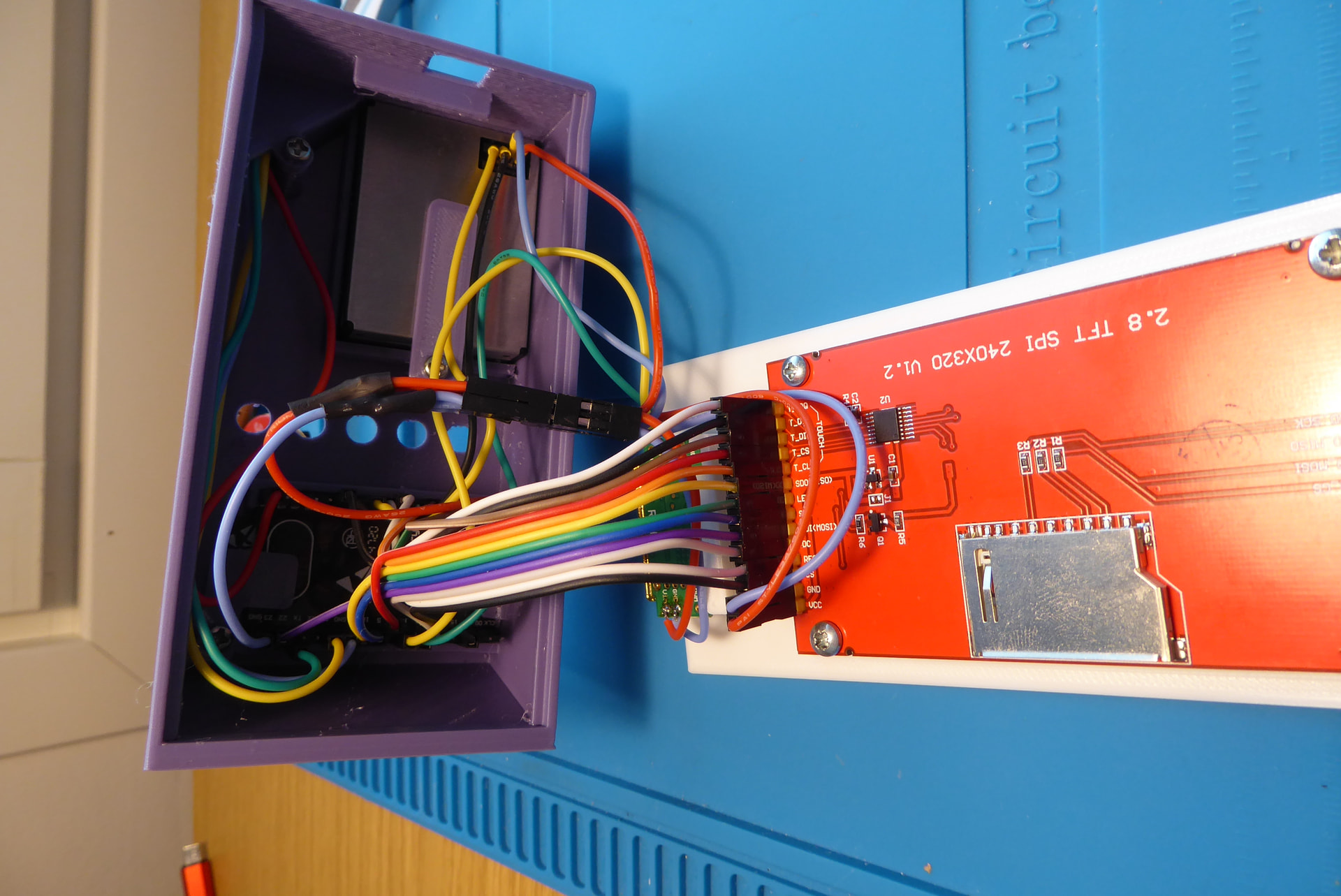
Airquality enclosure with touch screen (ILI9341)

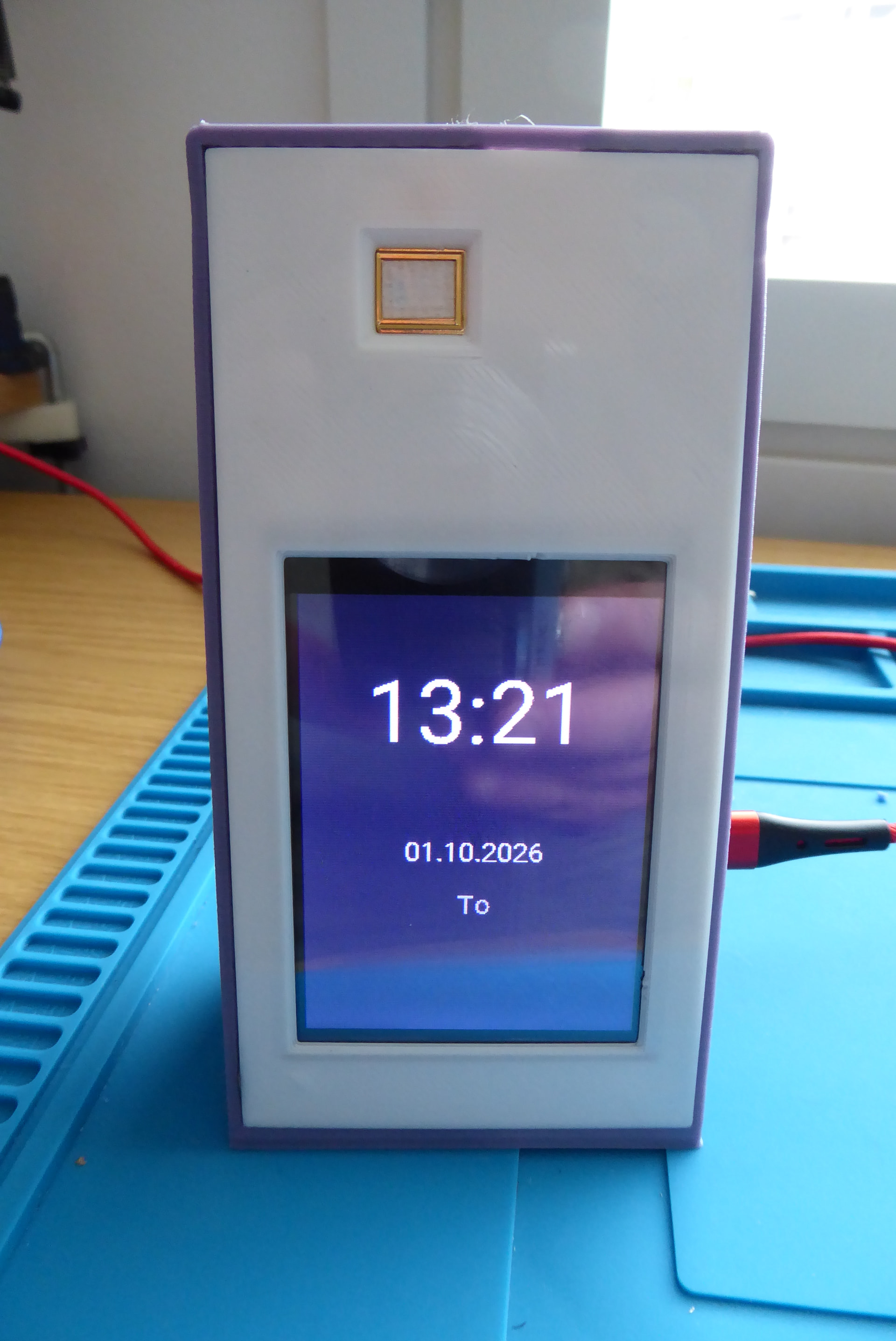
This design features a 15° tilted display for optimal viewing angles and easier touchscreen interaction, making it perfect for desktop placement. This enclosure houses a complete air quality monitoring system with multiple sensors and an ILI9341 touchscreen display. The angled design ensures comfortable touch interaction while displaying real-time data including temperature, CO₂ levels, and particulate matter (PM1.0, PM2.5, PM10).

Watch project video
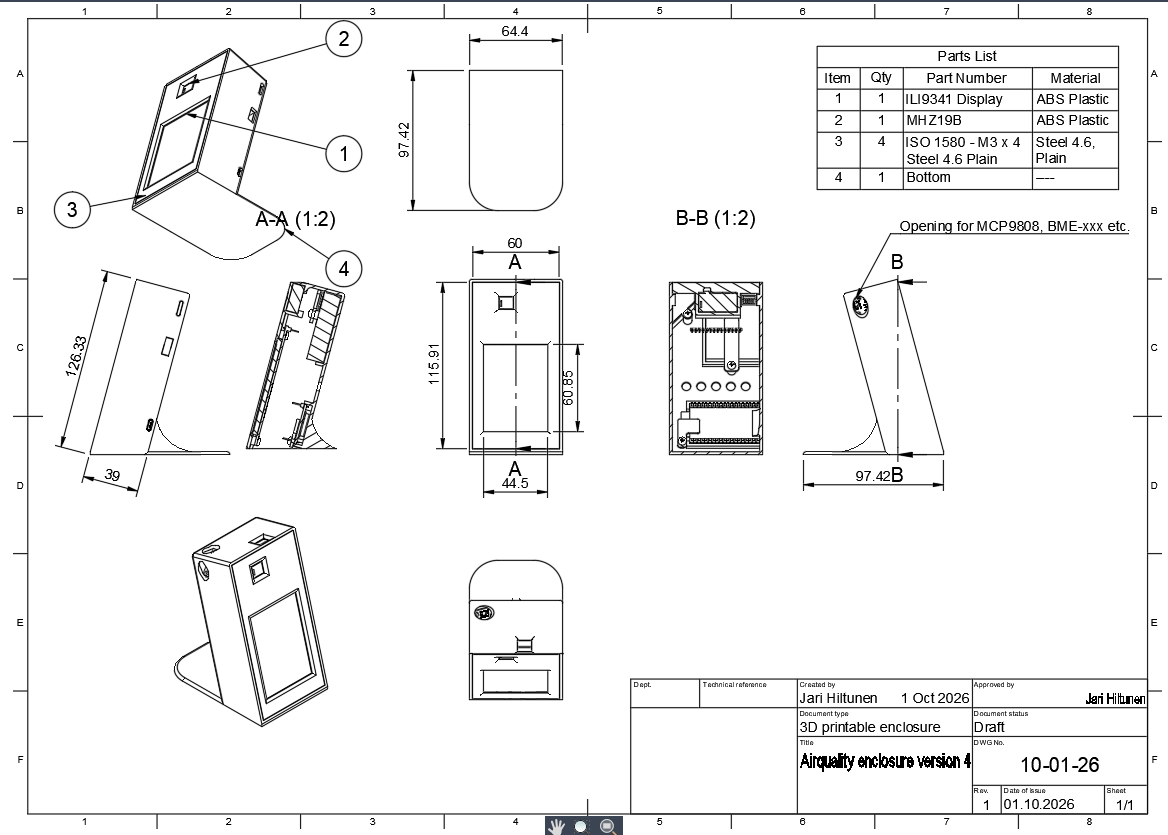
Key Features

  • 15° tilt angle for ergonomic touchscreen operation
  • Optimized airflow design with dedicated sensor chambers
  • MCP9808 temperature sensor in isolated 45° angled air channel (top left)
  • PMS7003 particulate sensor with side air intake/exhaust (right side)
  • MH-Z19B NDIR CO₂ sensor centrally mounted (gold-colored module)
  • 2.8" ILI9341 touchscreen (240x320 SPI)
  • Clean, professional appearance suitable for home or office
  • ESPHome compatible

Components Required

  • ESP32 development board
  • ILI9341 2.8" TFT touchscreen with XPT2046 controller
  • MCP9808 temperature sensor
  • MH-Z19B CO₂ sensor
  • PMS7003 particulate matter sensor
  • 2.8" TFT SPI display board (240x320 V1.2)
  • M3 x 4mm screws (4 pcs)

Fusion drawing, 3D printable objects and example ESPHome code
Feel free to remix and share your improvements.

Example code for the ESPHome (some is in Finnish but you figure it out):

# SPI-väylä (SPI for display and touchscreen)
spi:
  - id: spi_display 
    clk_pin: GPIO18
    mosi_pin: GPIO23
    miso_pin: GPIO19

  - id: spi_touch
    clk_pin: GPIO14
    mosi_pin: GPIO13
    miso_pin: GPIO35 

# I2C-väylä (I2C for the MCP or BME-xxx)
i2c:
  sda: GPIO21
  scl: GPIO22
  scan: true

uart:
  - id: uart_co2
    tx_pin: GPIO17
    rx_pin: GPIO16
    baud_rate: 9600

  - id: uart_pm
    tx_pin: GPIO32
    rx_pin: GPIO33
    baud_rate: 9600


# Kellonaika Home Assistantista (time from Home Assistant)
time:
  - platform: homeassistant
    id: ha_time

# Home Assistant -kytkimet (Switches for the HA)
switch:
  - platform: homeassistant
    id: tv_switch
    entity_id: switch.xxx_televisio
  
  - platform: homeassistant
    id: etupiha_switch
    entity_id: switch.xxx_valojenohjaus
  
  - platform: homeassistant
    id: olohuone_switch
    entity_id: switch.xxx_ledinauha
  
  - platform: homeassistant
    id: takapiha_switch
    entity_id: switch.xxx_takapiha
    
sensor: 
  - platform: mcp9808
    id: mcp_temp  
    address: 0x18
    name: "Huoneen lämpötila"
    update_interval: 10s

  - platform: mhz19
    co2:
      id: co2_sensor
      name: "CO2"
    temperature:
      id: mhz_temp
      name: "CO2-lämpötila"
    update_interval: 60s
    uart_id: uart_co2

  - platform: pmsx003
    type: PMSX003    
    pm_1_0:
      name: "PM1.0"
      id: pm1_0
    pm_2_5:
      name: "PM2.5"
      id: pm2_5
    pm_10_0:
      name: "PM10"
      id: pm10
    uart_id: uart_pm
    update_interval: 30s
 

font:
  - file: "gfonts://Roboto"
    id: font_small
    size: 20    
    glyphs:
      - "!\"%()+=,-./:°µ0123456789ABCDEFGHIJKLMNOPQRSTUVWXYZ abcdefghijklmnopqrstuvwxyzÄÖÅäöå"
  - file: "gfonts://Roboto"
    id: font_large
    size: 60
    glyphs:
      - "0123456789:"
        
        
display:
  - platform: mipi_spi
    id: tft_display
    model: ILI9341
    cs_pin: GPIO15
    dc_pin: GPIO4
    reset_pin: GPIO25
    spi_id: spi_display 
    rotation: 180
    buffer_size: "50%"
    pages:
      - id: idle_page
        lambda: |-
          it.fill(Color::BLACK);
          auto now = id(ha_time).now();
          it.printf(120, 80, id(font_large), Color::WHITE, TextAlign::CENTER, "%02d:%02d", now.hour, now.minute);
          it.printf(120, 180, id(font_small), Color::WHITE, TextAlign::CENTER, "%02d.%02d.%04d", now.day_of_month, now.month, now.year);
          const char* weekdays[] = {"Su", "Ma", "Ti", "Ke", "To", "Pe", "La"};
          it.printf(120, 220, id(font_small), Color(200, 200, 200), TextAlign::CENTER, weekdays[now.day_of_week - 1]);

      - id: active_page
        lambda: |-
          it.fill(Color::BLACK);
          
          // Sensoridata (ennallaan)
          if (id(mcp_temp).has_state()) {
            it.printf(10, 10, id(font_small), Color(255, 255, 0), "Lämpö: %.1f C", id(mcp_temp).state);
          }
          if (id(co2_sensor).has_state()) {
            it.printf(10, 40, id(font_small), Color(0, 255, 0), "CO2: %.0f ppm", id(co2_sensor).state);
          }
          if (id(pm2_5).has_state()) {
            it.printf(10, 70, id(font_small), Color(0, 255, 0), "PM2.5: %.0f µg/m3", id(pm2_5).state);
          }
          
          // Apufunktio nappulan piirtämiseen tilan mukaan
          auto draw_button = [&](int x, int y, const char* text, bool is_on) {
            // Vihreä jos päällä, tummanharmaa jos pois
            Color bg_color = is_on ? Color(0, 150, 0) : Color(60, 60, 60); 
            it.filled_rectangle(x, y, 110, 80, bg_color);
            it.rectangle(x, y, 110, 80, Color::WHITE); // Valkoinen reunus selkeyden vuoksi
            it.printf(x + 55, y + 40, id(font_small), Color::WHITE, TextAlign::CENTER, text);
          };

          // Piirretään nappulat ja tarkistetaan tila Home Assistantista!
          draw_button(5, 110, "TV", id(tv_switch).state);
          draw_button(125, 110, "Etupiha", id(etupiha_switch).state);
          draw_button(5, 210, "Olohuone", id(olohuone_switch).state);
          draw_button(125, 210, "Takapiha", id(takapiha_switch).state);


# Script aktiivisen sivun näyttämiseen ja automaattiseen palautumiseen
script:
  - id: show_active_page_script
    mode: restart
    then:
      - display.page.show: active_page
      - delay: 10s
      - display.page.show: idle_page

touchscreen:
  - platform: xpt2046
    id: touch_screen
    cs_pin: GPIO5
    interrupt_pin: GPIO26
    spi_id: spi_touch     
    threshold: 400
    calibration:
      x_min: 20
      x_max: 3860
      y_min: 340
      y_max: 3860
    transform:
      mirror_x: true  # Kääntää X-akselin, jotta vasen=0 ja oikea=240
    display: tft_display
    on_touch:
      then:
        - lambda: |-
            // TV
            if (touch.x <= 115 && touch.y >= 110 && touch.y <= 190) {
              id(tv_switch).toggle();
            }
            // Etupiha
            else if (touch.x >= 125 && touch.y >= 110 && touch.y <= 190) {
              id(etupiha_switch).toggle();
            }
            // Olohuone
            else if (touch.x <= 115 && touch.y >= 210 && touch.y <= 290) {
              id(olohuone_switch).toggle();
            }
            // Takapiha
            else if (touch.x >= 125 && touch.y >= 210 && touch.y <= 290) {
              id(takapiha_switch).toggle();
            }
        - script.execute: show_active_page_script
         
# Taustavalo
output:
  - platform: ledc
    pin: GPIO27
    id: backlight_pwm

light:
  - platform: monochromatic
    output: backlight_pwm
    id: backlight_light
    name: "Näytön taustavalo"
    default_transition_length: 0s
    restore_mode: ALWAYS_ON

# Automaattinen päivä/yö-himmennys
interval:
  - interval: 60s
    then:
      - lambda: |-
          auto now = id(ha_time).now();
          if (now.hour >= 7 && now.hour < 22) {
            // Päivä: kirkas (100%)
            auto call = id(backlight_light).turn_on();
            call.set_brightness(1.0);
            call.perform();
          } else {
            // Yö: himmeä (20%)
            auto call = id(backlight_light).turn_on();
            call.set_brightness(0.2);
            call.perform();
          }

I am not able to modify my original post. Here is better English code for this setup:

# SPI bus
spi:
  - id: spi_display 
    clk_pin: GPIO18
    mosi_pin: GPIO23
    miso_pin: GPIO19

  - id: spi_touch
    clk_pin: GPIO14
    mosi_pin: GPIO13
    miso_pin: GPIO35 

# I2C bus
i2c:
  sda: GPIO21
  scl: GPIO22
  scan: true

uart:
  - id: uart_co2
    tx_pin: GPIO17
    rx_pin: GPIO16
    baud_rate: 9600

  - id: uart_pm
    tx_pin: GPIO32
    rx_pin: GPIO33
    baud_rate: 9600


# Time from Home Assistant
time:
  - platform: homeassistant
    id: ha_time
    on_time:
      - seconds: 0
        minutes: 0
        hours: 7
        then:
          - if:
              condition:
                lambda: 'return !id(display_user_off);'
              then:
                - light.turn_on:
                    id: backlight_light
                    brightness: 80%
      - seconds: 0
        minutes: 0
        hours: 22
        then:
          - if:
              condition:
                lambda: 'return !id(display_user_off);'
              then:
                - light.turn_on:
                    id: backlight_light
                    brightness: 20%

# Home Assistant switches
switch:
  - platform: homeassistant
    id: tv_switch
    # TODO: Replace with your actual TV switch entity_id
    entity_id: switch.xxx.tv
    on_state:      
      then:
      - if:
          condition:
            light.is_on: backlight_light
          then:
            - script.execute: show_active_page
  
  - platform: homeassistant
    id: olohuone_switch
    # TODO: Replace with your actual LED strip switch entity_id
    entity_id: switch.xxx_ledinauha
    on_state:
      then:
      - if:
          condition:
            light.is_on: backlight_light
          then:
          - script.execute: show_active_page
    
sensor: 
  - platform: mcp9808
    id: mcp_temp  
    address: 0x18
    name: "Room Temperature"
    filters:
      - offset: -2.3  # Subtracts 2.3 degrees from the final reading
    update_interval: 20s

  - platform: mhz19
    co2:
      id: co2_sensor
      name: "CO2"
    temperature:
      id: mhz_temp
      name: "CO2 Temperature"
    update_interval: 60s
    uart_id: uart_co2

  - platform: pmsx003
    type: PMSX003    
    pm_1_0:
      name: "PM1.0"
      id: pm1_0
    pm_2_5:
      name: "PM2.5"
      id: pm2_5
    pm_10_0:
      name: "PM10"
      id: pm10
    uart_id: uart_pm
    update_interval: 30s
  
  # Numeric sensor: Outdoor temperature
  - platform: homeassistant
    id: ha_outdoor_temp
    # TODO: Replace with your actual outdoor temperature sensor entity_id
    entity_id: sensor.outsensor_temperature
    internal: true  # Prevents sending the value back to HA (saves bandwidth)

  # ALTERNATIVE: If you specifically want the temperature attribute from the weather entity:
  # - platform: homeassistant
  #   id: ha_weather_temp
  #   entity_id: weather.forecast_home
  #   attribute: temperature

text_sensor:
  # Text sensor: Weather condition (e.g., "sunny", "rainy", "cloudy")
  - platform: homeassistant
    id: ha_weather_condition
    entity_id: weather.forecast_home
    internal: true
 

font:
  - file: "gfonts://Roboto"
    id: font_small
    size: 20    
    glyphs:
      # Finnish characters (ÄÖÅäöå) kept in case your HA entities return them, 
      # but can be removed if you only need English.
      - "!\"%()+=,-./:°µ0123456789ABCDEFGHIJKLMNOPQRSTUVWXYZ abcdefghijklmnopqrstuvwxyzÄÖÅäöå"
  - file: "gfonts://Roboto"
    id: font_large
    size: 60
    glyphs:
      - "0123456789:"
        
        
display:
  - platform: mipi_spi
    id: tft_display
    model: ILI9341
    cs_pin: GPIO15
    dc_pin: GPIO4
    reset_pin: GPIO25
    spi_id: spi_display 
    rotation: 180
    buffer_size: "50%"
    pages:
      - id: idle_page
        lambda: |-
          it.fill(Color::BLACK);
          auto now = id(ha_time).now();
          it.printf(120, 80, id(font_large), Color::WHITE, TextAlign::CENTER, "%02d:%02d", now.hour, now.minute);
          it.printf(120, 120, id(font_small), Color::WHITE, TextAlign::CENTER, "%02d.%02d.%04d", now.day_of_month, now.month, now.year);
      
          // In ESPHome, day_of_week is 1-7 (1=Sunday), so now.day_of_week - 1 is correct
          const char* weekdays[] = {"Sunday", "Monday", "Tuesday", "Wednesday", "Thursday", "Friday", "Saturday"};
          it.printf(120, 150, id(font_small), Color(200, 200, 200), TextAlign::CENTER, weekdays[now.day_of_week - 1]);

          // Existing sensor data
          if (id(mcp_temp).has_state()) {
            it.printf(120, 180, id(font_small), Color(200, 200, 200), TextAlign::CENTER, "Indoor: %.1f C", id(mcp_temp).state);
          }
          // Data imported from Home Assistant
          if (id(ha_outdoor_temp).has_state()) {
            it.printf(120, 210, id(font_small), Color(200, 200, 200), TextAlign::CENTER, "Outdoor: %.1f C", id(ha_outdoor_temp).state);
          }
      
          if (id(co2_sensor).has_state()) {
            it.printf(120, 240, id(font_small), Color(200, 200, 200), TextAlign::CENTER, "CO2: %.0f ppm", id(co2_sensor).state);
          }
          
          if (id(ha_weather_condition).has_state()) {
            it.printf(120, 270, id(font_small), Color(200, 200, 200), TextAlign::CENTER, "Weather: %s", id(ha_weather_condition).state.c_str());
          }  
      - id: active_page
        lambda: |-
          it.fill(Color::BLACK);
          
          // Sensor data
          if (id(mcp_temp).has_state()) {
            it.printf(10, 10, id(font_small), Color(255, 255, 0), "Temp: %.1f C", id(mcp_temp).state);
          }
          if (id(co2_sensor).has_state()) {
            it.printf(10, 40, id(font_small), Color(0, 255, 0), "CO2: %.0f ppm", id(co2_sensor).state);
          }
          if (id(pm1_0).has_state()) {
            it.printf(10, 70, id(font_small), Color(0, 255, 0), "PM1.0: %.0f µg/m3", id(pm1_0).state);
          }
          if (id(pm2_5).has_state()) {
            it.printf(10, 100, id(font_small), Color(0, 255, 0), "PM2.5: %.0f µg/m3", id(pm2_5).state);
          }
          if (id(pm10).has_state()) {
            it.printf(10, 130, id(font_small), Color(0, 255, 0), "PM10: %.0f µg/m3", id(pm10).state);
          }
                   
          
          // Helper function to draw a button based on its state
          auto draw_button = [&](int x, int y, const char* text, bool is_on) {
            // Brighter green when on, dark gray when off
            Color bg_color = is_on ? Color(0, 180, 0) : Color(50, 50, 50); 
            // Border changes color based on state (green when on, gray when off)
            Color border_color = is_on ? Color(0, 255, 0) : Color(120, 120, 120);
            
            it.filled_rectangle(x, y, 110, 80, bg_color);
            it.rectangle(x, y, 110, 80, border_color); 
            it.printf(x + 55, y + 40, id(font_small), Color::WHITE, TextAlign::CENTER, text);
          };

          // Draw buttons and check state from Home Assistant
          draw_button(5, 210, "TV", id(tv_switch).state);          
          draw_button(125, 210, "LED Strip", id(olohuone_switch).state);

# Script to show the active page and automatically return
script:
  - id: show_active_page
    mode: restart
    then:
      - if:
          condition:
            light.is_on: backlight_light
          then:
            - display.page.show: active_page
            - delay: 20s
            - display.page.show: idle_page

touchscreen:
  - platform: xpt2046
    id: touch_screen
    cs_pin: GPIO5
    interrupt_pin: GPIO26
    spi_id: spi_touch     
    threshold: 400
    calibration:
      x_min: 20
      x_max: 3860
      y_min: 340
      y_max: 3860
    transform:
      mirror_x: true  # Mirrors the X-axis so left=0 and right=240
    display: tft_display

    on_touch:
      then:
        - if:
            condition:
              light.is_on: backlight_light
            then:
            - lambda: |-
                if (touch.x <= 115 && touch.y >= 210 && touch.y <= 290) {
                  id(tv_switch).toggle();
                } else if (touch.x >= 125 && touch.y >= 210 && touch.y <= 290) {
                  id(olohuone_switch).toggle();
                }
            - script.execute: show_active_page  
         
# Backlight
globals:
  - id: display_user_off
    type: bool
    restore_value: false
    initial_value: 'false'


output:
  - platform: ledc
    pin: GPIO27
    id: backlight_pwm

light:
  - platform: monochromatic
    output: backlight_pwm
    id: backlight_light
    name: "Display Backlight"
    default_transition_length: 0s
    restore_mode: RESTORE_DEFAULT_OFF
    on_turn_off:
      - lambda: id(display_user_off) = true;
    on_turn_on:
      - lambda: id(display_user_off) = false;