Great work! I also want to use this integration since the modbus variant messes my modbus with the inverter. So I need a different way to get my data out of the Alfen.
What username and password do I need to use? I used the one for the EVE installer but these do not work. Do I need to put something in “Name” other than just a name I want to give this configuration?
You will need Owner as user and then the password given by the installer or the card with the password and recovery on it. Its a long and annoying password most of the time
The ace service installer has its own username and password you can request from Alfen, that one has nothing todo with the charger itself tho.
@erwin.fiten Nice work, I was looking for this kind of solution. I also have a similar setup 1phase 230V. The only anoying factor I have, is that I also have a homebattery which I cannot read because there is no publicly available API. But I was planning on using the powercharge to manually set a maximum consumption below the average captar of the past months.
Anyhow, I installed the flow and adapted where necessary. But somehow the changes are not set in the wallbox. I’m using the plugin of fwestenberg for the connection to the wallbox (which works, since I can see all the readings from the wallbox). But when I try to set the max charging value manually, it always jumps back to the originally set value.
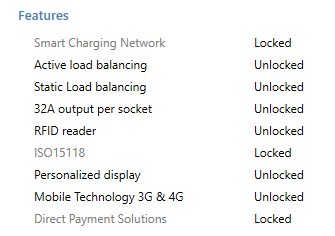
I can set that value using the Eve app, so I believe I have the right licenses (see below).
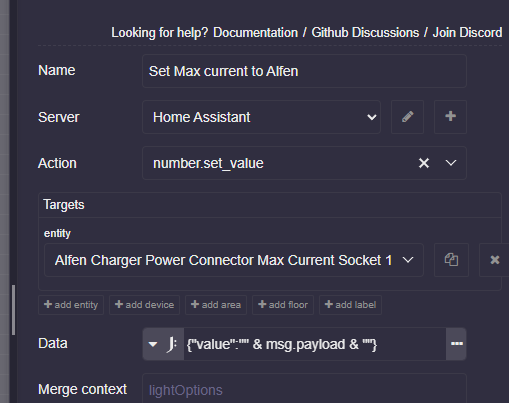
What can be the cause of this? And I think that I need to use *power_connector_external_max_current_socket_1 to set the maximum current because that is the value that changes when I use the app.
I disabled the loadbalancing using ACE, as you mentioned in one of the previous replies.
It would help me very much if someone could show me how the config of the Eve ChargePoint should look.
I’m in the process of bringing my Eve Pro line under my control, but thus far I’ve not been able to connect to modbus on my charger. I simply don’t know how to properly configure it on the charger.
Thanks for the whole info. i want to try something similar. I have an idea how i want to implement it, but i’m also looking at how you did it and i’m wondering some things. Especially because i do not have the alfen integration running properly yet. I’m looking at both your version in the first post here, and the nodered json you shared. (which includes the capacity tarifs for belgium, Great!)
If i may i have some questions in understanding what is happening. My apologies if they come off blunt, have already been answered and i missed it, or is just a very simple question. i’m really trying to understand this to implement or adapt this how i want it myself :
at the “Set power lever charge” you do “set charger -2, -1, +1, +2”., my questions on this topic:
Is this basically lowering or increasing the amperage by 1 or 2 amps?
If i understand correctly, this is treshold based? Meaning you give msg.payload with a certain value, and with the “Set power level charger” you check against this value, making the increase faster or slower (basically, steps of either 230 or 460 watts, meaning if you need to bridge 1500 watts, every 10 seconds it will check and decide to increase 2 Amps, which i think is for 3 times, and then stop increasing) ?
the 3rd option of the Switch, could you elaborate a bit on what this does? I find it weird that this suddenly checks for if the charging connector is connected & not charging, and as to why it’s only needed in this specific output of the switch
Why the choice to work by increasing amps, and not by setting the power? i have not dabbled to much with the alfen modbus/ocpp/Api, but can i assume it’s just the way you increase the power, by settings amps? i’m wondering because in the Eve Connect app you can choose what power to apply. I can only assume setting power is not possible, and it is done by amps, and therefore you also chose to go for amps?
What is the reason to go for this “control loop” style, and only increasing/lowering per 1 or 2 amps? why not set a calculated difference directly? (this answer I’m very interested in, if there is an electrical property to do so, or something else)
I’m a bit confused on the powerCharge button, on what that flow actually accomplishes. Does the powerCharge button create a means of “throttling” the maximum amps? On means maximum current defiend by the user (your 0-32A you mentioned). But what if it is off? If you happen to use 1600 Watts from the Grid, and not go through the “powercharge” flow if i can call it like that, it will see the “Set Power lever Charger” switch, go to path 1 (because >1500) and lower the amps by 2. Could you maybe elaborate a bit further? Because i fail to understand the reason of this logic.
In both the powerCharge & Captar flow’s, you have an “Update DSMR” node. If i understand NodeRed the “flow.” property is something like a local variable, accesible by all nodes in the flow (?). and i guess it’s used at some places, but, with what purpose?
Many many thanks in advance. If see people suggested improvements and all kinds of things, if i come across things when i implement them i’ll be happy to share them to. Many thanks for laying the foundation !
“Set power lever charge” : yes, this increases or decreases the AMPS on the charger. I change the ‘MAX CURRENT’ value of the charger, so you don’t need to buy the power balancing module.
According to the power level (that is calculated depending on what switch is set (captap, powercharge, …) When there is a big return to the grid (> 1500w), I add 2 amps to the max current, to get to the max sooner, but this is not needed; you can also use only +1 and -1, then the change is smoother.
No, i poll every 10 sec, and take the AVERAGE of the last 4 readings, to prevent switching on and off too fast. Now it levels in a smoother way.
Why AMPS and not power? Because the SET values you give to the charger are in AMPS (MAX_CURRENT), that’s the easiest. You could also use power, and calculate the amps at the end, same result.
The control loop is like I said above, to do the changes more smoothly, and not add 10A at once, or so, this would fluctuate the charger.
The powercharge button, that’s a nice one, I added it later.
This is when I want to FORCE the charger to use X amps from the grid, not taking in account the Capacity tariff. When do I use this?
At the beginning of the month, the CAPTAR is still low (1500w), but I know it will increase. So I set powercharge to 15A or so, to speed up the charging, knowing it will increase the CAPTAR value.
The flow.DSMR variable is set so I can use it in all the nodes in the flow.
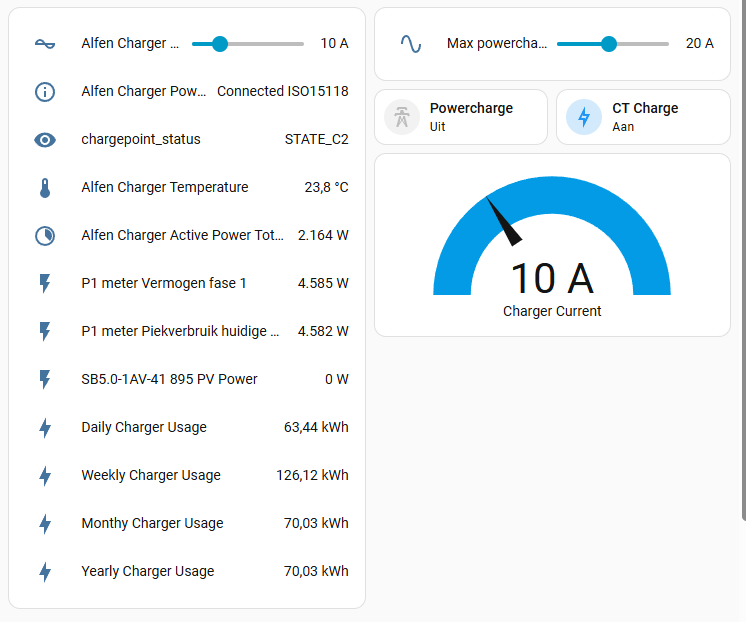
This is my current dashboard
Hi Erwin,
Can you share the node red solution for the eve control too? I cannot find it anymore as you have moved this part to HA.
I would like to keep the whole control in node red instead of a combination of HA and node red. I’ve tried to do it myself but did not succeed. I have a node red dashboard where I can put in the max charge price and can import the actual Epex price to compare with, but only miss the part to control the eve wallbox with a calculated current.
The Alfen Eve seems to be very picky on http requests, if it is not exactly like they want it, it doesn’t work…


 :
: