Folks, you have given me some really wonderful advice, I cannot thank you enough. First fix is in a couple of weeks and I intend to have a planning walk through with the electrician for a couple of hours. I will get in touch with him prior to make sure he is onboard.
@sota , an outline of your project and changes you would make would be amazing, thank you. Out of interest, does the KNX stuff need programming prior to anything working or do devices come with basic functionality out of the box, such as actuators just turning on the lights.
@Estanza good point on the wall panels, i had already considered this one luckily. Plan to emulate our Aussie friend here https://www.youtube.com/watch?v=uTxURzmrVtA and go the GitHub - leukipp/touchkio: Home Assistant Touch Panel Kiosk application for a Linux device (e.g. Raspberry Pi) with Touch Display. · GitHub route with poe RaspberryPi in a couple of locations at least, maybe three.
@Soukyuu i will check out that integration, and thank you for all the other tips.
Question to all KNX converts, is POE still the way to go for smart door locks or are there KNX equivalents?
Yes, they need prior commissioning. I’d recommend to watch some YT about that to see if you want to go that route. It has some rough edges.
I don’t know what you consider a dumb installation and a KNX one but the price of KNX components cannot be called cheap at all (talking from experience).
If I look at the current price for a 6 outputs x 16A C-Load and 6 inputs actuator and what else I had to add (power unit, IP interface) to use it and compare it to an ESP relay, the difference is quite big.
I consider a dumb installation when using old-fashion buttons and I guess that’s even cheaper.
Don’t get me wrong: KNX is super stable and luckily it can be integrated with HA very well.
I got it when I started with home automation and don’t regret it at all, it’s still integrated but I found other solutions that are equally as good for a fraction of the price.
@farmio: am I right that these days you don’t need ETS at all when used with HA?
No, you still need ETS - as always.
Would a middle ground be installing the KNX wiring only (alongside standard wiring) while walls are exposed to provide the option in the future? Can KNX wiring be used dual purpose for non KNX installations in the interim?
So even ETS has become more expensive, the cheapest versions are cloud based and look what they charge for a USB dongle!
Not really. It’s a different wiring schema - a bus. So you’d need to do all the routing twice, which just makes everything even more expensive. All or nothing imho. But you can do like cheapish Knx switches, some multi channel switch actuators and some additional cabling to expand the installation in the future. Shouldn’t add that much on top of a conventional installation and is imho even a bit easier to route the wires (if you do that yourself).
The KNX cabling should really be dedicated to the system only, as otherwise you will have problems. There are just two pairs - one for power and data and one for auxillary power. See my later comments below.
I would not recommend running KNX cable unless you are going ahead with it as a solution. As I mentioned, the big difference is where the devices are switched - at the light switch on a standard installation or at the consumer unit with a KNX actuator. It is extremely difficult to retrofit KNX properly because of this as it requires major rewiring.
My house is on three floors along with a separate workshop/shed. I made up a spreadsheet with what cables, sockets, etc. were required for every room and gave that to the electrician. Every service from heating, MVHR, solar, lighting, cameras, alarm, household appliances and doors are on the HA system, with most of it on KNX. I installed DIN rail 5 Volt and 12 Volt power supplies, and ran cable to locations throughout the house to power ESPHome and other devices.
It was a huge project lasting 13 months, but overall I’m very satisfied with it. Things I would change:
-
I have about 80 Cat 6a points, probably too much, but the PoE is very handy. However I should have stuck with Cat 6 as it is a lot easier to terminate and route through tight spaces. The electricians hated it!
-
I choose the wrong KNX presence sensors: they are really only motion detectors and are confusing to configure. MMWave KNX was not really available at the time, so I bought a few WiFi ones which have been great, but it has meant running surface cables to them.
-
I used the KNX presence sensors to report room temperature in some rooms to cut costs. Their location in the ceiling meant that they never reported the correct room temperature, despite trying to calibrate them.I’m probably going to have to drill some walls to fix this.
-
I over did the number of wall-mounted switches. Most of them are never used as the automations work fine. Just discovered recently that a lot of switches on the ground floor were never configured and no one noticed. During second fix and painting, I had configured one KNX switch to turn on every light in the house for the builders, and then forgot about it.
-
You asked about door locks. I ordered an upgrade kit for my Winkhaus front door lock which has a motorised bolt that just needs a switched 12 volt DC supply to retract the bolt. Unfortunately, I cannot find anyone to install it as the door needs to be drilled and routed to fit the lock and motor
 Winkhaus are popular lock suppliers here, so check if it’s an option with your door supplier - I think it’s called the EAV4+ model. Fits completely inside the door and no batteries required.
 -
For the internal doors, I put cheap magnetic door sensors into the frames of the bathroom doors for occupancy sensing. I ran the wiring to the door before first fix, so they are hidden in the frame. I should have done it for every room in the house.
-
I wanted to install a whole house A/V system and had specced out a nice system, but time, money and available space meant that it had to be dropped. However, Music Assistant has turned out to be a good second choice.
-
I installed 2" ducts in service spaces between the floors and out to the shed, and used it for KNX, DC, alarm and fibre optic cables. Fibre is cheap to run, I should have used more of it.
-
I completely underestimated how much space the Heat Pump, Solar, MVHR unit and all of the electrical panels would take up. Even getting all of the cable runs to the main consumer unit was a challenge.
-
I installed a lot of analogue and digital strip lighting using WLED and ESPHome to control them. I had looked at DALI to KNX, but I didn’t have time to research it. With the rest of the lighting on KNX, I have ended up with two lighting systems that are difficult to coordinate.
I would advise that you will need a few months to plan all of this, otherwise look at employing a KNX partner to assist you - if the budget allows!
Pat
What did you use the fibre for?
A number of reasons:
Because of the concrete construction of the house, we had a lot of space restrictions running services through ceiling voids and other internal spaces - there were no wooden joists we could drill through. The Cat 6a cables in particular, caused a lot of problems. The core network switch was located on the ground floor, and I put switches in the attic and the shed. This meant that a lot of Cat 6a had to be run between the first floor and the attic. I should have put a switch on the first floor, and ran fibre from there down to the ground floor.
There were a number of locations where I should have left a spare cable to allow for future expansion.
Also, I only used 4 core fibre, probably should have used 8 core to allow for redundancy and future link aggregation.
Photo of part of the main consumer unit in the utility room during installation - there are three more smaller units. This will give you an indication of the amount of wiring involved. We should have used a deeper surface mount unit, but it would have been too wide for the room, so we had to use a flush mounted unit. At the top left, you can see the KNX cables from each floor. The armoured KNX cable to the shed was linked to a different consumer unit. The grey boxes below that are the KNX dimming/switching actuators along with one of the blind controllers.
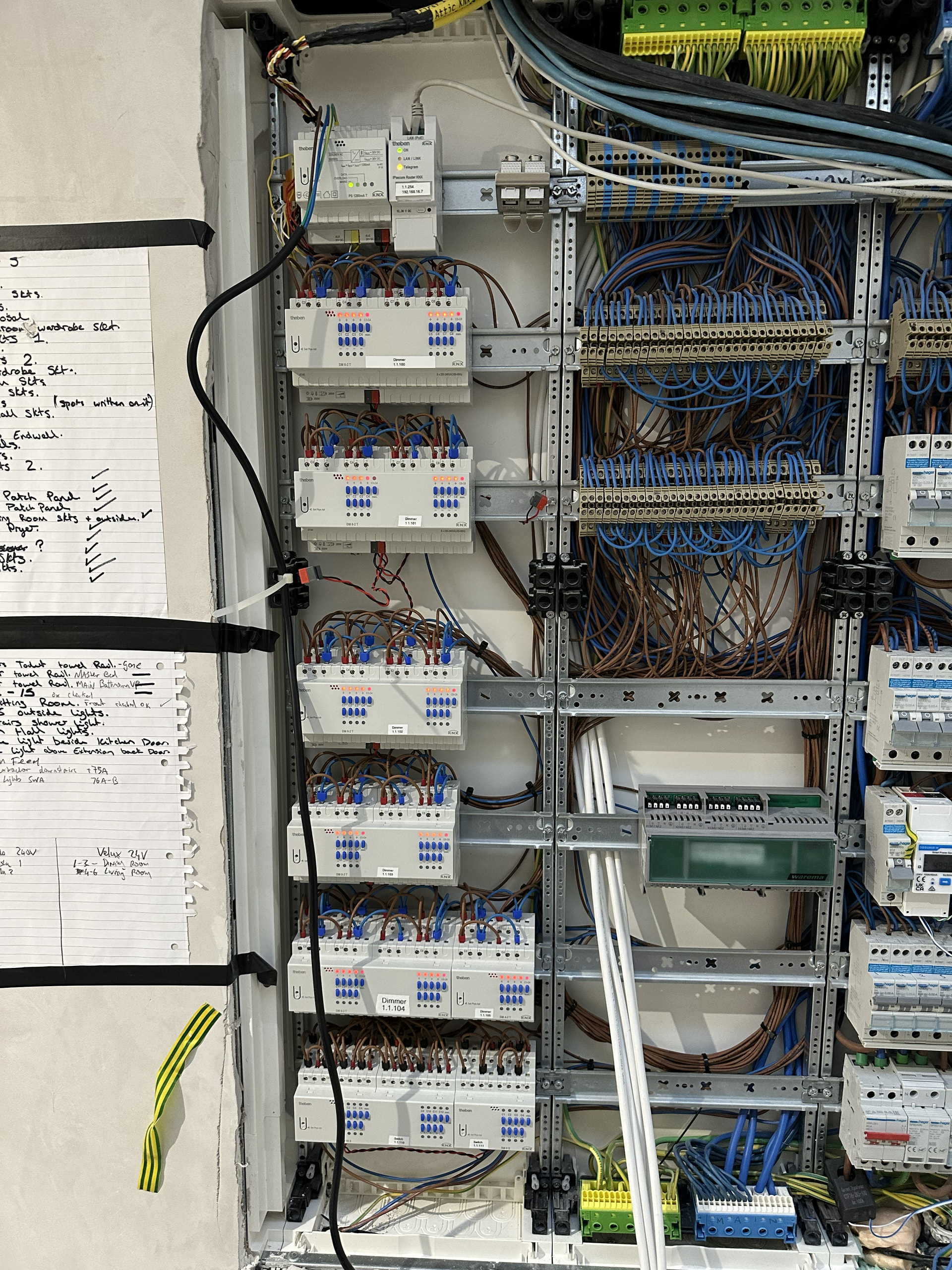
I am not going to lie, that photo is terrifying  Thank you for all the information. Cat 6a should be simpler to distribute in my setup luckily so the only location i anticipate needing fibre is for the internet connection to the gateway/router. The more i look into KNX, the more i worry i have left it too late and might even over engineer what i am trying to achieve. The future proofing part of my brain tells me its the only way to go and the sensible part of my brain says “your wife will literally murder you before second fix”.
As a happy medium I keep coming back to standard wiring back to Shelly Pro Dimmer 2PM din rail units for the lights, POE for surveillance, APs and wall mount dashboards, Zigbee or Zwave for sensors and blinds.
I am likely being dense but i still cant get my head around the dimmer switches. Most here in Ireland are the rotary type and hardly any push button (momentary) options that arent smart switches. I want to avoid any standard rocker switches that might look like they are on/off when HA has done the opposite.
It’s not as bad as it looks, but it was challenging to wire up! Most of it is simple point-to-point wiring from the lights to the consumer unit Wago terminations. Then just jumpered across to the associated KNX actuator channel.Keeping everything documented is key to this.
If you think you have left it too late for KNX, then you are probably right as it took me way longer than I expected to get to grips with the concepts and the ETS software. Then it was a matter of sitting down with a copy of the plans, and drawing out cable runs, light locations and all the other services.
For dimming switches, I used centre off, double pole retractive grid switches - these are easily available. A quick press on the top or bottom of the switch give you the on/off function. Press and hold gives you the dimming up and down function. This switch type also works for blinds, press and hold top to move the blind up and the bottom to mode down. Release when the blind reaches the desired position.
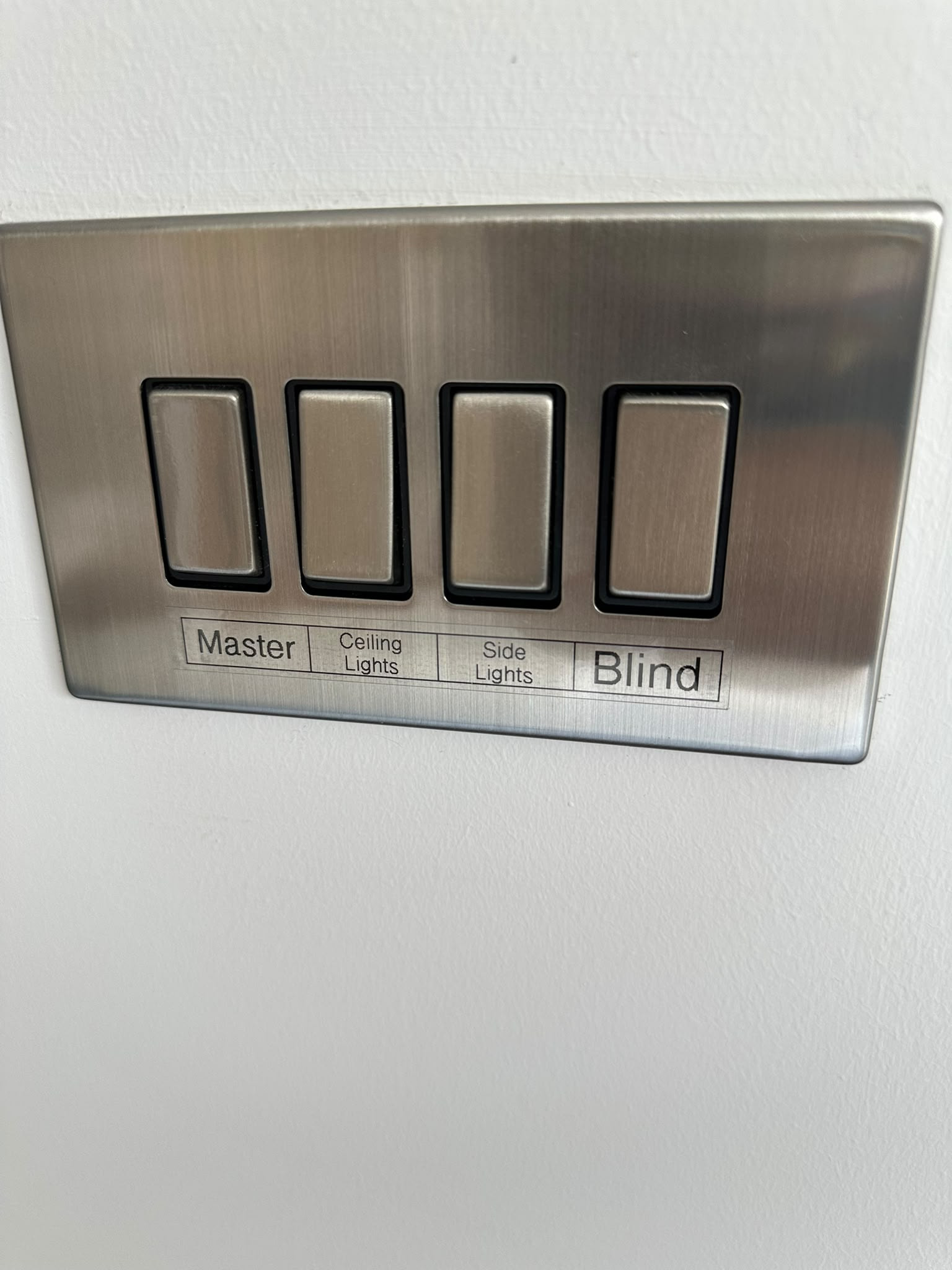
For simple on/off, I used a single pole retractive switch. See the photo for one of the four way grid switches with a mix of single and double pole types.
However, the reality is that these are almost never used here  The lights and blinds are automated, and I use the Adaptive Lighting integration (along with scenes) to control the brightness and colour temperature. Same for the blinds.On the photo, the two outside switches are double pole centre off. The left one is the master dimmer for the room and the right one is for the roller blinds. The two centre ones are simple press on/press off for individual lights. In bedroom, one switch runs the goodnight scene.
If you are installing a security system, go for one that integrates with Home Assistant, then you can use it’s sensors for presence and to monitor doors and windows. Use a wired system if you can, the cable is cheap and easy to run now and the sensors don’t need batteries.
Use Reolink cameras.
If you want to future proof, nothing beats conduit & pull string. Second place goes to solid Cat6, since the 8 conductors mean you can repurpose it for almost anything except mains wiring in a pinch. Just make sure to avoid anything that is labelled CCA or mentions aluminium.
Look into Candeo & Repenic. They both make zigbee rotary dimmer switches, though if you’re gonna be wiring everything centrally to a Shelly Pro Dimmer 2PM, then dumb switches should be all that you need.
I don’t get why this bothers people so much. Same thing happens in a dumb installation with 2&3-way switches - half the time the switches are in a “wrong” state. Personally, I stopped noticing. If the light is on, I don’t care what the switch position is. If it’s off, then I can’t see the switch at all, so problem solved.
Go unifi its more than just cameras  and has an extensive api, as far as smart plugs, i have every outlet in my home replaced with tp link smart outlets, aside from making anything in my home controllable (like 3d printers remote turn on, bedroom surround sound , ect you name it) i also have it set so almost all things turn off when no one is home exept wifi box. as well as other smart electric saving things
This

Yeah, people would provision conduit and think “I’m good”, but to actually use those conduits many years down the road, the pull string is actually the key people tend to forget…
Pull string is smart choice, but I have never met properly installed conduit that common wire guide didn’t pass. Sometimes it asks time though.
So for new installation conduit + pull string. Many flexible conduits have string inside out of the box.
Dumb as in traditional light switches. @sota posted an image of a 5-gang switch which could potentially save a lot of money, but that’s not an option here in Germany, the most you get is a 3-gang switch if you’re lucky, so to cover 4 lights and 4 blinds you’d have to get 2x2-gang switches for the lights and 4x2-gang switches for the blinds.
Imagine having a bar of 6 switches on your wall… each switch base is about 14€, plus the cover at the same 14€, makes 28€x6 → 168€. And it looks ugly. Or you go for i.e. Busch-Jäger Tenton 12x which costs you 205€ and have a clean solution which is also fully programmable.
If you run floor heating, you’d probably want a root thermostat anyway, so the Busch-Jäger Tenton 6x gets you that plus 6 programmable keys, no separate thermostat needed (unlike with a dumb installation).
Sure, the switching/blinds actuators come on top, but using multi-channel ones saves you some money and also does not count to the ETS Home limit of 64 devices. And as far as I know, you don’t actually need an IP interface. It just makes things easier.
And the wiring effort doesn’t actually change all that much, so what are you saving on, really? The largest part of the electrician bill is actually them wiring the cables and programming the ETS project for you. I opted out of the latter, because programming the bus is really not that hard and they quoted me 700€ just for creating a barebone project. That’s already more than I paid for my ETS Home license.
edit:
My electrician ran a cat6A cable to the door station as a future-proof solution, even though we went with a 2-wire doorbell solution (Hikvision). So I’m guessing, yes
This is a Home Assistant Forum, so I think it’s safe to say: You do need one Not only for ETS, but also for HA.
Fair point about the HA integration, but for ETS you could also use an USB interface from what I understand.