Aha, so it is already there? Meaning I don't have to create a script and a button?
I hope so; if we want HA to be accessible to more people we might consider making it easy to update. They can have had somebody else develop the system and now only need to maintain it. I made mine during Corona and would prefer not to be forced by something like this to write more scripts or figure out how to add a script to a button.
The new UI has all the features of the old but some have been renamed or reworked.
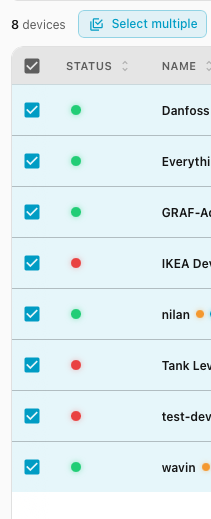
To update them all, go to the UI, click on "Select multiple" under the search box, then "Select all" at the bottom left and click on "Update" button at the bottom right.
What’s nice now is that you can filter online devices only before selecting all.
An update all button has great powers, but it can also create challenges for the untrained user.
They might spend a lot of time building the firmware for it to break due to an backward incompatible change that is not compatible with a specific project.
You can still update all, and if you integrate ESPHome into a systems like Home Assistant, you can also update from there - you could even setup automated updates.
The function is not that not that far away in the new device builder;
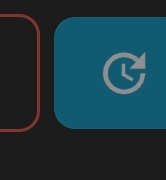
Aha, thanks. I was able to select multiple, but could not see the update all. But at the lower right corner (on Android) there is a round symbol, see picture. That is the update all. That is what I was missing.
Did anyone else noticed that when you edit an existing yaml, then press "update" to send new version to your device, but instead OLD non-corrected version is uploaded UNLESS i click "save" before uploading? It's pretty annoying, since i'm used to autosave function, which is now missing, as it seems... ?
I saw that fonts are too tinny for my taste. And there is no option to increse them.
Next problem is that I want to check is my config is valid before upgrading, but there is not option for upgrade after you check your config.
Probably in the next releases it will be fixed, but it does look more powerful then before.
I have 70 ESPHome devices and the thought of rewriting the YAML code due to breaking changes since they were first compiled would be a huge time waste. I update the ESPHome Builder integration as soon as an update is released, but my devices only get updates as needed. In other words, if it ain't broke, don't fix it.
There is no need to update firmware in working hardware unless there is a new feature that you want in the device.
Hmmm, yes. Currently making any code change activates the [Save] button, disables the [Validate], and leaves [Install] button active.
Logically, clicking [Install] without [Save] makes sense that the [Install] should send the previous version ... but surely you are more likely to want to Validate or Install your new code after making changes, than to re-install the old version of code ? Maybe a dev just disabled the wrong button ?
And yes, I think an auto-save before Validate or Install makes much more sense.
Personally I can see that the new UI should be easier for newbies to create their first devices ... but am unsure whether it will be an improvement for those already used to editing yaml directly.
if i make any changes i make them because they are needed and i want new version to be updated, not old one (that one i already have on my device...);
previous UI had autosave, so we're all "used to it" , making this new behaviour odd...
Ammm... nope I never use validate. Don't ask why... i just trust error checking while i write, and when i hit install it will tell me if anything isn't ok.
Great, thanks. I hope it will be solved in some way. Since now there are settings present in UI it could be made optional...
BTW personally i like new UI. It's more modern, more intuitive, and above all there's a decent listing, not a bunch of boxes...
Yeah, english is not my native language, so sometimes it takes time to fully 'get it'...
but, to be honest i guess we SHOULD use validate, that's why it's there, correct? Now, the question is whether using validate would then send new or old version into device? (I'm not behind the pc now, so i can't test).
Validate does the first stage of a compile - checking the syntax etc of the yaml code - but does not produce any executable code, so there is nothing to send.
I am old enough that I sometimes forget why I came into a room. (My wife says it's because I never have less than three projects going at the same time).
Yeah, i know. I wrote somewhat funny... what i meant is: if i'd press validate first, followed by install - would that compile/send old or new version to device ?
 I never use validate. Don't ask why... i just trust error checking while i write, and when i hit install it will tell me if anything isn't ok.