Hi
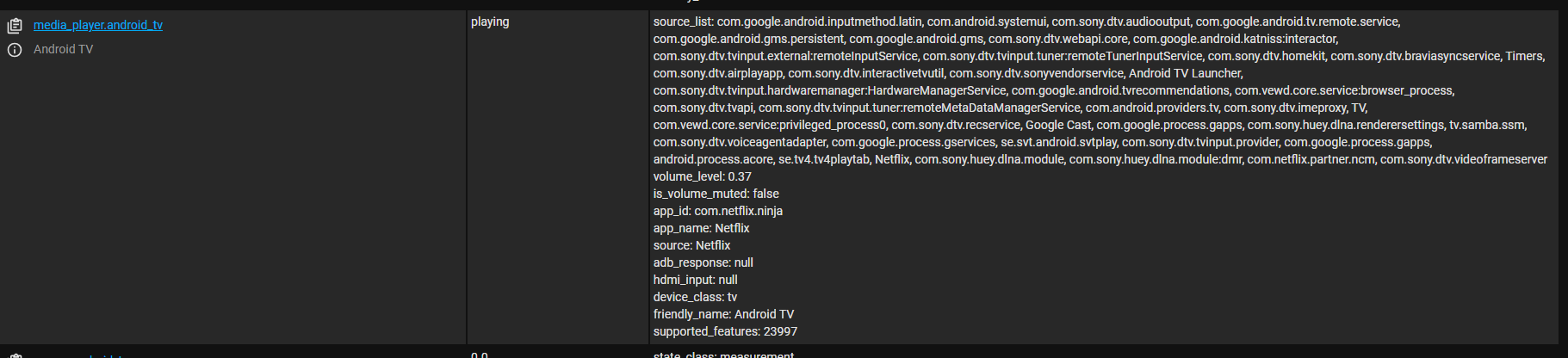
I’m woundering if anyone can help me figure out how to make an automation based on what “program” is playing on the TV.
E.g. I have an android tv, integrated through the ADB integration, and I can see that my kids are watching youtube, so after 20 min I want to pause it and tell them through a speaker that they should change to something else.
I can do the last steps but i cant figure out how to trigger based on the android tv status.
trigger:
  - platform: state
    entity_id: sensor.android_tv_source
    to: YouTube
    for: "00:20:00"
The state produced may be slightly different based on your TV, for example on my Amazon FireTV it would be YouTube (FireTV). Make sure the value for to matches what you see in the States tool for your media player entity.
Unless it’s been changed recently, for is not reliable for attributes because it is based on the last_updated property which changes whenever any attribute or the state changes. This is especially an issue for OP’s question, since many YouTube videos are shorter than 20 minutes and the entity_picture attribute changes with each video, resetting the last_updated value.
EDIT: The behavior of for with attributes no longer works like that.
Instead of starting the “countdown” the moment YouTube is opened, maybe a “fairer” version might be something like:
template:
  - trigger:
      - platform: state
        attribute: source
        to: "YouTube (FireTV)"
        entity_id: media_player.fire_tv_10_0_0_64
    action:
      - alias: Buffer in case someone left a video queued and YouTube starts playing it or ads
        delay: 15
      - alias: Wait for a video to be chosen or 2 minutes of browsing
        wait_template: "{{ is_state('media_player.example', 'playing')}}"
        timeout: "00:02:00"
    binary_sensor:
      - name: YouTube 20 minutes
        state: "on"
        auto_off: "00:20:00"
Then OP could just trigger based on the binary sensor going from on to off.
Well, I don’t have first hand experience with this. The documentation explicitly give an “attribute” + “for” example, but you might be right. To be tested, I guess.
automation:
  trigger:
    - platform: state
      entity_id: climate.living_room
      attribute: hvac_action
      to: "heating"
      for: "00:10:00"
I tried this one, but I changed to netflix and some times just to see how it responds but it is still “unknown”
template:
  - trigger:
      - platform: state
        attribute: source
        to: "Netflix"
        entity_id: media_player.android_tv
    action:
      - alias: Buffer in case someone left a video queued and YouTube starts playing it or ads
        delay: 15
      - alias: Wait for a video to be chosen or 2 minutes of browsing
        wait_template: "{{ is_state('media_player.android_tv', 'playing')}}"
        timeout: "00:00:30"
    binary_sensor:
      - name: YouTube 20 minutes
        state: "on"
        auto_off: "00:05:00"