A custom Home Assistant Dashboard card that displays images and videos with a built-in media browser for easy file selection. Perfect for displaying security camera snapshots, dashcam footage, family photos, or any media files stored in your Home Assistant media folder. 100% developed in VS Code by me directing GitHub Copilot with Claude Sonnet 4.0.
When mixing videos and pics for media play. Is it possible to have the video file finish playing first before advancing to the next file? I set auto_refresh_seconds: to 60 but some of the videos are longer than 60 secs. thanks!
This is an awesome card. I can finally turn my wall mounted iPad into both a control center and a photo frame.
I have a Samba shared usb disk over network with pictures from 2010-2025. But the vast majority of images shown are from 2019. Is this due to it being a in the middle thing?
Also, is it possible to add entities to the screen? Like the metadata but other HA sensors? Would love to display temperature and electric usage for instance.
Perhaps your total image estimate is incorrect in equal probability mode (which youll need to turn on). However before you futz with that, try the latest version of the card and install media index. Please file an issue on the repo for feature requests. A screenshot of what you are thinking these notifications would look like would be helpful as there are lots of ways to interpret this request!
I’m trying to use this show the most recent image from a variety of cameras, each with a different base string filename (based on the camera and/or object detected) but with the same format datestamp at the end
EG
back_alley_20251212_105941.jpg
video_doorbell_20251212_153845.jpg
The card is parsing the string correctly as it shows the correct date and time in the card itself for each image. But I can’t get the card to sort by anything other than filename. Regardless of which of the 4 sort options I choose. If I understood the card correctly there should be at least 1 sort option that pulls from the timestamps? But no matter what it either shows video_doorbell first (for descending) or back_alley first (ascending) and none of the other filename base strings in between. Is that expected behavior or am I misconfiguring something here? I looked through the examples on the github and the closest example I could find was I think assuming the same base filename string (the multicam example seemed to cycle between the most recent from all cameras, I’m seeing if I can do a single timeline for images across all cameras).
Anyway thanks for any time in responding, the card is much appreciated!
Regards
Edit: Perhaps a simpler way of explaining - each base filename string is in the correct chronological order, but then the filenames are alphabetized, always - I was hoping to be able to do purely chronological order without the filenames being alphabetized. No worries if this is not possible, but wanted to confirm!
very cool Card.
Maybe I’m blind, but I haven’t been able to figure out how to make a photo slideshow automatically start over from the beginning after the last photo.
Am I overlooking an option, or is this feature not available yet?
What I mean is an endless slideshow of photos, regardless of whether there are 10 or 100 photos in the queue.
Sorry, I don’t monitor the HA forums (and they don’t seem to notify me when someone replies on my posts). Please make sure you try the latest version. It does loop.
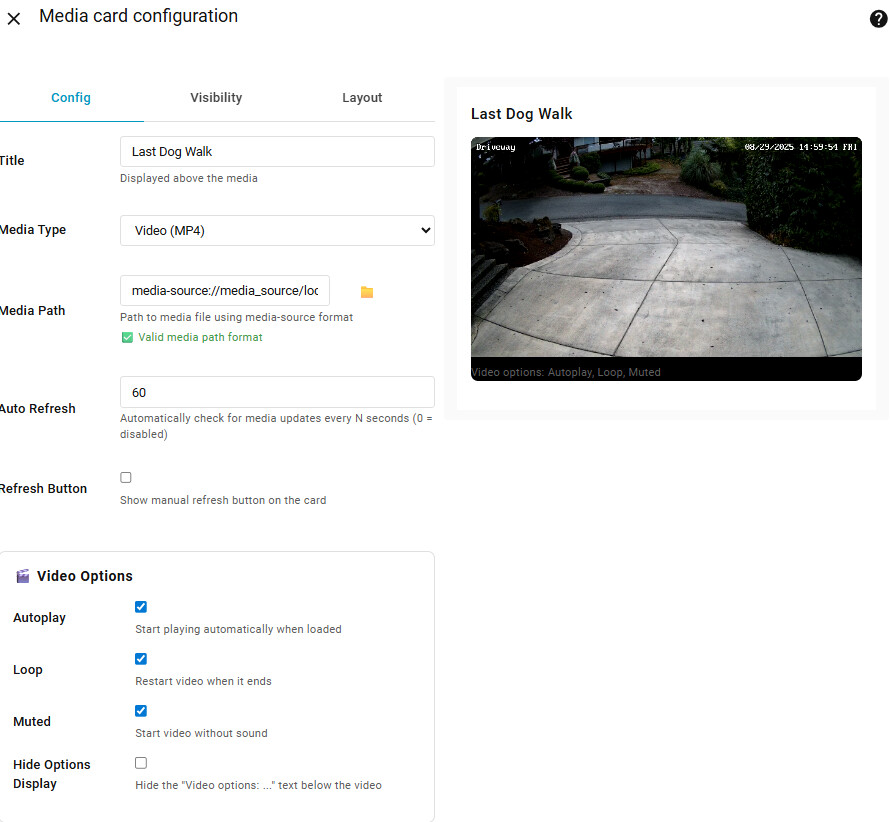
 Features
 Media Display
 Built-in Media Browser
 for images,
  Auto-Refresh System
 Video Controls
 Customization