I’ve been using AC Infinity CloudLine fans as bathroom extractor fans. They’re really excellent fans, high power and low noise, can continuously adjust their speed based on humidity and so on, but they don’t have an API so don’t integrate with Home Assistant.
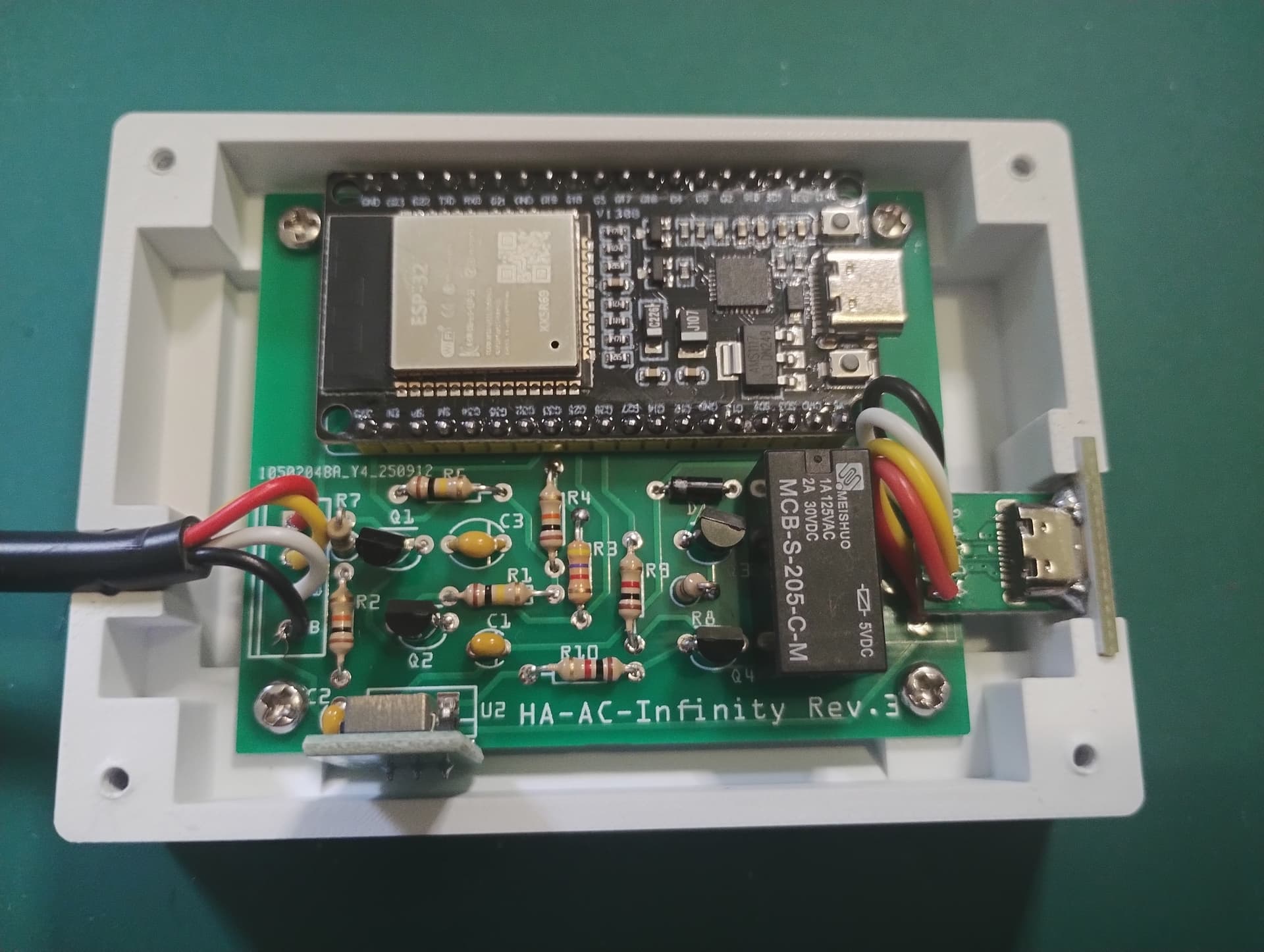
I made a project that sits ‘between’ the fan and its controller. It lets the controller do whatever it wants, but can switch it out and send signals to the fan itself, so HA can take over control when needed. Since it’s for my bathroom, I also added a ‘boost button’, so you can get some full speed air extract for 30 minutes if needed.
It’s been really good fun to make this project, and used a few different skills to get there. On a personal note, I’ve been super impressed with ESPHome - it really is a remarkable bit of tech, capable of a great many things.
I could be wrong, but the OPs project looks like it brings local only control to the AC Infinity cloudline fans, whereas the one you linked looks like it ties into the cloud based service. I’ve not used either, but that’s my guess!
@rsachoc is right @ltek - The project you linked to is ‘software only’, as it connects from the HA server to the AC Infinity cloud service to control the fans. That’s fine, and actually a nice way to get a lot more information into HA, but it requires the controllers be on wifi (and the Internet) and requires you use the cloud. It obviously won’t work if your Internet fails.
My project brings (limited) local control. It does so without impacting any of the AC Infinity controller or app features, so can be somewhat “invisible” if you want it to be. In fact, it’s default position is to do nothing and just pass through everything from controller to fan etc. It’ll work if your Internet, wifi or Home Assistant is down.
My reasoning here was that I wanted to get some local control of the fans for the boost button. HA is a handy easy addition, which sort of comes for free when you use ESPHome (which itself provides a brilliant base firmware, and makes the software part of this project super-easy).
I am looking to build an automated ventilation system for my Bambu P1S, and found a YouTuber that made a remote-controlled ball valve (https://www.barberspaddockwoodworking.com/product-page/diy-remote-controlled-blast-gates), and I was planning to use an AC Infinity fan for it. That got me thinking about how to connect all of this to Home Assistant, and then I found this.
I’ve gone through much of the repo, and I just wanted to say a huge thank you. You’ve done so much of the heavy lifting already. I love the idea of the boost button as well, but it looks like the 4-pack of devices using that board shape are no longer available on Amazon: I might just hold off on that part of the project for now.
Much appreciated for your contribution to open source, and to helping automate all the things
Why do you want a ball value? I installed a fan and just used a standard duct backdraft damper - super cheap and also conforms to building code (I built mine into the ceiling)
I put this project together on the desk and it all worked fine. When I put it all into service, I had a weird problem where the fan would reset every couple of minutes. It looked like maybe electrical noise or some such, although I couldn’t prove it by looking on a 'scope (weirdly, one of the 4 of these I made works absolutely fine, but 3 don’t!?).
I eventually tracked it down to the USB connector plug (and maybe the cable). I’ve tried a few different options, including pre-made ‘pig tails’, but none of them work reliably. The best I have is to cut up a vendor UIS cable - a rather expensive option, but it works.