80% of the Anycubic integrations running in Home Assistant right now cannot start.
That isn’t a guess. Home Assistant’s own opt-in analytics reports 206 installs of the anycubic_cloud integration, and 165 of them are on v0.2.2 — a version whose pinned paho-mqtt 1.6.1 no longer loads on current Core, which moved to 2.x. It fails during setup.
The cruel part is that those 165 people will never see a notice about it, because a repair notice has to run inside the integration’s own code — and their integration doesn’t get that far. There’s no update prompt either. If you set this up in 2024, it quietly stopped working and nothing told you why.
So: it’s maintained again, it’s in the HACS default store, and moving over takes about two minutes.
→ github.com/Nino6689/hass-anycubic — currently v2.1.0
Huge credit to WaresWichall (@WaresMyHass here), who built the original and whose last release was December 2024. This carries on from that work — same anycubic_cloud domain, same entity-ID scheme, so migrating is lossless: your history, automations and dashboards all survive. Remove the old one in HACS, add this, restart.
 First — if your token vanished from the .conf file
This keeps coming up (and did again in the original thread a couple of weeks ago), so let’s clear it up:
Slicer Next 1.4.1.1 started AES-encrypting the token in the config file. It isn’t missing and you haven’t broken anything — it’s just not readable there any more.
Two routes, and which you want depends on what you need out of it:
- Just want it working in two minutes? The
tools/folder has a browser bookmarklet. Add it as a bookmark once, click it while signed in atcloud-universe.anycubic.com, and it copies a web token to your clipboard. No terminal, no downloads, nothing to install. - Want live updates and the control buttons? That needs a slicer token — and the slicer token is the one that got encrypted. The macOS and Windows helpers in
tools/read it straight out of the slicer config, but only on versions before 1.4.1.1. For newer ones there’s a one-time memory-snapshot recovery documented in the README, which runs entirely on your own machine.
 The difference matters more than it sounds: Anycubic blocks MQTT for web tokens. A web token polls roughly once a minute and the control buttons won’t work — fine for “is it printing?”, useless for watching a temperature curve. Slicer tokens get sub-second push updates and full control.
And a fingerprint that cost me a full day: "User does not exist" is the server’s reply to any invalid token. I proved it by mutating a known-good token four ways — flipped signature, truncated signature, tampered payload, not-even-a-JWT — and all four came back with that exact message. It is never a statement about your account.
 Filament tracking, in actual grams
This is the part I’d install it for, and as far as I know nothing else does it.
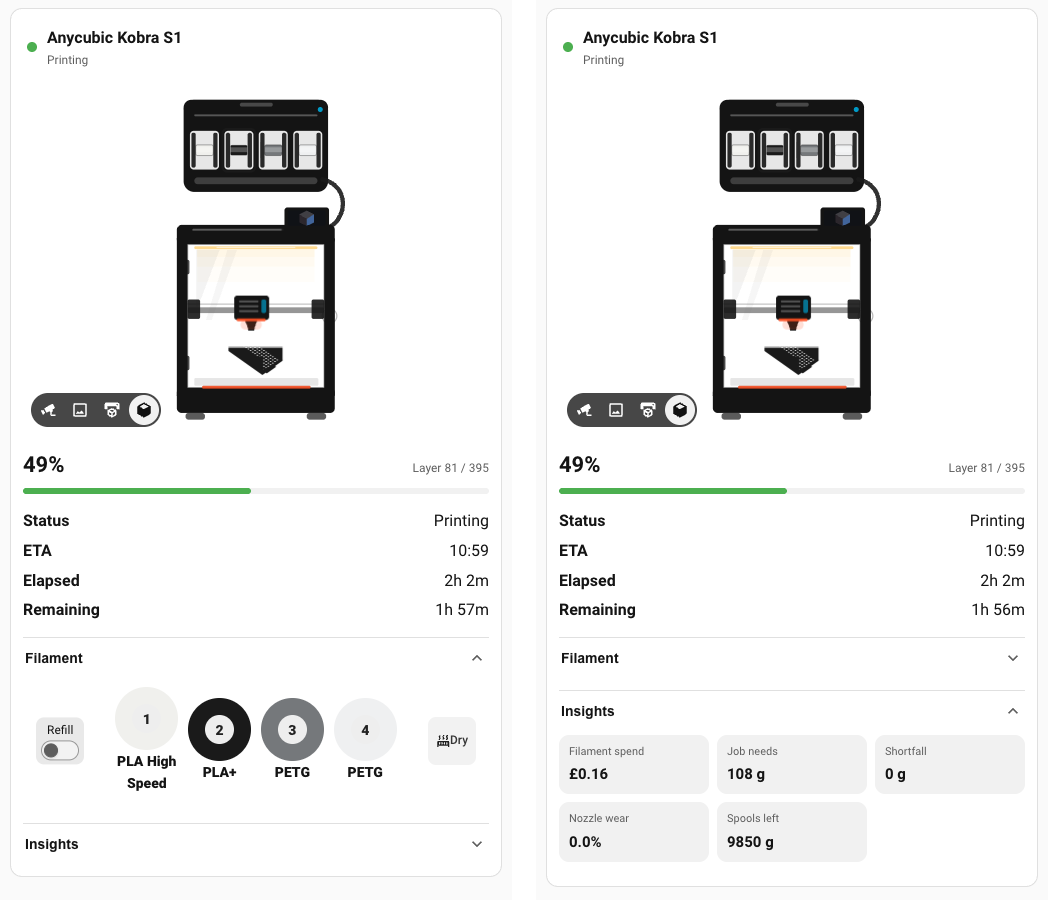
Start with an awkward fact: the ACE cannot weigh a spool. Its consumables_percent field reads 0.0 on every slot, always — including genuine Anycubic reels with factory RFID tags. I checked through the cloud API and the printer’s local API, so it isn’t a cloud artefact. The number simply isn’t there.
So it’s derived instead from supplies_usage — the millimetres the printer reports it actually extruded — converted using filament density and 1.75 mm. That turns out to be better than trusting the slicer’s estimate, because it includes purge and priming waste, charges a cancelled print for what it really used, and works for jobs sliced outside the cloud.
Measured against a real print: 16,727 mm → 49.90 g calculated, against the slicer’s own 49.76 g. Out by 0.13 g.
Once you have honest per-job grams, useful things fall out of it for free:
- Run-out forecast — will this job finish on this spool? No slicer estimate needed, so it covers prints started at the printer’s own screen.
- Cost per job — set a price per kg per reel; currency comes from your HA config. Unpriced spools read unknown, never a fake £0.00.
- Nozzle wear — grams through it, split abrasive vs non-abrasive. Grams, not hours; hours don’t wear brass.
- Spool inventory — how much filament you own, across every reel.
And reels are remembered. A spool is identified by material | colour | SKU, so a part-used reel you pull out and put back — in any slot — recovers its weight and its history.
A confession, because it’s the more useful story: the first run-out forecast shipped calculating
used ÷ progressand was wrong by 2.4×. A print’s purge and prime is a fixed cost — measured at 3.9 g, then 0.48 g/% — so at 5% progress it confidently predicted 125 g for a 52 g job. It now measures the rate between two observations, which cancels the fixed cost exactly. The unit tests passed the whole time. The arithmetic was right; the model was wrong. Only a real print caught it.
 Cloud, or
  straight over your LAN
Both are supported, both are first-class, and you can switch between them from one page.
Most people should stay on cloud. It’s the default for good reason — nothing needs re-pairing, and the file library is genuinely handy.
Local is worth it if your printer sits on an isolated VLAN, you want camera snapshots and recording, or you’d rather your printer didn’t phone home at all.
The surprise from building it: a local connection reports more than the cloud does.
| Cloud |
Local |
|
|---|---|---|
| Fan speeds (part / aux / box) | only pushed on change | continuously populated |
| Head position X/Y/Z | only when you ask, then goes stale | continuously populated |
| Camera | live view (WebRTC) | live view + snapshots + recording |
| Works with no internet | ✗ | ✓ |
| Keeps working when your token expires | ✗ | ✓ — no token involved |
| File library, job thumbnail, lifetime totals | ✓ | ✗ — these live in your Anycubic account |
| Update speed | sub-second push | polled ~15 s |
Everything the printer itself knows, you get either way — including filament tracking.
Full control works locally too: light, nozzle and bed preheat (on an idle printer, which the cloud makes hard), fans, ACE auto-refill, homing, jogging, motor release. Verified 10/10 against real hardware. The one thing that stays cloud-only is AI foreign-object detection, and that’s Anycubic’s own design decision — their code comments it 只有广域网, “WAN only”.
Read this before you flip LAN Mode on. Turning it on removes the printer from your Anycubic account — the cloud starts answering
code 1007 "The printer has been deleted". Turning LAN Mode back off does not undo it, and neither does a power cycle; I tried both. You have to re-add the printer in the Anycubic app. The good news is re-pairing is clean — it comes back with the same cloud ID and all entities reattach, because unique IDs are keyed on the printer’s MAC rather than the cloud record. But go in knowing.Also: a mode change needs two restarts — the printer has to reboot before the toggle takes effect, and Home Assistant needs its own restart afterwards. Skipping the printer reboot makes everything downstream look broken.
The local handshake was originally documented by chrisfore/anycubic_ha_local (MIT) — and if you want local-only with no Anycubic account at all, that project does it properly and is worth your time.
 The printer draws itself
The card’s printer isn’t a stock picture — it’s telemetry wearing a nice outfit. The chamber light is your light entity and casts into the chamber. The reels are the colours and fill levels your ACE reports. The feed tube runs from whichever slot is loaded. The head sweeps while a job runs, and heat blooms as the nozzle and bed climb.
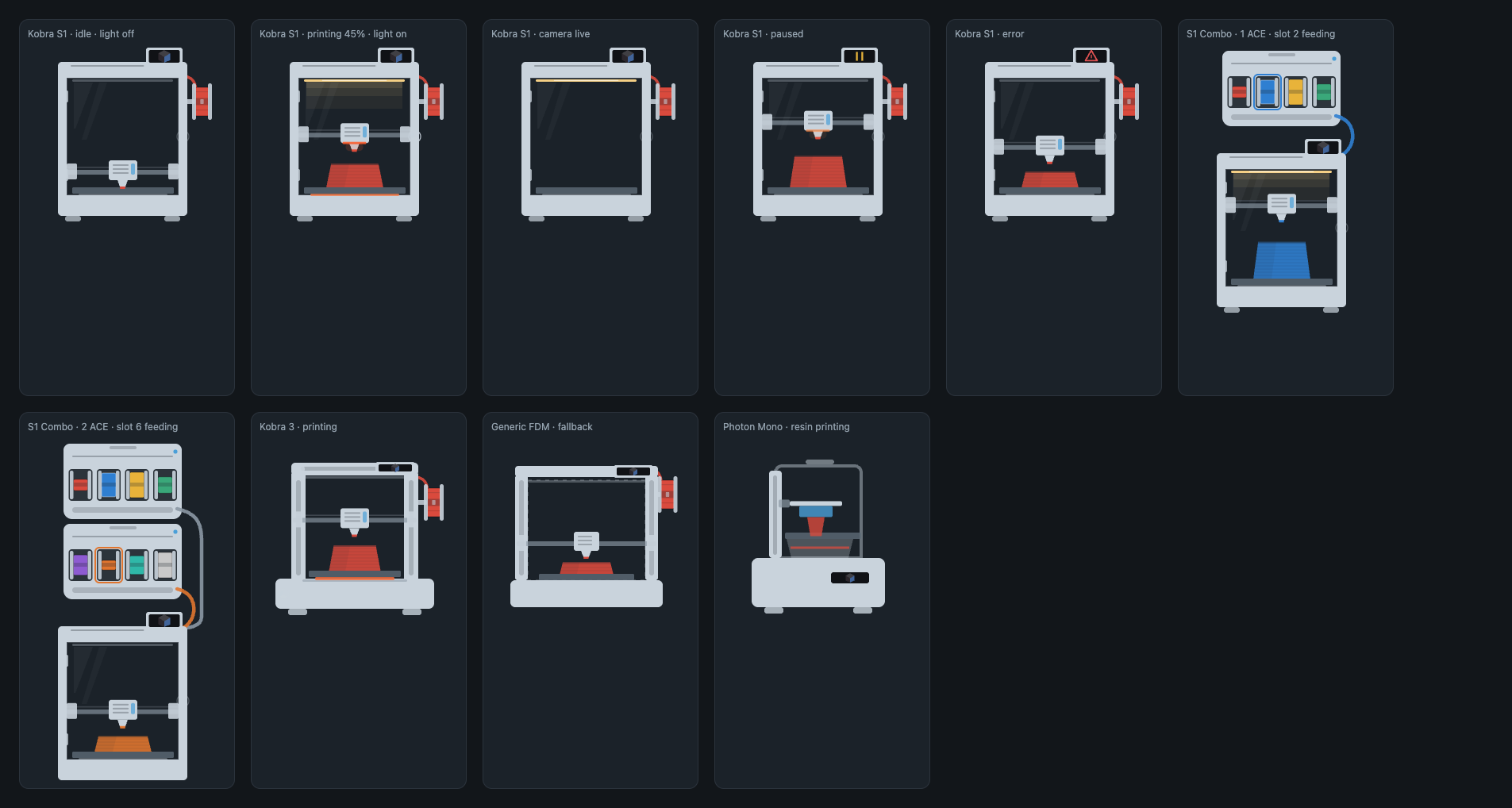
Set mediaView: printer_model and the object growing on the plate is the actual silhouette of the thing you’re printing, in the colour of the loaded filament, revealed from the bed up as the percentage climbs. Your printer publishes a render of every sliced job — it may as well get used.

And the sidebar panel ends with “Build this on your own dashboard” — four ready-made card layouts, rendered live with your data, each sitting above the exact YAML that produces it, with your printer_id already filled in and a Copy button that works on plain-http installs too.

 What I actually need: people with other printers
Here’s the honest bit, and it’s why I’m posting.
I own one machine: a Kobra S1 with an ACE Pro. That’s the only hardware every change is tested against — the TLS work, the MQTT connection, the entities, the card, all of it.
Everything else on the supported list — Kobra 3 Combo, Kobra 2 / 2 Max / 2 Pro, Photon Mono M5s, M7 Pro — is supported by inference. It works because upstream or the community reported it working, not because I verified it. I’ll take care not to break those models, but I genuinely cannot see them.
So if you run anything that isn’t a Kobra S1, you are my only visibility into that hardware.
- Post a report — there’s a short form, takes about a minute, and it builds the support table in the README automatically. Reports that things work matter just as much as reports that they don’t.
- Something actually misbehaving? Open an issue instead.
Two things I’d especially love eyes on:
- Other Kobra 3 / S1 family printers in LAN Mode. They speak the same protocol, but nobody has tried one yet. (Mind the account warning above.)
- A second ACE Pro. The card already draws two units stacked; issue #14 is open and I have no way to test it.
Resin owners, Kobra 2 owners, anyone on a China-region account (#13) — all useful.
If you’ve got a spare printer gathering dust and want a model properly supported rather than supported-by-inference, that’s a conversation too. Until then I’d rather be upfront about the gap than imply coverage I don’t have.