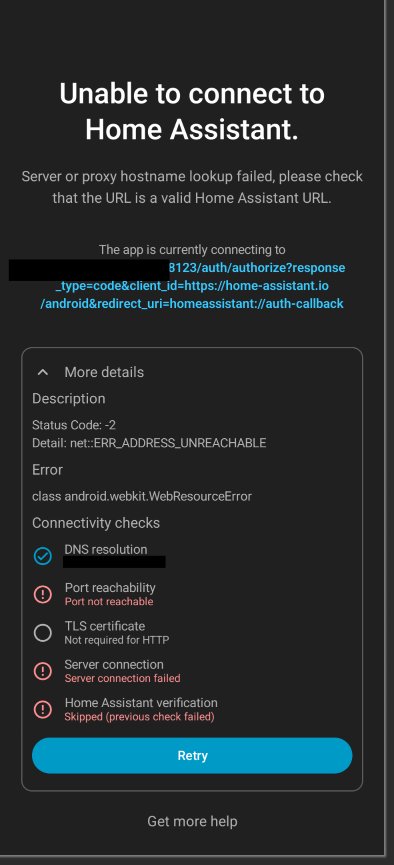
This was working until I moved Home Assistant to a new computer. It’s running as OS. I restored from my backup and everything went smoothly except my app can’t connect. I can log in through the web portal, and the app is finding the correct IP address.
Here’s screenshot of the error. Sometimes prior to this the app seems to find 2 instances of HA, both same IP and name.
I have tried the troubleshooting here: Troubleshooting | Home Assistant Companion Docs . The Starting Fresh…" sounded promising. No luck but maybe I’m missing something? Clearing storage and app data, I only know “storage and cache” on android. I did delete the device in the Integrations Dashboard and it hasn’t shown back up.
I’ve also uninstalled and reinstalled the app as well as reset my router. If anyone has other ideas I would appreciate it!
Well the app says port 8123 is not open at the redacted name you provided. Since you redacted the name, it’s difficult to know more. If you redacted the name because it’s an Internet resolvable name, that could be part of your problem.
Since DNS resolution is good, you should verify the IP being provided by DNS. Assuming this is Windows, open a command prompt and ping the fully qualified domain name of the server, the part you redacted at the top of the screen. Does it provide the IP you expect? Is it an internal IP address or publicly routable IP?
I would highly recommend you use the Companion apps setup for Internal LAN to simplify your configuration. Use the IP address in the “Internal connection URL” and enter your wireless SSID in “Home Network”. Once the app understands you are on your local LAN it will use the Internal connection URL.
Sorry, it’s just a local IP, I don’t know what I should share online.
In double checking the IP address I noticed that I had tried to set it for a static IP in the Network settings " Local network->Automatic ->Use the configured network settings"
Switching that back to automatic fixed it.
Thanks for your help. I’m still curious why this setting only messed up the app? I could use that address with other computers (windows and ubuntu) and my phone in the browser. Just the app struggled.
What’s the point in blurring it then!?
Since this is a local, non-routable (not accessible from outside of your network) there is no reason I can think of to do this.
On top of that: you make it more difficult to help you.
Good that it is solved!
Also: please take the time to mark the post that holds the solution.
You do that by selecting the three dots under the post:
Then select the check box:
By doing so:
this thread can be useful to other users as well (this thread comes up as solution when starting a thread which is similar to yours).
this prevents that someone else steps in trying to help