I run the appdeamon add-on on my haos based installation. I have not used it to run anything so far. I also keep my installation up to date in terms of versions etc.
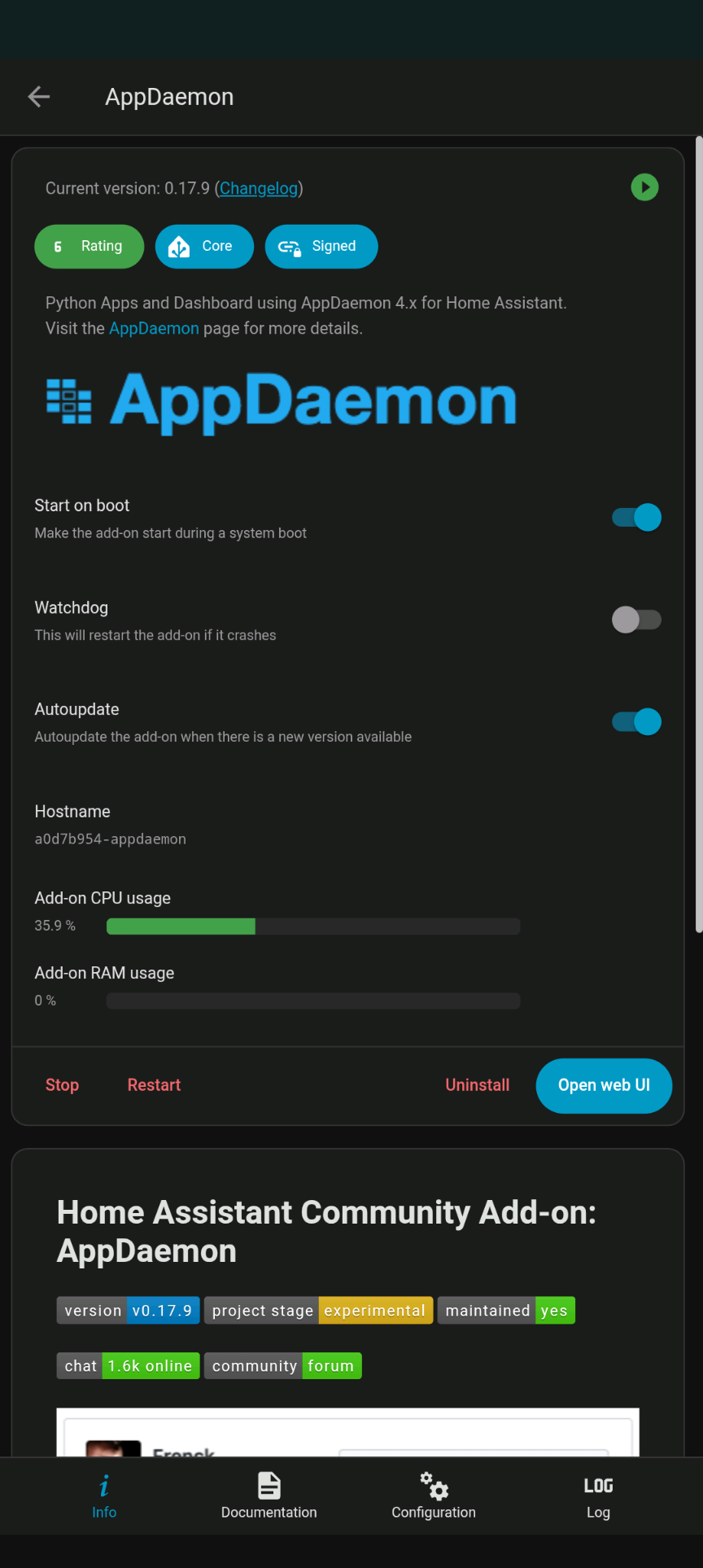
Recently I noticed the add-on is using 30-40% CPU, which can impact the performance of home assistant. A restart of the add-on did not fix this.
I attach a screenshot.
Is there anything that could need to be added to the default configuration? (I do not recall ever changing it)
ajfriesen
September 13, 2025, 7:18am
2
Did you try a full restart of the system?
Yes, the system has taken a very long time after restart to become accessible, which I assume is related to the add-on cpu usage
ajfriesen
September 14, 2025, 3:21pm
4
What hardware do you have?
Can you disable the AddOn and also disable start on boot and reboot.
Disabling appdaemon did it. Now total cpu usage is 5%, not even usually spiking above 30%.
I have a thin pc with 32G SSD, 8G memory.
➜ ~ ha info
reboot
shutdown
services
network
hostname
timedate
os_agent
haos
resolved
journal
disk
mount
amd64
i386
➜ ~ ha host info:production: :: :generic-x86-64:*
reboot
shutdown
services
network
hostname
timedate
os_agent
haos
resolved
journal
disk
mount