I’ve been running two APsystems EZ1-M inverters (firmware 1.7.0 and 1.7.5) with Home Assistant for a while and ran into several bugs in the official integration that have been bothering me for a long time. I’ve put together a community-enhanced version that fixes all of them.
Fixed bugs compared to the official integration:
Sensors go unavailable every night – The inverter physically shuts down at dusk and disappears from the network. The official integration marks all sensors as unavailable. Fixed with a cache mechanism: sensors keep their last known values until sunrise.
state is not strictly increasing log warnings – The inverter occasionally returns slightly smaller lifetime energy values due to floating point rounding. Fixed by tracking the last output value so it can never decrease.
output_fault_status shows a problem every evening – not c.operating with device_class=PROBLEM triggers a false alarm every time the inverter shuts down normally at dusk. Replaced with inverter_active using device_class=RUNNING with correct semantics.
Power limit always shows 800W – Fixed by calling the dedicated getMaxPower endpoint directly instead of relying on getDeviceInfo.
KeyError crash on newer firmware – maxPower/minPower are missing from getDeviceInfo on some firmware versions, crashing the integration on startup. Fixed with safe fallbacks.
Python 3 syntax errors – except ConnectionError, TimeoutError is Python 2 syntax and causes a SyntaxError in Python 3.
Lifetime energy counter overflow workaround – Known firmware bug: the internal counter resets to 0 at ~540 kWh. The integration detects and compensates automatically.
New features:
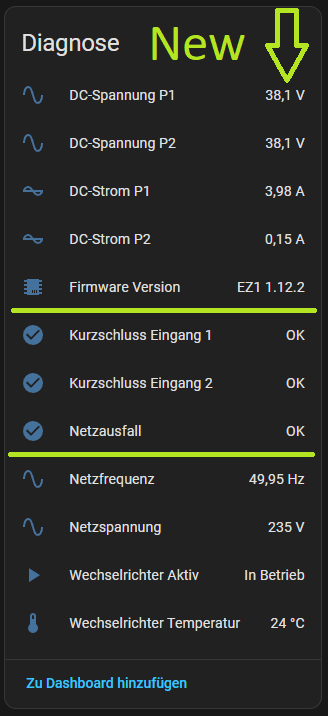
Firmware version as diagnostic sensor
Separate today/lifetime energy sensors per PV input (P1, P2)
Comprehensive logging with meaningful log levels
German translations
EZ1-D support (max power read dynamically from device)
Tested with: HA 2026.3.1, firmware 1.7.0 and 1.7.5
Hi,
Thanks a lot for your integration, it’s highly appreciated.
Just as a remark, I followed your migration steps to replace the official one with yours. But step 4 “deinstalling the official integration” is not possible as it’s not shown in the integration list anymore after the reboot.
Your integration seems to automatically replace the official one, at least that’s what I understand from “Benutzerdefinierte Integration, die eine Core-Komponente ersetzt”.
As I learned, starting with firmware 1.11.2, APSystems integrated a bluetooth lock. Is there a way to integrate a firmware update via Wifi into your integration?
Thanks for the feedback on the migration – good to know it works automatically! I’ll update the README to reflect that.
Regarding firmware updates via WiFi: unfortunately the local API does not provide a firmware update endpoint – updates are handled by APsystems’ own cloud infrastructure. This is outside the scope of a local integration. The AP EasyPower app is the only supported way to update firmware.
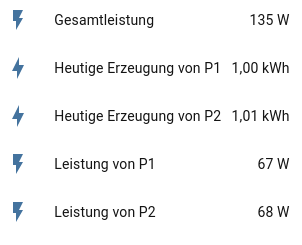
it’s a bit confusing that my inverter shows 135W power even though it’s shutdown. It also somehow falsifies the statistics.
Could the values for total power (Gesamtleistung), power of P1 (Leistung von P1) and power of P2 (Leistung von P2) go to 0 if the inverter is powered off?
Hi @meiser Sorry for the late reply. Please download v1.3.0; hopefully that should fix the issue. If you find any other bugs, please create an issue on GitHub. Thanks.
There are different EZ1 hardware versions. If your EZ1 is older, version 1.10.2 may be the only one available as of today. Newer versions receive 1.12.2 or 1.12.2t. And then there are specific “battery versions” with completely different firmware designations. You can find more detailed information in PV forums, e.g. at www.photovoltaikforum.com
 https://github.com/shopf/apsystems-ez1-enhanced