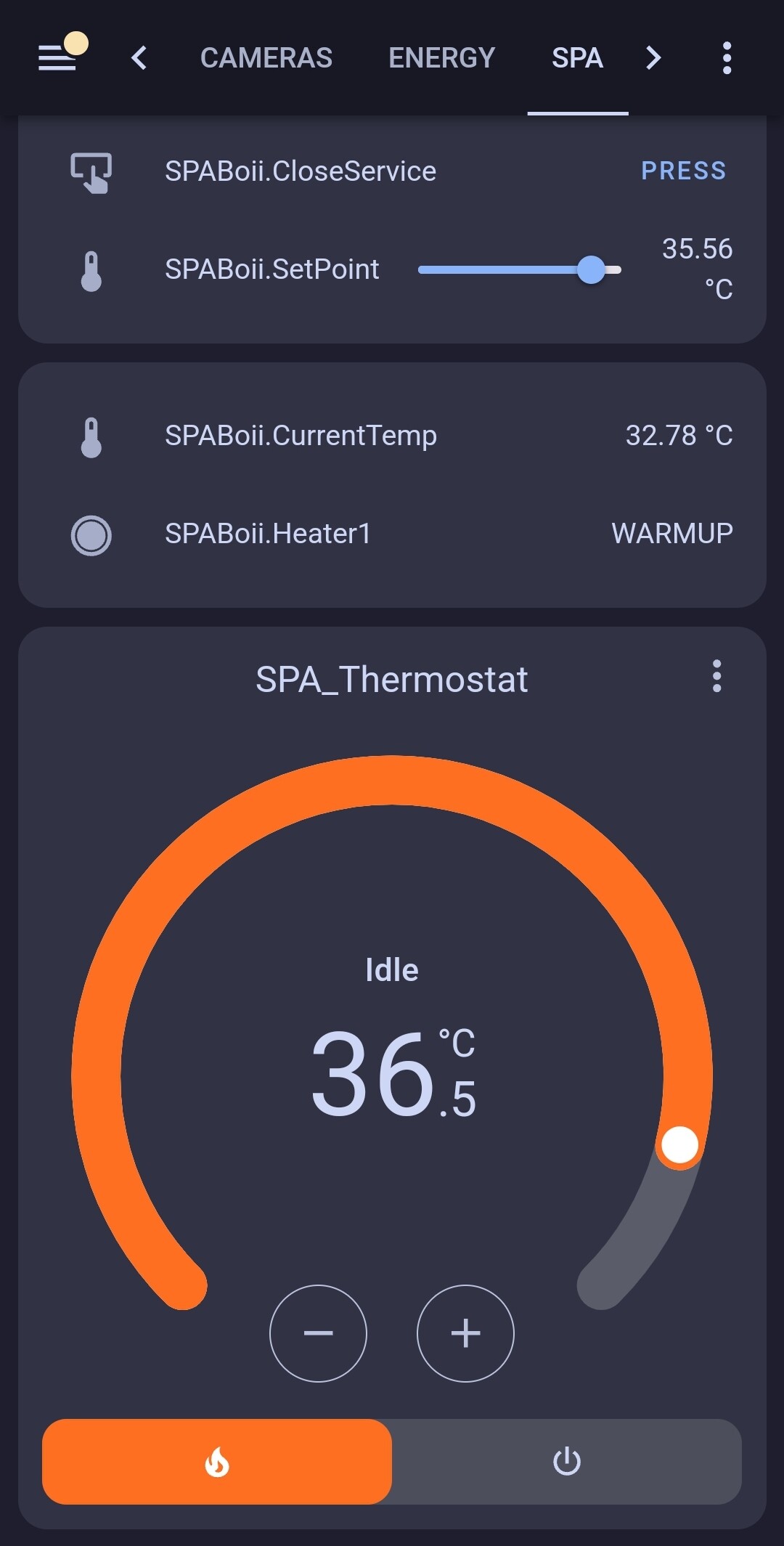
Starting this as a progress holder for my effort to make a local API for Arctic SPA
Spinoff of my thread hijack here: [Jacuzzi - Arctic Spas API - #68 by Patrick-Ohlson](Configure Actic SPA)
Follow this github for code releases: SpaBoii - Github
Starting this as a progress holder for my effort to make a local API for Arctic SPA
Spinoff of my thread hijack here: [Jacuzzi - Arctic Spas API - #68 by Patrick-Ohlson](Configure Actic SPA)
Follow this github for code releases: SpaBoii - Github
This is awesome.
Following
Can you add some info on how to add to HA from the GitHub repo??
When i try to add custom repo in HACS it tells me “Repository structure for main is not compliant”
Hi
The current codebase is just a start and proof of concept
I havent had much time last couple of days
Will update here when I have more news
Ok,
So controlling SetPoint now works and showing multiple entity values with some HACS js magic
Next step is letting it run and catch any bugs in the flow, will look into th possibilty of refactor into a proper HACS module
Thank you for doing this! Getting rid of the Arctic Spa cloud would be very nice.
I’m mulling buying an Arctic Spa. I’m a software dev, with lots of experience in python. So, I could contribute if others are also building this out.
But, I’m slightly worried about bricking something in my hot-tub. Is that a realistic scenario, or is there a factory reset that could get out of any trouble?
Published my current running solution to github
It is not hacs ready, but has been running standalone via pm2 since November
It contains the Flask base, but uses HA MQTT now
Feel free to test and report
I have not added the yaml for automations and thermostat
There is enough info if someone want to fork and make hacs friendly
I might go there at some point, but there are other projects that need my time​:wink:![]()
Craig added some excellent updates ![]()
Tried this out tonight because my Spa is currently not talking to the mothership, even though I can see the wifi device on the network and I can talk to port 80 & 8080 on it. First problem I found is that the code doesn’t appear to detect the Spa on the network, rather it goes directly to 192.168.68.106 and then fails to talk because nothing is there. I hardcoded the proper IP and it just looped printing the IP over and over when I ran the code. I looked at the mqtt server and there was hmd/sensor/SPABoii-CurrentTemp with an attribute of {“my attribute” : “awesome”}.
Hey Folks, this is as good a place as any for me to contribute something perhaps useful to others. I don’t know how you’ve connected the archaic tub pack brains (of an otherwise beautiful canuck tub!) to your networks, but my 2019 Klondiker with it tp-link wif extender was hot(tub) garbage of an experience. I’m all for ethernet, but did not want run cable into backyard .
In short, as I’ll create a separate thread should this be on interest, I’ve stuck a raspberry pi into the control pack, hooked it into the ethernet jack and then:
firewall-backend=none in NetworkManger.conf, and b) set net.ipv4.ip_forward=1 in sysctl.confRESULT: I’ve had 100% reliable connectivity of my tub in BOTH ArcieSpa cloud app, and for the ArcticSpaDC protocols we intend to use is projest such as this SPABoii (and others, GitHub - xxv/arctic-spa: Interface to Arctic Spa hot tubs).
*Some of the nuances in that nftables:
-broadcasts rules/actions are not supposed to work in ip tables, as kernel ignores these at the ip layer (one is supposed to use netdev table); but I guess that does not hold for the prerouting chain!
-the last line has a couple required quirks, #1 I’m forcing daddr to 255.255.255.255 (from 192.168.x.255 of home network) as that’s the only way that archaic arctic spa respond to the discovery, #2 rather than ending that action in dup to x.x.x.x device eth0 I’m duping directly to tub ip… because it seems that the ethernet connection likes to frequently drop out… who knows if that’s not the cause for all the tub’s connectivity problems!
@Patrick-Ohlson do you intend to include the source proto files to the repo? ![]()
Hey @Patrick-Ohlson
First off, I just want to say a huge thanks for starting this SpaBoii project. This is exactly what I was looking for to get my Klondiker spa running locally and integrated with Home Assistant!
I got the code and have been digging into it for the last few days… and I got a little carried away. ![]()
I’ve got a version running now that’s stable and implements almost everything. I wanted to share all the updates I’ve made, and then ask one small question to help get it 100% finished.
Here’s a quick rundown of all the changes:
Made spa_ip Configurable: I moved the hardcoded spa_ip from SpaBoii.py into the settings.yaml file, so now it’s fully configurable.
Added Connection Status: There’s a new ConnectionStatus binary sensor for Home Assistant, so you can tell at a glance if the script is running and connected to the spa.
All Entities Added: I added all the missing pumps and lights! Pump 2, Pump 3, Lights, Blower 1, and Blower 2 all show up as switches in HA.
Full Two-Way Control: This was the big one! I hooked up all those new switches (Pumps, Lights, Blowers) to send the correct commands back to the spa. We now have full two-way control!
More Status Sensors: Added a bunch of new read-only sensors that were in the live data:
Filter Status (e.g., “FILTER_IDLE”)
Ozone Status (e.g., “OZONE_ACTIVE”)
Heater ADC
Current ADC
Text-based status for Heater 1 and Heater 2 (so you can see “IDLE”, “HEATING”, etc.)
pH and ORP Sensors (Got 'em!): This was a fun one. I realized the pH and ORP data wasn’t in the LIVE packet. After some digging (and staring at raw packets), I found they’re in the INFORMATION (0x30) packet outside the main protobuf message. I added the raw-byte-parsing logic to find them by their IDs (\x10, \x18) and now they show up perfectly in HA.
SpaBoy “Boost” Button: I saw the onzen field and figured this was the SpaBoy. It’s now a “Button” in HA that sends the set_onzen = 1 command to kick off the boost cycle.
Cl Range Select: Mapped out the Chlorine Range settings. It’s now a dropdown in HA for “Low”, “Mid”, and “High” that sends the correct orp_min/orp_max values to the spa.
Fahrenheit Conversion: Switched all the temperature reporting and controls to Fahrenheit. The CurrentTemp sensor and SetPoint number input are now in °F.
Bug Fixes:
Fixed the Enum crash for my Klondiker (Product Code 3836). It now just prints the unknown ID instead of crashing.
My Question
This thing is 99% complete, but there are still a few fields in the SpaCommand.proto I can’t figure out just by looking at the data (like setting filter cycles, economy mode, etc.).
You mentioned in the HA forum that you had reverse-engineered the app and had the protobuf protocols. Would you be willing to share the original .proto files? (Especially SpaCommand.proto and SpaConfiguration.proto).
Having those definition files would make it super easy to map out and implement the last few remaining functions. It would be a massive help to get this thing totally finished!
Thanks again for all the awesome groundwork on this!
Heys all
Added the full proto pack to repo
Make good use of it​:tada:![]()
Thanks for all this work, I’m excited! I’m going to integrate your work for my new summit xl as soon as you give the 100% complete go-ahead! I’m new to third though - would this be something on HACS eventually or more of a manual install route?
Heys all
@walterua has done some major updates, be sure to test it out❤️
Added you to main repo, Walter​:+1:![]()
Do add your reversing info and other tidbits
You’ve got the green light—it’s now 100% solid on the Klondiker model. Since the Summit XL likely runs on the same Arctic Spas platform, you should be good to go there too.
Just to clarify: this isn’t a “click and install” HACS integration yet. It’s a standalone bridge that runs separately (in Docker) and talks to Home Assistant over MQTT. Once it’s running, HA discovers it automatically, so you don’t have to touch any YAML config files inside HA itself.
The cleanest way to run this is with Docker Compose. It handles the networking and ensures the container restarts if it crashes.
Heads up: The files below aren’t in the main GitHub repo. You’ll need to create them manually in your project folder.
settings.yamlThis file holds your network info so the script knows where to find your spa.
spa_ip: 192.168.1.XXX # The local IP of your Spa
host: 192.168.1.XXX # The IP of your MQTT Broker (probably your HA IP)
username: mqtt_username # MQTT username
password: mqtt_password # MQTT password
docker-compose.yamlImportant: network_mode: host is critical—it allows the container to scan your local network to find the spa.
services:
spaboii:
# Build from the current directory
build: .
# Name the image
image: spaboii-app
# Name the container
container_name: spaboii-ha-mqtt
# Automatically restarts the container if it crashes
restart: unless-stopped
# Gives the container access to your host network
network_mode: host
volumes:
# Mount your local settings file into the container
- ./settings.yaml:/app/settings.yaml
Open a terminal in that folder and run:
sudo docker-compose up -d
This will:
After that, Home Assistant should automatically discover the spa via MQTT, and you’re good to go.
Spas systems appear to allow only one active local TCP session at a time. This means:
Make sure your mobile spa app is fully closed before starting the Docker service. This ensures the bridge can successfully establish the TCP session.
I’m having trouble connecting SpaBoii to my new Tundra spa. I’m wondering if something has changed since the reverse engineering of the app, since, when I try to connect the Android app directly to the tub I also get an error. It states that the firmware needs to be upgraded from 1.x.x to 2.x.x for 2020+ spas. However, looking at the firmware upgrade section, everything is at the latest version which which is 1.x.x:
Yoktub: 1.0.43
LPC: 1.1.44
SpaBoy: 1.0.32
I know the local IP and get the standard “It works!” on port 80 but when I run SpaBoii it can’t connect (I replaced the IP below with x’s):
(venv) ~/Repos/SpaBoii $ python SpaBoii.py
Spa IP: xxx.xxx.xxx.xxx
An error occurred: [Errno 111] Connection refused. Restarting...
The error continues in a loop. I scanned ports on the spa’s IP which shows the following, and is missing the target port 65534 which is used in the SpaBoii code:
(venv) ~/Repos/SpaBoii $ nmap xxx.xxx.xxx.xxx -p1-65535
Starting Nmap 7.95 ( https://nmap.org ) at 2025-12-11 23:02 EST
Nmap scan report for xxx.xxx.xxx.xxx
Host is up (0.018s latency).
Not shown: 65526 closed tcp ports (conn-refused)
PORT STATE SERVICE
22/tcp open ssh
53/tcp open domain
80/tcp open http
111/tcp open rpcbind
515/tcp open printer
8080/tcp open http-proxy
12121/tcp open nupaper-ss
42131/tcp open unknown
51120/tcp filtered unknown
I tried each of these in the code to no avail. One of them managed to interrupt the remote API, requiring me to reboot the spa. However, this did not result in good data in SpaBoii as all of the MQTT sensors and controls in HA show Unknown.
Hoping for help from anyone seeing the same issues.
Hoping for some pointers and help here:
I previously had this running in a venv in Ubuntu, on the same machine my HA core runs, also in a venv. When run it setup 5 mqtt sensors, for pump 1, lights ,temp etc. I completely removed that project, and d/l the latest from github. I made the settings and docker_compose.yamls, and spun up the container. It starts, imediately errors with:
â ż spaboii Error
with no description of the error, then it continues, starts, but does not connect with error:
socket.gaierror: [Errno -2] Name or service not known
I expect this is because my MQTT broker is on a remote machine and the docker can’t talk to it, do I need to add the bridge network connection to my compose.yaml, format??
I tried adding ports 1883:1883 to compose.yaml, no change?
Also when I started the SpaBoii container, 3 others were also created, with random generated names, and images with names that seem to be in MAC address formats. What are these, why. They did not start…
Any help appreciated, thanks