Ariston Group integration via eBusd

2025-02-13 15:28:03.009 [bus info] poll cmd: 313c2000026847
2025-02-13 15:28:03.149 [update info] sent MS cmd: 313c2000026847 / 03010000
2025-02-13 15:28:03.149 [update notice] sent poll-read boiler dhw_flowmeter QQ=31: 0.0

6847 could help to calculate KW consumption, as is Flame On on my boiler, but it needs to be multiplied with modulation amplitude and c404 does not publish any answer.

Here you’re wrong.
I can assure you that (at least in my system/firmware) the code 6847 IS the power output in kW of the boiler verified comparing the ebusd readings with the diagnostic reading on the remote interface.

That number is in direct relation with the gas flow: in standard condition 1m3 of NatGas (methane) is equivalent of 11kW/h (more or less).

If you pick the instant output kW of the boiler then divide it by 11 you’ll get a good estimate of the instant m3 consumption of the boiler.

in HA you create a template like this:

      - name: "Boiler Gas Instant Consumption"
        unit_of_measurement: m³
        device_class: gas
        unique_id: boiler_gas_instant_cons
        state_class: measurement
        state: >
          {{ states('sensor.ebusd_boiler_ebusd_boiler_flame_power_kw') |float(0) / 11.08 |round(2) }}

And if you want the total gas usage then insert in your config an integration to sum it:

  - platform: integration
    source: sensor.boiler_gas_instant_consumption
    name: boiler_total_gas_cons
    unique_id: boiler_total_gas_cons
    method: left

Please don’t copy/paste these snippets in your configuratin files without checking the exact sensor names etc.

1 Like

I am more confused as now I just understand from where I got the 6847 in Liters,

Oh, Sh.t!
I haven’t noticed that error. Sorry I probably pushed to the repo a wrong file. As I wrote in the Github README I’m not a sw developer so I mae continuous mistakes…
I’ll rectify it asap.

Sorry again for having replied to you without checking the github repo!

For those interested I just published a new release of my CSV (v2.6) with, among other findings, the current boiler output in kW.
If you find errors please open an issue on GitHub.

1 Like

Based on your discovery, I receive that:

2025-02-18 19:21:33.019 [bus info] poll cmd: 313c2000026847
2025-02-18 19:21:33.156 [update info] sent MS cmd: 313c2000026847 / 03010000
2025-02-18 19:21:33.157 [update notice] sent poll-read boiler flame_power_kw QQ=31: 0.0
when boiler is stopped and when heating with small request, I receive that:

2025-02-19 14:02:10.012 [bus info] poll cmd: 313c2000026847

2025-02-19 14:02:10.156 [update info] sent MS cmd: 313c2000026847 / 03016300

2025-02-19 14:02:10.157 [update notice] sent poll-read boiler flame_power_kw QQ=31: 9.9

I don’t know why is 'poll" but it seams ok.

Can you help me to force ebusd to publish under MQTT?

I use this line r1,boiler,flame_power_kw,Boiler Flame Power KW,3c,2000,6847,s,IGN:1,UIN,10,kW

but am I the only one having problems with this hardware? I put USB power, I moved the router closer. but when I connect it. once or twice a week, a bit randomly, the boiler blocks with various errors. I disconnected it a month ago and I never had any error messages from the boiler

The “poll” is due to the fact that

 r1,boiler,flame_power_kw,Boiler Flame Power KW,3c,2000,6847,s,IGN:1,UIN,10,kW

with the number 1 after the “r” you’ve asked ebusd to read by POLLing (directly ask) to the boiler (3c address) the parameter 6847. So ebusd every polling cycle it will isse the command and retrive the result.

The polling interval can be set with the pollinterval command line flag expressed in seconds. If not set the defult should be 5 seconds. Every 5 seconds FROM THE END OF THE PREVIOUS CYCLE ebusd start a new cycle.

If I understand correctly the ebusd logic then if you read many parameters (let’s say 10 parms) withr1,... and every read takes 2 seconds then the next polling cycle will occur after

10 parameters x 2 seconds + 5 seconds = 25 seconds

For the question: ebusd should send the value via MQTT alongside others. You can try to debug MQTT via MQTTexplorer and see if mosquitto gets the update.
If it doesn’t you can try to see the mqtt-home assistant OS.cfg has some rule that prevents it from working. try the mqtt-home assistant OS.cfg from my github, in my case it works.

Hi,
the problem you’re facing is very probably due to high latencies. It can be that in your case, sometimes, your wifi coverage drops, this can be caused by many different things:

  • electro-magnetic interference (EMI)
  • high traffic on the wifi
  • some device that has poor coverage and continuously try to log on the wifi causing latency spykes

you can try to solve your problem using ebusd in direct connection with the adapter. A simple solution could be to install ebusd on a raspberry (or similar) and connect the adapter via USB cable or (if you are using John’s adapter) connect the cadr directly on the raspberry GPIO headers

see here for the details

I personally tested it with a raspberry pi zero w and it kind of worked, I said almost because the pi zero w has really poor performances, but I had only that. the newer pi xero w2 seems to have a more powerful CPU so you can try it.
Drop a message here if you need further help

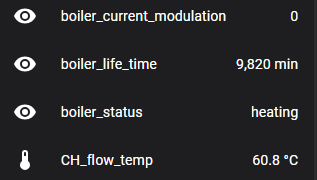
In my case (Genus One NEt boiler) it seems that the c404 parameter is not supported/implemented.
This evening the boiler started working in heating mode due to the lower ambient temperatures but, even if I see the flame active for hours I get always 0 modulation wit c404.

Dropping it here so that others should know it is not slways available…

I have the same thing, it means the modulation is at minimum.

I have this model, it is connected to the USB power supply and the wifi coverage is perfect, maybe it is the defective product? or maybe it is my configuration in homeassistant that is not correct?


scanconfig: true
loglevel_all: notice
mqtttopic: ebusd
mqttint: /config/ebusd/mqtt-hassio.cfg
mqttjson: true
configpath: /config/ebusd/
network_device: 192.168.102.18:3335
mode: enh
mqtthost: 192.168.80.3
mqttport: 1883
mqttuser: mqtt_user
mqttpass: XXXXX
pollinterval: 30
lograwdata: false
latency: 2000

I also have the same boiler model, but don’t you have problems with freezing or boiler blocking every now and then?

Hi, given that the error you’re facing is randomic and happens after days of correct connection it seems to me that the problem is not in the implementation itself. Excluding problems with power and/or tension loss as you’re powering the adapter via USB cable then the only other reason I see that a bus reconfiguration starts is that sometime for reasons unknown the latency between ebusd and the adapter spykes.

for what I’ve read on the adapter produced by Daniel Kucera the bus cannot be accessd via USB, the port can be used to power the PCB and for programming the esp. It seems the usb serial is not exposed/used so the solution I was proposing is not doable with that adapter.

You can try to move the adapter to another bus port (at least for a couple of weeks) to see if changing the position the problem goes away. If it do then you can think of a more permanent solution.

I did the same. I had many problem with Daniel adapter AND with John’s one when the PCB was connected directly to my boiler, even if powered independently by the bus. I’m now using the wifi connection (with John’s adapter) but tapping the bus from the remote control port inside my apartment where the wifi coverage did not drop.

Hope it helps.

but if the problem is wifi, isn’t there an adapter with an ethernet port?

yes, in fact there are multiple (see opening post!!!) in order of price:

  1. John’s adapter C6 version
    Welcome to eBUS Adapter Shield - eBUS Adapter Shield C6
    with the ethernet “hat” (see the above website for details)
  2. Esera Ethernet (24v or 230v) eBus Gateway, 300 series


but my module does not have the pins to connect the ethernet module

Because you’re using Daniel Kucera’s version of the adapter.

John’s version has the pins where you can plug in the ethertnet adapter.

You mus buy another one, if you want to use cable.

Hi, do you have any ideea why I get this error:

2025-02-22 15:49:54.437 [main error] error reading config files from /config/ebusd/: ERR: invalid argument, last error: _template.csv:2: ERR: invalid argument, name 0=off;1=on

for this _template.csv?

# template name,type / templates,divider / values,unit,comment
onoff,UCH,0=off;1=on,,
yesno,UCH,Yes no,0=no;1=yes,,
dhw_comfort_mode,DHW Mode,UCH,0=off;1=delayed_on;2=always_on,,
thermoreg_type,UCH,Thermoregulation type,0=fixed_temp;1=basic_on_off;2=room_temp_only;3=outdoor_temp_only;4=outdoor_and_room,,
#boiler_status,BCD:2,1=standby;2=heating;3=heating hot water;4=water tank;5=circulating;18=heating plate exchanger;23=manual test;24=comfort;51=low water pressure;52=no flame;65=rebooting,,
heat_request_mode,BCD,0=off;1=time_based;2=manual;3=unset,,
error_code,UCH,,0=101;1=102;2=1P1;3=1P2;4=1P3;5=104;6=107;7=1P4;8=1P4;9=109;10=110;11=112;12=114;13=116;14=118;15=103;16=105;17=106;18=108;19=111;20=1P5;21=1P6;22=1P7;23=1P8;24=201;25=309;26=203;27=308;28=205;30=2P2;31=209;32=301;33=303;34=304;36=306;38=120;39=121;40=122;41=123;42=311;43=312;45=501;46=502;47=504;48=5P1;49=5P2;50=5P3;51=5P4;52=601;53=602;54=604;56=607;57=421;59=610;60=612;61=6P1;62=6P2;65=422;66=510;71=511;73=3P9;75=620;76=621;105=410;236=---,,

Thank you!

_templates.csv doesn’t support comment field.

Line one is OK, the others are wrong.

it should be like this:

yesno,UCH,0=no;1=yes,,