Hi all,
Based on all the good work done by many others previously, I have expanded on the Tuya Local implementation for the Arlec 5L Pet Feeder and allow pass through to HomeKit.
You will need both the Tuya Local and HomeKit integrations installed.
What I found is that my Arlec 5L Pet Feeder was not recognised natively despite there being a dedicated yaml file for it. I suspect Arlec updated their design at some point. Mine is described by Tuya as model ID: kntyrl0a0mltmz8w
As a result I created my own Arlec 5L configuration file based on the visible DPs (sadly not all of them - if someone has managed to get all the DPs for this version please let me know!) My new file is listed below.
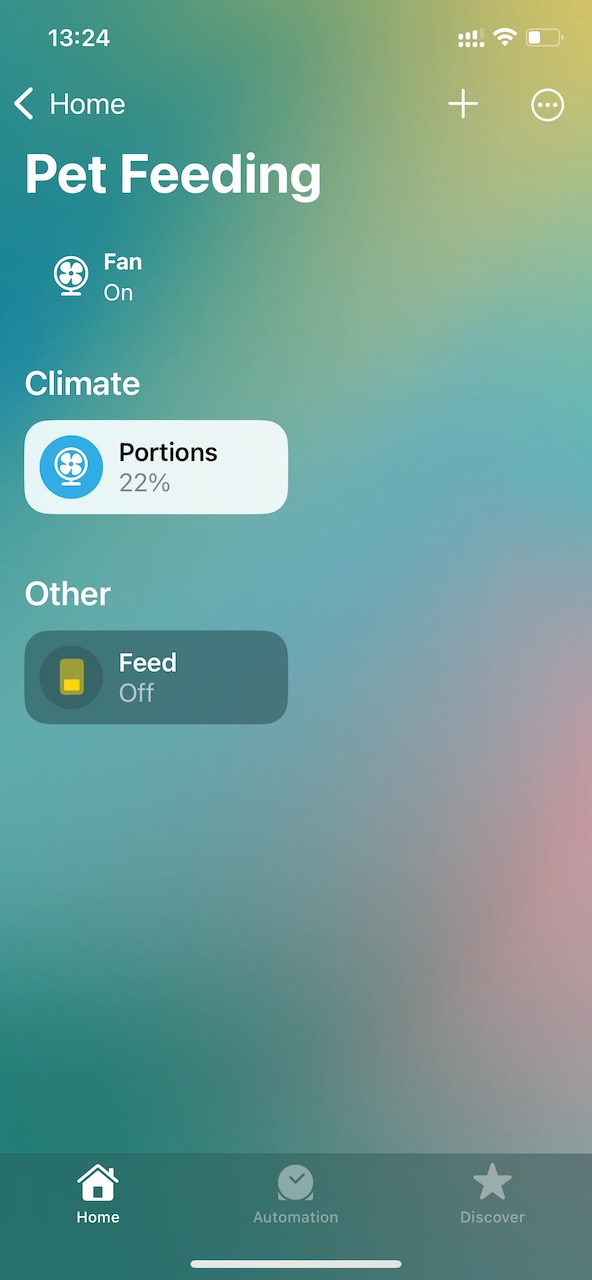
Then it was a matter of adding some configuration scripts to my configuration.yaml file. It will set up two switches that should all be exposed to Apple Home via a single HomeKit bridge that you can add to your Apple Home. These include:
A HomeKit bridge for Pet Feeder
A ‘fan’ switch to set the portion quantity (this will sync with the Tuya Local integration)
An on/off switch that dispenses the feed portions as set above
When configured, it should look like this:
I hope this is of interest to some!
Macdownunder
-------file and scripts-------
arlec_5l_petfeeder2.yaml - place this in your /home/homeassistant/.homeassistant/custom_components/tuya_local/devices directory (or similar), then add the pet feeder device in Home Assistant following the Tuya Local instructions (and of course choose this configuration when asked):
name: Pet feeder
products:
  - id: kntyrl0a0mltmz8w
    manufacturer: Arlec (macdownunder config)
entities:
  - entity: camera
    dps:
      - id: 134
        type: boolean
        name: motion_enable
        optional: true
      - id: 150
        type: boolean
        name: record
        optional: true
      - id: 115
        type: base64
        optional: true
        persist: false
        sensitive: true
        name: snapshot
  - entity: switch
    name: Flip image
    category: config
    dps:
      - id: 103
        type: boolean
        name: switch
        mapping:
          - dps_val: null
            value: false
            hidden: true
  - entity: select
    name: Motion sensitivity
    icon: "mdi:motion-sensor"
    category: config
    dps:
      - id: 106
        type: string
        name: option
        optional: true
        mapping:
          - dps_val: "0"
            value: Low
          - dps_val: "1"
            value: Medium
          - dps_val: "2"
            value: High
  - entity: select
    name: Nightvision
    icon: "mdi:weather-night"
    category: config
    dps:
      - id: 108
        type: string
        optional: true
        name: option
        mapping:
          - dps_val: "0"
            value: Auto
          - dps_val: "1"
            value: "Off"
          - dps_val: "2"
            value: "On"
          - dps_val: null
            value: Auto
            hidden: true
  - entity: sensor
    name: SD status
    class: enum
    translation_key: status
    category: diagnostic
    dps:
      - id: 110
        type: integer
        name: sensor
        optional: true
        mapping:
          - dps_val: 1
            value: normal
          - dps_val: 2
            value: fault
          - dps_val: 3
            value: full
          - dps_val: 4
            value: formatting
          - dps_val: 5
            value: missing
          - dps_val: null
            value: normal
            hidden: true
      - id: 109
        type: string
        optional: true
        name: memory_card_capacity
  - entity: button
    name: Format SD card
    category: config
    dps:
      - id: 111
        type: boolean
        optional: true
        name: button
      - id: 117
        type: integer
        optional: true
        name: sd_format_status
        mapping:
          - dps_val: 2000
            value: Formatting
          - dps_val: 2001
            value: Format error
          - dps_val: 2002
            value: "No SD card"
          - dps_val: 2003
            value: Card error
  - entity: select
    name: Recording mode
    icon: "mdi:file-video"
    category: config
    dps:
      - id: 151
        type: string
        name: option
        optional: true
        mapping:
          - dps_val: "1"
            value: Event
          - dps_val: "2"
            value: Continuous
  - entity: number
    name: Feed portions
    category: config
    icon: "mdi:food-drumstick"
    dps:
      - id: 201
        type: integer
        optional: true
        name: value
        unit: portions
        range:
          min: 0
          max: 12
        mapping:
          - dps_val: null
            value: 0
      - id: 203
        type: boolean
        optional: true
        name: history_data
  - entity: number
    name: Portion weight
    class: weight
    category: config
    icon: "mdi:scale-balance"
    dps:
      - id: 202
        type: integer
        optional: true
        name: value
        unit: g
        range:
          min: 1
          max: 100
        mapping:
          - dps_val: null
            value: 1
  - entity: event
    name: Feed problem
    dps:
      - id: 233
        type: string
        name: event
        optional: true
        mapping:
          - dps_val: "0"
            value: empty
          - dps_val: "1"
            value: blocked
  - entity: button
    name: Voice record
    icon: "mdi:record-rec"
    category: config
    dps:
      - id: 235
        type: string
        optional: true
        name: button
        mapping:
          - dps_val: "1"
            value: true
  - entity: button
    name: Stop voice record
    icon: "mdi:stop-circle"
    category: config
    dps:
      - id: 235
        type: string
        optional: true
        name: button
        mapping:
          - dps_val: "0"
            value: true
  - entity: text
    name: Meal plan
    category: config
    icon: "mdi:calendar-clock"
    hidden: true
    dps:
      - id: 207
        type: hex
        optional: true
        name: value
Then add these components to your configuration.yaml file:
input_number:
  pet_feeder_portions:
    name: Portions
    min: 0
    max: 12
    step: 1


script:
  pet_feeder_dispense:
    alias: Feed Now
    sequence:
      - variables:
          desired: "{{ states('input_number.pet_feeder_portions') | int(1) }}"
          current: "{{ states('number.pet_feeder_1_feed_portions') | int(0) }}"
          temp: >
            {% if current == desired %}
              {% if desired >= 12 %}0{% else %}{{ desired + 1 }}{% endif %}
            {% else %}
              {{ desired }}
            {% endif %}
      - service: number.set_value
        target:
          entity_id: number.pet_feeder_1_feed_portions
        data:
          value: "{{ temp }}"
      - delay: "00:00:01"
      - service: number.set_value
        target:
          entity_id: number.pet_feeder_1_feed_portions
        data:
          value: "{{ desired }}"

fan:
  - platform: template
    fans:
      pet_feeder_fan:
        friendly_name: "Portions"
        percentage_template: "{{ (states('input_number.pet_feeder_portions') | float / 12 * 100) | round(0) }}"
        set_percentage:
          service: input_number.set_value
          target:
            entity_id: input_number.pet_feeder_portions
          data:
            value: "{{ (percentage / 100 * 12) | round(0) }}"
        turn_on:
          service: input_number.set_value
          target:
            entity_id: input_number.pet_feeder_portions
          data:
            value: 1
        turn_off:
          service: input_number.set_value
          target:
            entity_id: input_number.pet_feeder_portions
          data:
            value: 0

homekit:
  - name: Pet Feeder
    filter:
      include_entities:
        - fan.pet_feeder_fan         # slider in HomeKit (selects helper value)
        - script.pet_feeder_dispense # button in HomeKit (triggers feeding)