Atmospheric Weather Card

Hi everyone,

I just wanted to share a little project I’ve been working on called the Atmospheric Weather Card.
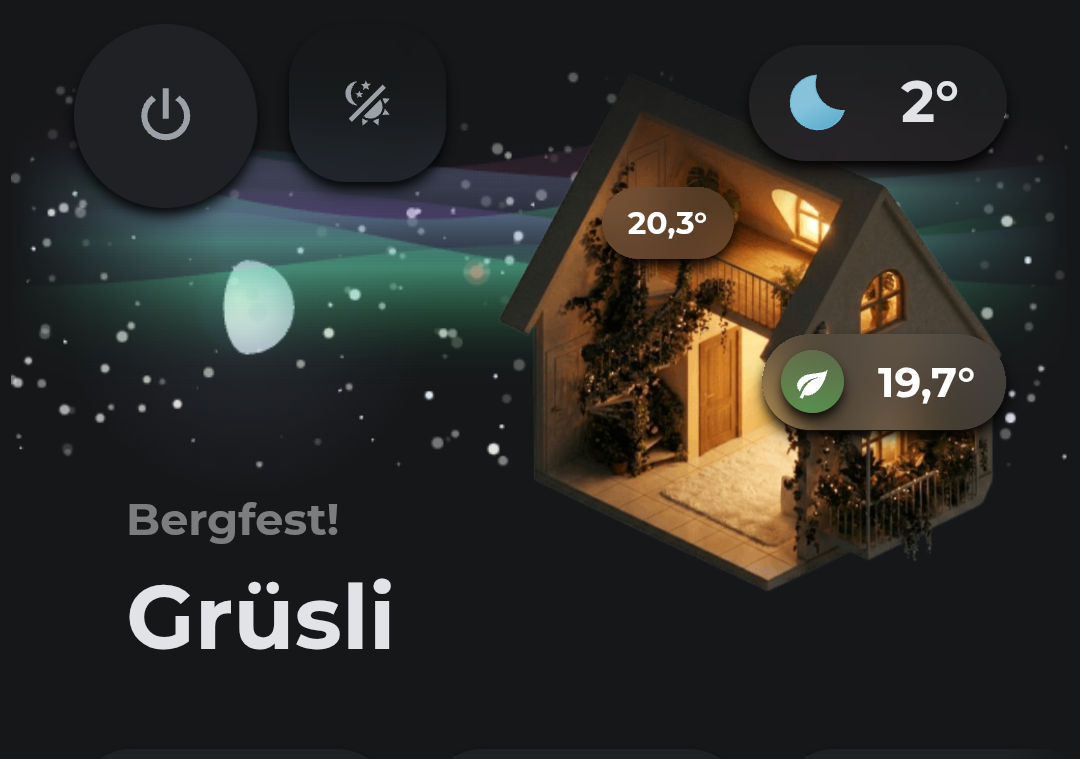
It’s a visual card that uses a canvas to add some nice weather visuals to your dashboard. It basically takes your home image and layers dynamic weather effects around it. Things like organic clouds, rain, snow, and the current moon phase. It also has some special effects like shooting stars.

Disclaimer: I did use AI to help me create this card.

I hope you find it fun to use!

4 Likes

Thanks for the heads up. Did you show your chat for others to build on that?

Hi there, I’m not sure what you mean with “did you show your chat for others”?

Your conversation and responses, so others can replicate your efforts and further contribute.

The prompts are basically just hundreds of tiny, messy iterations focused on fine tuning the visuals, things like cloud density, color contrasts and particle speeds. Since 99% of the work was just getting the weather visuals look good, the chat logs wouldn’t be very helpful I think. But the comments in the code are super verbose and explain all the details and approaches clearly.

There’s also a tutorial with a template prompt in the repo for creating the house image

Thanks for this card, this is in my opinion the best looking weather card, I love the graphics and animations! Although has gotten quite an ordeal to configure (probably necessary for how configurable it is!)

Is it possible to add another chip next to the one of the bottom left? Like if I want to a sunup and sundown time chips next to it, is that possible? I can't figure it out unless i hard code the position, but the weather text may be different lengths depending on the text.

Also it seems like the unit_format option isn't applying to the minimum temp line in the forecast chip.

- type: custom:atmospheric-weather-card
    weather_entity: weather.openweathermap
    theme: auto # Change to 'light' or 'dark' if your theme is always the same color
    card_style: standalone
    card_height: 110
    perf_mode: low
    sun_moon_x_position: -250
    sun_moon_y_position: 55
    sun_entity: sun.sun
    chip_area_position: top-right
    chip_text_size: 14px
    chip_text_gap: 1px
    chip_label_size: 11px
    chip_area_layout: horizontal-scroll
    chip_area_scroll_count: 3
    chip_area_align: center
    chip_area_width: 180px
    chip_area_height: 100%
    chip_padding: 0px
    chip_area_padding: 0px
    chip_area_gap: 2px
    chip_gap: 0px
    chip_icon_padding: 0px
    chip_style: vertical
    chip_area_background: true
    chip_area_grouped: true
    chip_area_separator: true
    chip_icon_background_color: rgba(255,255,255,0.55)
    chip_icon_background: false
    chips:
      # Temperature
      - entity: weather.openweathermap
        position: custom
        position_anchor: top-left
        position_y: 16px
        text_size: 48px
        hide_icon: true
        attribute: temperature
        background: false
        position_x: 16px
        padding: 0px 8px
        fancy_unit: true
        value_weight: "700"
      # Weather Text
      - entity: weather.openweathermap
        position: custom
        position_anchor: bottom-left
        hide_icon: true
        position_x: 16px
        position_y: 16px
        padding: 0px 8px
        background: false
      # Forecast Day Today
      - entity: weather.openweathermap
        forecast: daily
        attribute: temperature
        icon: weather
        forecast_precision: 0
        unit_format: °
        forecast_show_min: true
        forecast_low_position: below
      # Forecast Day 1
      - entity: weather.openweathermap
        forecast: daily
        forecast_offset: 1
        attribute: temperature
        icon: weather
        forecast_precision: 0
        unit_format: °
        forecast_show_min: true
        forecast_low_position: below
      # Forecast Day 2
      - entity: weather.openweathermap
        forecast: daily
        forecast_offset: 2
        attribute: temperature
        icon: weather
        forecast_precision: 0
        unit_format: °
        forecast_show_min: true
        forecast_low_position: below
      # Forecast Day 3
      - entity: weather.openweathermap
        forecast: daily
        forecast_offset: 3
        attribute: temperature
        icon: weather
        forecast_precision: 0
        unit_format: °
        forecast_show_min: true
        forecast_low_position: below
      # Forecast Day 4
      - entity: weather.openweathermap
        forecast: daily
        forecast_offset: 4
        attribute: temperature
        icon: weather
        forecast_precision: 0
        unit_format: °
        forecast_show_min: true
        forecast_low_position: below
      # Forecast Day 5
      - entity: weather.openweathermap
        forecast: daily
        forecast_offset: 5
        attribute: temperature
        icon: weather
        forecast_precision: 0
        unit_format: °
        forecast_show_min: true
        forecast_low_position: below
    tap_action:
      action: more-info
      entity: weather.openweathermap
    card_mod:
      style: |
        ha-card {
          border-width: 0px !important;
        }

Hi, and thanks for the nice words! :slight_smile:

You can use the "free position" chip feature, but as you noticed, that gets tricky with more than one chip because of the varying widths. Giving the first chip a fixed width could be used as a workaround. The new sub-value feature could also work as additional text for the chip with the large text you already use. It's also possible to use a custom sensor that combines different data; this works nicely with the scrolling text feature.

There will probably be an option to create different chip areas in the future, which will make this much easier.

Also, just as a note: I am currently completely changing the style and direction of the card, since I got tired of managing the complex weather animations. The upcoming version will be a very different, much simpler card, and the focus will be more on the weather data. So, I guess for users who like the animations, the current version will be the last one that supports them.