Atom Echo works for a while after restart, but then stops responding

My experiment with Voice Assistant has come to an impass. After a restart, it works great for a command or two, recognising my custom wake word (“Hey, Casper”) and doing what I ask (e.g., running my sentence-triggered automations), but stops after awhile (an hour or so). No amount of yelling gets it to turn blue until I restart again. The kids and spouse are starting to make fun of me and my attempts to get that @£$%@ white box to turn blue…

What do you all suggest I try to narrow down the issue, so I can regain my dignity and stop yelling cartoon characters at the living room wall?

Background: I use a container-based install. The relevant section of my docker-compose.yml looks like the following, and it’s composed with Home Assistant and Node Red. I just recently added --debug, which does not appear to do much.

  openwakeword:
    container_name: openwakeword
    image: rhasspy/wyoming-openwakeword
    network_mode: host
    volumes:
      - /media/homeassistant/home_assistant/openwakeword/custom:/custom
      - /media/homeassistant/home_assistant/openwakeword/config:/config
      - /media/homeassistant/home_assistant/openwakeword/data:/data
    environment:
      TZ: "Europe/London"
    depends_on:
      - homeassistant
    ports:
      - 10400:10400
      - 10400:10400/udp
    command: --debug --preload-model 'ok_nabu' --custom-model-dir /custom
    restart: unless-stopped
1 Like

I have this issue intermittently as well, is there a way to automate waking it up periodically?

Same here, overall the little Atom Echos are doing a great job, sometimes recognising the wake word across large rooms.
However, they seem to always hang up after some time and a reset is necessary to make them work again.
What would we have to include in the config file to restart them periodically?

I tried including a switch or button in the config, to restart via an automation in Home Assistant but that led to an error.

Thanks

Merc

Just build a Wyoming satellite. They work. Youll be up and running in less than an hour.

Thanks for the suggestion.
Since the Atom Echos are not doing a bad job, in general, I would still be interested in a solution to the issue of them “crashing” frequently. I am sure there must be a way to stop/circumvene or mitigate this.

I have now found a way that seems to improve the stability of the Atom Echos in my setup.

Every 15 minutes I am switching the “detect wake work” off and back on 2 seconds later. Through this it seems, that the Echos do not freeze.
Ideally, I would like to trigger a restart but I cannot figure out how to make a switch or button work that would trigger the restart through an automation.

I still have to run this for a longer time to see for how long it works but so far it looks promising and is relatively easy to realize.

You can set up an automation to turn off wake word detection if there is noone in the room. Thats what I did when I had ESP32 voice assistants.
Assuming you have room presence sensors anyway…

1 Like

Hi Rich,
Not enterily sure how or if this solves the problem but then I do not have room presence detection.
The approach I mentioned above seems to work.
Combined with a sound response to wake word detection this has improved my voice assistant setup a lot.

Cheers

Merc

You can add:

button:
  - platform: restart
    name: "${friendly_name} Restart"

to the YAML of the echo to create a restart button, I use this to force restarts evewry 30 minutes which helps with the voice recognition.

Ah, thanks @yalexau,
will give that a try.
The toggling of a switch has already improved things a lot.

But this was my main goal.

Cheers

Merc

EDIT:

Hm…ok I still keep getting the error I got before when I tried to implement the start button:

HARDWARE: ESP32 240MHz, 320KB RAM, 4MB Flash
 - framework-espidf @ 3.40407.0 (4.4.7) 
 - tool-cmake @ 3.16.4 
 - tool-ninja @ 1.7.1 
 - toolchain-esp32ulp @ 2.35.0-20220830 
 - toolchain-xtensa-esp32 @ 8.4.0+2021r2-patch5
Reading CMake configuration...
Dependency Graph
|-- noise-c @ 0.1.4
|-- ESPMicroSpeechFeatures @ 1.0.0
Linking .pioenvs/m5stack-atom-echo/firmware.elf
/data/cache/platformio/packages/toolchain-xtensa-esp32/bin/../lib/gcc/xtensa-esp32-elf/8.4.0/../../../../xtensa-esp32-elf/bin/ld: missing --end-group; added as last command line option
/data/cache/platformio/packages/toolchain-xtensa-esp32/bin/../lib/gcc/xtensa-esp32-elf/8.4.0/../../../../xtensa-esp32-elf/bin/ld: .pioenvs/m5stack-atom-echo/src/main.o:(.literal._Z5setupv+0xa0): undefined reference to `vtable for esphome::restart::RestartButton'
/data/cache/platformio/packages/toolchain-xtensa-esp32/bin/../lib/gcc/xtensa-esp32-elf/8.4.0/../../../../xtensa-esp32-elf/bin/ld: .pioenvs/m5stack-atom-echo/src/main.o:(.literal._Z5setupv+0xa4): undefined reference to `vtable for esphome::restart::RestartButton'
collect2: error: ld returned 1 exit status
*** [.pioenvs/m5stack-atom-echo/firmware.elf] Error 1
========================= [FAILED] Took 28.53 seconds =========================

Any idea what I need to change to get rid of this?

EDIT:

Finally I found the answer to the issue in this thread.
I was not aware of the “clean build” option but that did the job.

I installed and setup my m5 atom echo voice assistant in HA yesterday and with the latest versions of all software, the m5 would still cease to detect the wake word after one successful attempt. Wasted hours on this but I figured out a hacky work around.

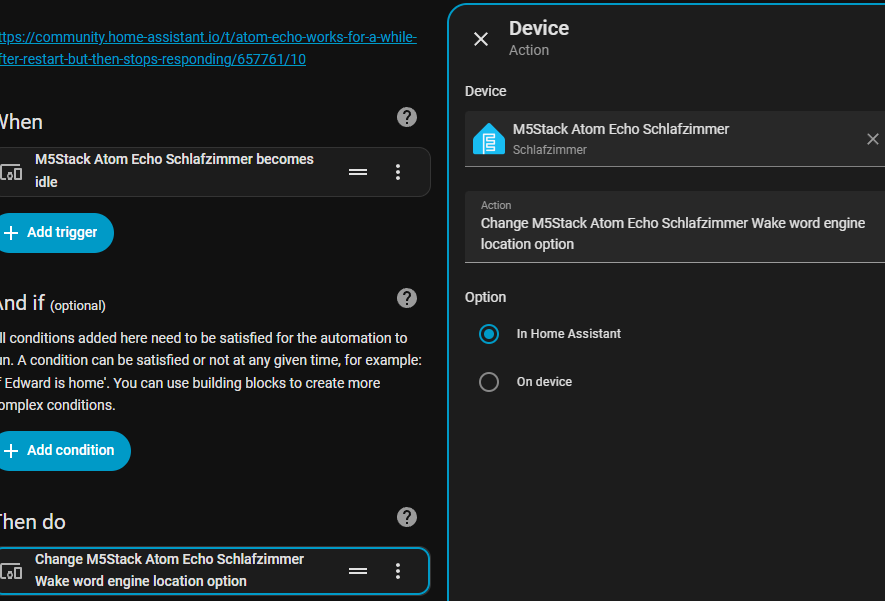
I created an automation that detects if any of my echos become idle, then I set the “Wake word engine location” to the setting it’s on already (HA), and this has resulted in a solid experience.

2 Likes

This solution works perfect for me. Works all the time now :slight_smile: .

Indeed a good workaround as it works without the need to fully restart the ESP.

does not seem to have a final solution yet so this workaround is the best option currently.

Hi,

I just got an M5Stack Atom Echo and was suffering the same fate as reported here,
here, and in issue 122.

After digging into the problem I made several updates to address ring buffer overruns, watchdog timeouts, and data races. I now have, at least what appears on my end, a stable functional device that doesn’t freeze up and reboot on every response.

Before submitting a PR to ESPHome, I need some help testing.

Would those of you that have been in this thread [@e-raser, @Snowball, @omarahmed500, @Merc, @yalexau, @Rich37804, @eamonn] please test this? Also, if you have access to any other ESPHome voice assisant devices it would be ideal to have the code tested there as well.

The easiest way to test is to use external components by adding this to your ESPHome YAML configuration:

external_components:
  - source: github://cjb0001/esphome-dev@feature/mww-speaker-improvements
    components: [ micro_wake_word, i2s_audio, speaker ]
    refresh: 0s

I also suggest increasing the speaker buffer_duration from 60ms to 240ms.

speaker:
  - platform: i2s_audio
    id: echo_speaker
    i2s_dout_pin: GPIO22
    dac_type: external
    bits_per_sample: 16bit
    sample_rate: 16000
    channel: stereo
    buffer_duration: 240ms

What to Test

Basic functionality:

  • Wake word detection still works
  • Voice assistant responses play completely without reboots
  • Device remains stable after multiple interactions

Monitor logs (optional but helpful):

logger:
  level: DEBUG

Look for these log entries at startup:

[C][micro_wake_word:078]: microWakeWord:
[C][micro_wake_word:079]: Ring buffer duration: 240 ms

and these after using the voice assistant:

[D][ring_buffer:034][mww]: Created ring buffer with size 7680
[D][micro_wake_word:389][mww]: Registered mww task with watchdog

Stress testing:

  • Try multiple wake word detections in quick succession
  • Test long voice assistant responses
  • Leave running for extended periods

Expected Results

  • No more reboots during voice responses
  • Stable operation over time
  • Complete audio playback

Report if you are having

  • Still experiencing reboots
  • Watchdog timeout errors
  • Audio glitches or cutoffs
  • Increased memory issues

Reporting Results

Please report your testing results and include:

Device: M5 Atom Echo (specify if ESP32 or ESP32-S3 variant)
ESPHome version: (e.g., 2024.11.0)
Wake word model(s): (e.g., okay_nabu, hey_jarvis)
Result: Working / Still has issues
Logs: (if experiencing issues, include relevant log output)

Rollback
If you experience issues, remove the external_components section from your YAML and reflash to return to the stock ESPHome version. You may need to click “Clean Build Files”

Feedback
Post in this thread with your results or issues!

Not very often I get to contribute back to the community, so I’m going to take the opportunity to do so this time…

This issue was bugging me as well. Based on what I’ve seen and reading through open issues for the device, the atom echo seems to be suffering from three compounding issues that all result in interrupting the voice assist pipeline. The first issue seems to be that the device simply runs out of ram for the audio buffer. The second issue is that the assist pipeline times out after a few minutes (as mentioned here Voice Assistant generating 404 audio URLs after inactivity · Issue #149882 · home-assistant/core · GitHub). The third issue seems to be that the piper TTS service on the HA server sometimes takes a bit longer to generate a WAV file for playback.

I’m providing a config yaml based on the widely available one from HA/M5stack with a few changes:

  • I’ve stripped out the on device wake word option in favor of the one running on the HA server. The general intent here is that it frees up more ram on the device to allow for seamless playback of the TTS responses from the HA server. I’ve also adjusted the playback audio channels on the device to 1 channel instead of the default 2 channels, further reducing the amount of ram required for playback. I’ve also included cjb_1’s suggestion for the 240ms buffer duration
  • I’ve put in a slight 100ms delay ahead of the TTS response, allowing piper TTS to more reliably finish generating a response before attempting to play it back on the atom echo
  • I’ve included the 5 minute timeout fix that fortuna made here: Voice Assistant generating 404 audio URLs after inactivity · Issue #149882 · home-assistant/core · GitHub. This allows the device to continue functioning after 5 minutes of idle time.
esphome:
  name: echo
  friendly_name: echo


esp32:
  board: m5stack-atom
  cpu_frequency: 240MHz
  framework:
    type: esp-idf

# Enable logging
logger:
  

# Enable Home Assistant API
api:
  encryption:
    key: ""

ota:
  - platform: esphome
    password: ""

wifi:
  ssid: !secret wifi_ssid
  password: !secret wifi_password


captive_portal:


button:
  - platform: factory_reset
    id: factory_reset_btn
    name: Factory reset

i2s_audio:
  - id: i2s_audio_bus
    i2s_lrclk_pin: GPIO33
    i2s_bclk_pin: GPIO19

microphone:
  - platform: i2s_audio
    id: echo_microphone
    i2s_din_pin: GPIO23
    adc_type: external
    pdm: true
    sample_rate: 16000
    correct_dc_offset: true

speaker:
  - platform: i2s_audio
    id: echo_speaker
    i2s_dout_pin: GPIO22
    dac_type: external
    bits_per_sample: 16bit
    sample_rate: 16000
    channel: right
    buffer_duration: 240ms

media_player:
  - platform: speaker
    name: None
    id: echo_media_player
    announcement_pipeline:
      speaker: echo_speaker
      format: WAV
      num_channels: 1
    codec_support_enabled: false
    buffer_size: 6000
    volume_min: 0.4
    files:
      - id: timer_finished_wave_file
        file: https://github.com/esphome/wake-word-voice-assistants/raw/main/sounds/timer_finished.wav
    on_announcement:
      - if:
          condition:
            - microphone.is_capturing:
          then:
            - script.execute: stop_wake_word
      - light.turn_on:
          id: led
          blue: 100%
          red: 0%
          green: 0%
          brightness: 100%
          effect: none
    on_idle:
      - script.execute: start_wake_word
      - script.execute: reset_led

voice_assistant:
  id: va
  microphone:
    microphone: echo_microphone
    channels: 0
    gain_factor: 4
  media_player: echo_media_player
  noise_suppression_level: 2
  auto_gain: 31dBFS
  on_listening:
    - light.turn_on:
        id: led
        blue: 100%
        red: 0%
        green: 0%
        effect: "Slow Pulse"
  on_stt_vad_end:
    - light.turn_on:
        id: led
        blue: 100%
        red: 0%
        green: 0%
        effect: "Fast Pulse"
  on_tts_start:
    - delay: 100ms
    - light.turn_on:
        id: led
        blue: 100%
        red: 0%
        green: 0%
        brightness: 100%
        effect: none
  on_start:
    - logger.log: Voice Assistant started!
    - script.execute: track_idle_stream
  on_end:
    # Handle the "nevermind" case where there is no announcement
    - wait_until:
        condition:
          - media_player.is_announcing:
        timeout: 0.5s
    - script.execute: reset_led
    - logger.log: Voice Assistant ended!
    - script.stop: track_idle_stream
  on_error:
    - light.turn_on:
        id: led
        red: 100%
        green: 0%
        blue: 0%
        brightness: 100%
        effect: none
    - delay: 2s
    - script.execute: reset_led
  on_client_connected:
    - delay: 2s  # Give the api server time to settle
    - script.execute: start_wake_word
  on_client_disconnected:
    - script.execute: stop_wake_word
  on_timer_finished:
    - script.execute: stop_wake_word
    - wait_until:
        not:
          microphone.is_capturing:
    - switch.turn_on: timer_ringing
    - light.turn_on:
        id: led
        red: 0%
        green: 100%
        blue: 0%
        brightness: 100%
        effect: "Fast Pulse"
    - wait_until:
        - switch.is_off: timer_ringing
    - light.turn_off: led
    - switch.turn_off: timer_ringing

binary_sensor:
  # button does the following:
  # short click - stop a timer
  # if no timer then restart either microwakeword or voice assistant continuous
  - platform: gpio
    pin:
      number: GPIO39
      inverted: true
    name: Button
    disabled_by_default: true
    entity_category: diagnostic
    id: echo_button
    on_multi_click:
      - timing:
          - ON for at least 50ms
          - OFF for at least 50ms
        then:
          - if:
              condition:
                switch.is_on: timer_ringing
              then:
                - switch.turn_off: timer_ringing
              else:
                - script.execute: start_wake_word
      - timing:
          - ON for at least 10s
        then:
          - button.press: factory_reset_btn

light:
  - platform: esp32_rmt_led_strip
    id: led
    name: None
    disabled_by_default: true
    entity_category: config
    pin: GPIO27
    default_transition_length: 0s
    chipset: SK6812
    num_leds: 1
    rgb_order: grb
    effects:
      - pulse:
          name: "Slow Pulse"
          transition_length: 250ms
          update_interval: 250ms
          min_brightness: 50%
          max_brightness: 100%
      - pulse:
          name: "Fast Pulse"
          transition_length: 100ms
          update_interval: 100ms
          min_brightness: 50%
          max_brightness: 100%

script:
  - id: reset_led
    then:
      - if:
        condition:
          - switch.is_on: use_listen_light
        then:
          - light.turn_on:
              id: led
              red: 0%
              green: 100%
              blue: 100%
              brightness: 60%
              effect: none
        else:
          - light.turn_off: led
  - id: start_wake_word
    then:
      - if:
          condition:
            and:
              - not:
                  - voice_assistant.is_running:
              - lambda: return id(wake_word_engine_location).state == "In Home Assistant";
          then:
            - lambda: id(va).set_use_wake_word(true);
            - voice_assistant.start_continuous:
  - id: stop_wake_word
    then:
      - if:
          condition:
            lambda: return id(wake_word_engine_location).state == "In Home Assistant";
          then:
            - lambda: id(va).set_use_wake_word(false);
            - voice_assistant.stop:
  # Work around https://github.com/home-assistant/core/issues/149882.
  - id: track_idle_stream
    mode: restart
    then:
      - delay: 270s
      - logger.log: "Restarting continuous recognition to avoid HA issue #149882"
      - voice_assistant.stop:
      - wait_until:
          condition:
            - not: {voice_assistant.is_running:}
      - voice_assistant.start_continuous:

switch:
  - platform: template
    name: Use listen light
    id: use_listen_light
    optimistic: true
    restore_mode: RESTORE_DEFAULT_ON
    entity_category: config
    on_turn_on:
      - script.execute: reset_led
    on_turn_off:
      - script.execute: reset_led
  - platform: template
    id: timer_ringing
    optimistic: true
    restore_mode: ALWAYS_OFF
    on_turn_off:
      # Turn off the repeat mode and disable the pause between playlist items
      - lambda: |-
              id(echo_media_player)
                ->make_call()
                .set_command(media_player::MediaPlayerCommand::MEDIA_PLAYER_COMMAND_REPEAT_OFF)
                .set_announcement(true)
                .perform();
              id(echo_media_player)->set_playlist_delay_ms(speaker::AudioPipelineType::ANNOUNCEMENT, 0);
      # Stop playing the alarm
      - media_player.stop:
          announcement: true
    on_turn_on:
      # Turn on the repeat mode and pause for 1000 ms between playlist items/repeats
      - lambda: |-
            id(echo_media_player)
              ->make_call()
              .set_command(media_player::MediaPlayerCommand::MEDIA_PLAYER_COMMAND_REPEAT_ONE)
              .set_announcement(true)
              .perform();
            id(echo_media_player)->set_playlist_delay_ms(speaker::AudioPipelineType::ANNOUNCEMENT, 1000);
      - media_player.speaker.play_on_device_media_file:
          media_file: timer_finished_wave_file
          announcement: true
      - delay: 15min
      - switch.turn_off: timer_ringing

select:
  - platform: template
    entity_category: config
    name: Wake word engine location
    id: wake_word_engine_location
    optimistic: true
    restore_value: true
    options:
      - In Home Assistant
    initial_option: In Home Assistant
    on_value:
      - if:
          condition:
            lambda: return x == "In Home Assistant";
          then:
            - delay: 500ms
            - lambda: id(va).set_use_wake_word(true);
            - voice_assistant.start_continuous:


Did a bunch more testing and I’m still occasionally getting a “[E][i2s_audio.speaker:130]: Not enough memory”. So, not a 100% fix, but still a lot more stable.

I found another option that seems to have increased stability and available ram significantly.

According to the speaker perf docs for esphome (Speaker Audio Media Player - ESPHome - Smart Home Made Simple) setting enable_high_performance: false in the network component will reduce ram usage. This is seems to make the “on_tts_start: - delay: 100ms” thing that I put in previously no longer necessary. So the config looks like this now:

esphome:
  name: echo
  friendly_name: echo


esp32:
  board: m5stack-atom
  cpu_frequency: 240MHz
  framework:
    type: esp-idf

# Enable logging
logger:
  

# Enable Home Assistant API
api:
  encryption:
    key: ""

ota:
  - platform: esphome
    password: ""

wifi:
  ssid: !secret wifi_ssid
  password: !secret wifi_password


captive_portal:

network:
  enable_high_performance: false

button:
  - platform: factory_reset
    id: factory_reset_btn
    name: Factory reset

i2s_audio:
  - id: i2s_audio_bus
    i2s_lrclk_pin: GPIO33
    i2s_bclk_pin: GPIO19

microphone:
  - platform: i2s_audio
    id: echo_microphone
    i2s_din_pin: GPIO23
    adc_type: external
    pdm: true
    sample_rate: 16000
    correct_dc_offset: true

speaker:
  - platform: i2s_audio
    id: echo_speaker
    i2s_dout_pin: GPIO22
    dac_type: external
    bits_per_sample: 16bit
    sample_rate: 16000
    channel: right
    buffer_duration: 240ms

media_player:
  - platform: speaker
    name: None
    id: echo_media_player
    announcement_pipeline:
      speaker: echo_speaker
      format: WAV
      num_channels: 1
    codec_support_enabled: false
    buffer_size: 6000
    volume_min: 0.4
    files:
      - id: timer_finished_wave_file
        file: https://github.com/esphome/wake-word-voice-assistants/raw/main/sounds/timer_finished.wav
    on_announcement:
      - if:
          condition:
            - microphone.is_capturing:
          then:
            - script.execute: stop_wake_word
      - light.turn_on:
          id: led
          blue: 100%
          red: 0%
          green: 0%
          brightness: 100%
          effect: none
    on_idle:
      - script.execute: start_wake_word
      - script.execute: reset_led

voice_assistant:
  id: va
  microphone:
    microphone: echo_microphone
    channels: 0
    gain_factor: 4
  media_player: echo_media_player
  noise_suppression_level: 2
  auto_gain: 31dBFS
  on_listening:
    - light.turn_on:
        id: led
        blue: 100%
        red: 0%
        green: 0%
        effect: "Slow Pulse"
  on_stt_vad_end:
    - light.turn_on:
        id: led
        blue: 100%
        red: 0%
        green: 0%
        effect: "Fast Pulse"
  on_tts_start:
    #- delay: 100ms
    - light.turn_on:
        id: led
        blue: 100%
        red: 0%
        green: 0%
        brightness: 100%
        effect: none
  on_start:
    - logger.log: Voice Assistant started!
    - script.execute: track_idle_stream
  on_end:
    # Handle the "nevermind" case where there is no announcement
    - wait_until:
        condition:
          - media_player.is_announcing:
        timeout: 0.5s
    - script.execute: reset_led
    - logger.log: Voice Assistant ended!
    - script.stop: track_idle_stream
  on_error:
    - light.turn_on:
        id: led
        red: 100%
        green: 0%
        blue: 0%
        brightness: 100%
        effect: none
    - delay: 2s
    - script.execute: reset_led
  on_client_connected:
    - delay: 2s  # Give the api server time to settle
    - script.execute: start_wake_word
  on_client_disconnected:
    - script.execute: stop_wake_word
  on_timer_finished:
    - script.execute: stop_wake_word
    - wait_until:
        not:
          microphone.is_capturing:
    - switch.turn_on: timer_ringing
    - light.turn_on:
        id: led
        red: 0%
        green: 100%
        blue: 0%
        brightness: 100%
        effect: "Fast Pulse"
    - wait_until:
        - switch.is_off: timer_ringing
    - light.turn_off: led
    - switch.turn_off: timer_ringing

binary_sensor:
  # button does the following:
  # short click - stop a timer
  # if no timer then restart either microwakeword or voice assistant continuous
  - platform: gpio
    pin:
      number: GPIO39
      inverted: true
    name: Button
    disabled_by_default: true
    entity_category: diagnostic
    id: echo_button
    on_multi_click:
      - timing:
          - ON for at least 50ms
          - OFF for at least 50ms
        then:
          - if:
              condition:
                switch.is_on: timer_ringing
              then:
                - switch.turn_off: timer_ringing
              else:
                - script.execute: start_wake_word
      - timing:
          - ON for at least 10s
        then:
          - button.press: factory_reset_btn

light:
  - platform: esp32_rmt_led_strip
    id: led
    name: None
    disabled_by_default: true
    entity_category: config
    pin: GPIO27
    default_transition_length: 0s
    chipset: SK6812
    num_leds: 1
    rgb_order: grb
    effects:
      - pulse:
          name: "Slow Pulse"
          transition_length: 250ms
          update_interval: 250ms
          min_brightness: 50%
          max_brightness: 100%
      - pulse:
          name: "Fast Pulse"
          transition_length: 100ms
          update_interval: 100ms
          min_brightness: 50%
          max_brightness: 100%

script:
  - id: reset_led
    then:
      - if:
                condition:
                  - switch.is_on: use_listen_light
                then:
                  - light.turn_on:
                      id: led
                      red: 0%
                      green: 100%
                      blue: 100%
                      brightness: 60%
                      effect: none
                else:
                  - light.turn_off: led
  - id: start_wake_word
    then:
      - if:
          condition:
            and:
              - not:
                  - voice_assistant.is_running:
              - lambda: return id(wake_word_engine_location).state == "In Home Assistant";
          then:
            - lambda: id(va).set_use_wake_word(true);
            - voice_assistant.start_continuous:
  - id: stop_wake_word
    then:
      - if:
          condition:
            lambda: return id(wake_word_engine_location).state == "In Home Assistant";
          then:
            - lambda: id(va).set_use_wake_word(false);
            - voice_assistant.stop:
  # Work around https://github.com/home-assistant/core/issues/149882.
  - id: track_idle_stream
    mode: restart
    then:
      - delay: 270s
      - logger.log: "Restarting continuous recognition to avoid HA issue #149882"
      - voice_assistant.stop:
      - wait_until:
          condition:
            - not: {voice_assistant.is_running:}
      - voice_assistant.start_continuous:

switch:
  - platform: template
    name: Use listen light
    id: use_listen_light
    optimistic: true
    restore_mode: RESTORE_DEFAULT_ON
    entity_category: config
    on_turn_on:
      - script.execute: reset_led
    on_turn_off:
      - script.execute: reset_led
  - platform: template
    id: timer_ringing
    optimistic: true
    restore_mode: ALWAYS_OFF
    on_turn_off:
      # Turn off the repeat mode and disable the pause between playlist items
      - lambda: |-
              id(echo_media_player)
                ->make_call()
                .set_command(media_player::MediaPlayerCommand::MEDIA_PLAYER_COMMAND_REPEAT_OFF)
                .set_announcement(true)
                .perform();
              id(echo_media_player)->set_playlist_delay_ms(speaker::AudioPipelineType::ANNOUNCEMENT, 0);
      # Stop playing the alarm
      - media_player.stop:
          announcement: true
    on_turn_on:
      # Turn on the repeat mode and pause for 1000 ms between playlist items/repeats
      - lambda: |-
            id(echo_media_player)
              ->make_call()
              .set_command(media_player::MediaPlayerCommand::MEDIA_PLAYER_COMMAND_REPEAT_ONE)
              .set_announcement(true)
              .perform();
            id(echo_media_player)->set_playlist_delay_ms(speaker::AudioPipelineType::ANNOUNCEMENT, 1000);
      - media_player.speaker.play_on_device_media_file:
          media_file: timer_finished_wave_file
          announcement: true
      - delay: 15min
      - switch.turn_off: timer_ringing

select:
  - platform: template
    entity_category: config
    name: Wake word engine location
    id: wake_word_engine_location
    optimistic: true
    restore_value: true
    options:
      - In Home Assistant
    initial_option: In Home Assistant
    on_value:
      - if:
          condition:
            lambda: return x == "In Home Assistant";
          then:
            - delay: 500ms
            - lambda: id(va).set_use_wake_word(true);
            - voice_assistant.start_continuous: