Auto-Lock Door Monitor monitors door openings and closings. Allows for custom schedules and timings to locks the doors and send notifications for any phase of the automation.
Version 2026.02.06.15c **
recent: a few bug fixes and refactored the timeouts to be more flexible.
Author: LTek
Features
🚪 Door Sensor state monitoring to ensure door is closed before attempting to lock
🎯 Customizable Delays and Timeouts for Actions with Retry logic (for lock jams or misalignments)
🛑 Bypass entity - completely disable the automation based on state of an entitity of your choosing
🧭️ 3 Disable Schedules - Day and Time to Disable the activity
⏰ Schedule End Triggers - Check and lock door when a schedule ends
📢 Custom Notifications for all phases of the automation
📱 Mobile Notifications with iOS and Android specific options
📌 Persistent Web UI Notifications
[](https://my.home-assistant.io/redirect/blueprint_import/?blueprint_url=https%3A%2F%2Fgist.github.com%2FLtek%2Ff6e517ac49d3e9ecd58714c2b9afe7d3)
@Ltek thanks for this, it works almost perfectly. The only issue I have is I want it to lock within seconds of the door being detected as closed. This works, except that if I unlock the door, but don’t open it for a few seconds, it will auto lock again. It would be good if this could require the door sensor to show door as open before it would lock when it becomes closed again.
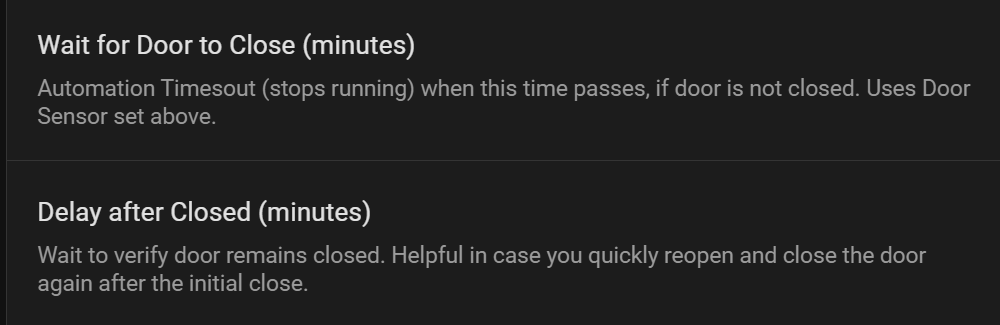
The intent is that the door will auto-lock unless the sensor shows it open. There are two timeout variables exposed (see screenshot) you can set to what you’d like…
Great blueprint! Thanks a lot for sharing it, I started to use it yesterday it looks like it works great.
I made some small changes to the code to fit my own use case - I wanted to use an input_boolean which enables the automation rather than disables, and I changed one of the schedules to accept input_datetime entities. This allows me to configure the schedule right from the dashboard, without having to go to the automation config.
I was wondering though, can you share why you chose to trigger the automation when the door opens and then have the automation continue running until reaching the timeout, rather than triggering when the door closes and remains in that state for the configured time?
I’m afraid of a case where I would restart home assistant for some reason right when the automation is waiting for the time out. In such a case it would interrupt it from running and leave the door unlocked until the next trigger fires. Of course, I can change the automation to handle this, but I thought maybe I am missing something?
Would appreciate to hear your thoughts.
I can definitely see the utility of what you did and would like if you would share and i’ll put that update in the system so others can use?
You just flipped the boolean’s effect, fine of course. The existing option “Bypass Entity (optional) -
Automation will not run when this Entity is ON” already turns the automation on and off… when the Entity is ‘off’, the automation runs, when ‘on’ the automation will not run. Its the same result. A bypass entity is the common way of doing this since most automations are meant to run most of the time, and only occasionally disabled. I could simply make an option that the user selects which way they want it… On = Enabled, or On = Disabled / Bypass
Setting a Schedule via a dashboard is a nice idea for sure… If you want to share the code, I’ll update the BP.
Also if you want to take on the challenge, I thought it would kinda be cool to have be able to define a list of schedules, then from the dashboard, be able to select one that would be used in the blueprint.
I think that would require… input_select helper (to use as the chooser on the dashboard)
whatever number of `schedule helpers’ you want
a template sensor
this would make it UI-editable, Drop-down driven, and blueprint/automation-friendly and Stable across HA releases
It does what you are wanting.
Here’s how it works:
Door opens → Automation triggers
Wait for door to close → Waits up to door_close_timeout minutes
Door closes → Verification period begins
Verification wait → Waits for verification_timeout (10-600 seconds or minutes, depending on your verification_timeout_unit setting)
Re-check door state → If door is still closed after verification period, lock the door
There is no built-in way to disable the door_close_timeout. We could do that… but then that automation could be running forever
We could easily change the built-in setting that has a max in the UI of 15 minutes… easy to allow that value to be any higher number like 60 or even 1440 for 24 hours. That is just by changing
selector:
number:
min: 1
max: 15
step: 1
Which is cool, but a description should warm people that it will be gone after a reboot/restart, and long time frames start to defeat the purpose of the automation… which is to alert you when the door is open longer than you expect/want.
While it is pretty easy to add, I did not add a helper to make it survive reboots because 1/ people should not be restarting HA often 2/ most timeframes to open/close/lock a door should not be that long
if you want to add to the code, I’d certainly upload it
Please post your YAML, I’ve seen this a few times myself but yet to figure out why… I suspect its a very specific situation so I want to compare yours and mine.
I had disabled the notifications earlier. Now when I turned them back on, I noticed that, after unlocking and locking the door manually, I don’t get the “Auto-Lock locked door successfully” notification until the 60 second verification timer has expired. But I still get the “Auto-Lock Failed to lock door after multiple attempts” message as soon as I unlock it and as soon as I open the door.
The new version is better, but also worse. I don’t get any of the false notifications when I unlock, lock, or open the door (good), but now it fails to lock the door (bad). When the 60 second verification timer expires, then I get the “Auto-Lock Failed to lock door after multiple attempts”.
Also, I get the “Door was manually locked” notification when I lock it manually, but I also get it when I lock it from my HA dashboard. Is that expected?
uploaded 2026.02.05.12c, try this one.
so far I tested, and it worked as expected… : Unlock → Kept Closed and Unlocked → Open → Closed
I need to test Unlocked → Open → Keep Open
HA does not know if you ‘physically’ or ‘by automation’ changed something so it considers them both manually. I put that in there mainly for debug. You can disable it in the settings.
Looks like I had a problem with my retry counter. I saw it twice in the Entities list for some reason. I deleted it, created a new one with a different name, and configured that one in the blueprint, and now it appears to be working correctly. Thanks for the help, and also for creating this blueprint!
I decide to refactor a little and make the timeouts ‘cleaner’ using seconds for everything. And I added better explanations for how each setting works.
It works well for me, but I’m not sure the Wait for Door to Close timer is working. I have it set to 30 seconds and left the door open for about a minute before closing it, and it still auto-locked (and I never got the “Door is still open at schedule end” notification). That’s what I want, but I suspect not what you intended. Or am I misunderstanding that timer?
@brianewman
Just fixed this… I changed the last revision to use Seconds, the code was still using Minutes. thx for the testing!
v15c all fixed up.
btw… I have a separate blueprint for ‘Repeating Alerts’ (door, window, etc is left open), that one can pair well with this for when the door is left open for an extended period of time. I use it for alert/alarms also (water leaks, smoke alarms, etc)
It has worked fine for a year but considering adding features. If you use that LMK if there is anything you could use with it.
 Auto-Lock Door Monitor
 Version 2026.02.06.15c **