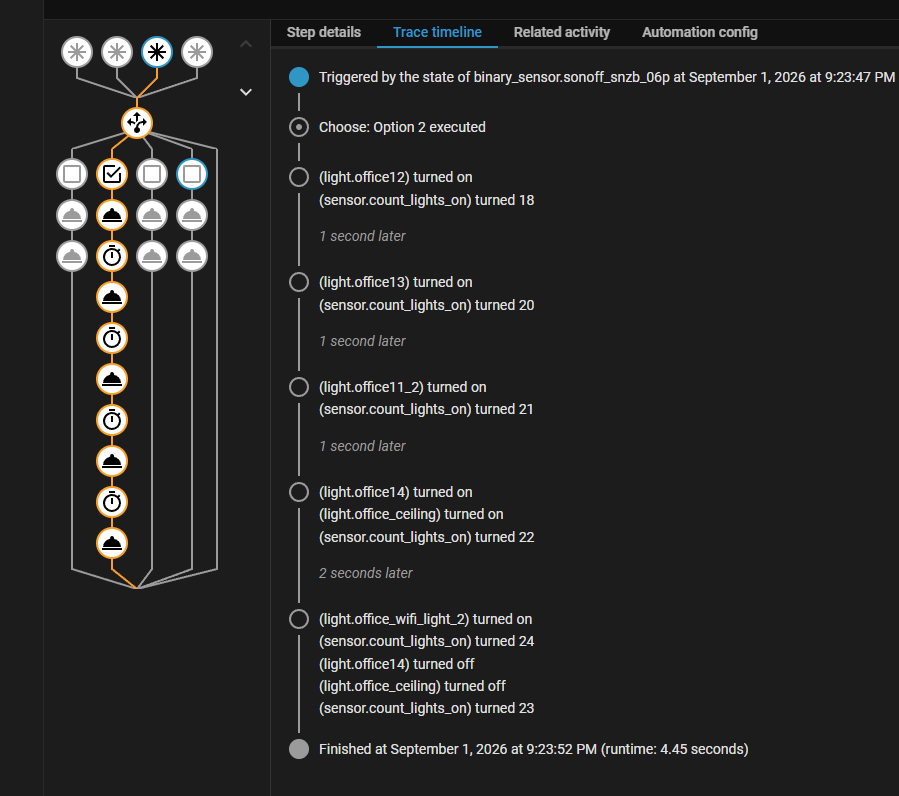
Has anyone had automations that turn on Zigbee lights behave weirdly?
I have created a relatively basic automation that responds to the state of a binary sensor which is set to turn ff when a light sensor exceeds 80 Lux (with a hysteresis of 10 lux to prevent bouncing). The sensor is called Darkness, but is On (light detected) when the threshold is above 80 lux or off when below (No light detected). Activity records show that this is behaving as expected.
This is combined with a mm wave presence sensor in the office.
The option is defined with 4 options
Option 1, The darkness sensor is triggered by becoming No light detected AND there presence detected. (i.e. presence already in the office and it becomes dark)
Option 2.The presence senor detects a presence AND the state of the darkness sensor is set to No light.
Option 3. The Darkness sensor state changes to Light.
Option 4. The presence sensor state changes to Clear.
The issue I am having is with Option 2.
When this is triggered, entering the room. The automation triggers. This should turn on 4 zigbee lights in a sequence waiting 1 second before turning on the next finally turn on a basic Tuya based WiFi bulb.
The effect I am getting is that some occasions the zigbee bulbs turn on then immediately off. One may remain on. But the WifFi bulb turns on and remains on.
I tried getting assistance from Claude which made a few suggested changes, but didnt make a real difference.
This is the YAML. Is there an issue in the script or with a zigbee response which can be handled with a tweak in the script?
alias: Office lights
description: >-
  Turns on office ceiling group + accent light when it gets dark and the room is
  occupied; turns off when bright or unoccupied. Cleared trigger has a 1-minute
  debounce to avoid reacting to brief presence-sensor dropouts. Ceiling always
  turns on to 80% explicitly rather than resuming its last brightness.
triggers:
  - trigger: state
    entity_id:
      - binary_sensor.office_light_sensor_flat_darkness_flat
    to:
      - 'off'
    id: Becomes dark
  - trigger: state
    entity_id:
      - binary_sensor.office_light_sensor_flat_darkness_flat
    to:
      - 'on'
    id: Becomes Bright
  - id: Occupied
    options:
      behavior: each
      for: '00:00:00'
    target:
      entity_id: binary_sensor.sonoff_snzb_06p
    trigger: occupancy.detected
  - id: Cleared
    options:
      behavior: each
      for: '00:01:00'
    target:
      entity_id: binary_sensor.sonoff_snzb_06p
    trigger: occupancy.cleared
conditions: []
actions:
  - choose:
      - conditions:
          - condition: trigger
            id:
              - Becomes dark
          - condition: state
            entity_id: binary_sensor.sonoff_snzb_06p
            state: 'on'
        sequence:
          - note: >-
              Explicit brightness so the group always turns on to a usable
              level, instead of resuming whatever dim level the bulbs were last
              left at (was landing around 14%, easy to mistake for off).
            action: light.turn_on
            data:
              brightness_pct: 80
              transition: 30
            target:
              entity_id: light.office_ceiling
          - action: light.turn_on
            metadata: {}
            target:
              entity_id: light.office_wifi_light_2
            data: {}
      - conditions:
          - condition: trigger
            id:
              - Occupied
          - condition: state
            entity_id: binary_sensor.office_light_sensor_flat_darkness_flat
            state:
              - 'off'
        sequence:
          - action: light.turn_on
            data:
              brightness_pct: 50
            target:
              entity_id: light.office12
          - delay:
              hours: 0
              minutes: 0
              seconds: 1
              milliseconds: 0
            enabled: true
          - action: light.turn_on
            data:
              brightness_pct: 50
            target:
              entity_id: light.office13
          - delay:
              hours: 0
              minutes: 0
              seconds: 1
              milliseconds: 0
            enabled: true
          - action: light.turn_on
            data:
              brightness_pct: 50
            target:
              entity_id: light.office11_2
          - delay:
              hours: 0
              minutes: 0
              seconds: 1
              milliseconds: 0
            enabled: true
          - action: light.turn_on
            data:
              brightness_pct: 50
            target:
              entity_id: light.office14
          - delay:
              hours: 0
              minutes: 0
              seconds: 1
              milliseconds: 0
            enabled: true
          - action: light.turn_on
            data: {}
            target:
              entity_id: light.office_wifi_light_2
      - conditions:
          - condition: trigger
            id:
              - Becomes Bright
        sequence:
          - action: light.turn_off
            data: {}
            target:
              entity_id: light.office_wifi_light_2
          - action: light.turn_off
            data: {}
            target:
              entity_id: light.office_ceiling
      - conditions:
          - condition: trigger
            id:
              - Cleared
        sequence:
          - action: light.turn_off
            data: {}
            target:
              entity_id: light.office_wifi_light_2
          - action: light.turn_off
            data:
              transition: 5
            target:
              entity_id: light.office_ceiling
mode: restart
As always, any help will be gratefully received.