I my bathroom I have a Zigbee light that controls lights and an extractor fan. Light on = fan on, light off = fan off.
I also have a humidity sensor
The switch turns on when presence is detected and turns off when presence is no long detected and humidity < 56%. This works.
However if I have a shower (humidity goes to 80+%) then the fan doesn’t turn off when the humidity drops unless I walk in and trigger the off automation again.
The automation is:
id: '1774943711014'
alias: Turn off Bathroom Light & Fan
description: ''
triggers:
  - trigger: state
    entity_id:
      - binary_sensor.bathroom_presence_sensor_snzb_03p_occupancy
    to:
      - 'off'
    enabled: true
conditions: []
actions:
  - repeat:
      while:
        - condition: numeric_state
          entity_id: sensor.bathroom_temp_humidity_humidity
          above: 55
      sequence:
        - delay:
            hours: 0
            minutes: 1
            seconds: 0
            milliseconds: 0
  - action: light.turn_off
    metadata: {}
    target:
      entity_id: light.bathroom_light_switch
    data: {}
mode: single

What I have spotted is that if I look at traces I get the following:
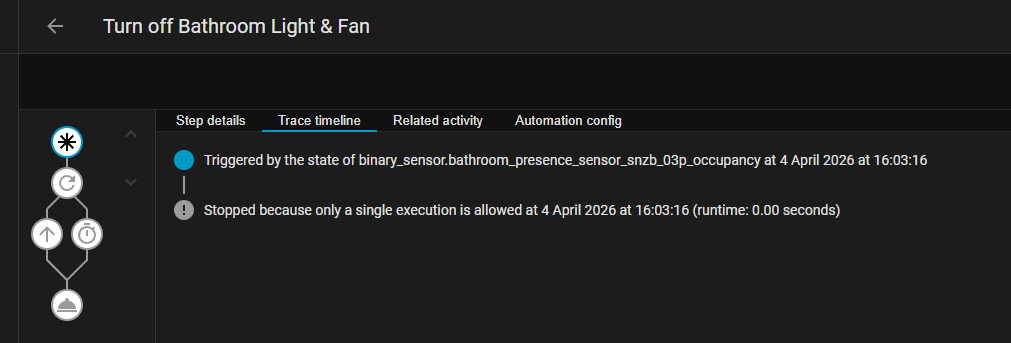
This implies to me that the automation is not going round the while loop for some reason.
Any ideas?