Automation triggered, but not running

I’ve started running into a weird situation with at least one automation since upgradeing to 2025.10.3. The automation is getting triggered, and it’s producing traces, but no steps are executed, not even the first one. There are no conditions and the first step is only setting some variables. I’ve checked all of the templates for these variables into the template editor and they all seem fine. Regardless, there are no errors being produced either.

The last log entry I see for this automation when it is behaving like this (even with debug logging turned on) is the state update for the last_triggered property of the automation itself.

Just trying anything to get it to work, even with a manual trigger, I toggled the automation off and on again, and it seemed to allow it to work again, but it has since relapsed into its non-working state. I’m not even sure that this isn’t happening with other automations, because there are no errors being logged. I just expected the results of this pardticular automation, and I wasn’t seeing them, so I investigated and found this issue.


UPDATE: Before I even finished writing this post, I already have an update: It turns out the automations were still running (queued) and were only finally stopped because I toggled the automation on and off. I never noticed this before because it was happening so far after the trigger, and the automation typically gets triggered too often to show me traces this old:

Triggered manually at October 22, 2025 at 08:40:44
Stopped because of unknown reason at October 22, 2025 at 09:03:25 (runtime: 1361.31 seconds)

Now, on successful runs, the entire automation runs in a few seconds. In failure cases, not even the first action is running and it’s getting hung up somewhere between the trigger and the first action.

Has anyone else experienced this? What are some steps I could take to investigate further? This particular automation has the following as a trigger, it’s watching for a change of state in a Folder Watcher component and it is the only trigger (besides manual triggers):

id: new_motion
trigger: state
entity_id:
  - event.security_camera_folder_watcher
attribute: event_type
to: closed

A separate automation dumps clips from my security cameras in a folder, and this watches for them to be finished being written to disk before processing them and sending me a notification.

It would be helpful if you would download and share the debug trace.

In many cases it is better to use a more general trigger for event entities, then use a condition to check the event_type attribute’s value.

triggers:
  - id: new_motion
    trigger: state
    entity_id:
      - event.security_camera_folder_watcher
conditions:
  - "{{ trigger.to_state.attributes.event_type == 'closed' }}"
...
1 Like

I will post the debug trace for the automation. However, since manually toggling the automation, it’s currently working again. I’ll have to wait until the next failure. If the pattern holds, it’ll fail again within 24 hours.

Edit: It would be cool if traces showed the actual logs for the automation as well as the flow.

Post your entire automation in addition to the trace. Chances are it’s something in the actions which is getting stuck, and the fix might be as simple as changing the automation mode to restart or parallel.

Here’s the automation. I just recently modified the trigger away from triggering on attribute change and used a condition instead, as suggested above in this thread. I currently don’t have a trace showing the problem because the automation runs too often, and it pushes the failed runs out of the history. I’ll post one as soon as it happens again though.

alias: Motion Notification with AI Description
description: >-
  Sends a notification with the latest video and AI description when motion is
  detected from a camera.
mode: queued
max: 25
triggers:
  - id: new_motion
    trigger: state
    entity_id:
      - event.security_camera_folder_watcher
conditions:
  - condition: or
    conditions:
      - condition: template
        value_template: "{{ trigger.to_state.attributes.event_type == 'closed' }}"
      - condition: not
        conditions:
          - condition: template
            value_template: "{{ trigger is defined }}"
actions:
  - variables:
      response: ""
      video: ""
      video_file_path: |-
        {% if trigger is defined and
          trigger.to_state is defined -%}
          {{ trigger.to_state.attributes.path }}
        {% else -%}
          {{ state_attr('event.security_camera_folder_watcher', 'path') }}
        {% endif -%}
      video_file_name: "{{ video_file_path.split('/') | last }}"
      serial: "{{ video_file_name[16:-4] | upper }}"
      camera_entity_id: |-
        {% set cams = states.camera
          | selectattr('attributes.brand', '==', 'Blink')
          | list -%}
        {% set cam_names = cams
          | map(attribute='attributes.friendly_name')
          | map('upper')
          | map('replace', 'CAMERA', '')
          | map('replace', '-', '')
          | map('replace', '_', '')
          | map('replace', ' ', '')
          | list -%}
        {% set i = cam_names.index(serial) | default(-1) -%}
        {{ cams[i].entity_id }}
      camera_name: |-
        {% set tmp = state_attr(camera_entity_id, 'friendly_name')
          | default('Unknown camera', true) -%}
        {{ iif((tmp | lower).endswith(' camera'),
          tmp[:-7], tmp) }}
      datetime: |-
        {{
          video_file_name[:4] + '-' + 
          video_file_name[4:6] + '-' + 
          video_file_name[6:8] + ' ' +
          video_file_name[9:11] + ':' +
          video_file_name[11:13] + ':' +
          video_file_name[13:15]
        }}
      footage_time: "{{ strptime(datetime, '%Y-%m-%d %H:%M:%S').strftime('%b %-d, %-H:%M') }}"
      title: "{{ camera_name + ': ' + footage_time }}"
      notifiable_people: |-
        {{
          expand('group.camera_notifications')
            | map(attribute='attributes.id')
            | map('lower')
            | list
        }}
  - variables:
      notifiable_people:
        - steve
    enabled: true
  - alias: Use LLMVision
    sequence:
      - action: llmvision.video_analyzer
        metadata: {}
        data:
          provider: [the provider ID]
          include_filename: true
          max_frames: 5
          max_tokens: 1000
          temperature: 0.05
          generate_title: true
          expose_images: true
          remember: false
          video_file: "{{ video_file_path }}"
          message: >-
            You are the chief of security overseeing a group of guards watching
            over a single-family home. The guards have several vantage points
            from which they can observe events in the front yard, driveway,
            doorstep, and  back yard. Your job is to inform the family of events
            that might impact the security of their home, events that might
            require the attention of one of the residents, or events that might
            be otherwise interesting. 


            Ignore inconsequential things like the sun moving or reflecting off
            the clouds. Do not make assumptions about the gender of any people,
            but accurately describe their appearance. Structure the description
            of events as a single flowing narrative. Do not include introductory
            text. Do not tell me what frame you are analyzing, just talk about
            what is happening.


            Avoid speculation.


            Your response should be a JSON object containing the following
            fields:
              importance: the judged importance 
                of the event. If something happens that
                requires someone's attention, use 'high'. 
                If something otherwise interesting happens,
                use 'low'. Otherwise use 'not_important'.
              reason: the methodology used to determine
                the importance of an event. Why did you deem
                it important or not?
              description: the description of the scene.
                Try to keep this to two sentences, unless
                that is inadequate to describe the 
                situation.
              detail: a more detailed description of what
                has happened. Be as wordy as necessary to
                fully capture the moment.
        response_variable: llmvision
      - alias: Restructure response
        variables:
          ai_response:
            error: "{{ llmvision.error }}"
            data: "{{ llmvision.response_text[7:-3] }}"
            title: "{{ llmvision.title }}"
            thumbnail: "{{ llmvision.key_frame }}"
  - alias: LLM action error or success?
    choose:
      - conditions:
          - condition: template
            value_template: "{{ ai_response is not defined }}"
            alias: AI_response is not defined
        sequence:
          - alias: Define 'ai_response' variable if none returned
            variables:
              video: "{{ video_file_path }}"
              ai_response:
                conversation_id: ""
                data:
                  description: AI analysis did not provide a response
                  detail: ""
                  reason: n/a
                  importance: high
        alias: There was no AI Response
      - conditions:
          - alias: AI analysis encountered errors
            condition: template
            value_template: |-
              {{ ai_response is not defined or 
                (ai_response.error | length > 0) or 
                (ai_response.data | length == 0) }}
        sequence:
          - alias: Define 'ai_response' variable if error returned
            variables:
              video: "{{ video_file_path }}"
              ai_response:
                conversation_id: ""
                data:
                  description: AI analysis encountered errors
                  detail: ""
                  reason: n/a
                  importance: high
      - conditions:
          - condition: template
            value_template: "{{ ai_response is defined and (ai_response.error | length == 0) }}"
        sequence:
          - alias: Stop here if the AI thinks the event isn't important enough
            if:
              - alias: If the AI has deemed the event 'not_important'
                condition: template
                value_template: "{{ ai_response.data.importance == 'not_important' }}"
            then:
              - stop: Not important
        alias: AI analysis has completed successfully
  - action: llmvision.remember
    metadata: {}
    data:
      title: "{{ ai_response.title }}"
      image_path: "{{ ai_response.thumbnail.replace('/media/', '/local/') }}"
      camera_entity: "{{ camera_entity_id }}"
      start_time: "{{ datetime }}"
      summary: "{{ ai_response.data.detail }}"
  - alias: Notify people
    repeat:
      for_each: "{{ notifiable_people }}"
      sequence:
        - alias: Send the regular motion notification
          action: notify.{{ repeat.item }}
          data:
            title: "{{ title }}"
            message: "{{ ai_response.data.description }}"
            data:
              importance: "{{ ai_response.data.importance }}"
              image: "{{ ai_response.thumbnail }}"
              video: "{{ video }}"
              priority: high
              ttl: 0
              group: motion-detected
              channel: Motion Detection
              actions:
                - action: URI
                  title: View timeline
                  uri: /lovelace-people/timeline

It’ll happen as soon as the automation is triggered 26 times.

You have it set to queued with a max of 25. My hunch is that your automation isn’t actually always completing & is getting stuck in one of the million action branches you set up.

If you want to debug this properly, reduce that max from 25 to 4 or else increase the number of stored traces to 26.

There should also be something which tells you how many running instances of that automation there are in a given time. Apologies but the name escapes me at the moment.
If someone could tell you the name & where to find that property, it’ll make your debugging much easier.

When they run, they always run to completion, until they don’t. And when they don’t, the don’t even run the first action.

And until this last update of HA, it ran flawlessly every time.

It sounds like your symptoms line up with queue saturation rather than a logic error in your first action:

In mode: queued an automation run won’t start actions until earlier runs finish. When a backlog forms, new runs appear as “triggered” but “don’t even run the first action” because they’re just waiting in the queue. Toggling the automation off/on cancels those waiting runs, which could explain the long “runtime” followed by “Stopped because of unknown reason” in your traces (that message often shows when a run is canceled externally). Home Assistant+1 Your own thread shows mode: queued with max: 25, plus a trigger (Folder Watcher) that may fire frequently. If even one branch occasionally stalls (e.g., I/O or provider call), 25 pending runs is surprisingly easy to hit. Home Assistant Community

The timing with 2025.10.x might be coincidence. I don’t see a documented breaking change to the automation engine in 2025.10 (most changes are editor/UI), but a regression is always possible.

In short you got to many in que runs of your automations so when you toggle it on/off you basically reset the que and it starts working again for a short time.


edit:

Also keep in mind how other modes will affect your automation, i get what its for and it seems dope actually!

  • If the goal is “always act on the latest clip quickly” (and you don’t care about older ones)
    Try mode: restart. Each new trigger cancels the previous run and starts fresh so you don’t pile up and you avoid the “triggered but didn’t reach first action because it was waiting its turn” symptom. Some notifications may not reach you in this mode if events fire back to back.

  • If every clip matters but you don’t want a giant line
    Try **mode: parallel . That processes a few at once and keeps latency down, but avoids a thundering herd. (Order isn’t guaranteed, so if strict ordering matters, stick with queued.) I don’t recommend this as it seems you want every event, and parallel will literally through out anything outside of its max.

  • If you truly need strict ordering and must handle every clip
    Keep mode: queued, but I’d start with a much higher max while debugging so problems surface early.

But the only thing is figuring out what your max needs to be because i assume based what your automation actually is ( a camera motion pipeline that watches a folder for new/closed video files, runs an LLMVision analysis on each clip, and then notifies people with a title, short description, image, and video.) your automation can ramp up high based on who is home if you have an event going on at your home and if what ever your doing requires you to walk past your camera several times repeatedly. Honestly an increase from 25 to 26 aint gonna help you lol, id try a much higher number like 50.

That’s interesting. I would have expected an error saying as much. Something like “25 instances of this automation are already queued. The queue is full.”

Anyway, here is the trace from this morning’s failed run. You can see it gets triggered, and passes the condition, but then stops at the very first action. This doesn’t look like I would expect “queue saturation” to present itself. (Trace JSON file follows)

Here’s the trace file. Actually in here, I can see that the current run is only 2 out of a possible 25. And this is only because I separated out the attribute condition from the trigger so it’s getting triggered once for the file getting opened, but failing the condiition, and another for it closing, which passes. The files are pretty small (a couple of megabytes) so I’d imaging the opening and closing happen in pretty rapid succession.

{
  "trace": {
    "last_step": "condition/0/conditions/0",
    "run_id": "edd1ac6e5313f34c306bd715332453aa",
    "state": "running",
    "script_execution": null,
    "timestamp": {
      "start": "2025-10-23T11:20:01.658313+00:00",
      "finish": null
    },
    "domain": "automation",
    "item_id": "1745255108803",
    "trigger": "state of event.security_camera_folder_watcher",
    "trace": {
      "trigger/0": [
        {
          "path": "trigger/0",
          "timestamp": "2025-10-23T11:20:01.658353+00:00",
          "changed_variables": {
            "this": {
              "entity_id": "automation.motion_notification_with_ai_description",
              "state": "on",
              "attributes": {
                "id": "1745255108803",
                "last_triggered": "2025-10-23T11:20:01.276581+00:00",
                "mode": "queued",
                "current": 2,
                "max": 25,
                "friendly_name": "Motion Notification with AI Description"
              },
              "last_changed": "2025-10-22T14:30:39.433787+00:00",
              "last_reported": "2025-10-23T11:20:01.276616+00:00",
              "last_updated": "2025-10-23T11:20:01.276616+00:00",
              "context": {
                "id": "01K88CR4ZWXRADX51GBGSD9Y2M",
                "parent_id": "01K88CR4ZVV07V7V1BF3DEZG7K",
                "user_id": null
              }
            },
            "trigger": {
              "id": "new_motion",
              "idx": "0",
              "alias": null,
              "platform": "state",
              "entity_id": "event.security_camera_folder_watcher",
              "from_state": {
                "entity_id": "event.security_camera_folder_watcher",
                "state": "2025-10-23T11:20:01.655+00:00",
                "attributes": {
                  "event_types": [
                    "closed",
                    "created",
                    "deleted",
                    "modified",
                    "moved"
                  ],
                  "event_type": "modified",
                  "path": "/media/cameras/videos/2025/10/23/20251023_081103_Driveway.mp4",
                  "file": "20251023_081103_Driveway.mp4",
                  "folder": "/media/cameras/videos/2025/10/23",
                  "friendly_name": "Security Camera Folder Watcher"
                },
                "last_changed": "2025-10-23T11:20:01.655080+00:00",
                "last_reported": "2025-10-23T11:20:01.655080+00:00",
                "last_updated": "2025-10-23T11:20:01.655080+00:00",
                "context": {
                  "id": "01K88CR5BQSYB9V15V72T9GR3N",
                  "parent_id": null,
                  "user_id": null
                }
              },
              "to_state": {
                "entity_id": "event.security_camera_folder_watcher",
                "state": "2025-10-23T11:20:01.657+00:00",
                "attributes": {
                  "event_types": [
                    "closed",
                    "created",
                    "deleted",
                    "modified",
                    "moved"
                  ],
                  "event_type": "closed",
                  "path": "/media/cameras/videos/2025/10/23/20251023_081103_Driveway.mp4",
                  "file": "20251023_081103_Driveway.mp4",
                  "folder": "/media/cameras/videos/2025/10/23",
                  "friendly_name": "Security Camera Folder Watcher"
                },
                "last_changed": "2025-10-23T11:20:01.657960+00:00",
                "last_reported": "2025-10-23T11:20:01.657960+00:00",
                "last_updated": "2025-10-23T11:20:01.657960+00:00",
                "context": {
                  "id": "01K88CR5BSSRZN3G7PFNA312GG",
                  "parent_id": null,
                  "user_id": null
                }
              },
              "for": null,
              "attribute": null,
              "description": "state of event.security_camera_folder_watcher"
            }
          }
        }
      ],
      "condition/0": [
        {
          "path": "condition/0",
          "timestamp": "2025-10-23T11:20:01.658376+00:00",
          "result": {
            "result": true
          }
        }
      ],
      "condition/0/conditions/0": [
        {
          "path": "condition/0/conditions/0",
          "timestamp": "2025-10-23T11:20:01.658395+00:00",
          "result": {
            "result": true,
            "entities": []
          }
        }
      ]
    },
    "config": {
      "id": "1745255108803",
      "alias": "Motion Notification with AI Description",
      "description": "Sends a notification with the latest video and AI description when motion is detected from a camera.",
      "triggers": [
        {
          "id": "new_motion",
          "trigger": "state",
          "entity_id": [
            "event.security_camera_folder_watcher"
          ]
        }
      ],
      "conditions": [
        {
          "condition": "or",
          "conditions": [
            {
              "condition": "template",
              "value_template": "{{ trigger.to_state.attributes.event_type == 'closed' }}"
            },
            {
              "condition": "not",
              "conditions": [
                {
                  "condition": "template",
                  "value_template": "{{ trigger is defined }}"
                }
              ]
            }
          ]
        }
      ],
      "actions": [
        {
          "variables": {
            "response": "",
            "video": "",
            "video_file_path": "{% if trigger is defined and\n  trigger.to_state is defined -%}\n  {{ trigger.to_state.attributes.path }}\n{% else -%}\n  {{ state_attr('event.security_camera_folder_watcher', 'path') }}\n{% endif -%}",
            "video_file_name": "{{ video_file_path.split('/') | last }}",
            "serial": "{{ video_file_name[16:-4] | upper }}",
            "camera_entity_id": "{% set cams = states.camera\n  | selectattr('attributes.brand', '==', 'Blink')\n  | list -%}\n{% set cam_names = cams\n  | map(attribute='attributes.friendly_name')\n  | map('upper')\n  | map('replace', 'CAMERA', '')\n  | map('replace', '-', '')\n  | map('replace', '_', '')\n  | map('replace', ' ', '')\n  | list -%}\n{% set i = cam_names.index(serial) | default(-1) -%}\n{{ cams[i].entity_id }}",
            "camera_name": "{% set tmp = state_attr(camera_entity_id, 'friendly_name')\n  | default('Unknown camera', true) -%}\n{{ iif((tmp | lower).endswith(' camera'),\n  tmp[:-7], tmp) }}",
            "datetime": "{{\n  video_file_name[:4] + '-' + \n  video_file_name[4:6] + '-' + \n  video_file_name[6:8] + ' ' +\n  video_file_name[9:11] + ':' +\n  video_file_name[11:13] + ':' +\n  video_file_name[13:15]\n}}",
            "footage_time": "{{ strptime(datetime, '%Y-%m-%d %H:%M:%S').strftime('%b %-d, %-H:%M') }}",
            "title": "{{ camera_name + ': ' + footage_time }}",
            "notifiable_people": "{{\n  expand('group.camera_notifications')\n    | map(attribute='attributes.id')\n    | map('lower')\n    | list\n}}"
          }
        },
        {
          "variables": {
            "notifiable_people": [
              "steve"
            ]
          },
          "enabled": true
        },
        {
          "alias": "Use LLMVision",
          "sequence": [
            {
              "action": "llmvision.video_analyzer",
              "metadata": {},
              "data": {
                "provider": "01JS5SG6026VCRQQ78G1085N46",
                "include_filename": true,
                "max_frames": 5,
                "max_tokens": 1000,
                "temperature": 0.05,
                "generate_title": true,
                "expose_images": true,
                "remember": false,
                "video_file": "{{ video_file_path }}",
                "message": "You are the chief of security overseeing a group of guards watching over a single-family home. The guards have several vantage points from which they can observe events in the front yard, driveway, doorstep, and  back yard. Your job is to inform the family of events that might impact the security of their home, events that might require the attention of one of the residents, or events that might be otherwise interesting. \n\nIgnore inconsequential things like the sun moving or reflecting off the clouds. Do not make assumptions about the gender of any people, but accurately describe their appearance. Structure the description of events as a single flowing narrative. Do not include introductory text. Do not tell me what frame you are analyzing, just talk about what is happening.\n\nAvoid speculation.\n\nYour response should be a JSON object containing the following fields:\n  importance: the judged importance \n    of the event. If something happens that\n    requires someone's attention, use 'high'. \n    If something otherwise interesting happens,\n    use 'low'. Otherwise use 'not_important'.\n  reason: the methodology used to determine\n    the importance of an event. Why did you deem\n    it important or not?\n  description: the description of the scene.\n    Try to keep this to two sentences, unless\n    that is inadequate to describe the \n    situation.\n  detail: a more detailed description of what\n    has happened. Be as wordy as necessary to\n    fully capture the moment."
              },
              "response_variable": "llmvision"
            },
            {
              "alias": "Restructure response",
              "variables": {
                "ai_response": {
                  "error": "{{ llmvision.error }}",
                  "data": "{{ llmvision.response_text[7:-3] }}",
                  "title": "{{ llmvision.title }}",
                  "thumbnail": "{{ llmvision.key_frame }}"
                }
              }
            }
          ]
        },
        {
          "alias": "LLM action error or success?",
          "choose": [
            {
              "conditions": [
                {
                  "condition": "template",
                  "value_template": "{{ ai_response is not defined }}",
                  "alias": "AI_response is not defined"
                }
              ],
              "sequence": [
                {
                  "alias": "Define 'ai_response' variable if none returned",
                  "variables": {
                    "video": "{{ video_file_path }}",
                    "ai_response": {
                      "conversation_id": "",
                      "data": {
                        "description": "AI analysis did not provide a response",
                        "detail": "",
                        "reason": "n/a",
                        "importance": "high"
                      }
                    }
                  }
                }
              ],
              "alias": "There was no AI Response"
            },
            {
              "conditions": [
                {
                  "alias": "AI analysis encountered errors",
                  "condition": "template",
                  "value_template": "{{ ai_response is not defined or \n  (ai_response.error | length > 0) or \n  (ai_response.data | length == 0) }}"
                }
              ],
              "sequence": [
                {
                  "alias": "Define 'ai_response' variable if error returned",
                  "variables": {
                    "video": "{{ video_file_path }}",
                    "ai_response": {
                      "conversation_id": "",
                      "data": {
                        "description": "AI analysis encountered errors",
                        "detail": "",
                        "reason": "n/a",
                        "importance": "high"
                      }
                    }
                  }
                }
              ]
            },
            {
              "conditions": [
                {
                  "condition": "template",
                  "value_template": "{{ ai_response is defined and (ai_response.error | length == 0) }}"
                }
              ],
              "sequence": [
                {
                  "alias": "Stop here if the AI thinks the event isn't important enough",
                  "if": [
                    {
                      "alias": "If the AI has deemed the event 'not_important'",
                      "condition": "template",
                      "value_template": "{{ ai_response.data.importance == 'not_important' }}"
                    }
                  ],
                  "then": [
                    {
                      "stop": "Not important"
                    }
                  ]
                }
              ],
              "alias": "AI analysis has completed successfully"
            }
          ]
        },
        {
          "action": "llmvision.remember",
          "metadata": {},
          "data": {
            "title": "{{ ai_response.title }}",
            "image_path": "{{ ai_response.thumbnail.replace('/media/', '/local/') }}",
            "camera_entity": "{{ camera_entity_id }}",
            "start_time": "{{ datetime }}",
            "summary": "{{ ai_response.data.detail }}"
          }
        },
        {
          "alias": "Notify people",
          "repeat": {
            "for_each": "{{ notifiable_people }}",
            "sequence": [
              {
                "alias": "Send the regular motion notification",
                "action": "notify.{{ repeat.item }}",
                "data": {
                  "title": "{{ title }}",
                  "message": "{{ ai_response.data.description }}",
                  "data": {
                    "importance": "{{ ai_response.data.importance }}",
                    "image": "{{ ai_response.thumbnail }}",
                    "video": "{{ video }}",
                    "priority": "high",
                    "ttl": 0,
                    "group": "motion-detected",
                    "channel": "Motion Detection",
                    "actions": [
                      {
                        "action": "URI",
                        "title": "View timeline",
                        "uri": "/lovelace-people/timeline"
                      }
                    ]
                  }
                }
              }
            ]
          }
        }
      ],
      "mode": "queued",
      "max": 25
    },
    "blueprint_inputs": null,
    "context": {
      "id": "01K88CR5BT3Y75FECD5BTZ38ER",
      "parent_id": "01K88CR5BSSRZN3G7PFNA312GG",
      "user_id": null
    }
  },
  "logbookEntries": [
    {
      "name": "Motion Notification with AI Description",
      "message": "triggered by state of event.security_camera_folder_watcher",
      "source": "state of event.security_camera_folder_watcher",
      "entity_id": "automation.motion_notification_with_ai_description",
      "context_id": "01K88CR5BT3Y75FECD5BTZ38ER",
      "domain": "automation",
      "when": 1761218401.6585495
    }
  ]
}

Honestly, I see nothing wrong with the trace, except for the fact that the flow just doesn’t run the actions. Can anyone versed in interpreting these trace files read more into this?

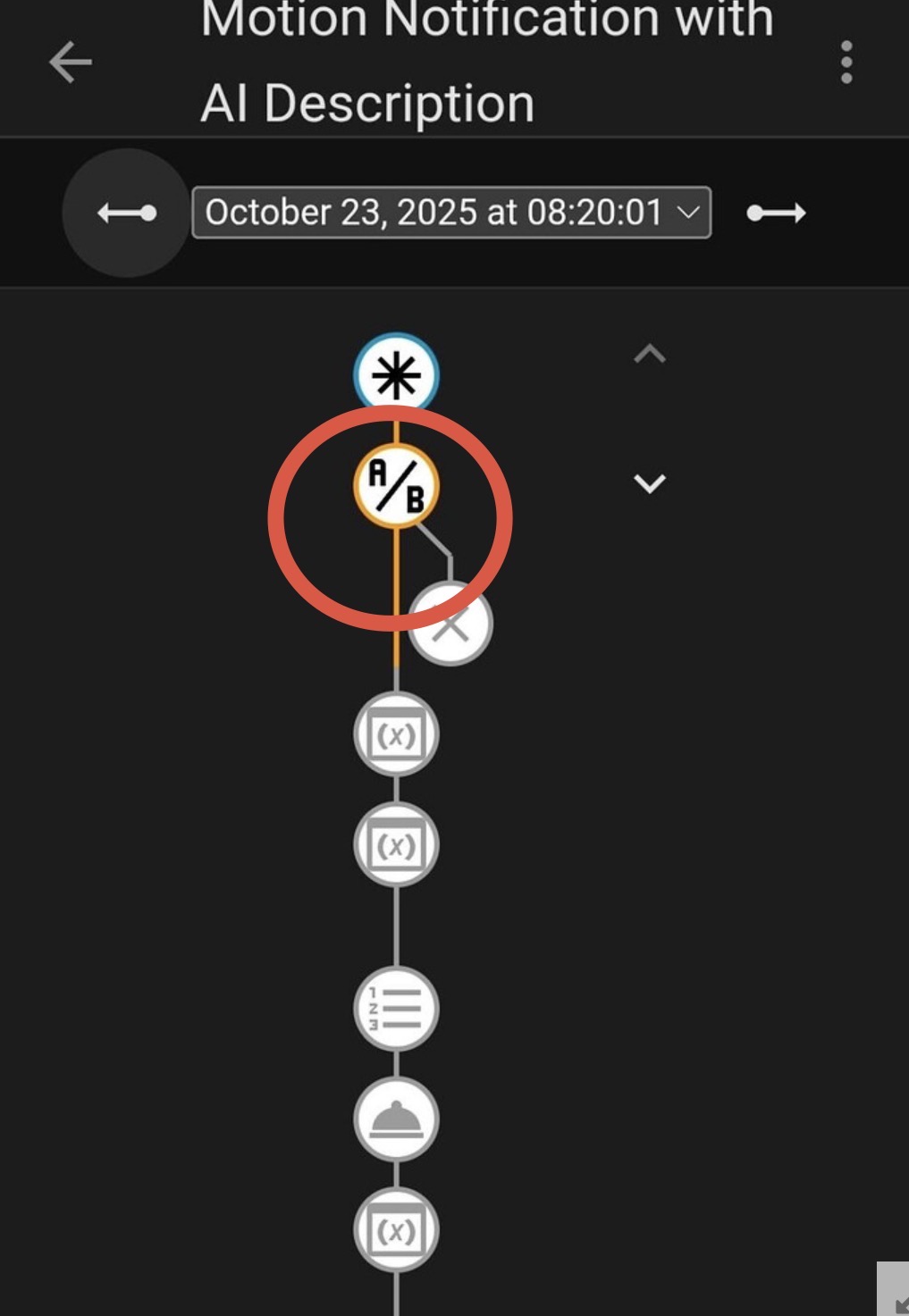
This is clear sign of que saturation.

The second screenshot in your most recent post doesn’t relay much doesn’t even say the automation is stoped but if you took that picture after you clicked on the most step in that trace that would be helpful to diagnose this trace.

Additionally you did not change your max que from 25. We can’t rule this out until you change this to a bigger number and not just 26.

In the trace JSON, in the hierarchy of
trace -> trace -> trigger/0 -> changed_variables -> this -> attributes
we have this:

It is clear to me that there is no queue saturation here (yet). This is the second of 25 items in the queue. In any case, it is not being run 25 times. I do think that there may be a run that is hanging, and causing the queue to start backing up. Is this what you’re talking about when you say “saturation”?

I found something interesting in my logs:

2025-10-23 08:20:31.250 WARNING (MainThread) [custom_components.llmvision.media_handlers] Timeout while waiting for ffmpeg stdout read; terminating read loop

That could explain why the automation is not completing, and why the queued instances seem to start buliding up. I don’t know why this kind of operation should timeout though. these videos are all small, less than 5 MB. FFMPEG should rip through those in a second or two, all that LLMVision is doing is pulling out key frames to send to the AI, it’s not like it’s re-encoding video. I guess I’ll raise an issue with LLMVision to see why this might happen.

I also found 3 days-old instances of ffmpeg still running, but doing nothing.

I shall continue to investigate :slight_smile:

Sorry about that, on my phone i did not see the trace file. give me a second to see

Okay @SteveDinn what i can see on my end is that the time between the file is closed and your llmvision call is within the milliseconds. Issue that might be too quick as the way nvr’s write video is by adding meta data to it at the end of the process which may be triggering llm to pull a video file that not truly ‘finished’ writing. Just a theory try adding a delay before llm vison just a 1 second delay should be fine.

If this is a poke at what I wrote earlier, read my post again. I was not suggesting to increase the queue to 26. I was suggesting to ensure the stored trace is greater than the queue by either increasing the trace to 26 or setting the queue to 4 (1 below the default trace of 5).

@SteveDinn the only thing I can suggest at this point is to investigate the HA logs. Your LLM might be throwing errors due to too many requests or whatever other reason LLMs decide to freak out.
I don’t use LLMs so can’t be very specific, but given that practically all your actions depend on your LLM to provide a response to be considered done, that would be the next logical troubleshooting step.

@ShadowFist

Sorta, what he first described matched that.

Regardless i dont think its the api for the llm itself i think its to do with the blazing speed it reads the file. For instance when i download files from the internet sometimes i cant just double click and open the file tho chrome says its done, sometimes in the folder the file actually live youll see a blank file because it not truly done writing the file. I feel thats the same thing going on here. If it were truly api rate limit i feel i would of caught that himself and say an appropriate error. And honestly if thats not the case here either then its an issue with the integration.

But to be transparent i had a similar automation that complimented anyone who walked past my front door (smart tactic to stop people from hanging around my nyc apartment) and the volume is way higher than what he probably has in his home. I never ran into this issue