Autonomous ESPHome controllers with modern UI

My goal is to run ESPHome controllers as autonomously as possible, i.e., without Home Assistant, so the core functionality remains available even if Home Assistant is down.

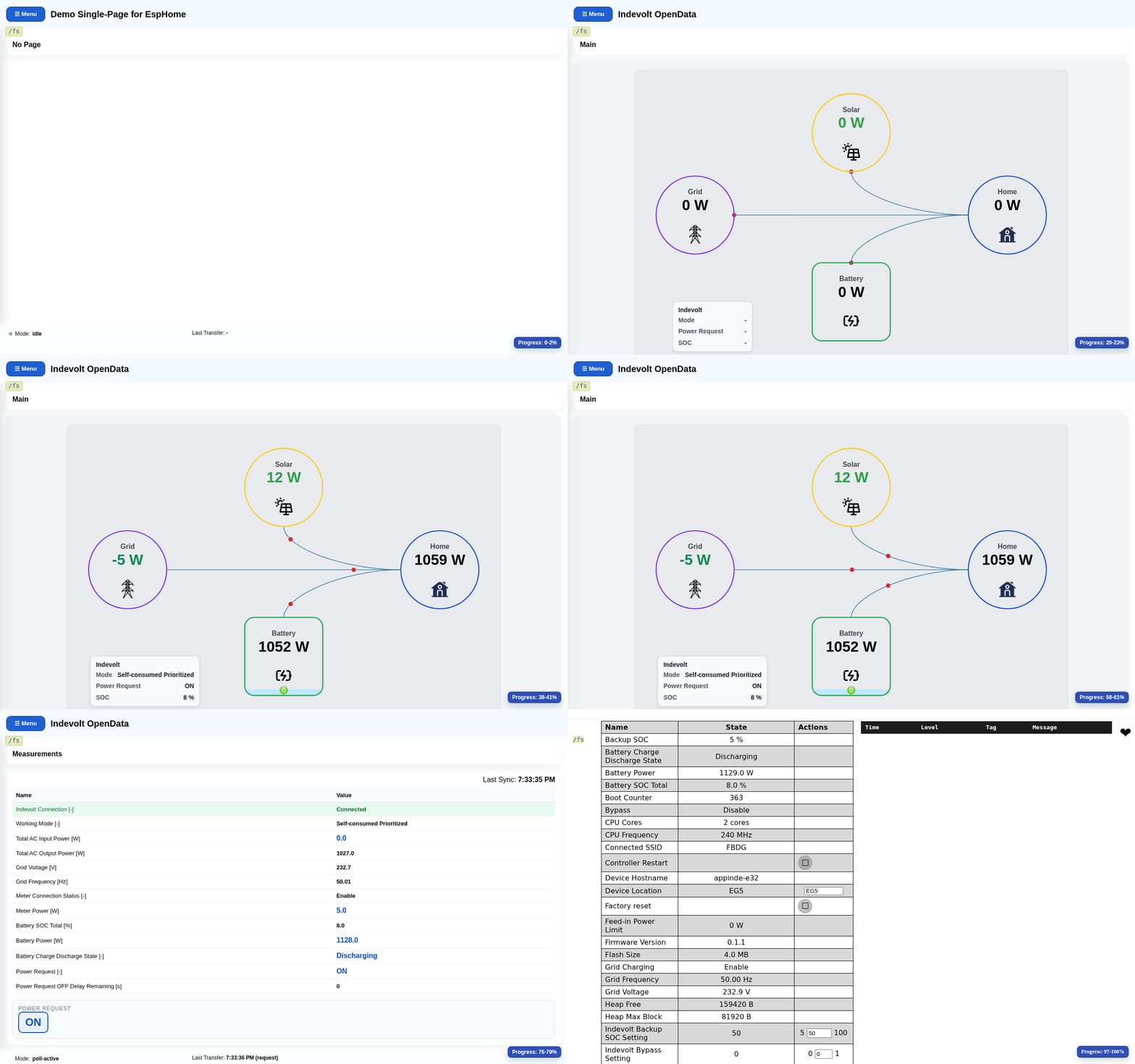
As an example, I implemented the integration of an Indevolt Solidflex battery system:

  • Capturing the Solidflex system metrics via the “Open API”
  • Presenting the data in a modern web UI in the browser
  • Publishing the values via MQTT
  • Optional integration into Home Assistant via MQTT

ESPHome is obviously not intended for modern web UIs.
For this you need a web-based file system, and I found very few solid references.

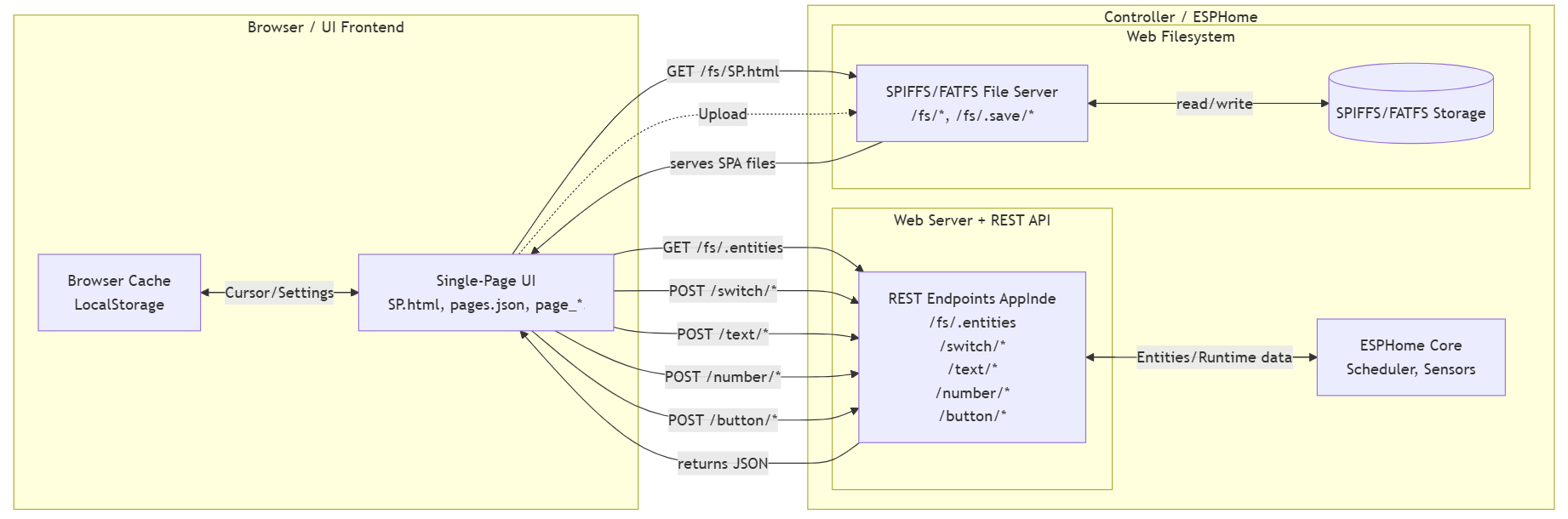
My solution was to integrate a lightweight file server on the controller
and deliver the UI as a reactive Single Page Application. That keeps updates small
and allows them to be rolled out independently from the firmware.

ui-flow

Hi, well done: nice project.
I think your post would fit better in the ‘Share your Projects!’ section of the forum.

Additionally: would you mind elaborating a little on your solution to get this to work?

Would be nice if you published the code? Is this actually implemented with ESPHome? What hardware is suitable?

Agreed. Also about ESPHome controllers being autonomous.

While ESP32-S3 is my preferred microcontroller due to fast speed, plenty of memory and ease of programming with ESPHome … ESPHome was designed to support much less capable controllers (such as old ESP8266 series) and still does.

Home Assistant started as something that would run on a Raspberry Pi with devices connected directly to its GPIO pins (like the ESP is now), and has since grown and grown. I remember the anger when HA officially removed support for devices to be directly connected to GPIO pins (which of course had been a selling point of RasPi). I considered the final stage in the shift from directly managing the devices and sensors, to focus on the whole house (requiring indirect management of multiple distributed devices), reporting and User Interface. I don’t see RasPi being an ideal back-room server … but that’s another discussion.

Personally I am pleased that the close association with Home Assistant (but not required) means that ESPHome is able to keep focus on the sharp end of the sensors and devices - and leave the UI and data logging etc to HA.

Back to your solution … you mention

a lightweight file server on the controller and deliver the UI as a reactive Single Page Application

… which I’m assuming is not running on ESPHome, but on a separate machine (and thus introducing a different point of failure). I’m curious that you felt HA’s UI is inadequate.

You have got me thinking that it should be reasonable to provide the ESPHome web server component with a different HTML template (after all HTML itself is just text), and it is already inserting the different data fields. Hmmm…

Thanks a lot for the hints.

Happy to share more about the background of the application.

The “UI magic” happens in the browser via JavaScript. As the reactive framework I use Alpine.js. It needs very little memory and can be hosted by the controller.

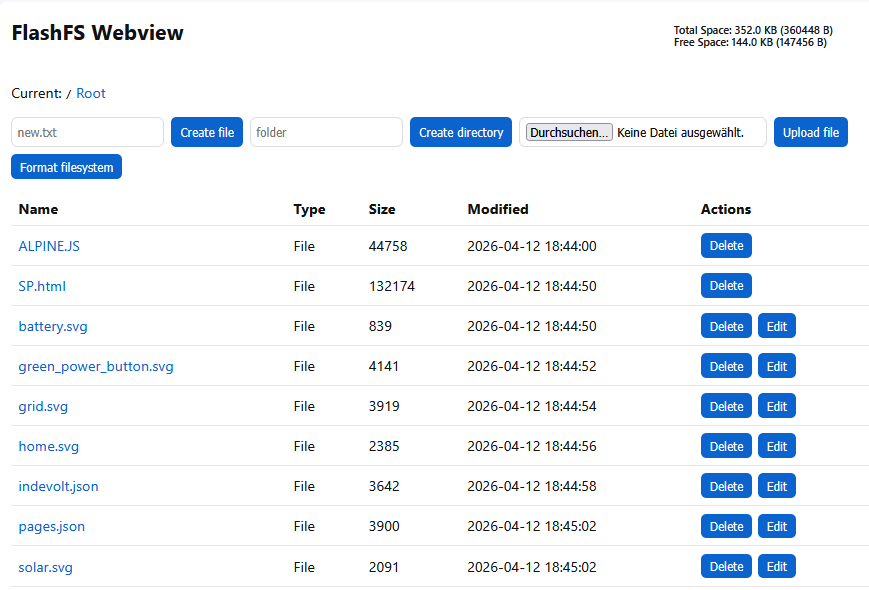
Here you can see the interface of the web file system

In this post, you can find another example of this technique. Here, a Midea dehumidifier is visualized.

1 Like

yes, I will do that as soon as I can make time for it.

yes

I am using a NodeMCU ESP32 controller, but other options are also possible.

no, that assumption is incorrect; the file server runs on ESPHome.

That is not the case. I will use HA, but I think it’s still valuable for an ESPHome controller to offer a simple UI that non-technical users can use comfortably.

1 Like

I think it relates to the development model in mind. While you can do more with esphome, it is really mostly a framework and process for easily creating firmware that does interfacing to sensors and controls that are then integrated into a home automation system with the expectation that the UI layer is in HA.

I use esphome because it does a decent job of simplifying the process of generating firmware AND deploying it to devices. I have a long history with Tasmota (which came first) and still use it with many esp8266 based devices. Tasmota has a simple UI, which I find helpful.

esphome, typically doesn’t include a web UI and even adding it, it is simplistic at best. But, this is probably because creating a good UI is hard. Doing it well for a random combination of sensors and controls is probably impossible.

Your UI looks pretty, but how did you specify it and easy would it be to do that automatically so it is usable by someone with no UI design skills? I use the v3 version of the web server and it meets my needs. I don’t really like the view, but I also don’t spend a lot of time looking at the web UI of individual devices. I am much more interested in the aggregations I have created in Grafana. But, I would be interested in what you created once you share it someway that it can be duplicated by someone else.

Colour me impressed ! Rather above my own expertise level, but great to know that it’s possible, and would be great to get a more detailed project write-up for others to learn from.

Thank you very much for your post.

So far, I have implemented my projects with Tasmota/Berry.

My first ESPHome project (a BLE gateway with UI) was not feasible under Tasmota due to insufficient resources (RAM), and even without a UI it was already relatively unstable (low heap).

Until about a year ago, I had ruled out ESPHome for this because the learning curve for C++ and the ESPHome API felt far too steep.

ESPHome + Codex (AI) should now get the chance to crack this tough nut.

Since February, I have been working with ESPHome in the role of software architect, not programmer. I only have basic knowledge of C++ and HTML/JavaScript.

I understand the core concepts of each component and can follow the code.

Codex is integrated in VS Code and handles:

  • code generation, compilation, SPA generation, upload, log checks, crash analysis

Many functions are covered by automated tests:

  • local unit tests
  • E2E integration tests (REST API)
  • UI tests with simulated end devices

Regarding your questions:

"…but how did you specify it and easy would it be to do that automatically "

If by automate you mean not having to write code yourself, then the answer is yes.
You need to learn how to work with this new AI tool.

Information provided to AI:

  • foundational: description of existing components + definition of rules
  • specific: description of a new page with concrete features

“I would be very interested in your solution once you share it in a way that others can replicate.”

As soon as my time allows, I will create a demo project that makes the core concepts clear.

Wouldn’t it make sense to provide more ready-made projects?

  • The UI could expose all parameters that need to be adapted.
  • Many potential users would not need to work directly with the ESPHome IDE.
1 Like

That is mostly the Tasmota model. The esphome model appears to be different, with the specification done primarily with configuration in YAML. Since that has its limitations, it does allow using code to do more.

There are people who have made specific devices that do some particular thing and shared how they did it. Doing something in general that can be used to do just about anything someone can imagine is typically quite hard to do well.