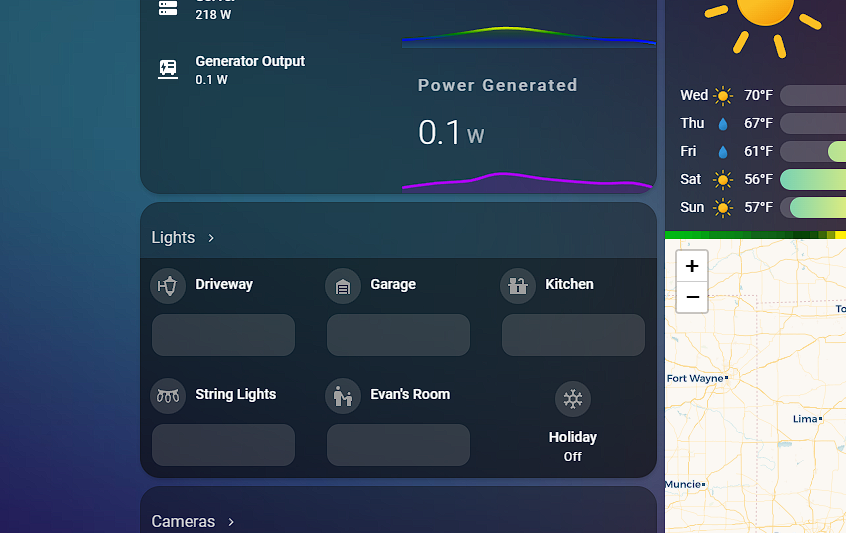
Team, hoping for some help! I have been a HA user for years and currently have 4 wall mounted tablets, as well as various other dashboards actively in use. Its finally gotten to the point where it’s bothered me enough to ask for help! As you can see from the picture attached, the backgrounds of different portions of the cards are different opacities, and for the life of me, I have no idea why, or more importantly, how to fix it. I am happy to provide any yaml or additional information that I can. Running HA in an unraid docker. Coloring is consistent on all devices.
Bump! Any thoughts?
Let’s start with reviewing your YAML.
Sure thing, what YAML file would you like to see? Themes file? Dashboard?
Here is the YAML for the theme file currently in use for all my dashboards, I have a hunch the issue lurks in here:
iOS Dark Mode Theme - blue-red
ios-dark-mode-blue-red:
Global
background-image: “center / cover no-repeat fixed url(‘htt://cdn.jsdelivr.net/gh/basnijholt/lovelace-ios-themes@a37376d918fcfe4785be99910dc9a7200ac37da9/themes/homekit-bg-blue-red.jpg’)”
lovelace-background: var(–background-image)
primary-color: “#ff9f09” # from Apple systemOrange dark mode
light-primary-color: “#B6B6C1” # (icons on left menu) (light: systemGray5 from iOS dark mode, dark: XXX)
primary-background-color: “#2c2c2e” # systemGray5 dark mode
secondary-background-color: rgba(25, 25, 25, 0.9)
divider-color: rgba(152, 152, 157, 0.3) # from Apple systemGray dark mode
accent-color: rgba(255, 159, 9, 1)
Text
primary-text-color: “#FFF”
secondary-text-color: “#d3d3d3”
text-primary-color: “#FFF”
disabled-text-color: “#555” # XXX: htt://github.com/basnijholt/lovelace-ios-dark-mode-theme/issues/2
text-dark-color: “#FFF”
Sidebar Menu
sidebar-background-color: var(–primary-background-color)
sidebar-icon-color: var(–light-primary-color)
sidebar-text-color: “#F1F1F1”
sidebar-selected-background-color: var(–primary-background-color)
sidebar-selected-icon-color: “#FFF” # (light: systemGray5 from iOS light mode, dark: XXX)
sidebar-selected-text-color: var(–sidebar-selected-icon-color)
States and Badges
state-icon-color: “#FFF”
state-icon-active-color: rgba(255, 214, 10, 1) # or make light icons yellow when active: rgba(255, 214, 10, 1)
state-icon-unavailable-color: var(–disabled-text-color)
paper-item-icon-active-color: rgba(255, 214, 10, 1) # see htt://github.com/basnijholt/lovelace-ios-dark-mode-theme/issues/30
Sliders
paper-slider-knob-color: “#FFFFFF”
paper-slider-knob-start-color: var(–paper-slider-knob-color)
paper-slider-pin-color: var(–paper-slider-knob-color)
paper-slider-active-color: “#0984ff” # from Apple systemBlue dark mode
paper-slider-secondary-color: var(–paper-slider-knob-color)
paper-slider-container-color: rgba(255, 255, 255, 0.5)
paper-slider-font-color: “#000”
ha-slider-background: none !important
Labels
label-badge-background-color: “#23232E”
label-badge-text-color: “#F1F1F1”
label-badge-red: rgba(255, 159, 9, 0.7) # from Apple systemOrange dark mode
Cards
card-background-color: var(–secondary-background-color) # Unused entities table background
paper-listbox-background-color: var(–primary-background-color)
ha-card-border-radius: 20px
ha-card-background: rgba(10, 10, 10, 0.4)
paper-card-background-color: var(–ha-card-background)
rgb-card-background-color: rgb(10, 10, 10) # see htt://github.com/basnijholt/lovelace-ios-themes/issues/60
ha-card-border-width: 0 # htt://github.com/basnijholt/lovelace-ios-dark-mode-theme/issues/82#event-7732695357
Toggles
paper-toggle-button-checked-button-color: “#484848”
paper-toggle-button-checked-bar-color: “#484848”
paper-toggle-button-unchecked-button-color: var(–paper-toggle-button-checked-button-color)
paper-toggle-button-unchecked-bar-color: var(–disabled-text-color)
Table row
table-row-background-color: var(–primary-background-color)
table-row-alternative-background-color: var(–secondary-background-color)
Switches
switch-checked-color: “#30d257” # XXX: remove when htt://github.com/home-assistant/home-assistant-polymer/pull/4203 is in HA
switch-checked-track-color: “#30d158” # from Apple systemGreen dark mode
switch-checked-button-color: “#FFF”
Other
paper-dialog-background-color: rgba(55, 55, 55, 0.8) # e.g., background of more-info
paper-item-icon-color: white # also should mini-media-player icon white (but doesn’t work by itself)
more-info-header-background: rgba(25, 25, 25, 0.5)
lumo-body-text-color: var(–primary-text-color) # see htt://github.com/basnijholt/lovelace-ios-dark-mode-theme/issues/42
app-header-background-color: rgba(30, 2, 61, 0.4)
markdown-code-background-color: “#464646”
code-editor-background-color: “#161616”
clear-background-color: var(–ha-card-background) # see htt://github.com/basnijholt/lovelace-ios-themes/issues/64
Custom
mcg-title-letter-spacing: .15em
mini-media-player-base-color: white
mini-media-player-icon-color: white
Added for htt://github.com/basnijholt/lovelace-ios-dark-mode-theme/issues/72
TODO: add description for lines below. Suggested in htt://github.com/basnijholt/lovelace-ios-dark-mode-theme/issues/72
input-ink-color: var(–primary-text-color)
input-fill-color: transparent
input-disabled-fill-color: transparent
input-label-ink-color: var(–primary-text-color)
input-disabled-ink-color: var(–disabled-text-color)
input-dropdown-icon-color: var(–primary-text-color)
input-idle-line-color: var(–secondary-text-color)
input-hover-line-color: var(–secondary-text-color)
codemirror-property: var(–accent-color)
I’ll look into it later today, but start by going to the default theme to test your theory.
Yup, removing the theme fixes the issue. I just don’t know where to look. As the darker “areas” don’t seem to have any commonality. Colors and transparency values are all over the place in the theme file. If i had to guess, it was two values laid on top of one another that is creating the issue, just not sure which value is the culprit.
Did you have a few moments to glance at the theme YAML? I think its an easy fix once the culprit is identified.