Hi,
I’ve just released a new Home Assistant custom integration: Bagwatch.

It’s built for tracking stocks, ETFs, and crypto inside Home Assistant without turning everything into a spreadsheet maintenance job.
Instead of only entering a static position, Bagwatch works from buy/sell transactions and calculates the rest for you:
- current value
- open cost basis
- unrealized P/L
- realized P/L
- average cost
- quantity
- per-asset sensors
- portfolio-level sensors
Right now the main provider is Yahoo Finance, with optional support for Twelve Data, and CoinGecko as an optional crypto source.
What do you get?
Once configured, Bagwatch creates portfolio entities and per-position entities, so you can use them in dashboards, automations, statistics, and whatever else you already build in HA.
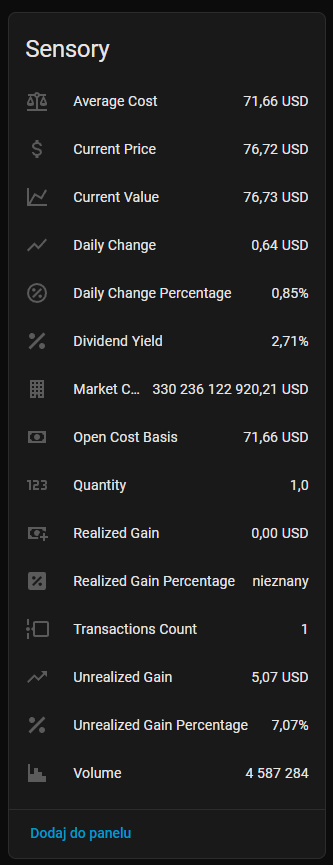
For individual positions, you get sensors like:
- current price
- current value
- average cost
- unrealized gain
- daily change
- daily change %
- volume
- market cap
- dividend yield
- transactions count
Why I built it
Most portfolio tools live outside Home Assistant.
I wanted something that works as a native part of HA:
- alongside the rest of my dashboards
- using my own cards and layouts
- available for automations
- without manually recalculating positions after every trade
So the goal was basically:
portfolio tracking that feels like a real HA integration, not a separate app glued on top.
How it works
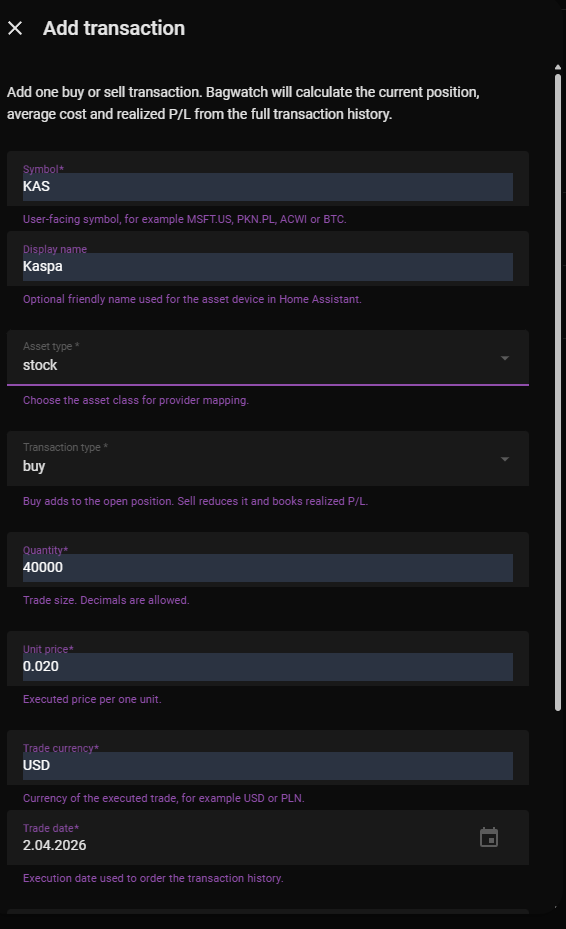
You add transactions with:
- symbol
- asset type
- buy / sell
- quantity
- unit price
- currency
- trade date
- optional fees
- optional provider symbol
Bagwatch then builds the live position state from that history.
That works for simple cases like:
- one buy and hold position
but also for more realistic ones like:
- multiple buys
- partial sells
- different entry prices
- different currencies
Dashboard use
This was one of the main goals from the start: make the entities dashboard-friendly.
Bagwatch works well for:
- summary cards
- allocation charts
- winners / losers
- portfolio value charts
- asset detail cards
- finance dashboards built your own way
Current scope
Supported asset types:
- stocks
- ETFs
- crypto
Supported providers:
- Yahoo Finance
- Twelve Data
- CoinGecko for crypto as an option
Installation
The easiest way is through HACS as a custom repository.
HACS installation
- Open HACS in Home Assistant.
- Go to
Custom repositories. - Add this repository:
https://github.com/SmolinskiP/ha-bagwatch - Select category:
Integration - Install Bagwatch
- Restart Home Assistant
- Go to
Settings > Devices & Services - Click
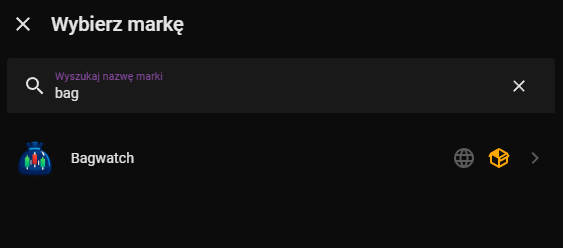
Add Integration - Search for
Bagwatch
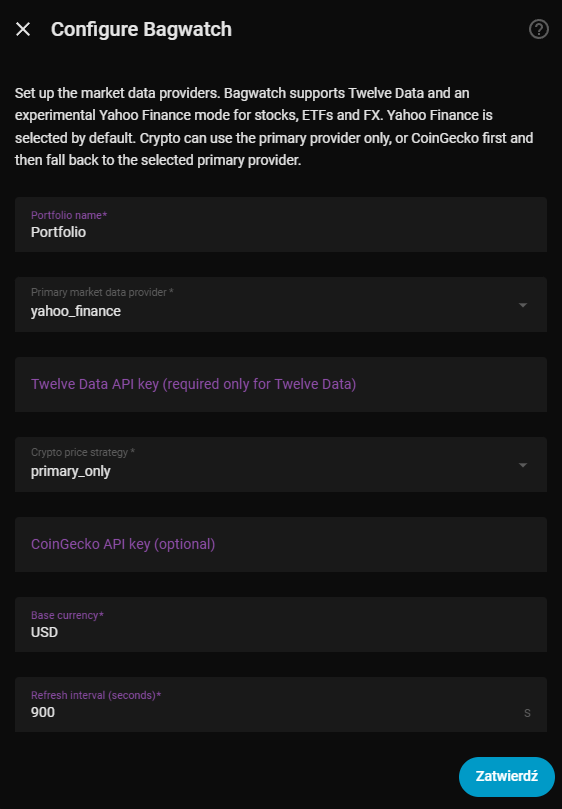
After that, you can configure the provider, base currency, refresh interval, and start adding transactions.
If anyone wants to try it, break it, or give feedback, I’m happy to hear it.
If something behaves oddly for a specific ticker, exchange, or market, let me know.
If there is interest, I’ll keep improving it.