
🧊 BamBuddy Integration – Bambu Lab printers, AMS, camera and controls in Home Assistant

BamBuddy – Home Assistant Integration

Open your Home Assistant instance and open a repository inside the Home Assistant Community Store.

HACS: Custom Latest release License: MIT Home Assistant 2025.5+

Hi everyone,

I’d like to share a project I’ve been working on: a Home Assistant integration for BamBuddy.

BamBuddy by maziggy is a self-hosted command center for Bambu Lab printers – from a single A1 to a whole print farm: live monitoring, camera, print archive, a virtual printer you can send jobs to from Bambu Studio or OrcaSlicer, Spoolman integration, notifications and much more. Your printers. No cloud. Your rules.

My integration brings the printers of your BamBuddy server into Home Assistant: their status, camera, AMS and controls as Home Assistant entities, and a dashboard card for each printer. It talks only to BamBuddy, through its API and its live connection. So there is no cloud and no second connection to your printers. Set up in the UI, no YAML.

This is the integration, not the app: it connects Home Assistant to a BamBuddy server — on any machine, or inside Home Assistant with the BamBuddy app.

:tada: Version 2.0.0 is out: a complete redesign. HACS offers v2.0.0 as an update. Coming from a date version (2026.05.17 or older)? The upgrade needs a new API key and cannot be undone. Read the release notes first.


:sparkles: What you get

  • Everything your printer reports — print status and stage, progress, layers, remaining and end time, the job’s name and cover, temperatures, fans, HMS errors, Wi-Fi, nozzle type and size
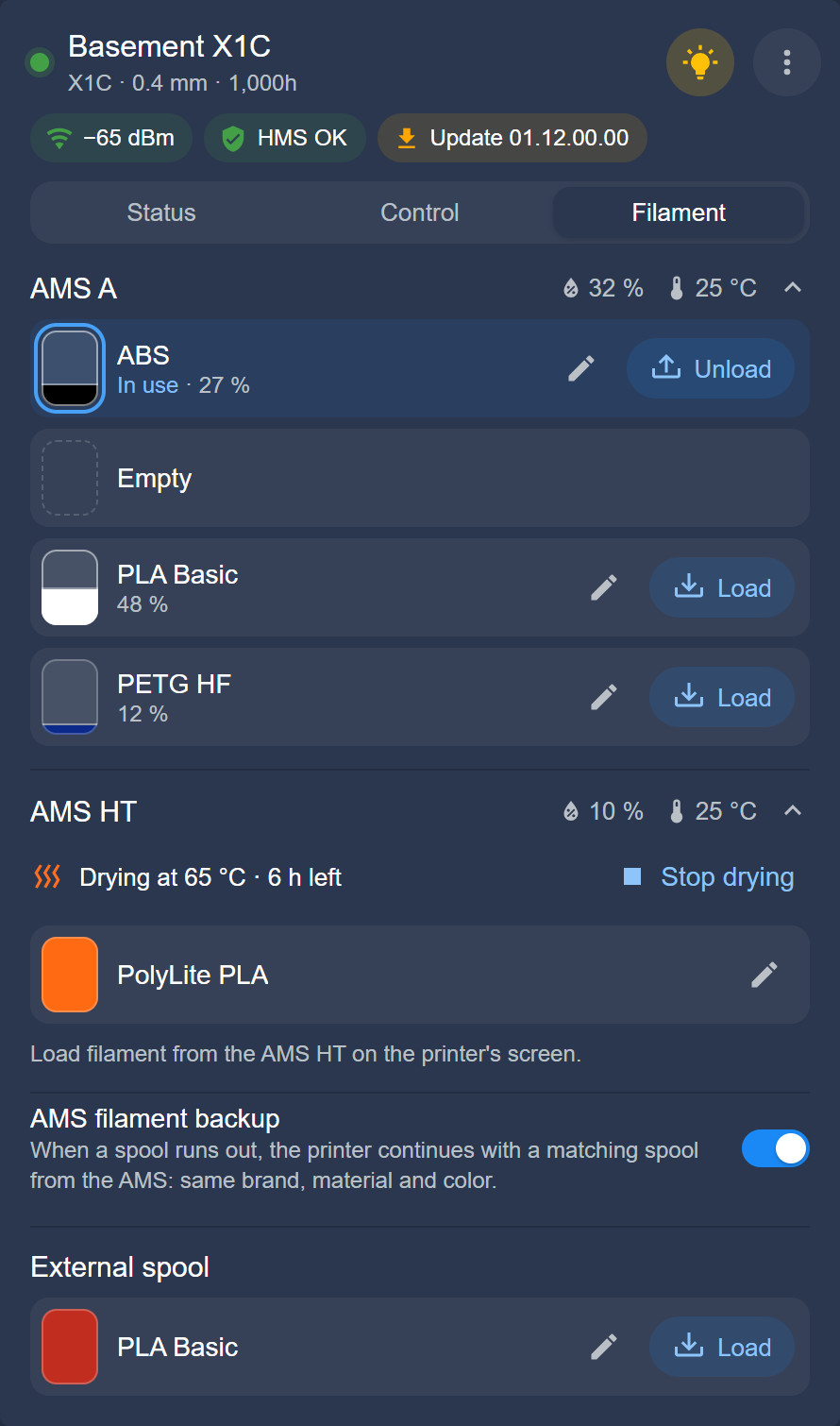
  • AMS and spools — every AMS unit (AMS, AMS 2 Pro, AMS HT, AMS Lite) as its own device, named as in BamBuddy: the filament in each slot with its color and what is left, humidity, temperature and drying, the external spool, and a spool without a chip set by vendor and Bambu Studio profile, as on the screen of the printer
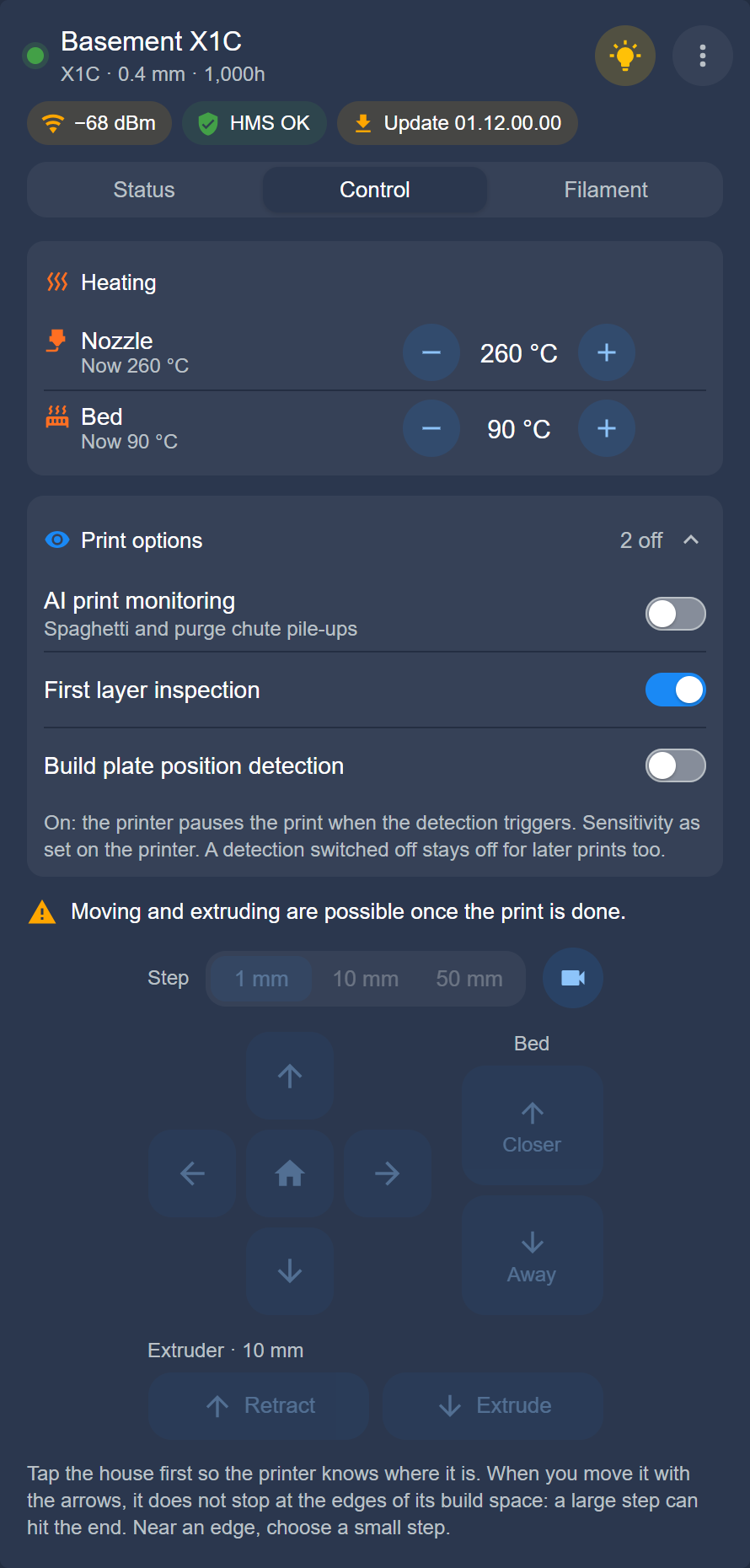
  • Control — pause, resume and stop, skip objects, the printer’s own AI detection, print speed, nozzle, bed and chamber targets, the active nozzle of two-nozzle printers, fans, the chamber light, airduct mode and ventilating the chamber (P2S, X2D, H2 series), the AMS filament backup, answering and clearing HMS errors, clearing the plate
  • Move the printer — actions to move the axes, home, extrude and retract, load and unload filament, start and stop drying
  • Camera — the live stream, also in full screen, and snapshots through BamBuddy’s camera proxy
  • Maintenance and connection check — the printer’s maintenance tasks, marked done from Home Assistant; BamBuddy’s check of a printer that went offline
  • Smart plugs — the plugs BamBuddy links to a printer: switch them, see their power and energy, and switch the printer off after a print once its nozzle has cooled
  • A dashboard card per printer, shipped with the integration: status, camera, temperatures, AMS colors, controls, heating and a jog pad, arranged as you like, with compact chips if you want — nothing else to install
  • Updates — new BamBuddy releases and new printer firmware as update entities
  • Several printers — add any number of the printers BamBuddy manages; choose them while setting up, add or remove them later
  • BamBuddy itself — print statistics, printers online and disk space of your server

Works with the X1, P1, P2, A1, A2 and H2 series and the X2D. Entity names in English and German; a change shows within about a second through BamBuddy’s live connection.


:camera_with_flash: Screenshots

All screenshots show simulated printers.
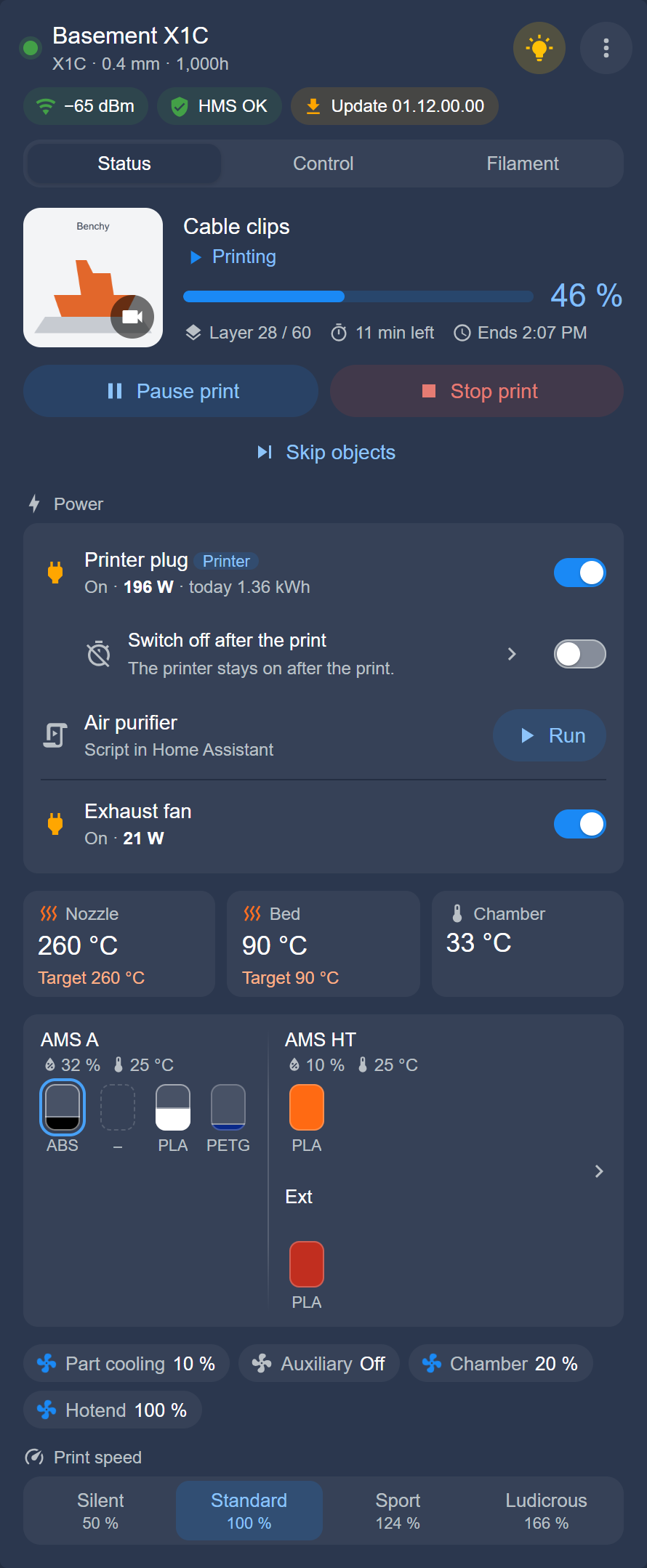
Status A printer with two nozzles

:package: Installation

Method 1: Installation via HACS (Recommended)

Open your Home Assistant instance and open a repository inside the Home Assistant Community Store.

One-Click Install: Click the button above to add and open the repository directly inside Home Assistant!

Manual HACS Steps:

  1. In Home Assistant, open HACS.
  2. Click the three dots â‹® in the top right corner and choose Custom repositories.
  3. Paste the repository URL:
    https://github.com/Spegeli/hacs_bambuddy
    
  4. Select Integration as the Type and click Add.
  5. Find BamBuddy in the list and click Download.
  6. Restart Home Assistant.

Method 2: Manual Installation

  1. Download the Source code (zip) of the release you want from the Releases page.
  2. Unpack the ZIP archive.
  3. Copy its custom_components/bambuddy folder into your Home Assistant directory under:
    /config/custom_components/bambuddy/
    
  4. Restart Home Assistant.

Then: open Settings → Devices & services → Add integration, search for BamBuddy, enter BamBuddy’s address and an API key, and choose your printers.

Requirements: Home Assistant 2025.5 or newer; a BamBuddy server 1.2.5.7 or newer with your printers added there; a BamBuddy API key with Read Status, Control Printer and Manage Maintenance; for the controls, the printer’s developer LAN mode on.


:up_arrow: Coming from a date version (2026.05.17 or older)?

2.0.0 is a new integration under the old name. In short: make a backup — the upgrade is one-way —, create a new API key in BamBuddy, update through HACS and restart, enter the new key when Home Assistant asks for it, and check your dashboards and automations.

:backhand_index_pointing_right: Upgrading from a date version, step by step


:link: Links

This Home Assistant integration

BamBuddy itself

:speech_balloon: Feedback

Questions and ideas are welcome here in this thread. For a bug in the integration, please open a bug report on GitHub and attach the BamBuddy entry’s diagnostics. Bugs and feature requests for BamBuddy itself belong in the BamBuddy project.


:balance_scale: Disclaimer

  • Not a BamBuddy or Bambu Lab product. This integration is an independent community project. Neither the BamBuddy project nor Bambu Lab develops, endorses or supports it, and their support cannot help with it — use the GitHub issue tracker instead.
  • Trademarks. Bambu Lab, BamBuddy, their logos and other product names belong to their respective owners.
  • Use at your own risk. The integration is provided as is, without warranty, under the MIT License. Its controls act on a real printer — mind that in automations.

:test_tube: 2.0.0-beta.2: live updates, full screen, and smart plugs known by what they switch

The second beta of 2.0.0 is out. Its main changes:

  • Live updates: the integration now follows BamBuddy’s live connection (its WebSocket). A change on the printer — a light switched, a print that pauses — shows in Home Assistant within about a second instead of up to 10 seconds. After a command the printer is read again after 1.5 and 4 seconds, and the read every 10 seconds stays. Configure → Settings → Live updates tests the connection, can switch it off, and sets how often a printer is read after live messages.
  • The live view in full screen: â›¶ in the card shows the camera on the whole screen — the browser’s own full screen on computers, iPads and Android, as large as the window on an iPhone. The icon, Esc or back leave it.
  • Smart plugs known by what they switch: a plug’s entities now belong to its Tasmota, its Home Assistant entity, or its MQTT topic and path (a REST plug to its BamBuddy record), its device to BamBuddy’s plug. A plug deleted and created again in BamBuddy, plugs swapped there, or a switch to another BamBuddy server no longer mix up devices, history or automations.

Also in this beta:

  • Configure opens a menu: Manage printers and Settings
  • Reconfigure to another BamBuddy server says what becomes of the smart plugs
  • The card’s Status tab sets the AMS units apart, and its dialogs fit the screen
  • Fixes from the first beta: the card’s “AMS: Assist” through every print, Cool down (now Heating off), “0 fps” on the A1 and A1 mini, “100 %” for spools without a chip, and see-through dialogs with a translucent theme such as Noctis

Known in this beta: in the Home Assistant app on Android, ⛶ needs a second tap — the first only hides the status bar. Fixed for the next beta. All known bugs and their state: #20.

:wrench: Trying the beta

HACS does not offer the betas of 2.0.0 as an update, not even with pre-releases switched on: they rank below the date versions.

  1. HACS → BamBuddy → ⋮ → Redownload → Need a different version? → v2.0.0-beta.2, then restart Home Assistant
  2. Reload the browser page twice — the first reload can still come from the cache. In the Home Assistant app, open Settings → Companion app → Troubleshooting and select Reset frontend cache

Coming from beta.1: no new API key. Your smart plugs get new entity IDs — switch.bambuddy_smart_plug_3f9a2c instead of switch.bambuddy_smart_plug_3 —, and the switch-off after the print is named after its printer, such as switch.x1c_00m00a000000001_auto_off. It starts from its defaults: arm it again where you use it. Update automations, scripts and Energy dashboard entries that name the old IDs. If HACS offers 2026.05.17 as an update, select Skip: it cannot load the migrated entry.

Coming from a date version (2026.05.17 or older): make a backup first — the upgrade is one-way —, create a new API key with Read Status, Control Printer and Manage Maintenance, and follow Upgrading from a date version.

Everything in detail: release notes

:speech_balloon: Your feedback

How do the live updates and the full screen work for you — in your browser, in the app? Tell me here in this thread. Found a bug? Please open an issue on GitHub and attach the BamBuddy entry’s diagnostics (Settings → Devices & services → BamBuddy → ⋮ → Download diagnostics; the API key and other secrets are left out).

BamBuddy – Home Assistant Integration

Open your Home Assistant instance and open a repository inside the Home Assistant Community Store.

HACS: Custom Latest release License: MIT Home Assistant 2025.5+

The status, camera, AMS and controls of your Bambu Lab printers on your Home Assistant dashboard — through your own BamBuddy server, its REST API and its live connection, no cloud. Set up in the UI, no YAML.

This is the integration, not the app: it connects Home Assistant to a BamBuddy server — on any machine, or inside Home Assistant with the BamBuddy app.

:tada: Version 2.0.0 is out: a complete redesign. HACS offers v2.0.0 as an update. Coming from a date version (2026.05.17 or older)? The upgrade needs a new API key and cannot be undone. Read the release notes first.


:sparkles: What you get

  • Everything your printer reports — print status and stage, progress, layers, remaining and end time, the job’s name and cover, temperatures, fans, HMS errors, Wi-Fi, nozzle type and size
  • AMS and spools — every AMS unit (AMS, AMS 2 Pro, AMS HT, AMS Lite) as its own device, named as in BamBuddy: the filament in each slot with its color and what is left, humidity, temperature and drying, the external spool, and a spool without a chip set by vendor and Bambu Studio profile, as on the screen of the printer
  • Control — pause, resume and stop, skip objects, the printer’s own AI detection, print speed, nozzle, bed and chamber targets, the active nozzle of two-nozzle printers, fans, the chamber light, airduct mode and ventilating the chamber (P2S, X2D, H2 series), the AMS filament backup, answering and clearing HMS errors, clearing the plate
  • Move the printer — actions to move the axes, home, extrude and retract, load and unload filament, start and stop drying
  • Camera — the live stream, also in full screen, and snapshots through BamBuddy’s camera proxy
  • Maintenance and connection check — the printer’s maintenance tasks, marked done from Home Assistant; BamBuddy’s check of a printer that went offline
  • Smart plugs — the plugs BamBuddy links to a printer: switch them, see their power and energy, and switch the printer off after a print once its nozzle has cooled
  • A dashboard card per printer, shipped with the integration: status, camera, temperatures, AMS colors, controls, heating and a jog pad, arranged as you like, with compact chips if you want — nothing else to install
  • Updates — new BamBuddy releases and new printer firmware as update entities
  • BamBuddy itself — print statistics, printers online and disk space of your server

Every printer model BamBuddy supports — the X1, P1, P2, A1, A2 and H2 series and the X2D. Entity names in English and German; a change shows within about a second through BamBuddy’s live connection.


:camera_with_flash: Screenshots

All screenshots show simulated printers.
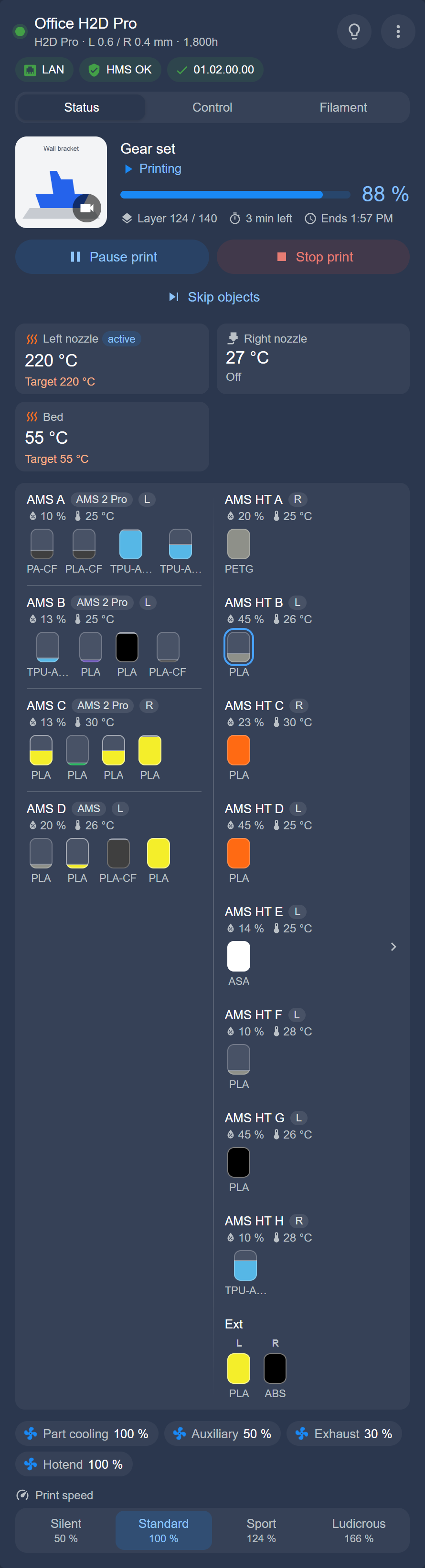
Status A printer with two nozzles

:package: Installation

Method 1: Installation via HACS (Recommended)

Open your Home Assistant instance and open a repository inside the Home Assistant Community Store.

One-Click Install: Click the button above to add and open the repository directly inside Home Assistant!

Manual HACS Steps:

  1. In Home Assistant, open HACS.
  2. Click the three dots â‹® in the top right corner and choose Custom repositories.
  3. Paste the repository URL:
    https://github.com/Spegeli/hacs_bambuddy
    
  4. Select Integration as the Type and click Add.
  5. Find BamBuddy in the list and click Download.
  6. Restart Home Assistant.

Method 2: Manual Installation

  1. Download the Source code (zip) of the release you want from the Releases page.
  2. Unpack the ZIP archive.
  3. Copy its custom_components/bambuddy folder into your Home Assistant directory under:
    /config/custom_components/bambuddy/
    
  4. Restart Home Assistant.

Then: open Settings → Devices & services → Add integration, search for BamBuddy, enter BamBuddy’s address and an API key, and choose your printers.

Requirements: Home Assistant 2025.5 or newer; a BamBuddy server 1.2.5.7 or newer with your printers added there; a BamBuddy API key with Read Status, Control Printer and Manage Maintenance; for the controls, the printer’s developer LAN mode on.


:up_arrow: Coming from a date version (2026.05.17 or older)?

2.0.0 is a new integration under the old name. In short: make a backup — the upgrade is one-way —, create a new API key in BamBuddy, update through HACS and restart, enter the new key when Home Assistant asks for it, and check your dashboards and automations.

:backhand_index_pointing_right: Upgrading from a date version, step by step


🤖 Automation example: a push message when a print finishes or fails
alias: BamBuddy print finished or failed
triggers:
  - trigger: state
    entity_id: sensor.x1c_00m00a000000001_print_status
    from: [printing, paused]
    to: [finished, failed]
actions:
  - action: notify.mobile_app_your_phone
    data:
      title: "{{ 'Print done' if trigger.to_state.state == 'finished' else 'Print failed' }}"
      message: "{{ states('sensor.x1c_00m00a000000001_current_print') }}"

Put in the entity IDs of your printer (its device page under Settings → Devices & services → BamBuddy lists them) and the notify action of your phone. Four more examples are in the README.


:link: Links

:speech_balloon: Feedback

Questions and ideas are welcome here in this thread. For a bug, please open an issue on GitHub and attach the BamBuddy entry’s diagnostics. Problems with BamBuddy itself belong to BamBuddy’s own project.


:balance_scale: Disclaimer

  • Not a BamBuddy or Bambu Lab product. This integration is an independent community project. Neither the BamBuddy project nor Bambu Lab develops, endorses or supports it, and their support cannot help with it — use the GitHub issue tracker instead.
  • Names and logos. BamBuddy and its logo belong to the BamBuddy project; Bambu Lab and the names of its printers are trademarks of their owner. They appear here only to name the software and the printers the integration connects to.
  • Status for information only. The integration shows what BamBuddy’s REST API returns; values can be delayed or differ from BamBuddy’s own interface and the printer’s display.
  • Use at your own risk. The software is provided as is, without warranty, under the MIT License. Its controls act on a real printer — mind that in automations.

:test_tube: 2.0.0-beta.4: the job’s picture large, AMS names from BamBuddy, compact chips

The fourth beta of 2.0.0 is out. Its main changes:

  • The job’s picture large: a tap on the job’s picture in the card’s Status tab shows it large, where the live view opens; âś• or a second tap brings back what was there before. The live view now starts only by the camera button in the picture’s corner — on the job’s picture and on the printer drawing alike —, so a tap meant for the picture no longer opens the camera.
  • AMS names from BamBuddy: an AMS unit you named in BamBuddy has that name in Home Assistant and in the card too — Workshop Silk (AMS 2 Pro / serial). Its entity IDs stay.
  • Compact chips: a new switch in the card’s editor shows the chips below the name with icon and value only — OK instead of HMS OK, 3 instead of Maintenance: 3 due, the version an update brings, the drying time, a plug’s power —, so five chips fit on one row. Every chip has a tooltip with the full text now, and screen readers read it out.

Also in this beta:

  • HMS and maintenance say what they count: 2 HMS messages, Maintenance: 3 due, Maintenance: 2 due soon
  • Show external spool: a switch in the card’s editor hides the external spool on printers with an AMS
  • The print’s percentage beside its bar, and a long file name breaks after an underscore or a hyphen instead of mid-word
  • Fixes from beta.3: the buttons and the frame rate in the live view stand on one grey disc, readable on a bright picture. The live view option Automatically is called Always. The step choice of the jog pad locks with its arrows. Reconfigure to another BamBuddy server names an MQTT plug by its topic and path.

All known bugs and their state: #20.

:wrench: Trying the beta

HACS does not offer the betas of 2.0.0 as an update, not even with pre-releases switched on: they rank below the date versions.

  1. HACS → BamBuddy → ⋮ → Redownload → Need a different version? → v2.0.0-beta.4, then restart Home Assistant
  2. Reload the browser page twice — the first reload can still come from the cache. In the Home Assistant app, open Settings → Companion app → Troubleshooting and select Reset frontend cache

Coming from beta.3: no new API key, no entity ID changes. AMS units you named in BamBuddy take that name in Home Assistant; an automation that finds a device by its name follows it.

If HACS offers 2026.05.17 as an update, select Skip: it cannot load the migrated entry.

Coming from beta.2 or beta.1: also the changes in beta.3’s release notes (a slot’s state, filament in bambuddy.set_filament, the X2D’s fan IDs) and, from beta.1, the new smart plug IDs in beta.2’s.

Coming from a date version (2026.05.17 or older): make a backup first — the upgrade is one-way —, create a new API key with Read Status, Control Printer and Manage Maintenance, and follow Upgrading from a date version.

Everything in detail: release notes

:speech_balloon: Your feedback

Do the compact chips suit your dashboard? Do your AMS units show the names you gave them in BamBuddy? Tell me here in this thread. Found a bug? Please open an issue on GitHub and attach the BamBuddy entry’s diagnostics (Settings → Devices & services → BamBuddy → ⋮ → Download diagnostics; the API key and other secrets are left out).

:tada: Version 2.0.0 is out

The integration has been rebuilt from the ground up, and after four betas 2.0.0 is the stable release now. The first post above shows everything it does. In short:

  • A dashboard card for every printer, shipped with the integration: status, live view, temperatures, AMS colors, controls, heating and ventilation, and the filament of each slot
  • Every AMS unit and smart plug as its own device, with the switch-off after the print
  • Controls and actions for printing, moving, loading and drying, setting a spool by vendor and Bambu Studio profile, and answering HMS messages
  • Live updates through the live connection of BamBuddy: a change shows within about a second
  • Five automation examples in the README

Since beta.4 only small things changed. The slot dialog keeps its K field usable while the printer is asked, the jog pad moves 1, 10 or 50 mm, and the live view shows a dash until its frame rate is measured. The integration also takes up what BamBuddy 1.3 brings by itself, and it keeps working with 1.2.5.7.

:up_arrow: Updating

  • From a date version (2026.05.17 or older): HACS offers 2.0.0 as an update. Make a backup first, because the upgrade is one-way, and create a new API key in BamBuddy with Read Status, Control Printer and Manage Maintenance. Then follow the release notes.
  • From a beta: update through HACS, or install v2.0.0_redesign by hand if HACS offers nothing. Restart, then reload the browser page twice. No new API key is needed.

:telescope: What’s next

Ideas I’m looking at, nothing is decided yet:

  • The spool inventory of BamBuddy: see which spool sits in a slot and assign spools from the card (#21)
  • The print queue of BamBuddy: see what waits to print, and start, move or remove a job from Home Assistant

All ideas and open points are collected in #12.

:speech_balloon: Your feedback

Thanks to everyone who tested the betas! What would you like to see next? Tell me here in this thread. Found a bug? Please open a bug report on GitHub and attach the diagnostics of the BamBuddy entry.